What is Autosoft DMS
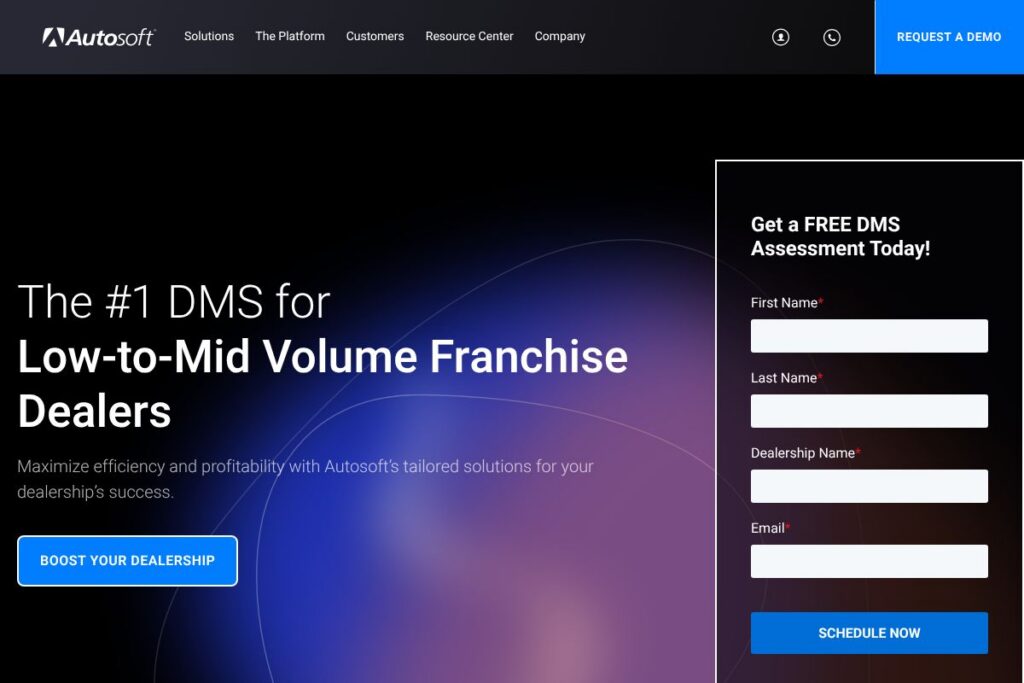
Autosoft DMS is a dealer management system designed to unify sales, service, parts, accounting, and customer relationship workflows for low- to mid-volume franchise dealerships. The platform centralizes data across departments so dealers avoid duplicate data entry and manual reconciliation between systems.
Compared with larger, enterprise-focused DMS vendors such as CDK Global and Reynolds and Reynolds, Autosoft DMS positions itself for smaller franchise operations by emphasizing modular deployments, faster onboarding, and a lighter per-site operational footprint. Against cloud-native retail solutions like Dealertrack, Autosoft offers comparable core DMS functionality but targets dealers who need a balance between comprehensive features and straightforward administration.
Autosoft DMS does particularly well at integrating daily dealer operations into a single system and providing workflow tools tailored to low- and mid-volume franchises. This makes it a practical choice for dealerships that need full DMS capabilities without the complexity and pricing structures of enterprise offerings.
How Autosoft DMS Works
The system consolidates dealer workflows into connected modules for sales, F&I, service, parts, and accounting, sharing a single data model so records update across departments in real time. Users access inventory status, repair orders, customer histories, and accounting entries from role-specific screens that reduce redundant tasks.
A typical implementation maps existing dealer processes into Autosoft’s modules, configures integrations for third-party systems, and uses built-in reporting to tune operations. For daily work, service advisors create repair orders that automatically update parts availability, technician hours, and invoicing entries, while sales staff can pull accurate VIN-level inventory and customer contact histories for outreach.
What does Autosoft DMS do?
Autosoft DMS organizes core dealership functions into a single platform so teams can manage vehicles, parts, service appointments, customer leads, and financials without switching systems. Recent platform updates focus on tighter third-party integrations and incremental workflow automation to reduce manual steps.
Let’s talk Autosoft DMS’s Features
Inventory Management
Inventory management provides VIN-level tracking, automated cost and pricing updates, and a centralized view of stock across locations. This helps sales and purchasing teams keep listings accurate, reduce days on lot, and improve turn rates.
Sales and F&I
The sales and F&I module covers lead-to-sale processes, deal structuring, compliance checks, and document generation. Integrated tools reduce errors at the point of sale and streamline required paperwork for finance and insurance.
Service and Repair Orders
Service workflows include RO creation, labor scheduling, technician assignments, and warranty tracking. The module ties directly into parts and accounting so repair orders move through to invoicing without double entry.
Parts Management
Parts functionality handles purchasing, bin tracking, returns, and vendor invoices while exposing current availability to advisors and e-commerce channels. Accurate parts data reduces order lead time and improves service fulfillment rates.
CRM and Customer Communications
Built-in CRM features consolidate customer records, service histories, and communication logs to support appointment reminders and targeted outreach. These tools help maintain consistent follow-up and increase repeat business.
Accounting and Reporting
The accounting module integrates general ledger, payables, receivables, and bank reconciliation with dealership operations. Prebuilt and configurable reports provide operational and financial visibility for managers and controllers.
Integrations and APIs
Autosoft centralizes data by integrating directly with common third-party solutions for digital retailing, OEM connections, and parts suppliers, supporting more than 200 partner technologies. Integration points reduce duplicate entry and keep upstream and downstream systems synchronized.
Support, Training, and Services
Vendor-provided support and onboarding include implementation services, training programs, and ongoing support tiers designed for smaller dealer groups. A focused support team helps minimize downtime and speeds user adoption.
With these capabilities, Autosoft DMS reduces administrative friction and connects frontline dealer activities to accounting and reporting in one system.
Autosoft DMS pricing
Autosoft DMS uses a tailored pricing model common to enterprise and dealer-focused software, with costs determined by dealership size, module selection, integration scope, and support needs. Pricing is negotiated based on the specific configuration each dealer requires rather than published flat-rate plans.
Enterprise
Enterprise – Custom pricing (Includes module selection for sales, service, parts, accounting, integrations, and optional training and support packages). For a firm quote and details on deployment options, contact the vendor through Autosoft’s sales and demo request page.
What is Autosoft DMS Used For?
Dealerships use Autosoft DMS to manage daily operations across sales, service, parts, and back-office accounting in a single system rather than juggling multiple disconnected tools. The platform is particularly useful for franchise dealers who need accurate inventory control, repair order management, and integrated financial records.
Autosoft DMS is ideal for low- to mid-volume franchises that require full DMS functionality without the complexity and cost of enterprise-level systems. Organizations that prioritize fast onboarding, modular deployments, and a centralized data model will find it especially well suited.
Pros and cons of Autosoft DMS
Pros
- Centralized dealer workflows: Consolidates sales, service, parts, and accounting into one database to reduce duplicate entry and reconciliation work. This improves data accuracy and speeds up daily processes.
- Designed for low- to mid-volume dealers: Offers a lighter deployment footprint and implementation approach that matches smaller franchise needs while retaining DMS-grade functionality. Implementation timelines are often shorter than enterprise alternatives.
- Extensive third-party connections: Integrates with over 200 external technologies to connect OEM feeds, digital retailing tools, and parts suppliers, which lowers manual integration work. This helps maintain current market listings and vendor relationships.
- Focused support and training: Vendor-provided onboarding and a support team oriented toward smaller dealers helps reduce operational disruption during rollouts and upgrades.
Cons
- Custom pricing model: Pricing is not published and requires direct engagement to get a quote, which can slow initial budget planning. Dealers need to contact sales for detailed cost estimates.
- Feature depth varies by module: Some dealerships may find deeper functionality in specific domains from niche vendors, requiring extra integrations for specialized workflows. Dealers must evaluate module coverage against business needs.
- Less visibility than enterprise competitors: Compared with very large DMS vendors, Autosoft may have fewer dev resources for broad platform customization in very large multi-dealer groups. Larger groups should verify roadmap fit before committing.
Does Autosoft DMS Offer a Free Trial?
Autosoft DMS offers a live demo and evaluates trial deployments on a case-by-case basis. Dealers can request a demo and discuss pilot or trial arrangements by contacting Autosoft through their demo and contact page, where sales can outline available trial options and pilot scopes.
Autosoft DMS API and Integrations
Autosoft provides integration capabilities and published connectors to a wide set of third-party automotive solutions, simplifying data flow between digital retailing, OEM services, parts suppliers, and CRM tools. See Autosoft’s integration listings for partner details and supported connections.
Developer and partner-level integration options are available for custom workflows, and dealers can work with Autosoft to obtain API access and documentation during implementation and partner onboarding. For developer access and API details, contact the Autosoft team via the contact page.
10 Autosoft DMS alternatives
Paid alternatives to Autosoft DMS
- CDK Global – A major DMS provider with deep OEM integrations and enterprise-grade features tailored to large dealer groups. Often chosen by multi-store operations.
- Reynolds and Reynolds – Long-established DMS vendor with comprehensive dealership workflow coverage and strong document management capabilities.
- Dealertrack – Offers digital retailing and DMS solutions with strong connectivity to financing and registration services.
- DealerSocket – Provides a CRM-first approach combined with DMS integrations and customer lifecycle tools for retailing and service retention.
- Auto/Mate – Targets independent and franchise dealers with a focus on ease of use and cost-efficient DMS functionality.
- DealerBuilt – Offers DMS and fixed operations tools for dealers focused on improving service and parts productivity.
- PBS Systems – Provides DMS and parts-focused solutions for dealers seeking integrated inventory and parts workflows.
Open source alternatives to Autosoft DMS
- Odoo – An open-source ERP with modular apps for sales, inventory, accounting, and CRM that can be configured for dealership workflows. Good for dealers who want full control and self-hosting options.
- ERPNext – A general-purpose open-source ERP that includes inventory, accounting, and sales modules which can be adapted to dealer operations with customization.
- OpenCRX – An open-source CRM that can be part of a custom DMS stack for customer and lead management when combined with open-source inventory and accounting systems.
Frequently asked questions about Autosoft DMS
What is Autosoft DMS used for?
Autosoft DMS is used to manage dealership operations across sales, service, parts, and accounting. It centralizes core workflows so teams can access the same vehicle, customer, and financial data.
Does Autosoft DMS integrate with third-party OEM and parts vendors?
Yes, Autosoft DMS integrates with a wide set of OEM feeds, digital retailing tools, and parts suppliers. The vendor documents supported connections on its integrations page and can configure specific partner links during implementation.
Can Autosoft DMS handle accounting and GL reconciliation?
Yes, Autosoft DMS includes accounting modules for general ledger, payables, receivables, and bank reconciliation. Financial entries are tied to operational transactions, which reduces manual posting and reconciliation work.
Is Autosoft DMS suitable for multi-store dealer groups?
Autosoft DMS supports franchise groups and multi-store deployments, particularly in the low- to mid-volume segment. Larger multi-dealer operations should assess integration and customization needs during vendor evaluation.
How do I get pricing for Autosoft DMS?
Autosoft DMS provides custom pricing based on dealership size, selected modules, and support requirements. Dealers should request a quote and demo through Autosoft’s contact and demo page to get a tailored proposal.
Final verdict: Autosoft DMS
Autosoft DMS delivers focused DMS functionality for low- to mid-volume franchise dealerships by centralizing sales, service, parts, and accounting into a single system with strong third-party connectivity. Its modular approach and targeted support make it a good fit for dealers who need full DMS capabilities without the complexity or pricing model of larger enterprise vendors.
Compared with CDK Global, Autosoft DMS typically offers a more tailored, lighter-weight deployment option and negotiable pricing oriented to smaller operations, while CDK Global targets larger dealer groups with broader enterprise features and a different pricing profile. Dealers should weigh the need for enterprise-grade scale and OEM mandates against Autosoft’s more focused offering when selecting a DMS.
For demos, integration details, and a tailored quote, request more information on Autosoft’s contact page.