BookStack: An Overview
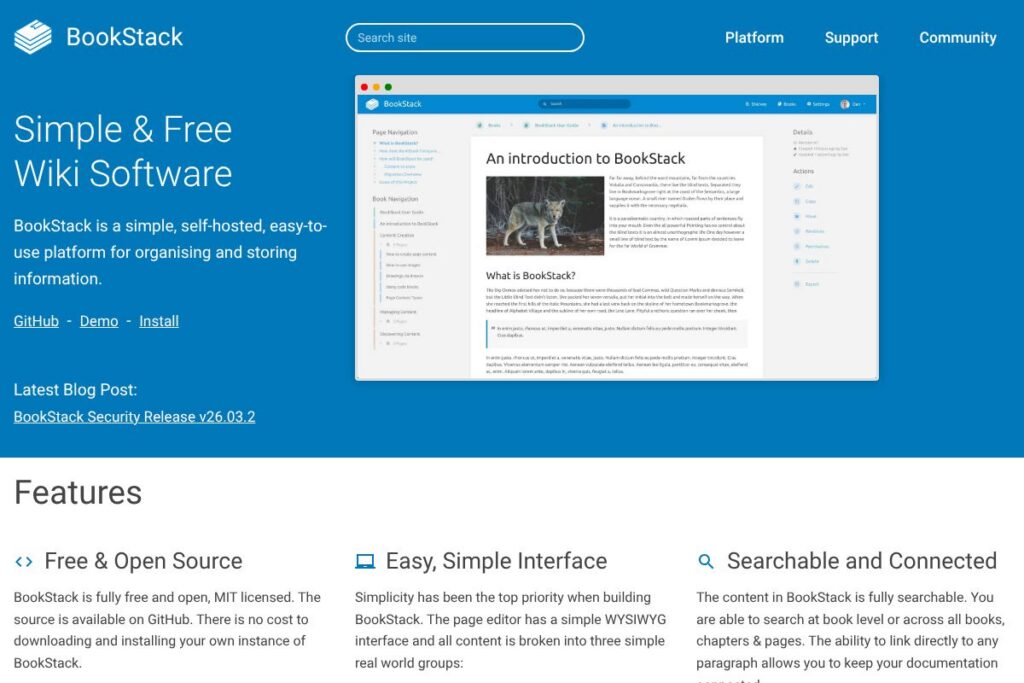
A simple, open-source, self-hosted knowledge management platform built around Books, Chapters, and Pages. BookStack focuses on an uncomplicated editing and browsing experience so teams can publish and access documentation without heavy configuration or developer work.
BookStack is frequently compared with tools like Confluence, GitBook, and MediaWiki. Compared to Confluence, BookStack is oriented toward self-hosting and minimal overhead rather than rich enterprise integrations and marketplace apps. Compared to GitBook, BookStack provides a traditional hierarchical structure that some documentation teams prefer to a flat document collection. Compared to MediaWiki, BookStack trades advanced customization and extension complexity for a simpler out-of-the-box interface and faster setup.
All of this makes BookStack particularly well suited to teams that want a lightweight, self-hosted documentation store with clear structure, straightforward permission controls, and an emphasis on ease of use. It is a practical choice for internal knowledge bases, product documentation, and runbooks where simple organization and searchability are priorities.
How BookStack Works
BookStack organizes content into three nested layers: Books, Chapters, and Pages. Authors create a Book as a top-level container, add Chapters to group related material, and create Pages that contain the actual documentation content.
Content can be created with a WYSIWYG editor or an optional Markdown editor with live preview, and pages support images, embedded diagrams, and direct paragraph linking. Search operates across all Books and Pages, letting readers find content quickly and jump to specific paragraphs using stable URLs.
For deployment, BookStack runs on PHP with the Laravel framework and stores data in MySQL or MariaDB. Administrators install BookStack on a web server, configure authentication and permissions, and optionally enable integrations like LDAP, SAML2, or OpenID Connect for single sign-on.
BookStack features
BookStack bundles the core capabilities teams need for internal documentation into a compact feature set that emphasizes usability and self-hosting. The platform combines a simple editor, structured content model, search, access controls, and built-in diagram support into a single package.
Free and open source
BookStack is released under the MIT license and the full codebase is available to inspect and extend. Self-hosting removes subscription requirements and lets organizations control data residency and upgrades; view the BookStack source code on GitHub for repository and license details.
Simple WYSIWYG editor with Markdown option
The default editor is a straightforward WYSIWYG interface intended for non-technical authors, while an optional Markdown editor with live preview is available for users who prefer plain-text workflows.
Searchable content and paragraph linking
Global and book-level search lets readers find pages and chapters quickly, and every paragraph can be linked directly so cross-references and documentation pointers remain precise and stable.
Built-in diagrams.net integration
Pages can include diagrams created with the embedded diagrams.net tool, enabling authors to add flowcharts and network diagrams without leaving the editor or managing separate assets.
Configurable branding and visibility
Administrators can change site name, logo, and registration options, and toggle whether the system is publicly viewable or restricted to authenticated users to match internal or public documentation needs.
Authentication, SSO, and permissions
BookStack supports local accounts and a range of enterprise authentication options including OIDC, SAML2, and LDAP. A role and permission system lets teams lock down Books, Chapters, and Pages at a granular level.
Page revisions and image management
Built-in page revision history enables content recovery and audit, while the image manager centralizes uploaded assets for reuse across documentation pages.
Multi-factor authentication and themes
Multi-factor authentication is available and can be enforced per role, with TOTP and backup codes supported. Users can switch between light and dark themes to suit personal preferences.
With these capabilities, BookStack makes it easy to host and maintain structured documentation without a lot of administration or tooling. The combination of simple editing, clear structure, and integrated diagrams is the platform’s main advantage.
BookStack pricing
BookStack uses a free and open-source pricing model under the MIT license, meaning the software itself can be downloaded, modified, and self-hosted at no cost. The project maintains the codebase and documentation openly so teams can deploy the software without subscription fees.
Self-hosting requires infrastructure which may incur hosting costs depending on your provider; for installation and hosting guidance refer to the official BookStack documentation and the BookStack source code on GitHub. Organizations that prefer not to self-host can engage third-party managed hosting providers; those providers set their own service and support fees separate from BookStack’s MIT-licensed codebase.
What is BookStack Used For?
BookStack is commonly used to build internal knowledge bases, employee onboarding manuals, runbooks, and product documentation. Its hierarchical organization into Books and Chapters is useful when documentation needs to mirror a product or process structure.
Small to medium teams, developer ops groups, and IT departments choose BookStack when they need a low-maintenance documentation site that can be hosted on-premises or in a private cloud, with straightforward permissions and search for end users.
Pros and Cons of BookStack
Pros
- Open-source and free: The MIT license allows unrestricted self-hosting, inspection, and modification of the codebase without subscription costs.
- Simple editing experience: Non-technical contributors can quickly create and edit content using the WYSIWYG editor, while Markdown is available for power users.
- Flexible authentication: Built-in support for OIDC, SAML2, and LDAP enables integration with corporate identity providers and single sign-on.
- Integrated diagrams and media management: The diagrams.net integration and centralized image manager reduce friction when adding visuals to documentation.
Cons
- Self-hosting required for full control: Organizations that do not want to manage servers must rely on third-party hosting or set up their own infrastructure, which introduces operational overhead.
- Fewer marketplace integrations compared to large SaaS competitors: Platforms like Confluence have extensive app ecosystems, while BookStack focuses on core documentation features rather than a broad plugin marketplace.
- Limited advanced publishing features: Features such as deep analytics, complex workflow automation, or built-in translation workflows are less mature than some commercial documentation platforms.
Does BookStack Offer a Free Trial?
BookStack is completely free and open-source. You can try an interactive instance via the BookStack demo site which resets periodically; for longer evaluation deploy a local instance using the installation guide or run the project from the BookStack source code on GitHub.
BookStack API and Integrations
BookStack provides a RESTful API for automation and integration; consult the BookStack API documentation for endpoints, authentication, and examples. The platform also supports integrations for authentication and single sign-on; see the authentication and SSO documentation for configuration details.
10 BookStack alternatives
Paid alternatives to BookStack
- Confluence — A widely used enterprise wiki with deep integration to Atlassian products, per-user subscription pricing, and an app marketplace for extended functionality.
- Notion — Combines notes, docs, databases, and simple collaboration; offered as a hosted SaaS solution with per-user plans and an easy editor aimed at cross-functional teams.
- GitBook — A hosted documentation platform oriented around Markdown and Git-based workflows, with paid tiers for teams and enterprise features.
- Microsoft SharePoint — An enterprise content and document management platform with extensive customization and integration with Microsoft 365 services.
- Read the Docs (hosted) — Focused on technical documentation, especially for code projects, offering build, hosting, and versioning capabilities for documentation sites.
Open source alternatives to BookStack
- DokuWiki — A lightweight, file-based wiki that is simple to install and popular for internal documentation with many community plugins.
- MediaWiki — The engine behind Wikipedia, suitable for large collaborative knowledge bases where advanced extension and customization are required.
- MkDocs — A static site generator for project documentation written in Markdown, ideal for documentation that is deployed as a static website.
- Documize (Community Edition) — An open-source knowledge management platform with structured content, access controls, and editor options suited for internal docs.
Frequently asked questions about BookStack
What is BookStack used for?
BookStack is used for creating and hosting structured documentation and knowledge bases. Teams use it for internal manuals, product documentation, runbooks, and other centralized information repositories.
Does BookStack have an API?
Yes, BookStack includes a REST API. The BookStack API documentation explains available endpoints, authentication methods, and examples for automation and integration.
Is BookStack free to self-host?
Yes, BookStack is free under the MIT license. You can download the code, run it on your own server, and modify it without licensing fees; installation instructions are available in the official BookStack documentation.
Can BookStack integrate with corporate single sign-on solutions?
Yes, BookStack supports OIDC, SAML2, and LDAP for authentication. These options allow integration with identity providers for SSO and centralized user management.
Does BookStack provide a hosted demo to try out?
Yes, BookStack maintains a public demo instance that resets periodically. The demo allows you to explore most features and see the editing and navigation experience without installing anything.
Final Verdict: BookStack
BookStack excels at providing a minimal, opinionated documentation platform that is fast to deploy and easy for teams to use. Its hierarchical Books/Chapters/Pages model, combined with a simple WYSIWYG editor, built-in diagrams, and a clear permission system, makes it a strong fit for organizations that prefer self-hosting and direct control over their documentation.
Compared with Confluence, which is a subscription-based hosted product with a broad app ecosystem, BookStack is free to self-host under the MIT license and keeps operational complexity low at the cost of fewer out-of-the-box enterprise integrations. For teams seeking a lightweight, maintainable documentation solution with full control over data, BookStack is a practical and reliable choice.