What is BotStar
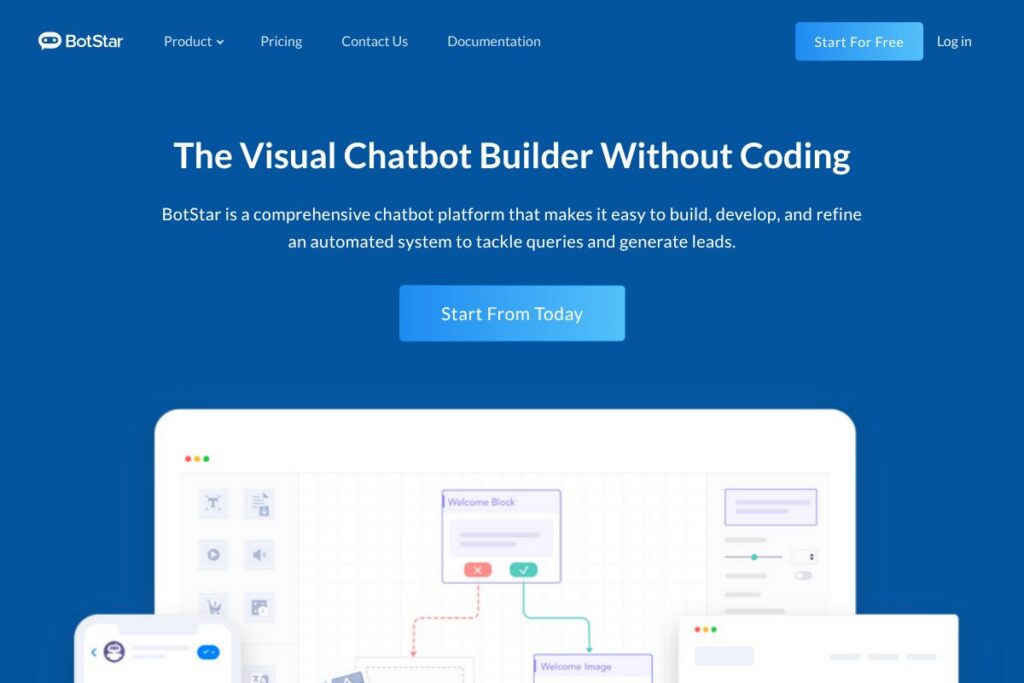
BotStar is a visual chatbot platform that helps businesses design, deploy, and manage conversational experiences across web chat, Facebook Messenger, and other channels. The platform combines a drag-and-drop flow builder with a content management system, live chat handover, multi-language support, and developer tooling so teams can deliver production-ready bots without heavy engineering overhead.
Compared to ManyChat and Chatfuel, BotStar emphasizes a richer content management workflow and stronger developer hooks, making it easier to send media-rich messages and route user data to external CRMs. Against enterprise messaging platforms like Intercom, BotStar offers a more affordable path to automated workflows while keeping live chat handover and campaign tools available for marketing teams.
BotStar works particularly well for e-commerce, lead generation, and customer service teams that need omnichannel coverage and predictable pricing. Its combination of a visual builder and inline scripting makes it a fit for teams that want non-technical editors to design conversations while allowing developers to extend behaviour when needed.
How BotStar Works
The platform centers on a visual flow builder where users create conversational paths using nodes for messages, user inputs, conditionals, and API calls. Designers can attach media, reference dynamic CMS content, and set up keyword training for simple natural language matching, then publish flows to channels such as a website chat widget or Facebook Messenger.
Developers can add inline scripts and call external APIs from within a flow, and teams can route conversations to human operators using the live chat handover feature when escalation is needed. BotStar also supports multi-language flows and broadcast campaigns, so teams can reuse core logic while providing localized messages and scheduled outreach.
BotStar features
BotStar combines no-code design, developer extensibility, omnichannel publishing, and campaign tools into a single platform. Core capabilities include a visual chatbot builder, a dynamic content management system for media-rich responses, built-in live chat handover, multi-language support, and an inline code editor for advanced API integrations.
Visual Chatbot Builder
Create conversational flows with a drag-and-drop interface that maps user journeys, captures inputs, and defines branching logic without writing code. This reduces setup time for marketing and support teams, and makes iteration faster during pilot phases.
Omnichannel Deployment
Publish the same bot logic to web chat widgets, Facebook Messenger using the Facebook Chat Plugin, and other supported channels so users have a consistent experience on the channel they prefer. Channel-specific settings let teams tailor messages while preserving core flow logic.
Dynamic CMS and Media Support
Manage frequently used content, images, and product carousels in an internal CMS and reference them inside conversation nodes. This makes it simpler to maintain marketing messages or product listings across multiple flows and channels.
Developer Toolset and Inline Scripting
Execute custom logic and API calls directly from conversation flows with an integrated code editor, enabling data transformation, conditional routing, and complex integrations. This helps engineering teams extend bot behavior without replacing the visual flow model.
AI, Keywords and Training
Use keyword-based triggers and training phrases to match user intents for common queries and route users to the correct flow. While not a full conversational AI platform, the training tools help increase matching accuracy for typical FAQ and lead-capture scenarios.
Live Chat Handover
Escalate to human agents when needed and continue conversations seamlessly, preserving context between the bot and live operator. Teams can customize agent routing and use live chat customization to improve agent response efficiency.
Broadcasts and Drip Campaigns
Schedule messages and run broadcast campaigns to re-engage users or deliver drip sequences for nurturing leads. Campaign tools allow segmentation based on captured attributes and conversation state.
Multi-language and Localization
Create versions of flows for different languages and locales to support global customers, while preserving a central flow structure for easier updates and maintenance. This simplifies scaling bots across time zones and regions.
With these features, BotStar is particularly useful for organizations that need a balance between non-technical authoring and developer-level integration. The visual builder combined with API access is the platform’s strongest capability for cross-channel automation.
BotStar pricing
BotStar uses a tiered SaaS subscription model with a free entry plan for low-volume use and paid monthly plans for higher traffic and team features. Pricing tiers focus on monthly session limits, active bots, and team collaboration capabilities.
Monthly Billing:
Free – Free (1 Active Bot, 100 Monthly Sessions, Single Seat, Dynamic CMS, Keywords & Training, Human Handover)
Pro – $29/month (1 Active Bot, 1,000 Monthly Sessions, Unlimited Member Seats, Live Chat Customization, Broadcast & Drip Campaigns, API & Integrations)
Agency – $299/month (3 Active Bots, 5,000 Monthly Sessions, Unlimited Member Seats, Custom Permission, Custom App Branding, Template Exports & Cloning)
Annual Billing:
Annual billing options are available and typically reduce the effective monthly cost for teams that commit for a year, with specific yearly rates provided upon subscription or request. For exact annual rates and any volume discounts, submit details through the contact form to discuss options.
Enterprise
Enterprise – Custom pricing (Advanced SLAs, dedicated onboarding, white-labeling, higher session volumes and priority support). For enterprise requirements and custom contracts, reach out via the contact form to get a tailored quote.
What is BotStar Used For?
BotStar is used for customer support automation, lead capture, and conversational marketing across web and social channels. Typical implementations include e-commerce product discovery bots, FAQ bots that reduce support load, and pre-sales lead qualification flows that feed data into CRM systems.
Teams also use BotStar for appointment booking, order tracking, and internal knowledge base access where employees query policies or procedures. Its multi-language support and campaign features make it suitable for companies operating across regions and time zones.
Pros and cons of BotStar
Pros
- Visual builder and CMS: The drag-and-drop editor and integrated CMS let non-technical users design and update rich conversational content without engineering support.
- Developer extensibility: Inline scripting and API calls allow developers to implement complex integrations and custom data handling inside flows.
- Omnichannel support: Publish to web chat and Facebook Messenger using the Facebook Chat Plugin, keeping conversations consistent across channels.
- Accessible pricing tiers: A free plan provides a low-risk starting point, while paid tiers scale session limits and team features for growing businesses.
Cons
- Limited advanced conversational AI: The platform focuses on keyword training and structured flows rather than offering a full natural language understanding suite comparable to dedicated NLU platforms.
- Session-based limits: Plans are tied to monthly session quotas, which may require upgrades for campaigns that generate large spikes in user interactions.
- No public dedicated pricing page: Annual rates and enterprise quotes require contacting sales, which adds an extra step to compare long-term costs precisely.
Is BotStar Free to Try?
BotStar offers a free plan that includes 1 active bot, 100 monthly sessions, a single seat, dynamic CMS, keyword training, and human handover. Paid plans start at $29/month for higher session limits and team features; contact sales via the contact form for enterprise and annual billing details.
BotStar API and Integrations
The platform provides API access and the ability to call external services from within conversation flows using inline scripting; consult the documentation for available endpoints and webhook formats. Built-in connectors and common integrations let teams send collected user data to CRMs and automation platforms, and the Pro plan explicitly includes API and integration capabilities.
Popular connection points include the Facebook Chat Plugin for Messenger, web chat widgets for websites, and webhook-based integrations to forward leads to systems such as CRMs or Zapier workflows. For developer-focused integration details, see the API documentation and examples in the help center.
10 BotStar alternatives
Paid alternatives to BotStar
ManyChat – A marketing-focused chatbot builder with strong Messenger and SMS campaign tools designed for marketers who prioritize audience growth and broadcast messaging.
Chatfuel – A visual bot builder primarily for Facebook Messenger that targets small to medium businesses building conversational commerce experiences.
Intercom – A customer messaging platform that blends live chat, bots, and product tours with CRM-like contact management for support and sales workflows.
Drift – A conversational marketing platform with emphasis on B2B lead routing, account-based marketing, and sales team alignment.
Tidio – A combined live chat and chatbot solution optimized for small e-commerce sites, with simple automations and chat-first features.
MobileMonkey – Omnichannel chat marketing focused on Facebook Messenger, web chat, and SMS with lead generation tools for marketers.
Open source alternatives to BotStar
Rasa – An open source machine learning framework for building contextual assistants with full control over NLU, dialogue management, and deployment.
Botpress – A developer-centric open source chatbot platform with a visual flow editor and modular architecture for on-premise or cloud deployment.
Microsoft Bot Framework – A flexible SDK and tools for building conversational agents that integrate with Microsoft Azure services and multiple channels.
ChatterBot – A Python library for creating rule-based and learned conversational agents, suitable for experimentation and small projects.
Frequently asked questions about BotStar
What is BotStar used for?
BotStar is used to build and run conversational bots for customer support, lead capture, and marketing campaigns. Teams deploy bots on websites and Facebook Messenger to automate common interactions and qualify users before handing off to human agents.
Does BotStar have a free plan?
Yes, BotStar offers a free plan. The free tier includes 1 active bot, 100 monthly sessions, a single seat, dynamic CMS, keyword training, and human handover.
Can BotStar integrate with Facebook Messenger and the Facebook Chat Plugin?
Yes, BotStar supports Facebook Messenger and the Facebook Chat Plugin. You can publish flows to Messenger and embed the chat plugin on websites to provide a channel-consistent experience.
Does BotStar provide an API for developers?
Yes, BotStar provides API access and inline scripting for API calls. Developers can call external services from within flows and use webhooks to push captured data into CRMs or automation platforms; see the documentation for specifics.
Can BotStar handle multiple languages?
Yes, BotStar supports multi-language bots. Teams can create localized versions of flows and messages to serve users in different regions and time zones while maintaining central flow logic.
Final verdict: BotStar
BotStar is a practical choice for teams that need an approachable visual chatbot builder with developer extensions and omnichannel publishing. Its visual editor, dynamic CMS, and inline scripting provide a balance between non-technical content authors and engineering teams that need to integrate bots with existing systems.
Compared with ManyChat, which commonly starts at around $15/month for basic marketing capabilities, BotStar’s $29/month Pro plan positions itself as a slightly higher-priced option that adds developer hooks, richer CMS features, and broader channel management. For teams that need a mix of ease of use and technical flexibility, BotStar delivers a compact feature set at a predictable price point, while enterprise buyers can request custom contracts for larger deployments.
Start exploring BotStar via the homepage or consult the documentation to review integration and deployment details.