ChatHelp.ai: An Overview
ChatHelp.ai is a cloud-based AI assistant platform that combines a website chat widget with a collection of specialized AI tools and custom-trained chat agents for business, office work, and study needs. The platform supports multiple large language models and lets organizations connect their own API keys to run assistants using OpenAI, Anthropic, Google Gemini, and similar model providers.
Compared with established chat and support platforms, ChatHelp.ai focuses on model flexibility and curated tooling instead of tying you to a single backend. For example, Intercom emphasizes integrated customer messaging, routing, and operator workflows for larger teams, while ManyChat and Tidio center on marketing and ecommerce chat automation with built-in flows and templates. ChatHelp.ai differs by offering a broader set of AI tools, private knowledge-base training, and the option to bring your own API keys.
The platform is best suited for small and medium businesses, internal teams needing quick knowledge access, and students or researchers who want a single interface for writing, summarization, and document Q&A. Its strengths are model choice, a customizable website chat widget, and a growing library of task-specific AI agents that help reduce manual support work and speed routine tasks.
How ChatHelp.ai Works
ChatHelp.ai runs as a web platform where you create an account, connect one or more AI API keys, and configure tools and chat agents that use those keys. You can upload documents, link data sources such as YouTube transcripts, and train a private knowledge base so chat agents answer questions using your business content rather than generic web knowledge.
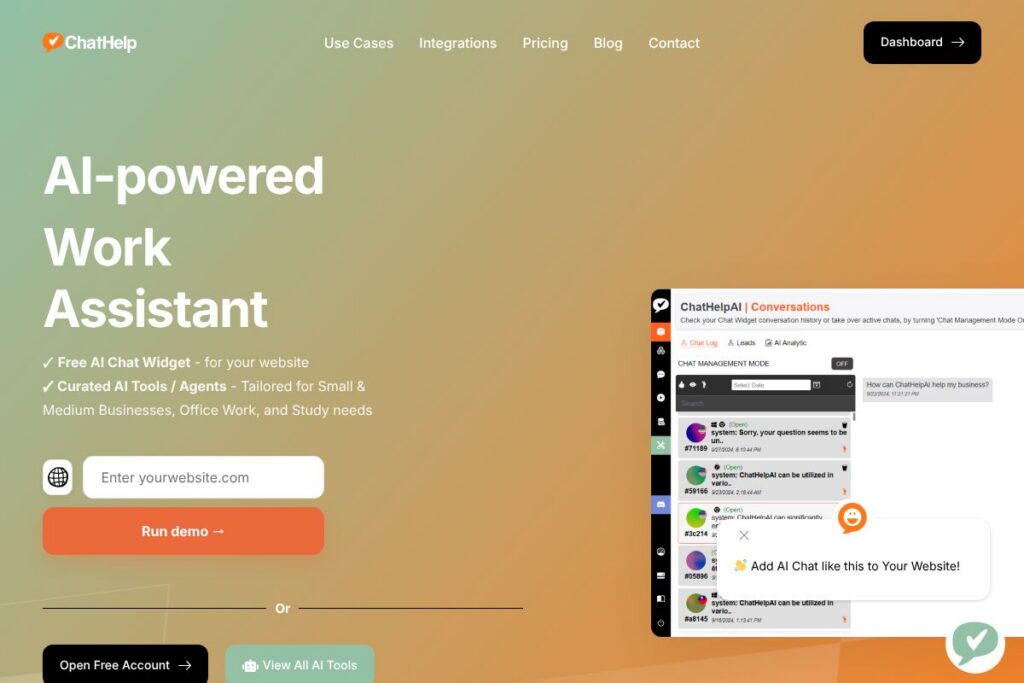
To add the chat experience to a website you drop a single line of embed code for the website chat widget, then customize prompts, lead-capture messages, and language settings. Live agents can take over any chat session, and chat logs can be configured to collect leads or push events to other systems.
Operational workflows typically include setting up model preferences for different tasks, mapping data sources to the knowledge base, creating or selecting an AI Tool or Agent for a use case, and deploying the widget to customer-facing pages or internal portals. The platform also supports bringing your own API keys which gives teams control over model costs and compliance when using third-party LLMs such as OpenAI, Anthropic, or Google Gemini.
What does ChatHelp.ai do?
ChatHelp.ai organizes capabilities around a website chat widget, a private knowledge base, and a growing library of specialized AI tools and agents that address customer support, content creation, research, and internal knowledge retrieval. The platform supports multiple AI models and many file formats, and it emphasizes customization, multilingual responses, and secure storage of uploaded documents.
Let’s talk ChatHelp.ai’s Features
Website Chat Widget
The chat widget provides a lightweight way to answer visitor questions in real time using a custom-trained agent; it includes lead capture prompts and an option to hand the session to a human at any time. Teams can embed it with one snippet of code, adjust appearance and behaviour, and route or store conversations for follow up.
Custom-trained AI Support Chatbot
You can train chat agents on your website content, PDFs, product documentation, and other internal resources so responses reference your materials directly. This reduces manual ticket volume and improves answer accuracy for product or support queries.
Multi-model Support and BYO API Keys
ChatHelp.ai supports connecting to multiple model providers, and it allows you to use your own API keys to manage model billing and data policies. This gives organizations control over which LLMs power specific tools and which accounts are charged for usage.
Curated AI Tools & Agents Library
The platform includes task-specific AI tools such as an AI writer, WordPress auto poster, Yelp review analyzer, and an image generator with Image-to-Image workflows. Each tool is designed for a concrete workflow so teams can pick tools for content creation, review analysis, or media generation.
File and Data Source Support
ChatHelp.ai accepts common document and media formats including pdf, doc, docx, ppt, pptx, xls, xlsx, csv, json, epub, mp3, jpg, jpeg, png, and YouTube transcripts, enabling Q&A over a wide range of internal and external sources. That variety helps teams centralize knowledge and run document-level queries without manual extraction.
Multilingual and International Support
The platform handles more than 175 languages for document ingestion and chat responses, allowing teams to support international visitors without a large multilingual support staff. Language detection and response generation are configurable per widget and agent.
Integrations and Extensibility
ChatHelp.ai provides connectors and plugin options for common platforms with a WordPress plugin mentioned for easy site integration, and planned integrations for messenger apps and Slack. The system can push captured leads or conversation events into downstream systems and accepts API-based extensions.
Security and Private Data Handling
Uploaded business files are stored on encrypted cloud storage, and the platform trains chat agents on encrypted snippets so that model queries reference your content securely. Teams can control access with private and public knowledge-base links and apply role controls for internal sharing.
With ChatHelp.ai you get a toolbox that handles website chat, private knowledge Q&A, content automation, and model flexibility all in a single interface. The biggest benefit is combining private data training, model choice, and a ready-to-deploy widget so teams can move from setup to live support quickly.
ChatHelp.ai pricing
ChatHelp.ai uses a SaaS approach with a freemium entry point and paid plans or usage tiers for expanded features and higher usage; the vendor encourages starting with a free account and bringing your own AI API keys to control model spend. For the most up-to-date account and plan options visit the ChatHelp.ai plans and account options page.
ChatHelp.ai Use Cases
Customer support: Use the website chat widget and a knowledge-base-trained agent to answer common customer questions, triage issues, and collect leads without adding headcount. This setup reduces simple ticket volume and speeds response times for scripted problems.
Content and marketing: Teams can use the AI writer and WordPress auto poster to draft, rephrase, and schedule blog posts, or generate social content and AI-assisted images for campaigns. The platform supports scheduling posts and exporting content for editorial review.
Internal knowledge and research: Create private knowledge bases to provide employees with instant answers about procedures, product specs, competitor summaries, and training materials. Researchers and students can use document Q&A and summarization tools to accelerate study and analysis.
Pros and Cons of ChatHelp.ai
Pros
- Model flexibility: Allows you to connect and manage your own API keys for OpenAI, Anthropic, Google Gemini, and other providers so you can control cost and model selection. This reduces vendor lock-in and gives admins precise control over model usage.
- Broad file support: Accepts a wide range of file formats including documents, spreadsheets, images, audio, and YouTube transcripts which enables accurate Q&A over diverse internal documents. That coverage reduces manual data preparation and speeds up knowledge ingestion.
- Custom training for private knowledge: Lets teams build a private knowledge base from site content and internal documents so responses are grounded in company-specific material. This improves answer relevance for product and support queries.
- One-line embed widget and live takeover: The chat widget is simple to deploy and supports live human takeover when needed, which preserves control over conversations and allows escalation for complex issues.
Cons
- Limited public pricing detail: Pricing tiers and enterprise terms are not published in detail on a dedicated pricing page, so larger teams may need to contact sales to estimate costs and enterprise features. This requires extra steps to evaluate total cost of ownership.
- Some integrations are still coming: Several messenger and collaboration integrations are listed as coming soon, which means teams relying on certain channels may need to use interim routing or custom integration work. That can delay multi-channel rollouts.
- Dependence on external model providers for costs: Using third-party API keys shifts model costs and compliance responsibility to the organization, which requires managing multiple vendor accounts and monitoring usage to avoid unexpected charges.
Does ChatHelp.ai Offer a Free Trial?
ChatHelp.ai offers a free account that includes the website chat widget and access to selected AI tools, with no credit card required to start; higher usage or advanced features are available on paid tiers or by adding your own model API keys. Open a free account to evaluate features and then review plan options on the ChatHelp.ai plans and account options page.
ChatHelp.ai API and Integrations
ChatHelp.ai supports connecting external AI providers through API keys so you can use providers like OpenAI, Anthropic, and Google Gemini to power specific tools. To learn how to link provider keys and configure model routing, consult the ChatHelp.ai integrations and plugins documentation.
The platform also lists connectors and plugins for common systems, including a WordPress plugin for site integration; additional channel connectors for WhatsApp, Instagram, Facebook Messenger, Telegram, Discord, and Slack are planned. For integration guides see the ChatHelp.ai integrations and plugins page.
10 ChatHelp.ai alternatives
Paid alternatives to ChatHelp.ai
- Intercom — A comprehensive customer messaging platform that combines live chat, helpdesk, and automation for sales and support teams with advanced routing and operator workflows.
- Drift — Focuses on conversational marketing and sales bots that qualify leads, schedule meetings, and integrate tightly with CRMs for revenue teams.
- Zendesk Chat — Part of the Zendesk suite, it emphasizes ticketing integration and enterprise support workflows with a strong focus on agent routing and SLA tracking.
- Tidio — Offers live chat and chatbot automation with a focus on ecommerce, including prebuilt templates and an easy-to-use visual bot builder.
- ManyChat — Specializes in social messenger automation, chat marketing, and sequence messaging for Facebook, Instagram, and SMS campaigns.
- Ada — Enterprise-focused automated support that blends self-serve content with conversational AI and strong analytics for large support organizations.
- HubSpot Conversations — Included in HubSpot CRM tools, it provides live chat, chatbot builders, and CRM-linked contact records for marketing and support teams.
Open source alternatives to ChatHelp.ai
- Botpress — An open source conversational AI platform that supports custom NLU, multi-channel deployment, and developer extensibility for building chatbots.
- Rasa — Developer-focused, open source framework for contextual assistants with strong control over NLU, dialogue management, and on-premise deployment options.
- Chatwoot — Open source customer engagement suite with live chat, shared inboxes, and integrations for teams that want to self-host their messaging stack.
- Rocket.Chat — A communications platform with chat, conferencing, and bot integrations, suitable for teams that need self-hosting and data control.
Frequently asked questions about ChatHelp.ai
What is ChatHelp.ai used for?
ChatHelp.ai is used for website chat, knowledge-base Q&A, and AI-powered task tools. Organizations deploy it to support customers, automate routine work, and centralize document-based answers.
Does ChatHelp.ai support custom AI models or keys?
Yes, ChatHelp.ai lets you bring your own API keys. You can route specific tools or agents to use OpenAI, Anthropic, Google Gemini, or other model providers you configure.
Can ChatHelp.ai be integrated with WordPress?
Yes, ChatHelp.ai offers a WordPress plugin for easy integration. The plugin simplifies embedding the chat widget and scheduling WordPress auto-posts from the AI writer.
Is ChatHelp.ai secure for private business documents?
ChatHelp.ai stores uploaded files in encrypted cloud storage and trains agents on encrypted snippets. Teams can create private knowledge bases and control access to internal content.
Does ChatHelp.ai have a free version?
Yes, ChatHelp.ai provides a free account with access to core features. Paid tiers or additional usage capacity are available for teams that need more tools or higher usage limits.
Final verdict: ChatHelp.ai
ChatHelp.ai is a practical choice for small and medium businesses or teams that need flexible model selection, private knowledge-base training, and a quick-to-deploy website chat widget. Its combination of curated AI tools, BYO API keys, broad file format support, and lead-capture features makes it a useful platform for reducing support tickets and accelerating content workflows.
Compared with Tidio, which offers a user-friendly ecommerce chat solution and paid plans that commonly start at $19/month, ChatHelp.ai distinguishes itself with model flexibility and private document training. Teams that need deep model control, multiple LLM options, and the ability to train on internal documents will find ChatHelp.ai especially valuable, while teams seeking a simpler out-of-the-box ecommerce chat solution might prefer Tidio for its ready-made templates.
Overall, ChatHelp.ai is a solid option when you want a single platform that combines website chat, knowledge-based Q&A, and a growing library of AI tools while retaining control over model providers and data handling. Start with a free account to test the widget and knowledge-base workflows, and then scale to paid tiers or custom integrations as needed by your team.