Chatwoot: An Overview
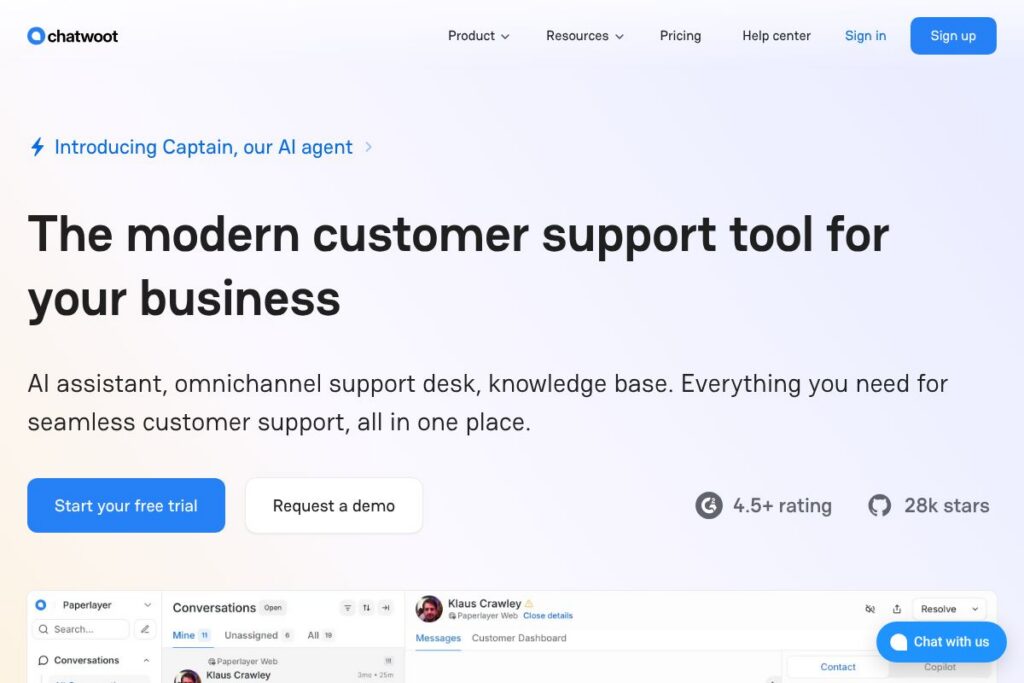
Chatwoot is an open-source customer support platform that centralizes conversations from live chat, email, WhatsApp, Instagram, Facebook, Telegram, and other channels into a single inbox. It includes an AI assistant called Captain that offers suggested replies, knowledge-base lookups, and translation support to speed agent responses and reduce manual workload.
Compared with Intercom, Zendesk, and Freshdesk, Chatwoot emphasizes ownership and privacy by offering a self-hosted option and an open codebase while matching core features such as omnichannel routing, automation, and a help center. Unlike many closed-source SaaS competitors, organizations that need strict data residency or regulatory controls can host Chatwoot on their infrastructure and integrate it with existing systems.
Chatwoot works particularly well for engineering-led teams, startups, and privacy-conscious enterprises that want an extensible support platform without vendor lock-in. Its combination of omnichannel routing, a native AI copilot, and developer-friendly APIs makes it a strong choice for businesses that need both conversational tools and the ability to build custom workflows.
How Chatwoot Works
Chatwoot collects messages from connected channels into a unified inbox where agents can assign, tag, and resolve conversations. Messages from website live chat widgets, email, and messaging platforms are represented as conversation threads, and agent tools surface customer history and relevant knowledge base articles during replies.
The platform’s AI assistant, Captain, can be configured to suggest responses, auto-reply to common queries, translate messages, and surface relevant help-center content. Teams can train Captain using their own help articles and past conversations so suggestions align with brand voice and policy.
Deployment options include self-hosting on your infrastructure or using Chatwoot’s managed cloud. Self-hosting provides full control over data and integrations, while the cloud option reduces operational overhead and adds managed security and uptime guarantees.
What does Chatwoot do?
Chatwoot combines an omnichannel support inbox, AI-assisted responses, a customizable help center, and developer APIs into a single platform. Recent focus has been on improving AI capabilities with Captain and Copilot features, plus expanding channel integrations like WhatsApp and social messaging.
Let’s talk Chatwoot’s Features
Omnichannel Inbox
All incoming customer messages are routed to a single inbox with assignment, labels, and SLA indicators, so teams can handle conversations from web chat, email, WhatsApp, Facebook, Instagram, Telegram, and other connected channels without context switching.
Captain AI Assistant
Captain provides automated replies to common queries, draws answers from your help center and past conversations, and can be tuned to reduce support volume. It helps triage requests and speeds up first response times by offering draft replies for agents to edit.
Copilot Suggestion Engine
Copilot gives agents suggested responses, quick access to related tickets, and inline help-center search results while composing replies, which reduces handling time and keeps replies consistent across agents.
Knowledge Base and Portals
The built-in help center lets teams publish articles, organize content into portals per brand or product, and offer AI-powered search to surface relevant help articles during conversations and via the public portal.
Live Chat Widget Customization
Teams can embed a branded live chat widget on websites, customize colors, language, and prompts, and enable optional identity validation to link sessions to known users for more personalized support.
Messaging Channel Integrations
Native integrations handle WhatsApp rich messaging, Facebook and Instagram DM, Telegram, and SMS via providers like Twilio, enabling transactional updates, multimedia sharing, and two-way conversations on customer-preferred channels.
Open-source & Self-hosting
The core code is open-source so organizations can self-host, audit the codebase, and extend functionality. Self-hosting is useful for data residency and compliance requirements while still benefiting from community contributions.
Developer APIs and Webhooks
Chatwoot exposes REST APIs and webhooks to fetch conversations, create messages, and automate workflows, enabling custom integrations such as CRM syncs, order lookups, and ticket automation.
Security and Compliance
Cloud customers can rely on managed security controls, and self-hosted deployments allow teams to apply their own security standards. Chatwoot emphasizes secure development, testing, and personnel practices, and the platform highlights SOC 2 Type II compliance for managed services.
With these features, the largest practical benefit is unified, extensible support that balances agent productivity and data control. Teams get omnichannel conversation handling, AI-assisted agent workflows, and the flexibility to build custom integrations.
Chatwoot pricing
Chatwoot follows a hybrid model: the core product is open-source and free to self-host, while managed cloud plans and enterprise services have paid tiers and custom options. Self-hosting avoids subscription fees but requires operational resources to run and maintain the service.
Self-hosted Chatwoot: the software is open-source under a permissive license and can be deployed at no software cost; source and installation instructions are available in Chatwoot’s GitHub repository. For managed hosting, enterprise features like SLAs, advanced security, and support are available under commercial cloud plans or custom contracts; check Chatwoot’s homepage for current cloud plan details and sales contact.
For source code and deployment resources see Chatwoot’s official repository on GitHub and consult Chatwoot’s homepage for information on managed plans and enterprise options at Chatwoot’s cloud offering.
What is Chatwoot Used For?
Chatwoot is used to centralize customer conversations and improve response efficiency for support, sales, and customer success teams. Common workflows include ticket routing and SLA management, live chat sales assistance, social media engagement, and using AI suggestions to shorten reply time.
Teams also use Chatwoot to power self-service with a knowledge base and AI search, reducing repetitive tickets, and to build custom automations via APIs for tasks like order lookups or CRM synchronization. It is especially useful where data ownership, compliance, or customization are priorities.
Pros and Cons of Chatwoot
Pros
- Open-source and self-hostable: Self-hosting gives full control over customer data, deployment, and customization, which is valuable for compliance and privacy-sensitive organizations.
- Omnichannel coverage: Unified inbox across web chat, email, WhatsApp, Facebook, Instagram, and other platforms reduces tool sprawl and preserves conversation context for agents.
- Built-in AI assistant: Captain and Copilot speed response times through suggested replies, knowledge-base lookups, and translation support, improving agent productivity and consistency.
- Developer-friendly APIs: The platform is designed for integrations, enabling automation and custom workflows that connect Chatwoot to CRMs, order systems, and internal tooling.
Cons
- Operational overhead for self-hosting: Running and maintaining a self-hosted instance requires DevOps resources for updates, scaling, and security patching compared to fully managed SaaS alternatives.
- Managed plan details vary: Since cloud and enterprise offerings are handled as commercial plans, pricing and included features can require direct discussion with sales to confirm SLAs and advanced capabilities.
- Reporting and analytics depth: Some organizations may find built-in analytics less mature than high-end enterprise helpdesk platforms and may need to export data for advanced BI workflows.
Does Chatwoot Offer a Free Trial?
Chatwoot offers a free self-hosted open-source edition and a free trial for cloud customers. The core software can be deployed with no software licensing cost using the GitHub repository, while the managed cloud service typically includes a trial period for evaluation before committing to paid plans.
Chatwoot API and Integrations
Chatwoot provides developer APIs and webhooks to read and write conversations, manage contacts, and trigger automations; detailed guidance is available in Chatwoot’s documentation. See Chatwoot’s API documentation and developer guides at Chatwoot’s documentation and the project source on GitHub.
Key built-in integrations include Slack, Google Workspace, Facebook and Instagram messaging, WhatsApp via providers like Twilio, and webhook connectors for custom systems, enabling a broad set of automation and notification patterns.
10 Chatwoot alternatives
Paid alternatives to Chatwoot
- Intercom — Conversational support and marketing platform with product tours, in-app messaging, and a mature automation ecosystem suitable for growth teams.
- Zendesk — Enterprise helpdesk with deep ticketing features, reporting, and omnichannel support for larger organizations with structured support processes.
- Freshdesk — Cloud helpdesk offering ticketing, automation, and multichannel support aimed at small to mid-market teams.
- Help Scout — Email-first helpdesk focused on simplicity, shared inboxes, and a built-in knowledge base for small to medium teams.
- Front — Shared inbox and collaboration platform that emphasizes team workflows and message-level automation across channels.
- HubSpot Service Hub — Integrated with HubSpot CRM, combines ticketing, automation, and knowledge base features for teams that want CRM tight coupling.
- Gorgias — E-commerce-focused helpdesk with deep integrations for storefronts and order management to resolve customer issues quickly.
Open source alternatives to Chatwoot
- Zammad — Open-source helpdesk with ticketing, multi-channel support, and a web-based admin interface focused on self-hosted deployments.
- osTicket — Lightweight, open-source ticketing system designed for basic helpdesk workflows and self-hosted environments.
- Helpy — Open-source help desk and knowledge base that supports multi-channel tickets and community-driven extensions.
Frequently asked questions about Chatwoot
What channels does Chatwoot support?
Chatwoot supports web chat, email, WhatsApp, Facebook, Instagram, Telegram, and SMS integrations. Additional channels can be connected via providers and custom integrations using the API.
Is Chatwoot open source?
Yes, Chatwoot is open-source and available on GitHub. The core project can be self-hosted so teams retain control over their data and deployment environment.
Does Chatwoot provide AI features?
Yes, Chatwoot includes an AI assistant called Captain and a Copilot suggestion engine. These tools provide suggested replies, knowledge-base lookups, and translation support to improve agent efficiency.
Can Chatwoot be integrated with other systems?
Yes, Chatwoot exposes REST APIs and webhooks for integrations. Developers use the API to synchronize tickets, lookup customer data, and trigger automated workflows with external systems.
Is there a managed cloud option for Chatwoot?
Yes, Chatwoot offers a managed cloud offering alongside the self-hosted edition. Managed plans include hosted infrastructure, security controls, and support; contact sales or visit Chatwoot’s homepage for details on cloud plans.
Final Verdict: Chatwoot
Chatwoot stands out for combining an open-source, self-hosted option with a modern omnichannel inbox and native AI assistance. It is particularly well suited for teams that need data ownership, compliance, and the ability to extend the platform via APIs while still getting productivity gains from AI features like Captain and Copilot.
Compared with Intercom, which is a commercial SaaS product with subscription pricing and a polished set of built-in engagement tools, Chatwoot offers a lower-cost entry point if you can self-host and the flexibility to customize integrations. Organizations that prioritize managed SLAs and minimal operational overhead may prefer Intercom, while those that require control over data and customization will find Chatwoot compelling.
Overall, Chatwoot is a practical choice for engineering-forward teams, privacy-conscious companies, and businesses that want a feature-rich helpdesk they can own and extend. For repository access and deployment resources see Chatwoot’s project on GitHub and consult the official documentation for implementation guidance.