Clariti: An Overview
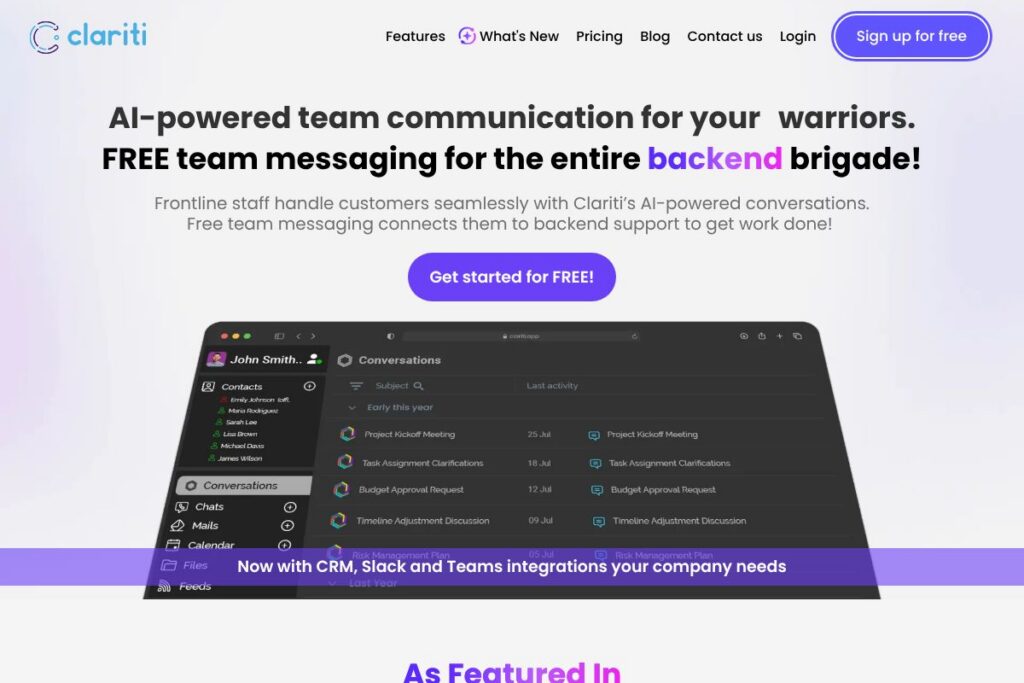
Clariti is a context-driven messaging and collaboration platform that groups chat, email, files, calendar events and social feeds into subject-based Conversations so teams keep full chronology and context in one place. The platform is aimed at frontline and backend teams who frequently switch between Instant Messaging and email, and need an integrated way to track work without losing context.
Clariti differs from channel-based chat tools by treating the subject as the primary organizing unit rather than a flat channel or mailbox. Compared to Slack, which focuses on channels and threads, Clariti embeds emails and files into Conversations to preserve the full communication timeline; versus Microsoft Teams, Clariti emphasizes subject grouping and embedded email handling rather than tight Office app integration. Against email-first products like Front, Clariti provides a hybrid approach that blends real-time chat with email history and file attachments to reduce forwarding and duplication.
All of this makes Clariti a strong option for customer-facing organizations and operational teams that need single-threaded context across communication types. It performs particularly well when teams must combine chat speed with email detail, and when frontline staff require quick access to backend resources without switching apps.
How Clariti Works
Clariti organizes work around hybrid Conversations that collect chat messages, embedded emails, files, calendar events, calls and feeds by subject. Users start with direct messaging or basic team chat and can convert related items into a single Conversation where history and chronology are preserved automatically.
In practice, a support agent can pull in an email thread into a Conversation, add related chat messages, attach the latest invoice and start a voice call with screen sharing, all inside the same subject view. Clariti’s AI continually analyzes open Conversations to suggest related threads and add contextual links, so teams see relevant history as they multitask.
Onboarding typically follows a crawl, walk, run approach: start with direct messages and mail import, then create subject Conversations for common workflows, and finally enable integrations and AI-driven context linking as teams scale.
What does Clariti do?
Clariti centralizes messaging, email, file sharing, meetings, voice and video in subject-centric Conversations so teams retain context and reduce redundant communication. Core capabilities include hybrid Conversations that merge chat and email, AI context linking, file management inside Conversations, built-in voice/video and screen sharing, calendar and task features, and integrations with CRMs and third-party apps.
Let’s talk Clariti’s Features
Hybrid Conversations
Hybrid Conversations automatically collect chat, email, documents, calendar items and feeds around a single subject so users see the full history in one view. This reduces the need to forward emails or search multiple tools, and it helps new participants catch up quickly when added to a discussion.
AI Context Linking
Clariti’s AI continuously scans messages and activity to suggest related Conversations and surface relevant history, helping teams avoid duplicated work. The AI is designed to make multi-tasking easier by keeping context visible as users switch between topics.
Instant Messaging
Clariti provides real-time messaging with presence indicators and quick replies, while allowing embedded emails and files inside messages for richer context. Teams can use messaging for rapid collaboration without losing the detail of formal email communication.
Embedded Email Handling
You can import and embed emails from Gmail, Outlook, Microsoft 365 and other mail providers directly into Conversations to preserve thread history. This eliminates many email forwards and keeps relevant correspondence tied to the subject it concerns.
File Sharing and Clariti Drive
Files shared within a Conversation are saved to Clariti Drive and indexed by subject so attachments are easy to find later. The platform supports a wide range of file types, and integrates with cloud storage providers to reduce duplicate uploads.
Voice and Video Calling with Screen Sharing
Clariti includes voice and one-on-one video calling plus screen sharing inside Conversations so remote discussions retain contextual links to the underlying subject. Calls can be started from any Conversation and are saved in the subject timeline for reference.
Meetings and Calendar Integration
Built-in event scheduling and calendar features let teams create meetings tied to Conversations so agenda, notes and post-meeting files stay together. Calendar events can be attached to the relevant subject thread to preserve continuity.
Tasks and To-Dos
Clariti provides lightweight task and to-do features that can be linked to Conversations, enabling teams to assign actions and track progress without leaving the subject context. This keeps task status visible alongside the supporting discussion and files.
Integrations and Connectors
Clariti integrates with CRMs, Slack, Microsoft Teams and other enterprise systems and supports connecting thousands of apps via Zapier to automate workflows. Native integrations and Zapier connectors help propagate data into subject Conversations so work stays centralized.
Security and Hosting
Clariti uses end-to-end encryption for messaging and stores data on secure AWS infrastructure aligned with industry security practices. The platform emphasizes compliance and secure hosting to meet organizational data protection requirements.
Clariti centers the product around maintaining context across communication types, which reduces search time and email noise. The biggest practical benefit is fewer lost threads and faster onboarding when new people join a subject or when work transfers between frontline and backend teams.
Clariti pricing
Clariti uses a flexible licensing approach that includes a free option for eligible teams alongside paid tiers and enterprise licensing; specific commercial rates are handled through direct sales. The platform positions a free team messaging tier for frontline staff and mentions possible lifetime free premium grants for qualifying customers.
For exact plan details and to see if your team qualifies for the free license or lifetime premium offers, check Clariti’s home and licensing information. Enterprise customers can request custom quotes and discuss deployment, SSO and support options through Clariti’s sales channels.
What is Clariti Used For?
Clariti is commonly used to replace fragmented inboxes and disconnected chat tools by providing a single workspace where related email, chat, files and meetings live together. This is especially valuable for customer-facing operations such as support desks, sales support, patient care teams, real estate agents and building managers who need a unified history for each customer or property.
Operational teams in purchasing, supply chain and accounting use Clariti to tie transactional emails and documents directly to the subject they affect, reducing delays caused by searching mailboxes and siloed chat threads. HR and project managers can centralize onboarding conversations, policy questions and project artifacts in subject Conversations for consistent record keeping.
Pros and Cons of Clariti
Pros
- Context-first design: Clariti groups chat, email, files and calendar events by subject so teams retain full chronology and relevant history in one place. This reduces the need to forward emails or search multiple tools and helps new participants catch up quickly.
- Hybrid chat and email: The platform embeds emails inside chat and Conversations which eliminates duplicate threads and cuts down on email volume. Teams that rely on both real-time and asynchronous communication gain a single source of truth.
- Frontline-friendly free tier: Clariti promotes free team messaging for frontline staff and offers targeted lifetime free premium opportunities, which can lower deployment cost for customer-facing teams.
- Built-in voice, video and screen sharing: Native calling and screen sharing tied to Conversations keep meeting outcomes and context preserved without bouncing between apps.
Cons
- Adoption learning curve: Teams used to channel-based chat or pure email workflows may need time to adapt to subject-centric Conversations and to reorganize existing archives into the new structure.
- Integration nuances: While Clariti supports CRM, Slack and Microsoft Teams integrations and Zapier connectors, complex enterprise integrations or custom API work may require professional services or open engineering work.
- Public pricing visibility: Clariti does not publish a full price list on a dedicated pricing page, which means organizations typically need to contact sales to get detailed licensing and enterprise pricing information.
Does Clariti Offer a Free Trial?
Clariti offers free team messaging for eligible frontline teams and mentions options for lifetime free Premium subscriptions for qualifying customers. The platform encourages organizations to request a free license or contact sales to determine qualification, and also provides trial and demo options for teams evaluating paid or enterprise deployments.
Clariti API and Integrations
Clariti connects to CRMs, Slack, Microsoft Teams and other systems and supports automations via Zapier to integrate with thousands of third-party apps. Use the Zapier platform to build integrations that push data into Clariti Conversations and automate routine tasks.
Clariti also offers native connectors for common enterprise systems and cloud storage providers, and supports importing email from Gmail, Outlook and Microsoft 365 to consolidate mail into Conversations. For custom integration work, contact Clariti’s support or sales channels to discuss developer access and enterprise connectors.
10 Clariti alternatives
Paid alternatives to Clariti
- Slack — Channel-based team messaging with app integrations, threads and enterprise features for large organizations.
- Microsoft Teams — Collaboration platform tightly integrated with Microsoft 365, providing chat, video meetings, and Office file collaboration.
- Front — Shared inbox and collaborative email platform designed for customer support teams that need email-centric workflows.
- Twist — Conversation-focused team messaging that emphasizes asynchronous communication and topic organization.
- Flock — Team messaging and collaboration suite with built-in productivity tools and integrations.
- Workplace from Meta — Social-collaboration tool for enterprises that blends group conversations and company-wide communications.
- Google Chat (part of Google Workspace) — Messaging integrated with Gmail and Google Workspace apps for organizations using Google services.
Open source alternatives to Clariti
- Mattermost — Self-hosted team chat and collaboration platform with extensive customization and on-premises options.
- Rocket.Chat — Open source messaging platform that supports chat, video, and integrations and can be self-hosted for compliance control.
- Zulip — Topic-threaded open source chat system that emphasizes threaded conversations for clarity.
- Element (Matrix) — Decentralized, open protocol-based messaging and VoIP client with end-to-end encryption options.
Frequently asked questions about Clariti
What is Clariti used for?
Clariti is used to centralize and preserve context across chat, email, files and meetings. Teams use it to reduce email forwarding, keep subject-level history, and speed collaboration between frontline and backend staff.
Does Clariti integrate with Slack and Microsoft Teams?
Yes, Clariti integrates with Slack and Microsoft Teams through native connectors and supports broader automation via Zapier. These integrations help route messages and data into Clariti Conversations where appropriate.
Is Clariti secure for enterprise use?
Clariti uses end-to-end encryption and stores data on secure AWS infrastructure following industry security practices. The platform emphasizes compliance measures and secure hosting to meet enterprise needs.
Can I import my existing emails into Clariti?
Yes, Clariti supports importing emails from Gmail, Outlook, Yahoo Mail, Microsoft 365 and Google Workspace. Imported messages are organized into the Clariti Home and can be grouped into hybrid Conversations by subject.
Does Clariti offer a free plan or trial?
Clariti provides free team messaging for eligible frontline teams and offers trial/demo and licensing discussions for paid and enterprise options. Organizations should request a free license or contact Clariti sales to confirm qualification and trial availability.
Final verdict: Clariti
Clariti stands out for its subject-centric Conversations that combine chat, email, files, calendar and calls in one coherent timeline. This approach reduces email forwarding and scattered threads, making it especially useful for customer-facing and operational teams that need complete context when resolving issues or tracking work.
Compared to Slack, which focuses on channel and thread structures with per-seat subscriptions, Clariti prioritizes subject-level context and embedded email handling; that difference can reduce cross-tool switching for teams that rely heavily on both chat and email. Clariti’s free team messaging options for frontline staff also make it an attractive choice for organizations looking to give customer-facing workers access to a unified collaboration tool without immediate licensing costs for every backend seat.
Overall, Clariti is worth evaluating for teams that value preserved context across communication types and want to consolidate email and chat workflows into subject-based Conversations. For organizations that require deep Office app integration or existing heavy investment in the Microsoft ecosystem, Microsoft Teams may remain a closer fit, while Clariti better serves teams prioritizing contextual continuity between email and chat.