ClassMarker: An Overview
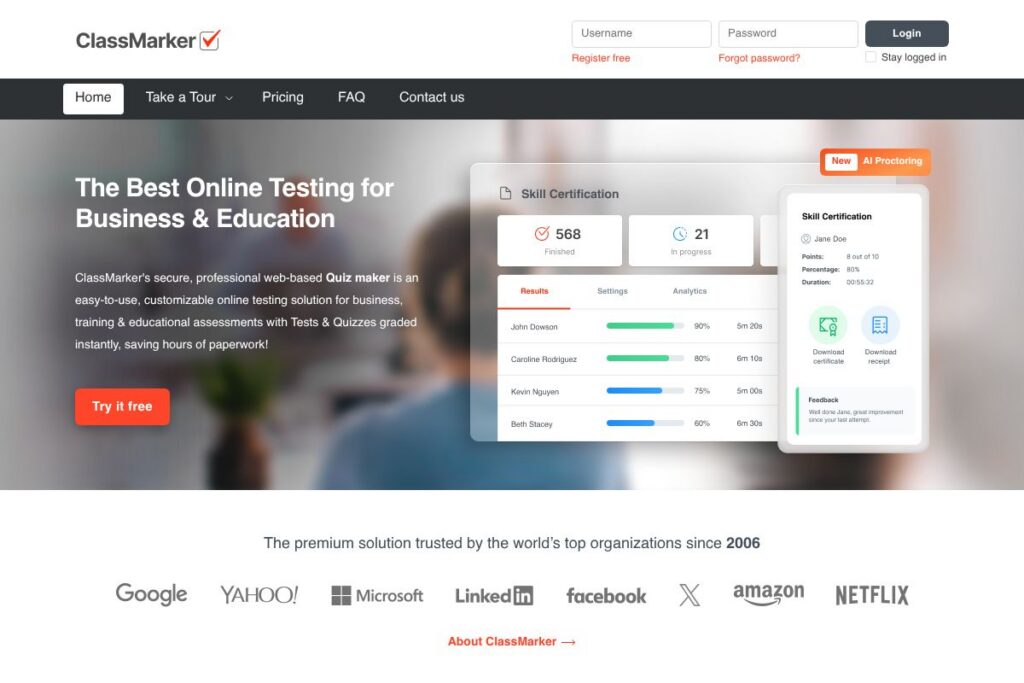
ClassMarker is a secure, web-based exam creator designed for business, training, and education. It focuses on online tests and quizzes that are graded automatically, with settings for timed exams, randomized questions, certificates, and access control that suit high-stakes assessments as well as routine training checks.
Compared with general survey tools like SurveyMonkey and form builders such as Google Forms, ClassMarker emphasizes exam-level features: secure delivery, exam proctoring, customizable certificates, and detailed result exports. Against learning platforms like Moodle, ClassMarker is more lightweight for assessment-only workflows and easier to embed into existing LMS setups.
All of this makes ClassMarker a practical option for organizations that need reliable, secure online testing. It is particularly well suited to HR teams running pre-employment assessments, training departments issuing compliance tests, and educators administering remote exams with proctoring and certificate generation.
How ClassMarker Works
Creating an assessment starts in a browser-based dashboard where administrators add tests, questions, and settings, then distribute access via public links or private authentication. The platform supports question banks, randomization, and answer shuffling so each test session can be unique, and results are graded instantly so instructors save time on marking.
When tests run, ClassMarker can apply secure delivery controls including timed sections, attempt limits, and optional proctoring. Results are viewable in real time, exported to CSV or spreadsheet formats, and can trigger automatic certificates based on pass thresholds.
How to create online tests in eight steps:
What does ClassMarker do?
ClassMarker provides the core tools needed to build, deliver, and grade online tests. Its capabilities range from question banks and randomized delivery to instant scoring, custom certificates, and reporting exports for offline analysis.
The platform also includes secure proctoring features labeled ClassMarker Monitor, which combine browser controls, camera checks, and identity verification to reduce cheating during remote exams. For organizations that need programmatic workflows, ClassMarker exposes webhooks and embedding options so exams can be integrated into LMS and CRM systems.
ClassMarker features
ClassMarker is organized around secure test creation, delivery controls, instant grading, and result analysis. Recent additions include AI-powered proctoring and deeper developer integration options for embedding exams and streaming results to third-party systems.
The platform includes several powerful capabilities:
AI Proctoring (ClassMarker Monitor)
ClassMarker Monitor adds automated proctoring controls such as tab switch detection, mouse boundary restrictions, camera monitoring, face detection, and optional ID verification. These controls run in the browser with no downloads required, reducing setup friction for test takers while providing audit data for administrators.
Question types and banks
Multiple choice, true/false, short answer, and other formats are supported, with reusable question banks and item tagging for organizing content. Banks allow instructors to build pools of questions that can be randomized per test to reduce item exposure.
Randomization and timing
Question and answer shuffling, timed sections, and attempt limits make tests adaptable for different assessment scenarios. Randomization helps reduce answer sharing, and timers ensure consistent time-on-task across test takers.
Instant grading and reporting
Tests are graded automatically for objective question types, and results are available in real time in the dashboard. Administrators can export detailed result reports to CSV or spreadsheet formats for offline analysis and recordkeeping.
Certification and passmark automation
Automatic certificate generation is available when a test taker meets a defined passmark. Certificates can be customized and issued immediately after completion, which is useful for compliance training and certification programs.
Security and compliance
ClassMarker keeps test data locked to the account, offers deletion controls, and maintains compliance with GDPR and CCPA privacy requirements. The platform reports strong uptime and monitoring, which is important for large-scale or time-sensitive assessments.
API, embedding, and webhooks
A developer-focused set of integration options lets teams embed exams into websites and LMS portals, receive real-time result callbacks via webhooks, and automate workflows with the API. Developers can consult the developer documentation for endpoints and examples.
With ClassMarker you get a focused exam toolset: secure delivery, automated grading, reporting exports, and certificate automation that together make running assessments faster and more auditable.
ClassMarker pricing
ClassMarker uses a mixed subscription and pay-as-you-go model with options for individuals, teams, and enterprise customers, plus credit packs for one-off exam use and discounts for educators and non-profits. This approach lets organizations choose ongoing subscriptions for frequent testing or credit packs for occasional exams.
For specific plan options and current rates, view ClassMarker’s current pricing options. The vendor also offers enterprise arrangements and volume discounts for large organizations, and sales can provide a Data Protection Agreement for compliance needs.
What is ClassMarker Used For?
ClassMarker is commonly used for professional development quizzes, pre-employment assessments, certifications, compliance testing, and academic exams. Its combination of instant grading, certificates, and proctoring makes it suitable where auditability and integrity matter.
Smaller uses include audience feedback, mock tests, and surveys tied to learning activities, while larger implementations embed exams into LMS platforms for remote learning and corporate training programs.
Pros and Cons of ClassMarker
Pros
- Secure exam delivery: ClassMarker provides browser-based proctoring options, ID checks, and access controls to reduce cheating and protect assessment integrity.
- Instant grading and reporting: Automatic scoring for objective items and real-time exports speed up result analysis and reduce administrative overhead.
- Flexible deployment: Options to embed exams, use public links, or require login provide flexibility for different distribution and integration needs.
- Certification automation: Automatic certificate issuance based on pass thresholds simplifies compliance and training workflows.
Cons
- Pricing visibility: Public-facing detailed pricing is limited, which can make direct plan comparisons harder without contacting sales or checking account options.
- Feature learning curve: Advanced settings such as API integration and complex proctoring configurations may require some setup time and technical familiarity.
- Content management for large banks: Very large question banks and multi-course deployments may benefit from tighter LMS-native integration than an assessment-focused platform alone can provide.
Does ClassMarker Offer a Free Trial?
ClassMarker offers a free plan and paid subscription options; the free account provides access to basic test creation and delivery so you can evaluate the platform, while paid subscriptions and credit packs unlock advanced features such as proctoring, certificates, and higher-volume usage. For exact trial limits and what is included in the free account, check the account and plan details.
ClassMarker API and Integrations
ClassMarker provides API access and webhooks for developers to embed exams, retrieve results programmatically, and integrate with LMS or CRM systems. The developer documentation explains available endpoints, webhook events, and sample integration patterns.
Key integrations include embedding exams in websites and learning platforms, real-time result callbacks via webhooks, and email delivery for notifications and certificates. These options make it practical to add assessments to recruitment workflows, training platforms, and performance tracking systems.
10 ClassMarker alternatives
Paid alternatives to ClassMarker
- SurveyMonkey — A well-known survey and assessment platform that is easy to use for low-stakes quizzes and feedback, with subscription tiers for advanced reporting and branding.
- Google Forms — A free-to-use form builder within Google Workspace that can handle basic quizzes and grading, and integrates with Sheets for exports.
- ProProfs Quiz Maker — Focused quiz creation with templates, reporting, and certificate generation aimed at training and customer education teams.
- Kahoot! — Interactive quiz platform oriented toward live, gamified assessments and classroom engagement, with business and education plans.
- Quizlet — Study and learning tool with flashcards and quiz modes suited to classroom and self-study use, with teacher and school plans.
- TalentLMS — An LMS with built-in testing and reporting features, designed for corporate training with course management and assessment tracking.
- Classroom by Google (Google Classroom) — Educational platform with assignment and quiz distribution tied to Google Workspace for Education accounts.
Open source alternatives to ClassMarker
- Moodle — A full-featured open source learning management system with an integrated quiz engine, extensive question types, and plugin-based proctoring options.
- LimeSurvey — Open source survey software that supports assessments and branching logic, suitable for research and form-based testing.
- OpenOlat — An open source e-learning platform with assessment modules, exam management, and SCORM support for course-integrated testing.
- TAO — An open source assessment platform aimed at high-stakes testing and psychometric needs, used for standardized assessments and item banking.
Frequently asked questions about ClassMarker
What is ClassMarker used for?
ClassMarker is used for creating, delivering, and grading online tests and quizzes. Organizations use it for certifications, compliance exams, pre-employment screening, and classroom assessments.
Does ClassMarker offer proctoring features?
Yes, ClassMarker includes built-in proctoring called ClassMarker Monitor. It offers automated checks like tab switching detection, camera monitoring, face detection, and optional ID verification.
Can ClassMarker integrate with an LMS or website?
Yes, ClassMarker supports embedding exams and offers API and webhook integrations. Developers can consult the developer documentation for integration details.
Is ClassMarker compliant with data protection regulations?
ClassMarker maintains GDPR and CCPA compliance and offers data protection agreements. Account data can be managed or deleted and enterprise customers can request contractual protections.
Does ClassMarker offer a free version or trial?
ClassMarker provides a free account alongside subscription and credit pack options. The free plan allows basic test creation and evaluation, with paid plans unlocking advanced features and higher usage capacity.
Final verdict: ClassMarker
ClassMarker delivers a focused assessment platform with strong security and administrative controls, automatic grading, and certificate automation, making it a suitable choice for organizations that need auditable, reliable testing workflows. Its built-in proctoring and developer APIs set it apart from general survey tools when integrity and integration matter.
Compared with SurveyMonkey, which targets surveys and simple quizzes with tiered subscriptions, ClassMarker is more specialized for exam delivery and compliance use cases; SurveyMonkey uses subscription tiers for access to advanced reporting, while ClassMarker pairs subscription options with pay-as-you-go credit packs and enterprise arrangements to fit testing volume and security needs. For teams that need assessment-grade features rather than general surveys, ClassMarker is a practical, exam-focused option.