Crazy Egg: An Overview
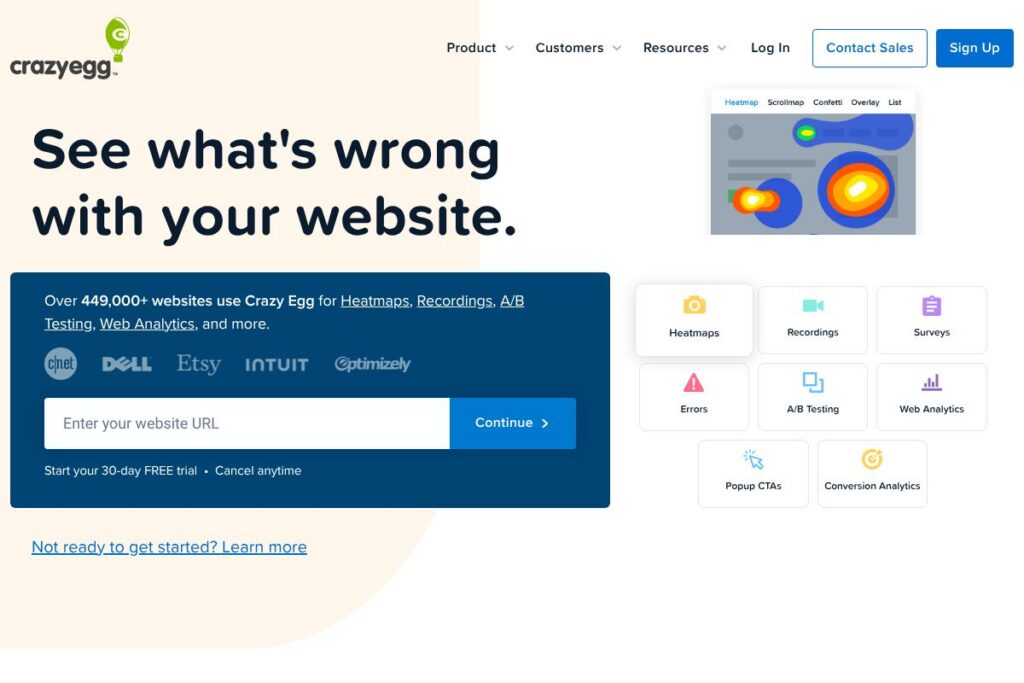
Crazy Egg is a conversion optimization platform focused on visualizing how visitors interact with websites and running experiments to improve outcomes. It combines heatmaps, session recordings, on-site surveys, popup CTAs, and A/B testing with a simple setup flow so teams can find friction and validate changes without heavy analytics overhead.
Compared with Hotjar and FullStory, Crazy Egg places extra emphasis on integrated A/B testing and quick CTA deployment alongside traditional heatmaps and recordings. Hotjar is often chosen for lightweight session replay and feedback collection, while FullStory targets deep session analytics and technical debugging. Compared to these, Crazy Egg is useful when you need fast, visual insight plus simple experimentation in one place.
All of this makes Crazy Egg a practical tool for product managers, UX designers, and marketing teams who want straightforward visual analytics and experiment capabilities that can be applied quickly to real pages.
How Crazy Egg Works
Crazy Egg begins by adding a short tracking snippet to your site or via common tag managers. The snippet collects anonymized event data that powers heatmaps, scrollmaps, confetti maps, and session replays so you can see where visitors click, how far they scroll, and where engagement drops.
Teams use the dashboard to filter recordings by behavior, segment heatmap data by referral or device, and build A/B tests to compare variations. On-site surveys and popup CTAs can be targeted to specific pages or visitor segments so you can pair qualitative feedback with quantitative behavior for faster hypothesis validation.
Crazy Egg features
Crazy Egg groups observation, feedback, and experimentation tools into a single interface so teams can move from discovery to testing without switching platforms. Recent updates emphasize easier setup, AI-assisted insights in analytics, and reusable CTA templates that speed up experimentation. The platform integrates with tag managers and common CMS platforms to reduce implementation time.
The platform includes several powerful capabilities:
Heatmaps
Heatmaps visualize where visitors click and interact on a page, helping identify which links and page elements attract attention and which are ignored. Heatmaps benefit teams by highlighting content that should be prioritized or redesigned to improve engagement.
Scrollmaps
Scrollmaps show how far users scroll down a page and where significant drop-off occurs, which helps teams decide whether content needs repositioning or if important CTAs should be moved higher. This is useful for landing pages, long-form content, and product pages where visibility matters.
Session Recordings
Session recordings let you watch individual user sessions to understand navigation patterns, friction points, and repeated behaviors that a heatmap cannot reveal. Watching recordings helps product and UX teams reproduce issues and see how real visitors interact with flows.
A/B Testing
The A/B testing feature allows teams to run experiments on variations of pages and measure conversion differences without a separate testing platform. It is aimed at marketers and product teams who want to validate changes with measurable results and basic targeting rules.
Web Analytics and Reporting
Web analytics in Crazy Egg provides a simplified dashboard with real-time traffic metrics and AI-assisted analysis to surface anomalies and suggested areas to investigate. Exportable data tables let analysts combine Crazy Egg metrics with other data sources for deeper reporting.
Surveys and Feedback Widgets
On-site surveys capture direct visitor feedback with targeted question flows or templates from a library of options, helping teams collect qualitative insights that explain observed behavior. Surveys are useful for diagnosing why visitors abandon funnels or what content they expect to see.
Popup CTAs and Sticky Bars
Popup CTAs, buttons, and sticky bars let teams deploy targeted messages quickly and measure click and conversion rates for each CTA. These elements are practical for testing offers, collecting emails, or steering visitors to high-value pages.
With visual diagnostics, session playback, and built-in experiments, Crazy Egg’s biggest benefit is its ability to link what users do with why they do it, enabling rapid, test-driven improvements to site experience and conversion rates.
Crazy Egg pricing
Crazy Egg uses a subscription SaaS pricing approach with tiered plans that scale by features and site traffic. The vendor typically offers plans for individuals and teams plus custom enterprise options, with billing available monthly and annually.
For exact plan names, feature limits, and current rates, view Crazy Egg’s current pricing options. That page shows how tiers are structured and whether annual billing or custom enterprise agreements apply.
What is Crazy Egg Used For?
Crazy Egg is used to analyze user behavior visually, diagnose UX problems, and validate design or content changes through experiments. Common tasks include mapping clicks on landing pages, replaying sessions to troubleshoot checkout flows, and using surveys to collect visitor intent and satisfaction.
Teams use Crazy Egg to prioritize development work by pairing heatmap evidence with recordings and survey responses, then running A/B tests or deploying CTAs to measure the impact of changes. It is useful for conversion optimization across marketing sites, ecommerce stores, and product pages.
Pros and Cons of Crazy Egg
Pros
- Visual behavior tools: Heatmaps, scrollmaps, and confetti maps provide clear visual signals about where users click and engage, making it easier to prioritize design changes.
- Integrated experimentation: Built-in A/B testing and CTA deployment let teams move from insight to validation without adding a separate tool to the stack.
- Simple setup and integrations: The tracking snippet and support for Google Tag Manager, Shopify, and WordPress reduce implementation friction and speed time to insight.
- Combined qualitative and quantitative data: Session recordings and on-site surveys complement heatmaps so teams can pair what users do with why they do it.
Cons
- Limited deep session analytics: Compared to tools focused exclusively on session replay and technical diagnostics, Crazy Egg is less feature-rich for deep technical debugging and event-level analysis.
- Advanced segmentation constraints: For very large sites or organizations needing complex audience segmentation, the platform may require additional integrations or an enterprise plan to meet needs.
Does Crazy Egg Offer a Free Trial?
Crazy Egg offers a free trial. The trial provides access to core features so you can test heatmaps, recordings, surveys, and basic A/B testing; check the signup and trial details for current trial length and any feature limitations.
Crazy Egg API and Integrations
Crazy Egg supports common integrations and easy deployment via a short tracking snippet or Google Tag Manager, plus plug-ins and instructions for Shopify and WordPress. For a full list of supported integrations and setup steps see the integration documentation.
The platform exposes integration points for common analytics and marketing workflows; if you need developer-level access or API endpoints, consult the vendor’s developer resources and guides for available options and implementation patterns.
10 Crazy Egg alternatives
Paid alternatives to Crazy Egg
- Hotjar — Combines heatmaps, session recordings, funnels, and on-site feedback with a focus on simplicity and a well-known free tier; good for user research and lightweight CRO.
- FullStory — Provides deep session replay, error reporting, and advanced event analytics for product teams that need detailed playback and developer-oriented diagnostics.
- VWO — A conversion optimization platform centered on experimentation and personalization with advanced A/B testing features and targeting rules.
- Optimizely — Enterprise-grade experimentation for web and mobile with robust targeting, feature flags, and rollout controls suited to engineering teams.
- Lucky Orange — Heatmaps, session recordings, live chat, and conversion funnels bundled together for small to mid-size websites looking for an all-in-one CRO tool.
- Smartlook — Session recordings and event-based analytics with a developer-friendly approach to capturing events and funnels.
- Contentsquare — Experience analytics and journey analysis for larger enterprises that need detailed behavioral insights and segmentation.
Open source alternatives to Crazy Egg
- Matomo — Self-hosted analytics with heatmap and session recording plugins; suitable for teams that need privacy control and on-premise deployment.
- PostHog — Product analytics and session recording with self-hosted and cloud options; useful for engineering-led teams that want ownership of data.
- Open Web Analytics — An open source web analytics framework that includes page and click tracking, suitable for basic on-premise analytics needs.
- Plausible — Lightweight, privacy-focused analytics that is open source; does not include session recordings but is useful for simple traffic and behavior metrics.
Frequently asked questions about Crazy Egg
What is Crazy Egg used for?
Crazy Egg is used to visualize visitor behavior and run basic experiments to improve conversions. Teams use heatmaps, recordings, surveys, and A/B tests to identify friction and validate improvements on websites.
Does Crazy Egg integrate with Shopify and WordPress?
Yes, Crazy Egg integrates with Shopify and WordPress. The platform provides installation guides and plugins to add the tracking snippet quickly and start collecting data.
Does Crazy Egg have an API for developers?
Crazy Egg offers integration points and developer resources. For specific API endpoints, data export, and developer guides consult Crazy Egg’s help and developer documentation.
How does Crazy Egg A/B testing work?
Crazy Egg’s A/B testing lets you create page variations and measure conversion differences. Tests run against selected pages or segments and report relative performance so you can choose the better-performing variant.
Is Crazy Egg suitable for small businesses?
Crazy Egg is suitable for small businesses looking for visual analytics and simple experimentation. Its easy setup and integrated features allow small teams to identify UX issues and run tests without a large analytics team.
Final Verdict: Crazy Egg
Crazy Egg delivers a focused set of visual analytics and experimentation tools that help teams quickly identify where visitors engage and why they do or do not convert. Its combination of heatmaps, session recordings, surveys, and built-in A/B testing makes it practical for product, UX, and marketing teams who want actionable insights without managing multiple tools.
Compared with Hotjar, Crazy Egg leans more toward integrated experimentation and quick CTA deployment while Hotjar centers on feedback collection and simple replays. Pricing for both is subscription-based and varies by traffic and feature needs, so review Crazy Egg’s current pricing options and Hotjar’s pricing to determine which aligns better with your site scale and testing requirements.