What is Crisp
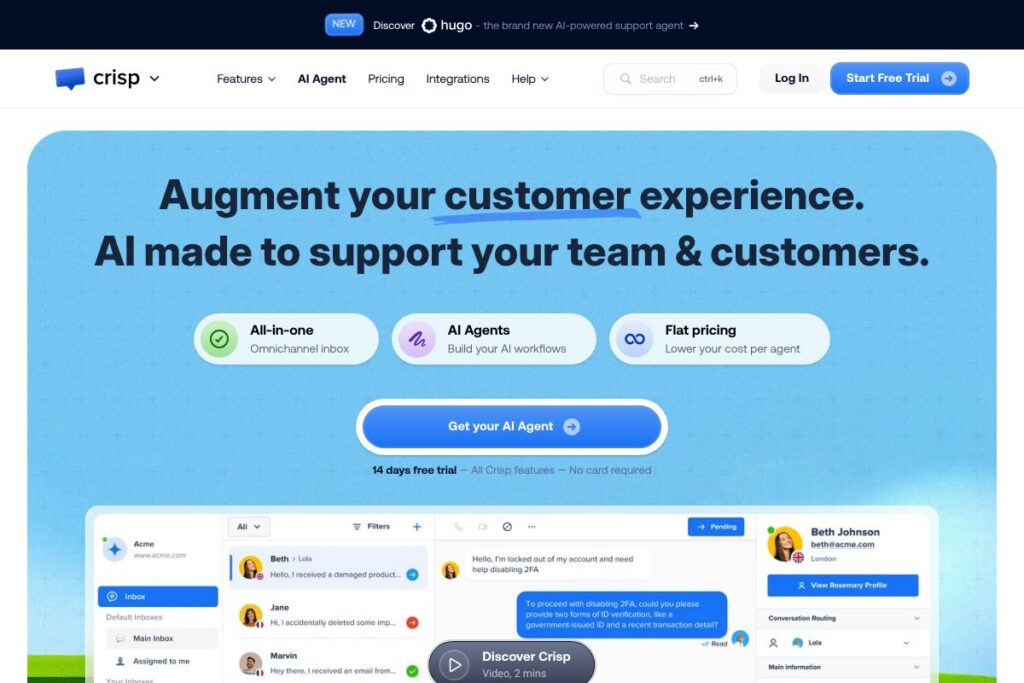
Crisp is a multichannel customer messaging platform that combines a shared inbox, chat widget, knowledge base, and AI-powered automation to help teams handle customer conversations from a single place. It targets support, sales, and marketing teams that need a lightweight but flexible tool to manage inbound messages across web chat, WhatsApp, Messenger, email, and other channels.
Compared with competitors, Crisp positions itself around simplicity and flat pricing rather than per-seat complexity. Compared to Intercom, which often emphasizes modular add-ons and per-seat pricing, Crisp focuses on an all-in-one inbox and built-in AI agents. Compared to Zendesk, which is feature-rich for large enterprise ticketing, Crisp provides a more compact, conversation-first workflow that is faster to set up for small and medium teams.
All of this makes Crisp well suited to businesses that want a single inbox with AI assistance and multichannel reach. It does particularly well at reducing repetitive tasks with AI suggestions and a knowledge base, and it is a practical fit for teams that need quick deployment and predictable costs.
How Crisp Works
Crisp centralizes incoming conversations from all connected channels into one collaborative shared inbox where agents can see conversation history, customer CRM fields, and automate responses. Teams route conversations, assign owners, and use internal notes so support and sales workflows stay coordinated across email, chat widgets, and messaging apps.
AI features operate on top of your content and knowledge base to provide smart replies, auto-summaries, and AI agents that can handle routine questions. You can build no-code workflows to automate triage or create internal copilot actions so agents spend less time on repetitive typing and more time on higher-value interactions.
Onboarding typically includes installing the chat widget on websites or apps, connecting channels like WhatsApp and Messenger, adding help articles to the knowledge base, and optionally training the support copilot on your own content. From there, teams iterate on automations and escalation rules to move more conversations into automated flows.
Crisp features
Crisp bundles a shared omnichannel inbox with AI-enhanced workflows, a website chat widget, a knowledge base, a built-in support CRM, and analytics. Recent additions emphasize AI agents and no-code internal workflows that reduce manual handling of common inquiries.
The platform includes several powerful capabilities:
Chat Widget
The chat widget embeds on websites and mobile apps to capture live conversations and collect lead data. It supports proactive messages, templates, and custom branding so you can present contextual prompts and route conversations directly into the shared inbox.
Shared Inbox
All incoming messages from connected channels are funneled into one collaborative inbox where agents can assign, tag, and respond with shared templates. This reduces channel switching and preserves conversation history for more personalized replies.
AI Agents
AI agents let you automate responses to common customer requests using a combination of your knowledge base and AI templates. They can handle first-level support, suggest answers to agents, and escalate complex queries to humans when needed, reducing agent load.
Knowledge Base
Create help articles and a branded help center that customers can search before contacting support. Articles are versioned and editable by teams, and the knowledge base feeds AI agents so automated replies remain consistent with your documentation.
Support CRM
Crisp stores customer profiles and interaction history directly in the platform so agents can see prior tickets, tags, and custom fields while messaging. This makes follow-ups and personalized outreach easier without switching apps.
Support Analytics
Built-in analytics track volume, agent performance, response times, and conversation outcomes day by day. Teams can identify bottlenecks and opportunities to improve self-service and agent efficiency.
No-code Workflows and Automations
A visual, no-code builder lets you create internal workflows that route messages, trigger templates, and update CRM fields without writing code. These automations are useful for triage, SLA management, and handoff rules between teams.
With these capabilities combined, Crisp’s biggest benefit is providing a single conversational workspace that layers AI on top of existing support content to reduce manual work and improve response quality.
Crisp pricing
Crisp uses a subscription-based SaaS pricing model with a focus on flat, predictable plans and an AI-enabled Plus tier. The product offers monthly and annual billing options, plus enterprise plans for larger customers; a 14-day trial is included so teams can test AI features before committing.
Monthly Billing:
Monthly subscriptions are available for teams and include a base plan for the inbox and additional paid tiers that unlock AI agents, advanced automations, and analytics. For exact monthly plan names and current rates, view Crisp’s pricing overview.
Annual Billing:
Annual subscriptions typically provide a lower monthly equivalent and are billed up front for the year. Annual plans are useful for teams that want predictable budgeting and access to the same feature set as monthly subscribers.
Enterprise
Enterprise options are available with custom contracts that include single sign-on, dedicated support, SLAs, and custom onboarding. Larger organizations can contact sales to discuss volume, security, and integration requirements via the Crisp homepage.
What is Crisp Used For?
Crisp is commonly used to centralize customer conversations, provide live chat on websites, and automate routine support questions with AI agents. Marketing and sales teams use Crisp to capture leads from chat and route prospects to the appropriate reps, while support teams use the shared inbox and knowledge base to resolve tickets faster.
It is ideal for small to medium businesses that need multichannel coverage without adopting a complex enterprise ticketing system. Teams that want to reduce repetitive tasks with AI, keep customer context in a single place, and publish a self-service help center will find Crisp especially useful.
Pros and cons of Crisp
Pros
- Multichannel inbox: Centralizes website chat, social messaging, and email so teams manage all conversations from one interface, reducing context switching.
- Built-in AI assistance: Smart replies, auto-summaries, and AI agents help automate common requests and speed up agent responses while using your own content as a knowledge base.
- No-code automations: Create workflows and routing rules without development resources, which accelerates setup and reduces operational overhead.
- Flat pricing focus: Pricing is presented as flat and predictable, which simplifies budgeting for growing teams compared to per-seat models.
Cons
- Limited enterprise-grade ticketing: For very large organizations with complex ITSM needs, Crisp lacks some advanced ticketing and case management features found in enterprise platforms.
- Ecosystem depth: The app marketplace and integrations catalog are growing but remain smaller than long-established competitors, which may require custom integration work for niche stacks.
- Advanced reporting: Built-in analytics cover common metrics, but teams that need deep custom reporting or BI-level exports may need additional tooling.
Does Crisp Offer a Free Trial?
Crisp offers a 14-day free trial that includes access to all core features and AI capabilities, with no credit card required. The trial gives teams the ability to test the chat widget, shared inbox, AI agents, and knowledge base before choosing a paid plan.
Crisp API and Integrations
Crisp provides an API and a range of integrations so you can extend the platform and connect it to CRMs, e-commerce platforms, and automation tools. The Crisp API documentation describes endpoints for messages, contacts, and webhooks to build custom flows and synchronize data.
Out-of-the-box integrations commonly include messaging channels and third-party connectors such as WhatsApp, Messenger, email, Slack, Shopify, and automation platforms like Zapier to glue Crisp into existing workflows.
10 Crisp alternatives
Paid alternatives to Crisp
- Intercom — A conversation-driven customer platform with advanced automation, product messaging, and a large partner ecosystem aimed at scaling support and engagement.
- Zendesk — A comprehensive ticketing and customer service platform with mature workflows, reporting, and enterprise features for large support teams.
- Freshdesk — An accessible helpdesk solution that offers multi-channel support, automation, and a range of add-ons for growing teams.
- HubSpot — HubSpot Service Hub bundles CRM, help desk, and conversational tools into a single platform that integrates tightly with HubSpot’s marketing and sales modules.
- Drift — Focused on conversational marketing and sales, Drift provides chatbots, routing, and playbooks optimized for lead qualification and revenue workflows.
- Help Scout — A simple shared inbox and knowledge base solution designed for small to mid-size teams that prefer email-first workflows.
- Tidio — A cost-effective chat platform with chatbot and live chat features geared toward e-commerce sites.
Open source alternatives to Crisp
- Chatwoot — An open source customer engagement suite that offers a shared inbox, chat widget, and multichannel support you can self-host or use via managed plans.
- Zammad — An open source helpdesk and ticketing system with a focus on email and web-based ticket management, suitable for organizations that need self-hosted control.
- UVdesk — An open source helpdesk platform built for e-commerce support workflows, with extensions for marketplaces and online stores.
- Rocket.Chat — A developer-friendly open source communication platform that can be adapted for customer messaging with customization and integrations.
Frequently asked questions about Crisp
What channels does Crisp support?
Crisp supports web chat, email, WhatsApp, Messenger, and other messaging channels. You can connect these channels to the shared inbox so conversations appear in one unified workspace.
Does Crisp include AI features in its plans?
Yes, Crisp includes AI features such as AI agents, smart replies, and auto-summaries. These capabilities are available in AI-enabled plans so teams can automate routine inquiries and assist agents.
Can Crisp integrate with my e-commerce store?
Crisp can integrate with e-commerce platforms like Shopify and other storefronts via built-in connectors or Zapier. Integrations let you surface order context and customer data directly in conversations.
Is there an API for Crisp to build custom integrations?
Yes, Crisp offers a developer API with endpoints for messages, contacts, and webhooks. Refer to the Crisp API documentation for details on authentication and available endpoints.
How does the Crisp free trial work?
Crisp provides a 14-day free trial with no credit card required. The trial includes access to the platform’s core features so teams can evaluate AI agents, the chat widget, and the shared inbox.
Final verdict: Crisp
Crisp is a practical choice for small to medium businesses that need a single conversational workspace with AI assistance and predictable pricing. Its combination of a shared inbox, knowledge base, and AI agents makes it straightforward to automate routine support and keep customer context in one place.
Compared with Intercom, Crisp tends to favor simplicity and flat pricing while Intercom emphasizes modular capabilities and an extensive app ecosystem. Intercom often bills per seat and through add-ons which can increase costs as you scale; Crisp’s flat plan approach aims for easier budget predictability while still offering AI features for automation.
Overall, Crisp is worth evaluating for teams that want a fast-to-deploy, AI-enabled messaging platform with multichannel support and centralized conversations, especially where predictable pricing and ease of use matter more than full enterprise ticketing depth. For current plan details and to start a trial, visit Crisp’s website.