DLive: An Overview
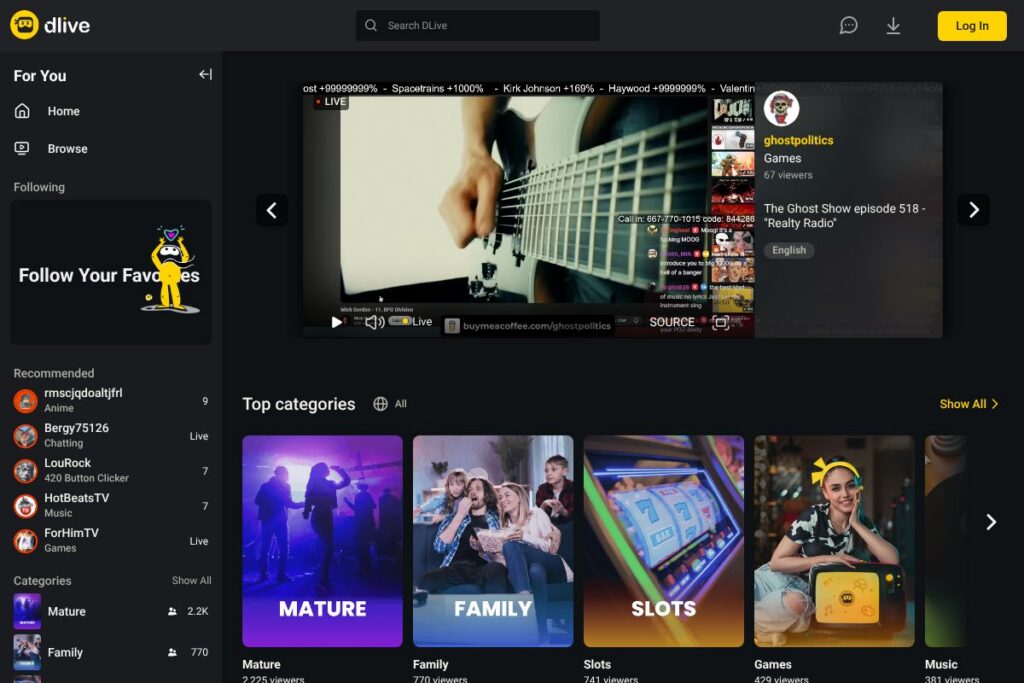
DLive is a live-streaming platform designed for individual creators and small to mid-size communities who want direct control over their channels and monetization. The platform emphasizes live interaction, channel customization, and viewer support mechanisms that let audiences contribute directly to streamers during broadcasts. Viewers can follow channels, participate in chat, and support creators with tips or subscriptions.
Compared with Twitch and YouTube Live, DLive focuses more on creator-driven monetization and community incentives rather than ad-first distribution. Compared with platforms like Trovo, DLive positions itself around direct viewer support and community tools rather than large-scale publisher features. This makes DLive a fit for creators who prioritize audience engagement and flexible monetization over platform-driven discovery.
All of this makes DLive particularly useful for independent streamers, niche communities, and creators who want a straightforward broadcasting experience with direct ways to receive support from their audience. Its feature set targets streamers who use external broadcasting tools and want channel-level customization and community reward options.
How DLive Works
DLive accepts incoming streams from standard broadcasting software such as OBS Studio and Streamlabs, which handle video encoding and scene composition. Streamers configure a stream key in their DLive channel, send the broadcast from their encoder, and manage the live session from the DLive dashboard.
During a live session, chat and moderation tools let creators control interaction, run polls, and highlight messages. Monetization flows through viewer subscriptions, one-time tips, and channel-specific reward mechanics that link contributors to badges or perks. Channel pages act as a persistent home for VODs, past broadcasts, and scheduled streams.
DLive features
DLive centers its product around live interaction, creator monetization, channel customization, and integration with common streaming tools. Core capabilities include real-time chat and moderation, subscription and tipping flows, channel customization, and compatibility with standard RTMP encoders. The platform continues to refine discovery and community features to help smaller creators surface content to interested viewers.
Live chat and moderation
Chat runs alongside the video player with tools for moderators to time out or ban users, set slow mode, and pin messages. These controls help maintain a focused viewing experience for communities of any size, and integrations with moderation bots are supported through common streaming tools.
Creator monetization
Streamers can accept viewer tips, run subscriptions, and create channel-specific funding options that let supporters contribute directly to the creator. Monetization options are visible on channel pages and during live broadcasts so viewers can choose how to support creators in real time.
Channel customization and VODs
Channels include customizable profile elements, banners, and a VOD library where past broadcasts are archived. Creators can use these elements to present a consistent brand and make it easy for new viewers to discover past content and subscribe.
Low-latency streaming and encoder support
DLive supports standard RTMP ingest and works with popular encoders so streamers can use multi-scene setups, overlays, and hardware capture. Low-latency settings help chat-driven streams feel immediate and interactive for live Q&A and gaming sessions.
Discovery and follow system
Viewers can follow channels, browse recommended streams, and discover content by category. Discovery is tailored toward viewers who want curated streams from creators they follow and community-driven recommendations rather than algorithm-driven mass suggestions.
Community rewards and incentives
DLive provides mechanisms for rewarding active viewers, including subscription perks and on-platform recognition. These features encourage repeat viewership and create incentives for community participation during live events.
With these features, DLive aims to make streaming and audience interaction straightforward for creators who use external encoders and want direct monetization paths. The platform’s most notable benefit is its focus on creator-driven support and simple channel management.
DLive pricing
DLive operates as a free-to-use streaming platform for both creators and viewers, with monetization flowing through viewer contributions rather than platform subscription fees. For the latest details on creator revenue splits, tipping mechanics, and any premium features, check the DLive homepage for current information and policies.
What is DLive used for
DLive is commonly used for live gaming streams, talk shows, creative arts, IRL streaming, and virtual events where real-time viewer interaction matters. Creators use the platform to host scheduled broadcasts, run community events, and build subscriber bases through recurring support.
Small teams and solo creators use DLive to provide a consistent channel presence, archive VODs, and monetize directly from their audience without relying solely on advertising revenue. Event organizers can also use the platform for live panels and interactive sessions with chat-driven Q&A.
Pros and cons of DLive
Pros
- Creator-focused monetization: DLive offers direct tipping and subscription mechanics that keep the relationship between creators and supporters explicit and visible. This helps creators monetize streams without relying only on ads.
- Simple channel management: Channel customization, VOD archiving, and straightforward broadcast setup make it easy for independent creators to start streaming quickly. The learning curve is oriented toward creators who already use encoder tools.
- Compatibility with standard tools: Native compatibility with common encoders and streaming overlays allows creators to integrate existing production workflows with minimal friction.
Cons
- Smaller audience reach: DLive has a more niche audience compared with larger platforms, which can make discovery and rapid audience growth more challenging for new creators. Building a follower base often depends on external promotion.
- Platform feature maturity: Some enterprise-level features and advanced discovery algorithms available on larger platforms are less developed on DLive, which may affect scaling for creators seeking mass-market exposure.
Does DLive Have a Free Version?
DLive offers a free platform for streaming and viewing content. Creators can broadcast, publish VODs, and receive tips or subscriptions from viewers without a platform subscription, and viewers can watch and follow channels at no cost.
DLive API and Integrations
DLive works with industry-standard streaming software such as OBS Studio and Streamlabs for encoding and overlays, making it straightforward to integrate with established broadcasting workflows. These integrations cover scene switching, overlays, and donation alerts through third-party tools.
For developers, DLive maintains resources and documentation on its site for channel configuration and broadcaster setup; see the DLive homepage for links to developer resources and any available API documentation. Third-party bot and moderation tools commonly used with DLive rely on published channel keys and standard streaming integrations.
10 DLive alternatives
Paid alternatives to DLive
- Twitch – A large-scale live-streaming platform focused on gaming, creative content, and live events with extensive discovery, subscription models, and an established creator economy. See the Twitch platform for creator tools.
- YouTube Live – Integrated with YouTube’s video ecosystem, offering broad discoverability, VOD permanence, and monetization through ads, memberships, and Super Chat. Explore YouTube Live features for details.
- Facebook Live – Built into Facebook for easy distribution to social audiences, with strong social sharing and page integration for creators and publishers. Learn more on the Facebook Live page
- Vimeo Livestream – A paid livestreaming solution aimed at professional events and businesses, with event management and privacy controls. Find Vimeo’s live options on the Vimeo live solutions page.
- Trovo – A growing streaming platform with features similar to mainstream gaming platforms, offering monetization and community tools for creators. See Trovo’s offering at the Trovo homepage
- StreamYard – A browser-based production tool for multi-source live streams that feeds into platforms like DLive, Twitch, and YouTube; geared toward interviews and professional broadcasts. Visit StreamYard for details.
Open source alternatives to DLive
- Owncast – A self-hosted, open-source live video streaming server that lets organizations run their own streaming instance with control over data and branding. Check the Owncast project for setup guides.
- PeerTube – A decentralized video platform that supports federation and live streaming through plugins, suitable for communities wanting distributed hosting. Learn about PeerTube at the PeerTube project
- Nginx RTMP Module – An open-source server module used to build custom RTMP ingest and streaming infrastructure for self-hosted streaming workflows. Documentation is available on the NGINX resources site.
- Ant Media Server Community Edition – An open-source streaming server for low-latency WebRTC and RTMP use cases, suitable for self-hosted live applications. See the Ant Media Server community edition for details.
Frequently asked questions about DLive
What is DLive used for?
DLive is used for live video streaming, viewer engagement, and creator monetization. Creators broadcast live content, interact with viewers through chat, and receive support via tips and subscriptions.
Does DLive charge creators to stream?
DLive does not charge creators a subscription fee to stream. The platform operates on viewer-supported monetization models rather than charging an up-front fee to broadcasters.
Can DLive integrate with OBS?
Yes, DLive integrates with OBS Studio and other RTMP encoders. Streamers use OBS for scene composition, overlays, and hardware capture, then send their stream to DLive using a stream key.
How does DLive handle monetization for creators?
DLive supports subscriptions, tipping, and community reward mechanics for creators. Viewers can contribute directly during streams and subscribe to channels for recurring support and perks.
Is DLive suitable for professional events?
DLive can be used for professional events but is best for community-driven broadcasts. For enterprise features like advanced event management and custom streaming SLAs, dedicated paid platforms such as Vimeo Livestream may be more appropriate.
Final verdict: DLive
DLive works well as a streaming home for independent creators who value direct audience support, simple channel management, and compatibility with standard broadcasting tools. Its strengths lie in making audience contributions visible and straightforward, and in providing a lightweight platform where creators can build community-centered channels.
Compared with Twitch, which offers larger built-in audiences and a mature ad and partnership ecosystem, DLive is similar in being free to use for creators but differs in discovery scale and platform features. For creators focused on community monetization and a more creator-centric revenue approach, DLive provides a viable alternative to larger platforms; for audience reach and brand partnerships, Twitch still leads in scale.