EmbedAI: An Overview
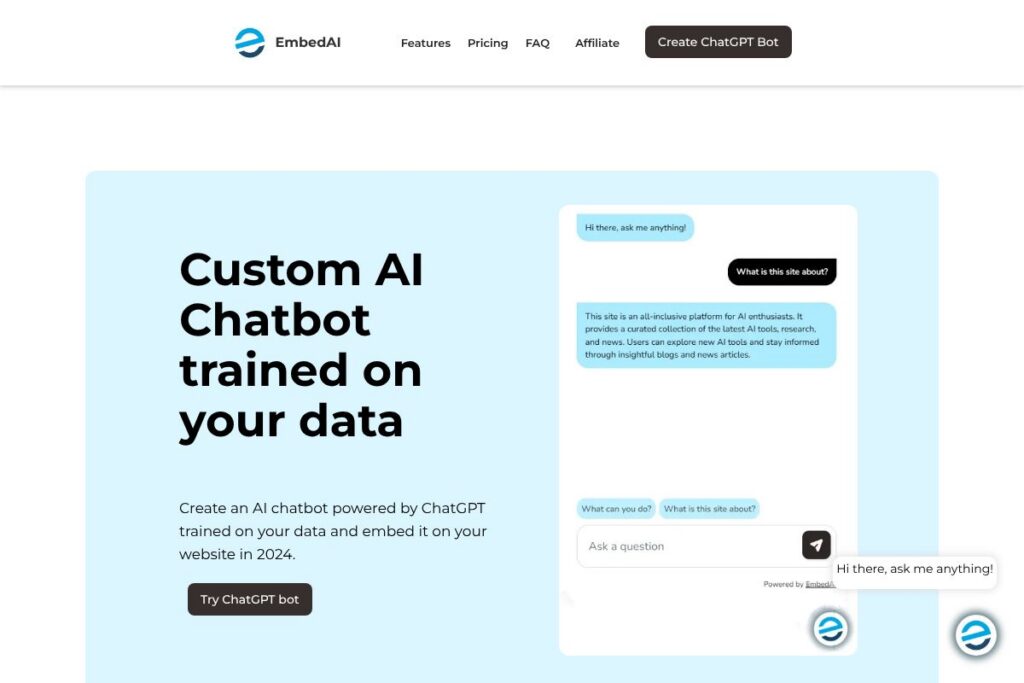
EmbedAI is a platform for building AI chatbots that use ChatGPT-style models trained on a customers own data. It focuses on making it straightforward to ingest documents, scrape websites, and transcribe video content so the chatbot answers questions using the specific knowledge you provide.
EmbedAI competes with other on-site chatbot and knowledge-base builders such as Intercom, Dialogflow, and Crisp. Compared with Intercom, EmbedAI is more narrowly focused on data ingestion and model training for site-specific assistants rather than full customer messaging suites. Against Dialogflow, EmbedAI emphasizes integrating large language models like OpenAIs stack and Googles Gemini for conversational answers rather than intent-and-entity routing.
All of this makes EmbedAI well suited for product documentation, help centers, and e-commerce sites that need a searchable conversational layer on top of their own content. It is particularly useful for teams that want a ChatGPT-style bot embedded on their site with control over the training sources and appearance.
How EmbedAI Works
EmbedAI ingests source material from files, web pages, and video links, then converts that material into embeddings and indexed chunks that a generative model can consult when answering queries. The ingestion pipeline supports PDFs and common text formats, website scraping, and YouTube transcription workflows so a single chatbot can draw from mixed media sources.
After ingestion you can define the chatbots system prompt and response behavior, customize the look and placement, and choose which model powers responses. On each user query the system retrieves relevant content from the indexed sources and seeds the generative model so answers are grounded in your uploaded data; teams can also call the bot via API for non-website use cases.
EmbedAI features
EmbedAI centers on building chatbots trained on private content, with tools for ingestion, styling, sharing, and integrations. Core capabilities include multi-source training, ChatGPT and Gemini model support, embed and link sharing, customization of UI, multilingual response handling, and API/Zapier connectivity.
The platform includes several powerful capabilities:
Multi-source training
You can train a single chatbot using uploaded files, public or private website pages, and YouTube links that are transcribed and indexed. This lets the assistant answer questions using the exact language from manuals, knowledge bases, and video tutorials.
ChatGPT and Gemini model support
EmbedAI routes queries to models from OpenAI and Google so teams can pick models based on latency, cost, or response style. Using both model families gives flexibility for different answer quality and compliance needs; see OpenAIs model docs at OpenAI’s GPT models and information on Google’s Gemini.
Styling and branding
The builder includes options for custom logos, colors, and widget sizing so the chatbot matches a sites visual identity. Widgets include chat bubbles and iframe embeds, and styling settings are intended to keep the assistant visually consistent with the rest of your site.
Sharing and embedding
You can deploy the assistant as an iframe, a bottom-right chat bubble, or share a direct link to the chat instance. These sharing options make it possible to use the same bot across documentation sites, marketing pages, or inside customer portals.
API access and Zapier integration
EmbedAI exposes an API for query and management workflows so you can integrate the assistant into backend systems or custom apps. For low-code automation the platform also supports Zapier connections to link chats with CRMs, ticketing systems, and analytics services.
Multilingual support
The assistant accepts queries and returns answers in over 100 languages, and can be trained on sources in multiple languages to serve global audiences. This reduces the need for separate bots per locale and simplifies multilingual documentation support.
With these features you get an embeddable, brandable assistant that uses your content as its knowledge base and integrates with common automation and model providers. The biggest benefit is rapid deployment of a site-specific conversational layer without building retrieval and model scaffolding from scratch.
EmbedAI pricing
EmbedAI uses a subscription-based SaaS model with options for individual teams and larger enterprise deployments, plus API usage-based elements for high-volume integrations. Exact plan tiers and enterprise options are not published here; pricing typically varies by seat count, model usage, and ingestion volume, and organizations can request custom enterprise terms.
For the most accurate and current rates and plan structures consult EmbedAI’s homepage at EmbedAI’s homepage or reach out to their sales team through the same site for enterprise proposals.
What is EmbedAI Used For?
EmbedAI is commonly used to add a conversational knowledge layer to product documentation, help centers, and e-commerce stores so visitors can ask natural-language questions and receive answers grounded in the sites own content. This reduces friction for customers searching for specific how-tos, specifications, or policy details.
Teams also use EmbedAI to build demo bots for marketing pages, internal assistants for onboarding documentation, and conversational search experiences where a simple search box is not sufficient. It is a practical choice for product managers, docs teams, and e-commerce owners who want direct control over what sources the bot uses.
Pros and Cons of EmbedAI
Pros
- Custom data training: The chatbot can be trained on PDFs, web pages, and YouTube content so answers reflect your own documentation and media. This improves answer relevance compared with generic chatbots.
- Model flexibility: You can route queries to OpenAI or Google models which helps balance response style, latency, and cost. Teams can pick the model family that matches their quality and compliance needs.
- Easy embedding and sharing: The platform provides an iframe, chat bubble, and link sharing so deployment across sites and portals is straightforward. That reduces engineering effort to get a conversational interface live.
- Multilingual capability: Support for over 100 languages lets global teams serve customers in their native language without separate bots for each locale.
Cons
- Potential costs at scale: High-volume querying and multimodal ingestion can drive model usage costs which require careful plan selection and monitoring. Organizations with heavy traffic will need to plan for usage-based charges.
- Learning curve for tuning: Achieving highly reliable, consistent answers may require prompt tuning, source curation, and retrieval configuration which can take time. Non-technical teams may need support from engineers or consultants.
- Platform scope: EmbedAI focuses on on-site assistants rather than full omnichannel customer messaging suites, so teams that need unified inboxes, advanced routing, and live agent handoff may still need an additional tool such as Intercom.
Does EmbedAI Offer a Free Trial?
EmbedAI provides trial or demo access for new users so you can create a chatbot, upload sources, and test embedding workflows before committing to a paid plan. Trial access typically includes core features like ingestion, styling, and model-backed responses so teams can validate capabilities; contact EmbedAI via their site to request demo credentials.
EmbedAI API and Integrations
EmbedAI exposes an API that supports query requests, bot configuration, and source management so developers can embed the assistant into apps or backend systems. The platform also lists Zapier connectivity for low-code automation with CRMs and help desks, and you can integrate model selection or analytics via the developer endpoints.
For details on endpoints and authentication visit EmbedAI’s developer documentation through their site or use Zapier to connect EmbedAI with other services via Zapier.
10 EmbedAI alternatives
Paid alternatives to EmbedAI
- Intercom: Customer messaging platform with bots, live chat, and product tours; stronger on omnichannel customer support and team inboxes.
- Dialogflow: Google Cloud conversational AI focused on intent and entity routing for virtual agents with deep integrations into Google Cloud services.
- Tidio: Chat and chatbot platform aimed at e-commerce, with templates for sales and support workflows.
- Landbot: Visual chatbot builder for web and messaging channels that emphasizes no-code flow design and automation.
- Crisp: Customer messaging suite with shared inbox, chatbots, and knowledge base features for support teams.
- Ada: AI-driven support automation platform focused on enterprise self-service and customer experience.
- Zendesk Answer Bot: Built into Zendesk Support to surface help center content in conversations; best for teams already on Zendesk.
- Drift: Conversational marketing and sales-focused chatbots that route leads and qualify visitors in real time.
- Freshchat: Customer messaging product with bot capabilities and multi-channel support for sales and support teams.
- Rasa Enterprise: Commercial offering for teams that need on-premises or managed deployments with full control over NLU models.
Open source alternatives to EmbedAI
- Rasa Open Source: Framework for building conversational assistants with control over NLU and dialogue management, requires developer setup.
- Botpress: Open source conversational platform with visual flow editor and modular architecture for custom bots.
- ChatterBot: Python library for building rule-based and learning chatbots that can be extended for specific domains.
- OpenAssistant: Community-driven assistant projects that can be adapted for on-site or self-hosted use with large language models.
- Haystack: Open source framework for building search systems and RAG-enabled conversational assistants around your own documents.
Frequently asked questions about EmbedAI
What is EmbedAI used for?
EmbedAI is used to build ChatGPT-style chatbots trained on your own documents, web pages, and videos. It helps teams create site-embedded assistants that answer questions using their specific content.
Does EmbedAI support multiple languages?
Yes, EmbedAI supports queries and responses in over 100 languages. You can upload sources in different languages and interact with the assistant in the language of your choice.
Can I customize the appearance of EmbedAI chatbots?
Yes, EmbedAI lets you add custom logos, colors, and widget styles. You can deploy chat bubbles, iframe embeds, or share direct links while keeping the bot visually aligned with your site.
Does EmbedAI provide an API for developers?
Yes, EmbedAI offers an API for querying and managing bots. The API supports integration workflows and can be combined with Zapier for low-code automations.
Can I train EmbedAI on YouTube videos and PDFs?
Yes, EmbedAI can ingest PDFs, scrape website content, and transcribe YouTube videos for training. Those sources are indexed so the chatbot can cite and use them when answering questions.
Final Verdict: EmbedAI
EmbedAI is a focused solution for teams that want a ChatGPT-style assistant trained on their own materials and embedded directly on their website. Its strengths are multi-source ingestion, model flexibility between OpenAI and Google families, and simple embedding options that reduce development overhead for front-end deployment.
Compared with Intercom, EmbedAI is more specialized for knowledge-grounded assistants while Intercom targets broader customer messaging and support workflows. Organizations that primarily need an on-site knowledge assistant and fine control over training sources will find EmbedAI a practical, purpose-built choice; teams seeking full omnichannel support and unified inboxes may prefer Intercom for its broader feature set.