Hiveage: An Overview
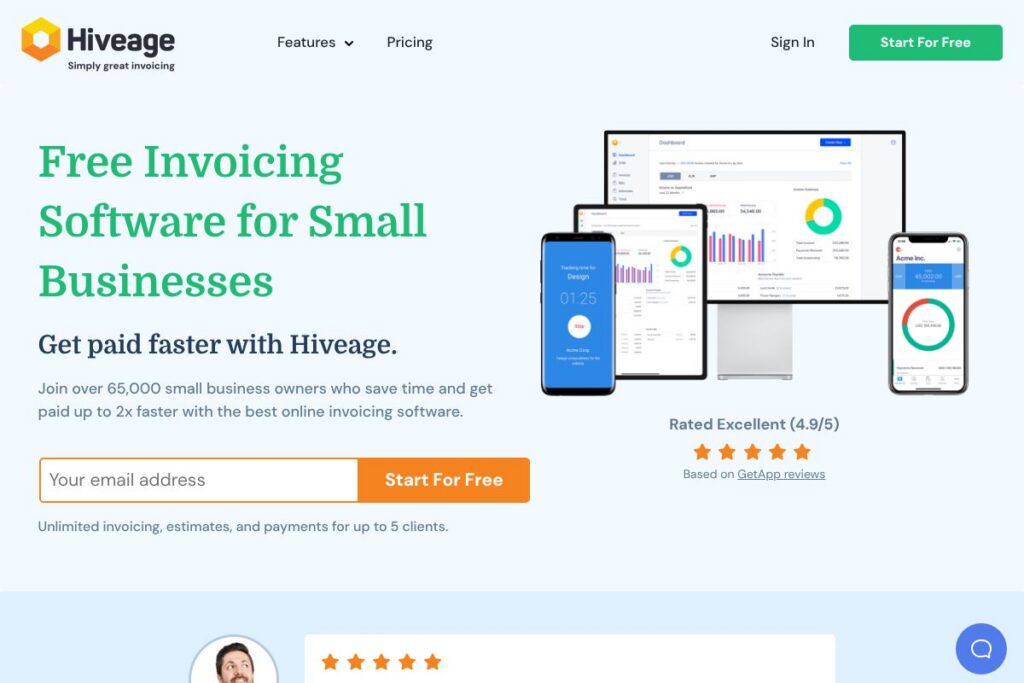
Hiveage is a cloud-based invoicing and billing platform built for freelancers, small businesses, and agencies that need straightforward tools to send invoices, collect payments, and track cash flow. It focuses on invoicing, estimates, recurring billing, time and expense tracking, and multi-currency support without the complexity of full accounting suites.
Compared with FreshBooks, which targets small businesses with integrated accounting and client portals, Hiveage keeps the interface lighter and more invoice-centric, making it easier to send estimates and recurring invoices quickly. Compared with QuickBooks Online, Hiveage lacks a full general ledger and payroll features but is typically faster to set up for solo freelancers and microbusinesses who only need billing and payment collection. Compared with Wave, Hiveage provides more built-in recurring billing controls and broader gateway options while Wave includes free accounting features alongside invoices.
All of this makes Hiveage a practical choice for users who need clean, fast invoicing and payments without the overhead of advanced accounting modules. It works well for service providers, consultants, agencies, and small product sellers who need multi-currency billing, payment gateway flexibility, and simple team access controls.
How Hiveage Works
Hiveage operates as a web application and native mobile apps that let you create invoices and estimates, accept online payments, and automate recurring billing. You add clients and items, set taxes and discounts, apply branding and templates, then send invoices by email, SMS, or a shareable link so customers can pay instantly.
For recurring revenue, set up subscriptions or recurring invoices with automatic or manual billing and save customer cards on file for auto-billing where supported. Time, expense, and mileage entries can be logged per project and converted into billable line items so you can consolidate billing for projects quickly.
Team members can be granted role-based access so employees or contractors track time and expenses and submit them for approval. Reports on income, expenses, and accounts aging update in real time, helping you monitor cash flow and overdue invoices from a single dashboard.
What does Hiveage do?
Let’s talk Hiveage’s Features. The platform centers on invoicing and payment collection, supplemented by estimates, recurring billing, time and expense tracking, multi-currency support, automated payment reminders, and basic reporting. Recent improvements emphasize mobile access, streamlined invoice templates, and broader payment gateway support for global clients.
Invoice customization
Templates let you add your logo, business details, colors, and custom fields so invoices match your brand. You can save reusable templates and the system auto-calculates taxes, discounts, and shipping for accurate totals.
Online payments and gateways
Hiveage connects to multiple payment providers to accept Visa, Mastercard, Amex, and local payment methods, letting clients pay online via credit card or supported gateways. Using external gateways reduces manual reconciliation and speeds up collections.
Recurring billing and subscriptions
Set up automatic recurring invoices and subscriptions with configurable billing intervals, trial periods, and auto-billing options. You can switch recurring invoices between automatic and manual modes to retain control over billing cycles.
Estimates and proposals
Create professional estimates and quotations that clients can accept online; approved estimates convert into invoices instantly. You can set expiry dates for proposals and send reminders to encourage faster acceptances.
Time, expense, and mileage tracking
Log billable hours, project expenses, and travel mileage and attach receipts for record keeping. Entries are convertible into invoice line items so billing reflects actual work and costs.
Multi-currency and tax handling
Bill clients in their preferred currency with locale-appropriate formatting and accurate currency labels. Apply multiple taxes, discounts, and shipping fees with control over calculation order and display.
Reporting and dashboards
Built-in reports cover income and expense summaries, accounts aging, and invoice status to reduce manual bookkeeping work. Dashboards provide at-a-glance metrics and you can export data as CSV for deeper analysis.
Mobile apps and accessibility
Native iOS and Android apps plus a responsive web interface allow invoicing and payment collection from any device. Create, send, and track invoices while on the go without needing desktop access.
With these features you get a focused invoicing platform that speeds up billing cycles, supports global payments, and keeps client billing data organized in one place.
Hiveage pricing
Hiveage uses a freemium subscription model with a free plan and higher-tier paid plans for businesses that need larger client counts, team permissions, and advanced features. The vendor publishes plan details and current rates on its website, and offers a free trial of the Pro tier for hands-on evaluation.
Free Plan
Free Plan – Free (Manage up to 5 clients, unlimited invoices, estimates, time tracking, expense tracking, and gateway access)
Paid Plans
Pro – Paid tier (adds more clients, team member access, recurring billing, financial reports, custom domains, branded email notifications, and automatic reminders).
Plus – Paid tier (adds higher limits, advanced team controls, and assisted data migration for customers moving from other systems).
For current monthly and annual pricing and to compare plan limits, view Hiveage’s pricing and plans on their website.
What is Hiveage Used For?
Hiveage is used for sending professional invoices and estimates, accepting online payments, and managing recurring billing for subscription services. Small service businesses, consultants, freelancers, and agencies commonly use it to centralize client billing, save invoice templates, and automate reminders.
It is also used to track billable time, project expenses, and mileage so that project-based work is billed accurately. Businesses that require multi-currency invoicing and flexible tax handling use Hiveage to serve international clients without extra configuration in third-party accounting software.
Pros and cons of Hiveage
Pros
- Simple, focused invoicing: The interface emphasizes faster invoice creation and payment collection without unnecessary accounting complexity. This reduces setup time for freelancers and solo operators.
- Flexible payment gateways: Wide gateway support lets businesses choose providers like Stripe, PayPal, Square, and Braintree which can speed up global payments and lower friction for clients. See Stripe’s payment platform and PayPal’s payment solutions for common integrations.
- Recurring billing and subscriptions: Built-in subscription tools support automatic and manual billing cycles, useful for membership services and retainers.
- Mobile accessibility: Native iOS and Android apps plus responsive web access let users invoice from any device and manage cash flow on the move.
Cons
- Limited full-accounting features: Hiveage is not a full accounting package, so businesses needing a full general ledger, payroll, or tax filing tools may need a complementary accounting product. Integration or export steps are required for full bookkeeping workflows.
- Advanced reporting limitations: While it offers essential reports, organizations that need deeply granular or custom financial analytics may find the reporting features basic compared with dedicated accounting platforms.
Does Hiveage Offer a Free Trial?
Hiveage offers a free plan and a 14-day free trial of its Pro plan. The free tier supports up to 5 clients with unlimited invoices, estimates, time tracking, and expense tracking, while the 14-day Pro trial unlocks expanded client limits, team access, recurring billing, reports, branded emails, and automatic reminders.
Hiveage API and Integrations
Hiveage provides integration options with multiple payment gateways and supports data import/export as CSV to help connect with bookkeeping tools. Popular gateways mentioned by the vendor include PayPal, Stripe, Square, and Braintree for online card payments.
For developer access and automated workflows, check the Hiveage homepage for API and integration details. CSV exports and gateway webhooks are commonly used to keep records synchronized with external accounting systems.
10 Hiveage alternatives
Paid alternatives to Hiveage
- FreshBooks – Cloud invoicing and accounting focused on service businesses with time tracking, expenses, and robust client portals.
- QuickBooks Online – Full-featured cloud accounting and invoicing with payroll, tax features, and comprehensive financial reporting.
- Wave – Free invoicing and basic accounting with paid add-ons for payments and payroll, suited for very small businesses.
- Zoho Invoice – Invoicing with automation and integration into the broader Zoho suite for CRM and finance.
- Xero – Accounting and invoicing with strong bank feeds and multi-currency support for small to mid-sized businesses.
- Square Invoices – Free invoicing integrated with Square payments and point-of-sale services.
- PayPal Invoicing – Fast invoice sending tied directly to PayPal payments and merchant services.
Open source alternatives to Hiveage
- Invoice Ninja – Open source billing, invoicing, and time tracking with self-host and hosted options.
- ERPNext – Open source ERP that includes invoicing, accounting, and extensive business modules.
- Odoo (Community Edition) – Modular open source business apps with invoicing and accounting capabilities.
- Simple Invoices – Lightweight open source invoicing system aimed at small operations.
Frequently asked questions about Hiveage
What is Hiveage used for?
Hiveage is used for invoicing, estimates, recurring billing, and payment collection. Small businesses and freelancers use it to send branded invoices, accept online payments, and track time and expenses.
Does Hiveage support multiple currencies?
Yes, Hiveage supports multi-currency billing. Invoices display locale-appropriate currency formatting so you can bill international clients in their preferred currency.
Can I accept credit card payments with Hiveage?
Yes, Hiveage integrates with multiple payment gateways. Common integrations include Stripe and PayPal, enabling clients to pay by card and allowing saved cards for auto-billing where supported.
Does Hiveage offer a free plan or trial?
Hiveage offers a free plan and a 14-day free trial of Pro. The free tier covers up to 5 clients with unlimited invoices, while the trial opens Pro features like recurring billing and team access.
Does Hiveage provide an API for automation?
Hiveage supports integrations and data export for automation. Check the Hiveage site for developer details and options to export CSV files or connect via webhooks and gateway integrations.
Final verdict: Hiveage
Hiveage delivers a focused, user-friendly invoicing experience that reduces the time it takes to bill clients and collect payments. Its strengths are clean invoice templates, flexible recurring billing, multi-currency support, and a freemium entry point that suits freelancers and very small businesses.
Compared with FreshBooks, Hiveage is lighter on full accounting features but provides a more streamlined billing-only experience and a free tier to get started; FreshBooks relies on paid tiers for advanced accounting and client management. If your priority is simple, reliable invoicing and flexible payment gateway choices without the overhead of a full accounting system, Hiveage is a practical option. For full accounting, payroll, or deep financial reporting, consider pairing Hiveage with a dedicated accounting product or evaluating a competitor like FreshBooks or QuickBooks Online for an all-in-one solution.