Invoice Ninja: An Overview
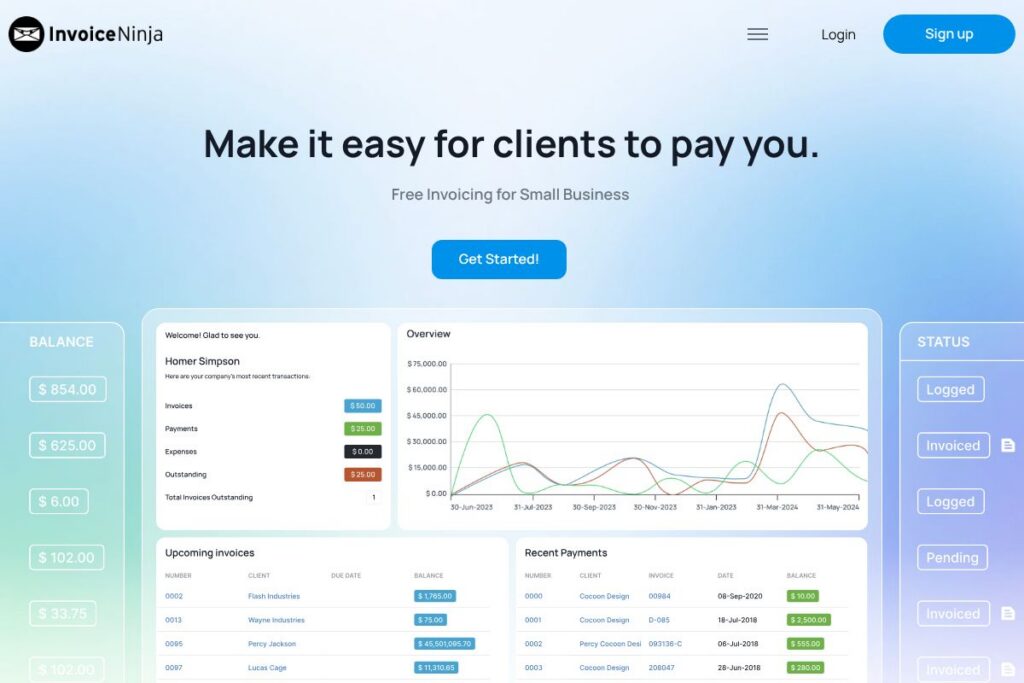
Invoice Ninja provides invoicing, payment processing, and basic billing automation tailored to freelancers and small businesses. It supports creating professional, customizable invoices and estimates, sending them by email, accepting online payments, and automating reminders to reduce late payments.
Compared with QuickBooks and FreshBooks, Invoice Ninja focuses more tightly on invoicing and billing rather than full bookkeeping and payroll features, making it lighter and often less expensive for users who only need invoicing. Against Wave, Invoice Ninja offers a stronger self-hosting option and more developer-focused tools for teams that want to extend or host their own instance.
Invoice Ninja does particularly well at delivering a usable free tier with essential invoicing features and a self-hosted option for teams that prefer control over data. This makes it a practical choice for freelancers, consultants, and small companies that need reliable invoicing without paying for a full accounting suite. For more details see the Invoice Ninja homepage.
How Invoice Ninja Works
Users set up clients and products or service items, then generate invoices or estimates from a web dashboard or mobile device. Invoices can include custom branding, taxes, discounts, and itemized lines, and they can be sent directly to clients by email as PDF attachments.
Payment links are included on invoices so clients can pay by supported gateways; automated reminders and late-fee rules can be configured to follow up on unpaid invoices. For teams and developers, the platform can be run on Invoice Ninja cloud hosting or self-hosted, and workflows can be automated via the platform’s integration and API surfaces.
Invoice Ninja features
Invoice Ninja’s core feature set centers on invoice creation, online payments, recurring billing, client management, and customization. The platform also highlights self-hosting, developer APIs, and automation tools that let businesses control data and integrate invoicing into existing systems.
Invoicing and estimates
Create and send branded invoices and estimates quickly using prebuilt templates, custom branding, and adjustable payment terms. The templates simplify producing professional documents and saving them as PDFs for client records.
Recurring invoices and auto-billing
Set up recurring invoices for subscriptions or ongoing services and optionally enable automatic charging of stored payment methods. This reduces manual billing work and helps maintain predictable cash flow for subscription-style services.
Online payments
Accept payments through common gateways so clients can pay by card or other supported methods directly from the invoice. Integrated payment links reduce friction and speed up remittances.
Client portal
Clients can view invoices, payment history, and statements through a secure portal, streamlining communication and reducing back-and-forth about balances. A consolidated client view also helps businesses track outstanding amounts and collections activity.
Custom templates and branding
Upload logos, choose templates, and adjust layout settings so invoices match your brand. Customization makes invoices look professional and consistent across communications.
Reminders and late fees
Automate email reminders, apply late-fee rules, and schedule follow-ups to encourage timely payment. These automation features cut down on manual collection tasks and reduce days sales outstanding.
Self-hosting and open source option
Invoice Ninja provides a self-hosted edition that teams can run on their own infrastructure for greater control over data and customization. Self-hosting supports advanced configuration and keeps invoicing workflows internal when required.
API and developer tools
A developer-facing API lets businesses integrate invoicing into existing systems, automate invoice creation, and pull payment or client data for reporting. This is useful for agencies, platforms, and developers building custom billing workflows.
With these features, the biggest benefit of Invoice Ninja is flexible invoicing that adapts to both simple and extensible workflows, whether you use the cloud offering or self-host a copy for full control.
Invoice Ninja pricing
Invoice Ninja uses a freemium SaaS model with a free tier for small users and optional paid plans or self-hosted deployments for larger needs. The free plan on the homepage specifies it covers up to five clients with core functionality, while upgrades and self-hosting options scale for growing teams.
Individuals and Freelancers
Free plan: Free for up to five clients (includes four templates, custom branding, online payments, unlimited invoices). This plan is aimed at solo professionals who need essential invoicing without recurring fees.
Teams and Businesses
Paid plans: Invoice Ninja offers paid subscriptions that unlock higher client limits, team seats, and advanced features for businesses that need more capacity or managed hosting. For current feature comparisons and plan tiers, consult the current pricing options.
Enterprise and Self-hosting
Self-hosted / Enterprise: A self-hosted installation is available for teams that require data control and custom deployment; enterprise implementations typically use custom pricing based on scale and support needs. Check the Invoice Ninja homepage for deployment and enterprise details.
What is Invoice Ninja Used For?
Invoice Ninja is primarily used for creating and sending invoices, tracking client balances, and accepting online payments in a way that reduces manual billing tasks. It is well suited to freelancers, consultants, agencies, and small businesses that need reliable invoicing without the overhead of full accounting software.
Teams also use Invoice Ninja for recurring billing, subscription management, and client-facing invoicing portals that centralize payment and invoice history. Those who need data portability or advanced customization choose the self-hosted edition to integrate invoicing with internal systems.
Pros and Cons of Invoice Ninja
Pros
- Free tier for small users: The free plan covers up to five clients and includes custom branding, four templates, and online payments, which is useful for solo professionals.
- Self-hosting option: Running a private instance lets organizations keep data on-premises and customize the platform, suitable for teams with compliance requirements.
- Developer-friendly API: The API and integration options make it straightforward to automate invoice generation and connect billing to other systems.
- Automated billing features: Recurring invoices, automatic reminders, and late-fee rules reduce manual follow-up and improve cash flow.
Cons
- Limited full accounting features: Invoice Ninja focuses on invoicing and billing rather than complete accounting, so businesses needing payroll or advanced bookkeeping may require a separate solution.
- Self-hosting complexity: Running your own instance requires server management and technical skills, which can be a barrier for non-technical small businesses.
- Payment gateway fees: While Invoice Ninja supports online payments, gateway transaction fees apply and are set by the payment processors, not Invoice Ninja.
Does Invoice Ninja Offer a Free Trial?
Invoice Ninja offers a free plan and a self-hosted free edition. The hosted free tier covers up to five clients with templates, custom branding, online payments, and unlimited invoices; paid plans and managed features are available for larger teams or additional capabilities. See the Invoice Ninja homepage to sign up or compare plans.
Invoice Ninja API and Integrations
Invoice Ninja provides an API and developer documentation to automate invoice creation, fetch client and payment data, and integrate with other systems; consult the API documentation and developer docs for endpoints and examples.
The platform also supports common payment gateways such as Stripe and PayPal and can be connected to automation platforms like Zapier to link invoicing to CRMs, project tools, and bookkeeping workflows.
10 Invoice Ninja alternatives
Paid alternatives to Invoice Ninja
- FreshBooks — Cloud invoicing and small business accounting with time tracking and client management built in.
- QuickBooks — A comprehensive accounting platform that includes invoicing, payroll, and tax reporting for small to mid-size businesses.
- Xero — Cloud accounting with invoicing, bank reconciliation, and reporting aimed at small businesses and accountants.
- Wave — A free invoicing and accounting service with paid payments and payroll add-ons, targeted at freelancers and microbusinesses.
- Zoho Invoice — Invoicing and client billing with automation and integration across the Zoho suite.
- Square Invoices — Invoice creation and payment collection integrated with Square’s point of sale and payments platform.
- Stripe Billing — Subscription management and invoicing built on top of Stripe’s payments infrastructure.
Open source alternatives to Invoice Ninja
- InvoicePlane — A self-hosted invoicing system that focuses on simple invoice creation and client management.
- ERPNext — An open source ERP that includes invoicing, accounting, inventory, and CRM features for small businesses.
- Dolibarr — A modular open source ERP/CRM that includes billing, invoices, and project management capabilities.
- Kill Bill — An open source billing and payments platform designed for subscription and usage-based billing systems.
Frequently asked questions about Invoice Ninja
What is Invoice Ninja used for?
Invoice Ninja is used for creating invoices, estimates, and accepting online payments. It helps freelancers and small businesses send branded invoices, track payments, and automate reminders to speed up collections.
Does Invoice Ninja offer a free plan?
Yes, Invoice Ninja offers a free plan for up to five clients. The free tier includes templates, custom branding, unlimited invoices, and online payments for small users.
Can Invoice Ninja be self-hosted?
Yes, Invoice Ninja provides a self-hosted edition. Organizations can deploy it on their own servers for data control and advanced customization, using the documentation on the developer site to guide installation.
Does Invoice Ninja integrate with Stripe and PayPal?
Yes, Invoice Ninja supports major payment gateways including Stripe and PayPal. These integrations let clients pay invoices online and let businesses reconcile payments more easily.
Does Invoice Ninja provide an API?
Yes, Invoice Ninja provides an API for automating invoices and retrieving payment and client data. Developers can use the API documentation to integrate invoicing into other systems and automate billing workflows.
Final Verdict: Invoice Ninja
Invoice Ninja excels at straightforward invoicing and billing for freelancers and small businesses, with the added flexibility of a self-hosted edition for teams that need control over data. Its free tier for up to five clients makes it especially attractive to solo professionals who need professional-looking invoices without subscription costs.
Compared with QuickBooks, which targets broader accounting and payroll needs with paid subscriptions, Invoice Ninja is lighter and more focused on invoicing and payments. For teams primarily seeking invoicing, recurring billing, and self-hosting options, Invoice Ninja delivers a practical, developer-friendly solution without the overhead of a full accounting platform. Visit the Invoice Ninja homepage to get started or review deployment options.