Invoicebus: An Overview
Invoicebus is an online invoicing service built to help creative professionals send professional invoices and accept online payments quickly. It focuses on invoice creation, customizable templates, PDF generation, and direct payment collection via popular gateways so freelancers and small firms can reduce the time they spend on billing.
Compared with full accounting suites like FreshBooks and QuickBooks Online, Invoicebus narrows attention to invoicing and payment flows rather than complete bookkeeping. Against free or low-cost alternatives such as Wave, Invoicebus emphasizes a lightweight, template-driven workflow and direct integration with payment gateways for faster client payments.
All of this makes Invoicebus particularly well suited to designers, photographers, writers, and small creative agencies that need a fast way to issue invoices, accept credit card or PayPal payments, and keep an at-a-glance view of unpaid invoices without the overhead of a full accounting system.
How Invoicebus Works
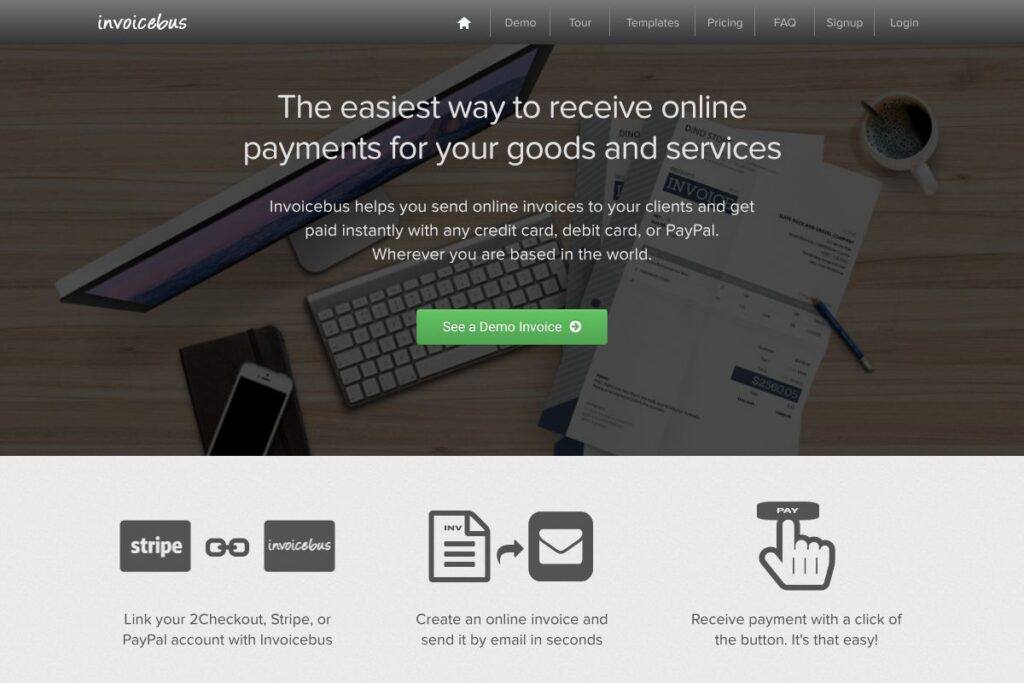
Invoicebus runs as a web-based invoicing platform where you create an invoice using a template, add client and line-item details, and send the invoice by email in seconds. Each invoice includes a payment button so clients can pay immediately with credit or debit cards or PayPal.
To accept payments you connect a payment gateway such as Stripe, 2Checkout, or PayPal to your Invoicebus account; the service then routes payments to the connected account and records payment status on the invoice. The workflow supports exporting PDFs, customizing HTML templates, and viewing unpaid invoices in a dashboard for quick follow-up.
What does Invoicebus do?
Invoicebus centers on invoicing and online payment collection. Core capabilities include template-based invoice creation, PDF export, one-click payments via integrated gateways, and a simple dashboard that highlights unpaid invoices. The platform also provides resources for creating HTML templates and a demo tour to evaluate the flow.
Let’s talk Invoicebus’s Features
Online invoice creation
Create invoices with line items, tax, discounts, and custom fields using a clean web editor. Templates can be branded with your logo and custom text to match client-facing documents, which helps maintain a consistent professional look across communications.
Payment gateway integrations
Invoicebus connects to major payment processors so clients can pay instantly with credit or debit cards or PayPal. Supported integrations include Stripe, 2Checkout, and PayPal, which removes the need for manual reconciliation and speeds up cash collection.
PDF and HTML templates
Generate downloadable PDF invoices and use editable HTML templates for full control over layout and styling. The template system is useful for matching invoices to your portfolio branding or client expectations and for producing print-ready documents when needed.
Client management and invoice tracking
Store client contact data, billing addresses, and invoice history to speed repeat billing and track outstanding balances. The dashboard surfaces unpaid invoices so you can prioritize follow-up and reduces time spent searching for billing records.
Multi-currency and localization support
Issue invoices in multiple currencies and include localized number and date formats to handle international clients. This capability simplifies billing for creatives who work with clients around the world and accept payment in different currencies.
Security and PDF delivery
Invoicebus delivers invoices over a secure connection and produces PDF files suitable for record keeping. Coupled with payment gateway security, this ensures invoice transmission and payment processing meet reasonable safety expectations for online billing.
With these features, Invoicebus aims to reduce billing friction for small teams and independent professionals, letting them focus on client work rather than chasing payments.
Invoicebus pricing
Invoicebus uses a subscription-style approach combined with payment processing through connected gateways, so charges typically consist of a platform subscription plus gateway transaction fees. For current plan structures and any usage tiers, consult the Invoicebus site for up-to-date options.
For details on sign-up options and available plans, view the Invoicebus homepage where demo, tour, and signup links are provided. For payment processing fees and gateway-specific rates, review the pricing documentation for the connected providers such as Stripe, PayPal, or 2Checkout.
What is Invoicebus Used For?
Invoicebus is commonly used for sending client-ready invoices, accepting online payments, and keeping a simple record of outstanding amounts. Freelancers and creative agencies use it to replace manual invoicing spreadsheets and to give clients a one-click payment experience via card or PayPal.
It’s also useful for one-person businesses and micro-agencies that do not need full accounting features but want reliable invoice templates, PDF exports for records, and integrations with payment processors to reduce payment friction.
Pros and Cons of Invoicebus
Pros
- Fast invoice creation: The editor and templates let you produce and email invoices in seconds, which reduces administrative overhead for small teams.
- Direct payment collection: Integrations with Stripe, PayPal, and 2Checkout let clients pay immediately, improving cash flow and reducing reconciliation time.
- Template flexibility: Support for HTML and PDF invoice templates provides control over branding and layout to match professional needs.
- Simple dashboard: An at-a-glance view of unpaid invoices makes follow-up straightforward without complex accounting reports.
Cons
- Limited accounting features: Invoicebus focuses on invoicing rather than full bookkeeping or payroll, so you may still need separate accounting software for broader financial management.
- Gateway-dependent fees: Payment processing costs are determined by connected gateways, which means transaction fees and chargeback policies vary by provider.
- Unclear public pricing: With no dedicated public pricing page, teams may need to contact sales or sign up to see full plan details, which can slow evaluation.
Does Invoicebus Offer a Free Trial?
Invoicebus offers a free plan and a free trial for premium features. The free tier covers basic invoicing and template access, while trial or paid plans unlock additional branding options, integrations, and advanced template controls; check the Invoicebus signup page to create an account and start a trial.
Invoicebus API and Integrations
Invoicebus integrates with major payment processors to enable instant payments; notable integrations include Stripe, PayPal, and 2Checkout. These integrations handle payment routing and status updates so Invoicebus can mark invoices as paid automatically.
The platform supports PDF exports and editable HTML templates for customization, and it typically offers webhook or export options to connect invoice events with other systems. For implementation details and developer endpoints, consult the integration sections on the Invoicebus resources pages and the gateway documentation linked above.
10 Invoicebus alternatives
Paid alternatives to Invoicebus
- FreshBooks — Cloud invoicing with time tracking, expense management, and client portals geared to small businesses and freelancers.
- QuickBooks Online — Full-featured accounting and invoicing platform with deep bookkeeping, reporting, and tax-ready workflows.
- Zoho Invoice — Feature-rich invoicing with automation rules, recurring billing, and built-in client payment acceptance as part of the Zoho suite.
- Wave — Free invoicing and accounting tools with paid payment processing, suitable for small operations with basic needs.
- Xero — Accounting platform with invoicing, bank reconciliation, and inventory for growing small businesses.
- Invoicely — Simple online invoicing with recurring payments and multi-currency support aimed at freelancers.
- PayPal Invoicing — Quick invoicing tied directly to PayPal for straightforward payment acceptance and client billing.
Open source alternatives to Invoicebus
- Invoice Ninja — Open source invoicing and billing with self-hosting options, client portals, and payment integrations.
- Siwapp — Lightweight open source invoicing system that supports basic invoicing workflows and PDF generation.
- ERPNext — Open source ERP with invoicing, accounting, and broader business modules for teams that want self-hosted control.
Frequently asked questions about Invoicebus
What payment methods does Invoicebus support?
Invoicebus accepts payments via connected gateways such as Stripe, PayPal, and 2Checkout. Clients can pay by credit or debit card and by PayPal depending on which processor the account owner connects.
Can Invoicebus create branded invoice templates?
Yes, Invoicebus supports branded PDF and HTML templates. Users can add logos, customize layout and text, and produce print-ready PDFs for clients.
Does Invoicebus track unpaid invoices?
Yes, Invoicebus provides a dashboard that highlights unpaid invoices and payment status. This view helps prioritize follow-up and simplifies collections for small teams.
Is Invoicebus suitable for international clients?
Yes, Invoicebus supports multi-currency invoicing and localized number/date formats. That makes it suitable for creatives billing clients in different countries.
Can I connect Invoicebus to Stripe or PayPal?
Yes, Invoicebus integrates with Stripe, PayPal, and 2Checkout. Linking a gateway enables one-click payments on invoices and automatic payment status updates.
Final verdict: Invoicebus
Invoicebus performs well as a focused invoicing tool for creative professionals who need to send branded invoices and accept card or PayPal payments quickly. Its strength lies in simple template management, direct payment gateway integrations, and a dashboard that clarifies unpaid invoices so you can follow up efficiently.
Compared with a broader accounting tool like FreshBooks, which offers time tracking, expense management, and more complete bookkeeping, Invoicebus is narrower in scope but typically easier to adopt for freelancers and micro-agencies. If you want full accounting features and advanced reporting, FreshBooks or QuickBooks Online may be better, but for fast invoicing and payment collection, Invoicebus provides a streamlined solution with lower complexity.