What is invoicely
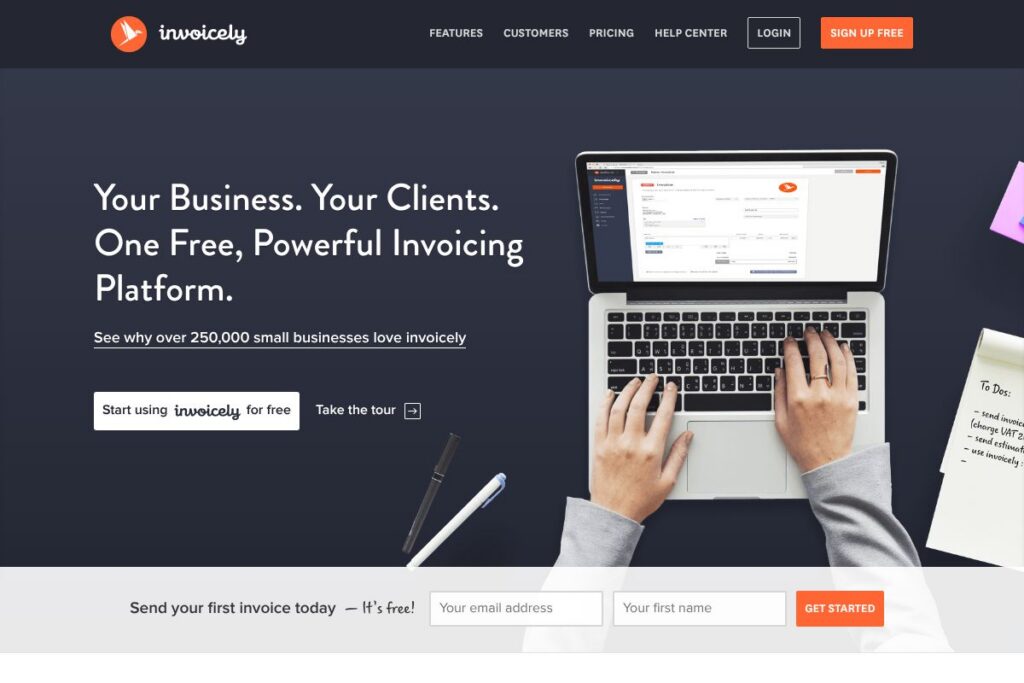
invoicely is a cloud invoicing service aimed at small businesses and freelancers who need a straightforward way to create, send, and track invoices and estimates. The platform combines core billing tools with time and expense tracking, reporting, and built-in online payment acceptance so businesses can manage invoicing from a single dashboard.
Compared with desktop accounting products, invoicely focuses specifically on invoicing workflows and speed of use. Compared with broader accounting suites such as QuickBooks Online and FreshBooks, invoicely emphasizes quick invoice generation, lightweight expense tracking, and mobile invoicing rather than full bookkeeping and payroll features.
All of this makes invoicely a practical choice for sole proprietors, small service businesses, and freelancers who want to spend less time on billing and more time on client work. The product is particularly useful for teams that need mobile invoicing and straightforward online payment collection, delivered without a steep learning curve.
How invoicely Works
Create a client record, add line items or tracked time, and generate an invoice or estimate in minutes using customizable templates. Invoices can include taxes, discounts, shipping, and a purchase order number, and they can be saved as drafts, emailed directly to clients, or exported as PDFs for offline delivery.
When payments are enabled, clients can pay invoices directly from the invoice using integrated payment gateways; invoicely records payment status and can automatically send reminders for overdue invoices. Teams can track billable hours, expenses, and mileage and convert those entries into line items on invoices without manual calculations.
invoicely features
invoicely centers on efficient, repeatable invoicing, with features that span invoice and estimate creation, online payments, time and expense capture, recurring billing, and reporting. The platform also includes customization options for branding and mobile apps for iOS and Android so you can invoice on the go.
Key functionality includes:
Invoice and estimate builder
Create professional invoices and estimates with customizable templates, line items, taxes, discounts, and PO numbers. Templates save layout and branding choices so you can produce a consistent invoice in under a minute and export or email the result directly to clients.
Online payments
Accept credit cards and a range of payment gateways so clients can pay invoices from desktop or mobile devices. Payment receipts and status updates are recorded against the invoice to simplify reconciliation and reduce accounts receivable follow up.
Time, expense, and mileage tracking
Track billable hours, expenses, and trips in the same account and convert those entries into invoice line items without manual copying. This helps service providers and contractors bill accurately and keep project costs organized for client reporting.
Recurring invoices and automated reminders
Set up recurring invoices for subscriptions or retainer billing and schedule automatic payment reminders to improve cash flow. Automation reduces manual admin and helps make late payments less frequent.
Reporting and business summaries
A suite of customizable reports and financial summaries aggregates invoices, payments, expenses, and outstanding receivables. These summaries help you monitor cash flow, track unpaid invoices, and prepare simple financial overviews for planning or tax time.
Custom branding and templates
Upload logos, adjust colors, and edit statement layouts so invoices match your business identity. Branding controls extend to client-facing pages and login screens, which helps maintain a consistent client experience.
Mobile apps and accessibility
Native apps for iOS and Android enable invoice creation, payment tracking, and expense capture while away from the office. Mobile access ensures you can issue invoices immediately after completing work or while traveling.
With these features invoicely speeds up billing tasks and keeps invoice management, payments, and basic reporting in one place so small businesses can focus on revenue generation.
invoicely pricing
invoicely follows a freemium approach, offering a core free plan that covers invoice and estimate creation, basic time and expense tracking, and online payment acceptance. For teams or businesses that need multi-user access, advanced automation, or prioritized support, there are paid upgrades and account tiers; details and current options are available from the invoicely site.
Free plan
Free (Core): Free (Create and send unlimited invoices, estimates, basic time and expense tracking, mobile access)
Paid upgrades
Paid upgrades: Additional tiers typically add features such as multi-user seats, advanced reporting, white-labeling, and priority support. For specific plan names, feature comparisons, and current prices, see the invoicely homepage for up-to-date details and any promotional offers.
What is invoicely Used For?
invoicely is commonly used for client billing, converting time and expenses into invoices, and collecting payments online. Freelancers, consultants, small agencies, and contractors find it useful for generating estimates, issuing invoices on the go, and tracking unpaid invoices without a full accounting package.
It is also suited for small teams that need simple recurring billing for subscriptions or retainers and want automated reminders to reduce outstanding receivables. Businesses that prioritize quick setup, mobile access, and easy payment acceptance will get the most immediate value from invoicely.
Pros and cons of invoicely
Pros
- Simple invoice creation: The builder lets you create and send professional invoices quickly, with templates that handle taxes, discounts, and PO numbers for consistent output.
- Free tier for small businesses: A core free plan covers the essentials of invoicing, time and expense tracking, and mobile access which is attractive for solo operators and startups.
- Built-in payment acceptance: Integrated payment gateway support means clients can pay invoices directly, and invoice statuses update automatically which shortens payment cycles.
- Mobile-focused workflows: Native iOS and Android apps make it practical to invoice from anywhere and capture billable time or expenses in real time.
Cons
- Limited full accounting features: For complete bookkeeping, payroll, and tax filing workflows, invoicely does not replace a full accounting suite and may require export to other software.
- Advanced features behind upgrades: Multi-user accounts, white-labeling, and advanced reporting are typically part of paid upgrades which can be a drawback for growing teams on tight budgets.
- Integration depth varies: While invoicely supports common payment gateways and automation, businesses needing extensive ERP or bank-level integrations may find the ecosystem more limited than larger accounting platforms.
Does invoicely Offer a Free Trial?
invoicely offers a free plan that allows small businesses and freelancers to create and send invoices, estimates, and track time and expenses without an initial payment. To evaluate any paid upgrades or multi-user features, sign up on the invoicely homepage and compare plans or contact sales for trial access to premium tiers.
invoicely API and integrations
invoicely integrates with common payment gateways so you can accept credit card payments and online transfers directly through invoices; supported gateways typically include providers such as Stripe and PayPal. For broader automation, invoicely connects with workflow platforms and third-party services to move data between apps.
For developer automation and custom integrations, invoicely provides documentation and developer resources; view the invoicely integrations and developer resources to learn about available endpoints, webhooks, and supported connectors.
10 invoicely alternatives
Paid alternatives to invoicely
- FreshBooks — Cloud accounting and invoicing focused on service businesses with time tracking, proposals, and more comprehensive accounting features.
- QuickBooks Online — Full-featured accounting with payroll, taxation, and deep bank integrations aimed at small to mid-size businesses.
- Xero — Cloud accounting with strong bank reconciliation, multi-currency support, and a large marketplace of add-ons.
- Zoho Invoice — Invoicing with automation, client portals, and integration across the Zoho suite for businesses already in that ecosystem.
- Sage Business Cloud Accounting — Invoicing and accounting built for small businesses with integrated inventory and reporting tools.
- And.Co — Invoice and contract tools tailored to freelancers, with time tracking and proposal workflows.
- Square Invoices — Invoicing and payments tightly integrated with Square’s payment ecosystem and point-of-sale tools.
Open source alternatives to invoicely
- Invoice Ninja — Open source invoicing and billing platform with self-hosted and hosted options, offering invoice templates, client portals, and payment integrations.
- ERPNext — A broader open source ERP that includes invoicing, accounting, inventory, and project management for businesses that want a full suite.
- Dolibarr — Open source ERP/CRM with invoicing modules for small businesses seeking a self-hosted solution.
Frequently asked questions about invoicely
How do I accept payments with invoicely?
invoicely supports direct online payments through integrated gateways. You can connect payment providers so clients pay invoices directly from the invoice and payments are recorded against the account.
Does invoicely offer mobile invoicing?
Yes, invoicely has native iOS and Android apps. Mobile apps let you create invoices, record expenses, and manage payments while away from the office.
Can invoicely track billable time and expenses?
Yes, invoicely includes time and expense tracking. Tracked entries can be converted to invoice line items so billing matches the actual work and costs incurred.
Is invoicely suitable for multiple users in a growing business?
invoicely can be used by multiple users, typically via paid upgrades. Multi-user seats, role controls, and team features are available for businesses that need shared access and collaboration.
Where can I compare invoicely pricing and plans?
You can view current plan options and account details on the invoicely homepage. The site lists available tiers, feature comparisons, and any trial or promotional offerings.
Final verdict: invoicely
invoicely does invoicing and payment collection well, with a simple, mobile-friendly interface, time and expense capture, and customizable invoices that help small businesses get paid faster. Its free core offering is valuable for freelancers and very small businesses that need a low-cost way to manage billing without adopting a full accounting suite.
Compared with Wave, which also provides free invoicing and basic accounting tools, invoicely focuses more tightly on streamlined invoice workflows and mobile-first invoicing. Wave includes broader accounting and receipt scanning as part of its free offering, so choose invoicely if your priority is fast invoicing and payment capture, and choose Wave if you prefer an integrated accounting package at no cost.
Overall, invoicely is a practical invoicing tool for small teams and independent professionals who need reliable invoicing, basic reporting, and online payment acceptance without a complex setup. For businesses that later require deeper accounting or payroll, invoices and exported data can be moved into a fuller accounting system as needs evolve.