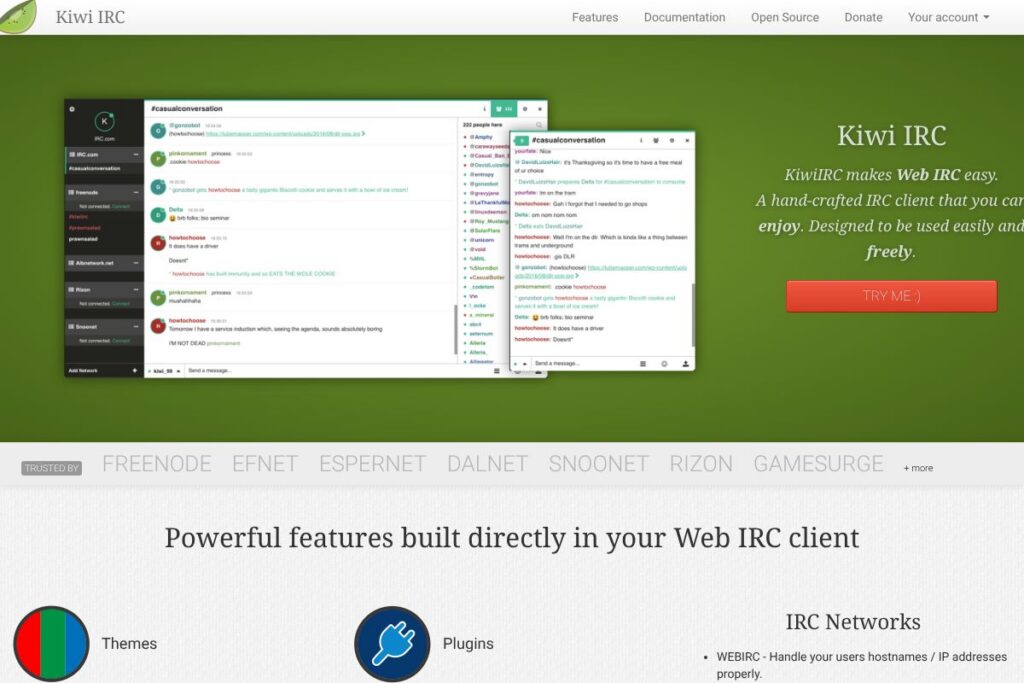
KiwiIRC: An Overview
KiwiIRC is a browser-native IRC client that runs as a hosted web app or as software you can self-host. It provides an embeddable web widget for websites, plus a full web client that connects users to multiple IRC networks without requiring downloads or browser plugins. The platform exposes controls around which servers users can connect to and supports passing accurate user host information via WEBIRC.
Compared with other IRC solutions, KiwiIRC focuses on simplicity and web embedding. IRCCloud is a commercial hosted IRC client with persistent connection features and mobile apps, which makes it easier for end users to stay connected but requires a paid subscription for full persistence. The Lounge and Quassel are self-hosted alternatives that emphasize always-on connectivity and multi-client synchronization, while KiwiIRC emphasizes easy embedding and a lightweight web interface. All of this makes KiwiIRC especially useful for communities and site owners who want an instant chat presence on their pages, plus full control over available servers and network-level options.
KiwiIRC does particularly well at providing a low-friction entry point to IRC through a browser, and at letting administrators control server lists, WEBIRC handling, and real-time connection stats. It is best suited to communities that want an embeddable, customizable IRC experience and to operators who prefer self-hosting or integrating IRC in web properties.
How KiwiIRC Works
The client runs in the browser and connects to IRC servers either directly or through a KiwiIRC gateway instance. For self-hosting, operators install KiwiIRC on a server and configure which upstream IRC servers and networks are available to users. The client handles standard IRC flows such as nick registration, channel joins, private messages, and channel lists in a web interface.
On the embedding side, KiwiIRC offers a web widget you place on a page so visitors can join channels or private chats instantly. The widget is configurable to point at specific networks or channels and to control whether nick registration or anonymous connections are allowed. Administrators can enable WEBIRC to have accurate user IPs and hostnames forward to IRC networks, and the server exposes simple stats so you can monitor active connections in real time.
KiwiIRC features
KiwiIRC centers on browser access to IRC, embeddable widgets, and basic network administration tools. Core capabilities include the embeddable web client, multi-network support, WEBIRC forwarding, server control for operators, and real-time connection statistics. The project also supports self-hosting and customization through its codebase.
The platform includes several powerful capabilities worth highlighting:
Web-based IRC client
The client provides a full IRC interface inside modern browsers, including channel lists, private messaging, and nick management. This removes the need for desktop clients, which lowers the barrier for new users and simplifies access across devices.
Embeddable web widget
A compact widget can be embedded into any website to offer live chat without downloads or plugins, letting visitors join channels or chat rooms instantly. This is useful for support pages, community sites, and event pages where you want a lightweight, zero-install chat option; see the web widget documentation for integration details.
WEBIRC support
WEBIRC lets KiwiIRC forward the end user’s real IP address and hostname to upstream IRC networks so that network operators see accurate connection metadata. This is important for moderation, bans, and accurate logging when connections are proxied through a hosted client.
Server management and network control
Operators can configure which IRC servers appear in the client and restrict or expose specific networks and ports. This gives administrators the ability to curate the available networks and apply connection-level settings for their user base.
Real-time stats and connection monitoring
KiwiIRC exposes basic statistics so administrators can see how many users are currently connecting and how traffic trends over time. These stats help with capacity planning and troubleshooting when embedding the client on high-traffic sites.
Self-hosting and customization
The codebase is open for self-hosting, enabling teams to customize branding, UX, and network lists, and to integrate KiwiIRC with existing infrastructure. Self-hosting also gives full control over security, TLS configuration, and integration with WEBIRC-capable IRC networks.
With these features, KiwiIRC provides a compact, practical web IRC experience. The biggest benefit is the ability to place a working IRC client directly on web pages, removing the installation barrier and giving site owners control of which servers and channels are available.
KiwiIRC pricing
KiwiIRC follows an open-source, self-hosting friendly model rather than a commercial subscription model. The software itself is available to download and run without per-user fees, and it can be embedded into sites at no licensing cost when self-hosted.
For organizations that prefer not to self-host or that want managed hosting or commercial support, third-party hosted instances and services exist; check KiwiIRC’s hosted options on the KiwiIRC homepage for details on hosted deployments and any commercial offerings. Developers can also review the KiwiIRC GitHub repository to clone the project, review licensing, and deploy their own instance.
What is KiwiIRC Used For?
KiwiIRC is commonly used to embed IRC-based chat directly into websites, enabling communities to offer IRC channels as a web-first chat experience. Site owners use the widget for support chat, live event rooms, and community channels where they want a lightweight chat presence without asking users to install an IRC client.
Administrators and IRC network operators use KiwiIRC to provide browser access to existing IRC networks, to control which servers are exposed to web users, and to enable WEBIRC so upstream networks receive accurate host and IP information. The combination of embeddability and server control makes KiwiIRC useful for education communities, open-source projects, event organizers, and niche communities that rely on IRC for real-time discussion.
Pros
- Easy browser access: Users can join IRC channels from a standard browser without installing software, lowering friction for newcomers.
- Embeddable widget: Site owners can place a configurable widget on pages to provide immediate chat, with no plugins required.
- WEBIRC and server control: Operators can forward real user IPs to networks and restrict which servers users may connect to, improving moderation and control.
- Self-hosting and customization: The project can be self-hosted and modified, enabling branding, custom configuration, and integration with internal systems.
Cons
- Not a modern team collaboration platform: KiwiIRC focuses on IRC protocol features and lacks integrated features common in commercial team chat tools such as threaded conversations and built-in file storage.
- Requires IRC knowledge for advanced setup: Administrators setting up self-hosted instances, WEBIRC, or custom server lists will need familiarity with IRC and server configuration.
- Less turnkey than hosted commercial options: Compared with hosted clients that offer persistent message history and mobile apps, KiwiIRC may require additional components for always-on connectivity.
Does KiwiIRC Offer a Free Trial?
KiwiIRC is free and open-source for self-hosting. You can deploy it on your own servers at no licensing cost and embed the web widget in sites without per-user fees. For hosted or managed options, review the KiwiIRC homepage to find hosted instances or commercial offerings from providers.
KiwiIRC API and Integrations
KiwiIRC does not present a broad third-party app marketplace; instead it exposes configuration and integration points through its codebase and the embeddable widget parameters. Developers can customize the widget and client behavior by modifying the project or by using widget configuration options described in the web widget documentation.
For development, the KiwiIRC GitHub repository is the primary resource for extending the client, reporting issues, and contributing code. Integrations with other web systems are typically handled by embedding the widget and connecting server-side infrastructure, rather than via a standalone REST API.
10 KiwiIRC alternatives
Paid alternatives to KiwiIRC
- Slack — A hosted team collaboration platform with channels, threaded conversations, file sharing, and integrations; aimed at businesses needing structured collaboration.
- Discord — Community-focused voice and text chat with persistent servers, moderation tools, and rich media support, common for gaming and large communities.
- IRCCloud — A hosted IRC client with persistent connections, message history, and mobile apps aimed at users who want always-on IRC without self-hosting.
- Zendesk Chat — A commercial live chat solution focused on customer support workflows and ticketing integrations for websites.
- Intercom — A customer messaging platform with website chat, targeted messages, and in-app help features for product and marketing teams.
- LiveChat — A paid live chat product for websites with support routing, analytics, and integrations with CRM systems.
- Mattermost — An open core team chat system with paid hosted plans, offering private deployments and integrations for enterprise teams.
Open source alternatives to KiwiIRC
- The Lounge — A self-hosted, modern web IRC client that maintains persistent connections and supports multiple users per account.
- WeeChat — A terminal-based IRC client with extensive scripting and relay options that can be paired with web front ends for browser access.
- Quassel — A distributed IRC client that separates a central core from lightweight clients, enabling always-on connectivity across devices.
- Irssi — A veteran terminal-based IRC client favored by power users and scripts, often used in server environments.
- Element (Matrix client) — While not IRC-based, Element offers an open-source, federated alternative for real-time chat over Matrix with modern features and bridges to IRC.
Frequently asked questions about KiwiIRC
What is KiwiIRC used for?
KiwiIRC is used to provide a browser-based IRC client and an embeddable chat widget. Communities embed it into websites or self-host it to allow users to join IRC channels without installing a separate IRC client.
Does KiwiIRC support WEBIRC?
Yes, KiwiIRC supports WEBIRC forwarding. That feature lets operators forward a user’s real hostname and IP to upstream IRC networks for accurate moderation and logging.
Can I embed KiwiIRC in my website?
Yes, KiwiIRC offers an embeddable web widget. The widget can be configured to point at chosen networks and channels so visitors can chat directly from a site; see the web widget documentation for integration steps.
Is KiwiIRC free to self-host?
Yes, KiwiIRC is free to download and self-host. You can run your own instance without per-user licensing fees and customize it via the project repository on GitHub.
Does KiwiIRC provide an API for developers?
KiwiIRC does not provide a traditional public REST API for integrations. Developers extend and integrate KiwiIRC primarily by configuring the widget, modifying the codebase, and using the resources available in the KiwiIRC GitHub repository.
Final verdict: KiwiIRC
KiwiIRC is a practical, browser-first IRC client well suited to embedding chat on websites and to operators who want control over which servers and networks are exposed. Its strengths are the embeddable widget, WEBIRC support for accurate host forwarding, and the ability to self-host and customize the client to fit community needs.
Compared with hosted commercial clients such as IRCCloud, which offers always-on persistence and mobile apps under a subscription model, KiwiIRC gives you full control without per-user fees when you self-host, but it may require more hands-on setup to achieve always-on history and multi-device synchronization. For communities and site owners who prefer an open, configurable web IRC client, KiwiIRC is a straightforward choice.