Kommunicate: An Overview
Kommunicate is a customer service automation platform that blends AI-driven agents with native human handoff to reduce repetitive ticket volume while preserving control and context in support workflows. The platform is model-agnostic, letting teams use OpenAI, Anthropic, Google Gemini, or existing bots to power AI agents across web, WhatsApp, email, and mobile apps. See how Kommunicate presents multichannel automation on the product site.
Compared with competitors, Kommunicate focuses on operational reliability rather than pure experimentation. Intercom is strong at conversational marketing and integrated CRM workflows but can require higher-tier plans for advanced automation. Zendesk provides deep ticketing and enterprise scaling but typically needs longer implementation for AI-driven automation. Freshdesk is feature-rich for ticketing and basic bots, but lacks the same built-in human handoff design that Kommunicate emphasizes.
Kommunicate does well where teams need controllable automation that is quick to deploy and integrates humans seamlessly into workflows. It is suited for support teams that want immediate workload reduction without sacrificing CX or spending months on implementation. The platform is less appropriate for organizations seeking fully autonomous, human-free customer service experiments.
How Kommunicate Works
Kommunicate trains an AI agent using your help documentation, FAQs, and website content so it can answer high-volume, repetitive queries immediately. Teams map intents and responses, connect models from OpenAI or Anthropic if desired, and deploy the same AI agent across channels so customers get consistent answers whether they message on web chat, WhatsApp, or email.
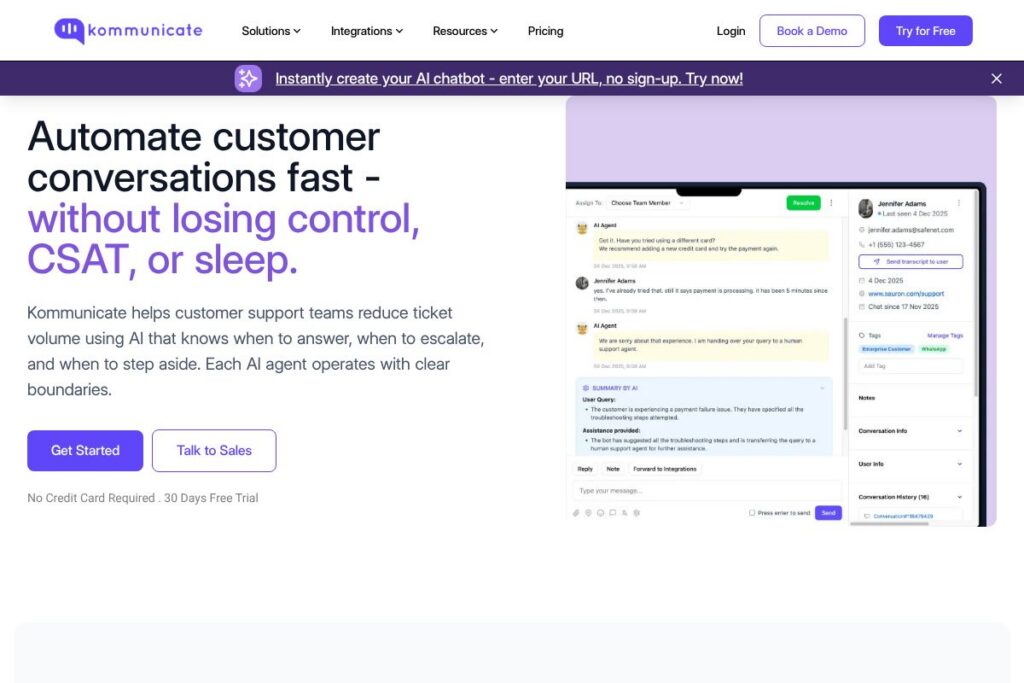
When the AI agent reaches a rule or confidence threshold that requires human attention, Kommunicate routes the conversation to the right team with full context preserved, including chat history and metadata. Administrators get dashboards showing what the AI handles, what it escalates, and how customers respond so automation can be tuned over time.
Implementation typically involves uploading or connecting knowledge sources, configuring routing and escalation rules, and enabling channels. For technical details and developer guidance, consult the Kommunicate documentation.
What does Kommunicate do?
Kommunicate combines an AI agent layer, omnichannel delivery, and native human handoff to automate repetitive customer support while preserving human oversight. Core capabilities include AI-driven response generation, rules-based routing, context-preserving handoff, and analytics to monitor agent performance and customer outcomes.
Let’s talk Kommunicate’s Features
Unified AI agent
A single AI agent layer powers conversational automation across web chat, WhatsApp, email, and mobile apps, ensuring consistent responses and shared context across channels. This reduces duplicated setup work and simplifies training because the same knowledge base and rules apply everywhere.
Native human handoff
Conversations that require empathy, nuance, or specialist knowledge are routed automatically to human agents with full context from the AI agent, avoiding information loss and duplicated customer explanations. This design reduces friction during escalations and preserves service quality.
Model-agnostic integrations
Kommunicate supports multiple AI models and connectors so teams can use OpenAI, Anthropic, Google Gemini, or their own models depending on cost, performance, or compliance needs. Leveraging third-party models is explained in the integration docs.
Omnichannel deployment
Deploy the same conversational experience on websites, mobile apps, WhatsApp, and email without separate bot instances per channel. Centralized routing and a single agent layer make it easier to maintain a consistent CX across channels.
No-code training and knowledge sources
Non-technical teams can train agents using uploaded content, FAQ pages, or by connecting help center documents so the AI behaves correctly in high-volume scenarios. This lowers reliance on engineering and speeds time-to-live.
Control-first automation and reporting
Administrators can set rules, escalation thresholds, and routing logic while monitoring agent actions in real time. Dashboards show automation coverage, escalation reasons, and customer feedback so teams can iterate on automation safely.
Security and compliance controls
Enterprise controls include role-based access, audit trails, and options to control which data models process customer content, supporting common enterprise security needs. For implementation specifics consult the security and compliance resources.
With these capabilities, the biggest benefit is operational automation that reduces repetitive work while keeping humans in the loop where it matters most. Teams gain measurable workload reduction without losing visibility or control over how automation behaves.
Kommunicate pricing
Kommunicate uses a SaaS subscription model with plans and enterprise options tailored to channel volume, feature needs, and model usage. Pricing is typically customized for teams that need omnichannel deployment, model credits, and enterprise controls.
For detailed quotes and to compare plan tiers or enterprise features, view Kommunicate’s current pricing options and contact channels where sales and support can provide a tailored estimate based on your channel volume and integration needs.
What is Kommunicate Used For?
Kommunicate is used to automate repetitive customer support queries across multiple channels while preserving handoff to human agents for complex or sensitive issues. It’s commonly adopted by SaaS companies, education platforms, e-commerce operations, and any support function that needs fast, multichannel responses without sacrificing CX.
Teams use Kommunicate to reduce repetitive ticket volume, speed response times on high-frequency questions, and centralize conversational history so humans can step in quickly with full context. It is particularly useful where WhatsApp or mobile app messaging are primary customer channels.
Pros and Cons of Kommunicate
Pros
- Model-agnostic deployment: Allows teams to use OpenAI, Anthropic, Google Gemini, or existing bots, providing flexibility to balance cost, performance, and compliance. This prevents vendor lock-in for AI models and supports gradual migration or experimentation.
- Native human handoff: Handoff is built into the core workflow so escalations carry full AI context to agents, reducing repeated explanations and improving resolution times. This design supports reliable production use rather than demo-only scenarios.
- Fast time-to-live: The platform is designed for short implementations so teams can deploy an AI agent across channels in days rather than months, reducing project overhead and accelerating ROI.
- Unified omnichannel experience: One agent across web, WhatsApp, email, and apps keeps responses consistent and lowers maintenance compared with separate channel-specific bots.
Cons
- Not for fully autonomous use cases: Teams seeking zero-human involvement across all conversations will find Kommunicate conservative by design, because the platform emphasizes safe escalation and operational reliability.
- Enterprise feature onboarding may require support: While time-to-live is fast, complex enterprise requirements such as advanced SSO, custom model hosting, or regulatory reviews can involve professional services and coordination.
Does Kommunicate Offer a Free Trial?
Kommunicate offers free trial and demo options for prospective customers. Trial scope and duration vary by region and use case; you can request a demo or trial through the Kommunicate contact and demo page to see the platform working with your knowledge base and channels.
Kommunicate API and Integrations
Kommunicate provides APIs and developer documentation to extend the platform, integrate with CRMs, and connect custom models. The API documentation and developer guides describe endpoints for messaging, conversation management, and webhooks to integrate with external systems.
Key built-in integrations include WhatsApp, email, mobile SDKs, and third-party CRMs and ticketing systems; the integration catalog is available on the Integrations overview.
10 Kommunicate alternatives
Paid alternatives to Kommunicate
- Intercom — A conversational relationship platform combining messaging, product tours, and basic automation, often used where product-led growth and support converge.
- Zendesk — A comprehensive ticketing and support suite with automation, knowledge management, and scalable enterprise capabilities for large support operations.
- Freshdesk — Ticketing and AI-assisted automation with multichannel support and an emphasis on ease of use for small to mid-sized teams.
- Drift — Conversational marketing and sales automation with a focus on lead capture and routing in addition to basic support use cases.
- Ada — An enterprise-grade AI automation platform focused on large-scale self-service and conversational automation with centralized management.
- LivePerson — A conversational AI and messaging platform for enterprise deployments with strong channel coverage and analytics.
- HubSpot Service Hub — Part of HubSpot’s CRM platform, combining ticketing, automation, and conversational tools in a single ecosystem.
Open source alternatives to Kommunicate
- Rasa — An open source conversational AI framework for building custom assistants with full control over models and data, suitable for developer-led teams.
- Botpress — A modular, developer-friendly open source bot framework with visual flow builders and channel connectors for custom implementations.
- Chatwoot — An open source customer engagement platform with multichannel inbox support and basic automation capabilities for teams that want self-hosted control.
- Rocket.Chat — An open source communications platform with messaging and bot integration capabilities that can be extended for support workflows.
Frequently asked questions about Kommunicate
What channels does Kommunicate support for customer conversations?
Kommunicate supports web chat, WhatsApp, email, and mobile app messaging. The platform delivers a unified AI agent experience across these channels so responses and context remain consistent.
Does Kommunicate integrate with OpenAI and other model providers?
Yes, Kommunicate is model-agnostic and integrates with OpenAI, Anthropic, and Google Gemini among others. This lets teams choose models based on cost, performance, and compliance requirements.
Can Kommunicate escalate conversations to human agents?
Yes, human handoff is built into Kommunicate’s core workflow. Conversations that meet escalation rules or confidence thresholds are routed to humans with full context preserved for faster resolution.
Is Kommunicate suitable for enterprise security and compliance needs?
Kommunicate includes enterprise controls like role-based access and audit trails. For detailed compliance requirements and deployment options, contact sales or review the platform documentation on security features.
How quickly can teams deploy Kommunicate in production?
Teams can be live with a production-ready AI agent in days in many cases. Time-to-live depends on knowledge base complexity, channel configuration, and any enterprise customization needs.
Final verdict: Kommunicate
Kommunicate is a practical choice for support teams that need reliable, controllable automation across multiple channels with native human handoff. Its model-agnostic approach and attention to escalation logic make it a good fit for organizations that want to reduce repetitive tickets while maintaining visibility and CX.
Compared with Intercom, Kommunicate places stronger emphasis on controllable handoff and model flexibility rather than bundling automation into large product suites. For teams prioritizing conversational marketing alongside support, Intercom may offer a more integrated CRM experience, while Kommunicate is often more focused and cost-effective for pure support automation and multichannel consistency.
If your goal is measurable operational improvement in support without long implementations or model lock-in, Kommunicate offers a focused path to reduce workload and keep humans in the loop where they matter most. For demos, custom pricing, or trial access, reach out via the Kommunicate contact and demo page.