What is Landbot
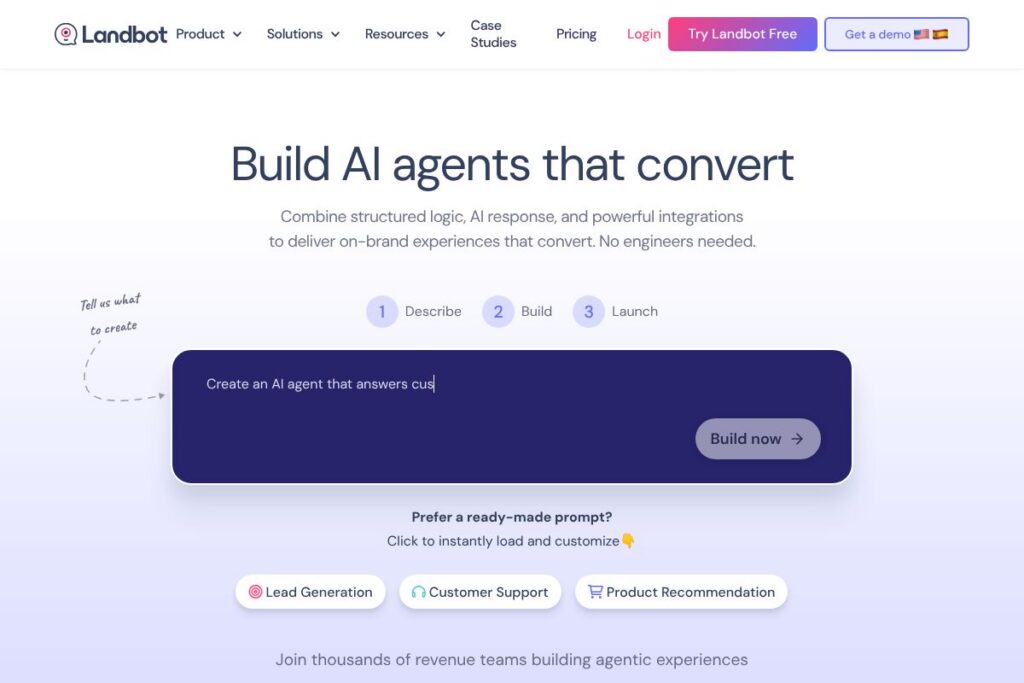
Landbot is a web-first platform for building AI agents and chatbots that run on WhatsApp, websites, and other conversational channels. It combines a visual flow builder with LLM-driven responses so teams can mix rule-based logic and open-ended AI to qualify leads, answer customers, and trigger backend actions without writing code.
Compared with Intercom, Landbot focuses more on visual workflow design and channel deployment such as WhatsApp and embedded web widgets, while Intercom emphasizes a broader customer messaging suite with built-in inbox and product tours. Against Drift, Landbot is similar on lead qualification and routing but puts more emphasis on low-code integrations and branded chat UIs. Versus ManyChat, Landbot offers stronger support for WhatsApp and enterprise integrations rather than purely social and marketing-focused automations.
Landbot excels at letting non-engineering teams create conversational funnels that connect to CRM and automation tools. Its mix of templates, AI Copilot assistance, and easy channel deployment makes it well suited for marketing, sales, and support teams who need fast iterations and branded chat experiences.
How Landbot Works
The platform uses a visual flow canvas where you assemble nodes that represent messages, conditional logic, data capture, and API calls. You can start from an AI-generated workflow, a template, or build one from scratch, then configure where it runs so channel-specific settings are applied automatically.
AI elements sit alongside rule-based blocks, allowing teams to hand off open-ended questions to an LLM or keep conversations strictly structured for compliance and predictable outcomes. Integrations let flows read and write customer data to CRMs, trigger automations in tools like Zapier or n8n, and call custom APIs to perform actions such as quoting or scheduling.
Publishing is channel-aware: choose WhatsApp for business messaging, embed a widget for web, or connect other messaging channels and monitor performance in the dashboard. Runtime logs, response quality metrics, and cost insights feed back into iterative improvements so teams can test and refine quickly.
Landbot features
Landbot combines visual flow design, LLM integration, multi-channel deployment, and connectors into a single builder that targets lead capture, support automation, and conversation-driven workflows. Recent focus areas include AI Copilot for faster configuration and expanded WhatsApp support to reach customers where they message.
Visual Flow Builder
The drag-and-drop canvas organizes conversations as nodes so teams can map intent, validation, and routing without code. It helps non-technical users model complex logic such as branching qualification, conditional routing, and data validation while preserving clarity for developers who need to extend functionality.
AI Agent and LLM Integration
You can insert AI steps that use OpenAI, Gemini, or other LLMs to generate responses, summarize threads, or classify inputs. Combining AI with rule-based controls allows teams to permit flexibility for general questions while keeping sensitive flows deterministic for compliance.
Multi-channel Deployment (WhatsApp + Web)
Channels apply channel-specific UI and delivery settings automatically so the same workflow can run as a WhatsApp business conversation or as a branded web widget. This simplifies maintaining consistent logic across touchpoints while using the right UI patterns per channel.
Integrations and API Connectivity
Landbot connects to CRMs, Zapier, n8n, and custom APIs so workflows can read and write customer records, create tickets, and trigger downstream automations. These connectors keep conversations in sync with backend systems and let teams automate follow-up actions after qualifying leads.
Templates and AI Copilot
A library of templates covers common workflows such as lead capture, booking, and support triage; AI Copilot helps generate and adapt flows, speeding configuration and onboarding. Templates provide a starting point that teams can customize to match brand tone and business rules.
Analytics and Monitoring
The dashboard surfaces conversation metrics, conversion rates, and indicators of response quality and cost so teams can identify drop-offs and optimize flows. Real-time logs and testing tools let you reproduce user paths and validate behaviour before deploying updates.
Branded UI and Customization
You can publish widgets with custom branding, CSS, and prebuilt UI components to match website aesthetics and deliver cohesive customer experiences. Customization options help increase trust and conversion rates by aligning appearance and messaging with your brand.
With these capabilities, Landbot’s biggest strength is enabling cross-functional teams to build, connect, and iterate on conversational automation quickly while keeping conversations aligned with business systems.
Landbot pricing
Landbot uses a subscription model with a free tier and paid plans tailored to different business needs, but detailed tiered pricing is not listed here. For up-to-date plan options, usage limits, and enterprise agreements, view Landbot’s plan and pricing information on their website.
What is Landbot Used For?
Marketing teams use Landbot to convert website traffic into qualified leads with interactive qualification flows and prebuilt templates. These flows capture contact details, segment users, and hand off qualified leads to sales systems for follow-up.
Sales and revenue teams deploy Landbot to automate quoting, booking, and scheduling workflows so reps spend less time on administrative tasks and more time closing deals. Support teams use it for 24/7 triage, knowledge-base retrieval, and ticket creation to reduce backlog and speed resolution.
Product teams use Landbot to onboard new users, guide feature discovery, and collect in-product feedback through conversational prompts. Combined, these use cases make Landbot useful across the customer journey from acquisition to retention.
Pros and Cons of Landbot
Pros
- Visual flow design: The drag-and-drop canvas makes it easy for non-developers to design, test, and iterate conversational flows without code.
- Multi-channel support: WhatsApp and web widget deployment are first-class, which helps teams keep conversations consistent across the channels customers use.
- Integration ecosystem: Built-in connectors to CRMs, Zapier, n8n, and LLM providers let you sync data and trigger backend actions from conversations.
- AI Copilot and templates: AI-assisted flow generation and template libraries accelerate setup and reduce the learning curve for new users.
Cons
- Scaling to complex enterprise needs: For very large enterprises with custom compliance or heavy data residency requirements, additional engineering work may be necessary to meet constraints.
- Pricing transparency: Public tier details are limited in this overview, so organizations typically need to contact sales to understand volume-based costs and enterprise features.
- Advanced customization can require engineers: While many flows are no-code, deeper integrations or bespoke UI components may require developer support.
Does Landbot Offer a Free Trial?
Landbot offers a free plan with no credit card required. The free tier lets teams build and test workflows, deploy basic widgets, and evaluate core features before upgrading to paid plans for higher volume, advanced integrations, or enterprise capabilities.
Landbot API and Integrations
Landbot provides API access and a range of prebuilt integrations so workflows can exchange data with CRMs, automation platforms, and LLM providers. The platform lists connectors for tools such as OpenAI and supports Zapier and n8n for broader automation; explore Landbot’s developer resources for endpoint details in their API docs.
Common integrations include OpenAI for LLM responses, Zapier and n8n for automation, and CRM connectors to keep customer records synchronized across systems. These integrations make it straightforward to trigger actions, log events, and update external systems from within a conversation.
10 Landbot alternatives
Paid alternatives to Landbot
- Intercom — A full customer messaging platform focused on in-app and inbox-based conversations, with features for sales, support, and product engagement.
- Drift — Conversational marketing and sales automation that emphasizes account-based routing and live handoff for B2B revenue teams.
- ManyChat — Chat marketing platform geared toward social and messaging marketing, with strong automation for Facebook and Instagram in addition to web chat.
- Tidio — Live chat and chatbot combo with easy-to-use chat widgets and marketing automation for small and mid-sized businesses.
- Zendesk — Messaging and support tools integrated with Zendesk’s ticketing system for teams that need unified support workflows.
- HubSpot Chatflows — Chatbot builder as part of HubSpot’s CRM and marketing suite, useful when you want a tightly integrated CRM experience.
- Ada — AI-driven customer service automation that focuses on scalability and multilingual support for enterprise use cases.
Open source alternatives to Landbot
- Rasa — Developer-focused open source framework for building contextual AI assistants with full control over models and data.
- Botpress — Modular open source chatbot framework with a visual flow editor and developer extensibility for on-premise deployments.
- Chatwoot — Open source customer engagement platform that offers multi-channel inbox and automation for support teams.
- Rocket.Chat — Communication platform with chat and bot capabilities that can be extended for conversational automation in self-hosted environments.
Frequently asked questions about Landbot
What is Landbot used for?
Landbot is used for building chatbots and AI agents that capture leads, automate support, and route conversations across channels. Teams deploy it for web widgets, WhatsApp conversations, and integrated workflows that connect to backend systems.
Does Landbot integrate with OpenAI or other LLMs?
Yes, Landbot supports LLM integrations such as OpenAI and similar providers. These integrations let you add AI-driven responses, summarization, and classification into flows while retaining rule-based controls where needed.
Can Landbot connect to CRMs and automation tools?
Landbot connects to CRMs and automation platforms via built-in connectors and Zapier or n8n. These integrations enable data sync, lead handoff, ticket creation, and other triggered actions from conversations.
How much does Landbot cost for business use?
Landbot offers a free plan and paid tiers for higher volume and enterprise needs. For the latest plan options, limits, and enterprise pricing, view Landbot’s plan and pricing information on their website.
Is Landbot suitable for WhatsApp messaging?
Yes, Landbot supports WhatsApp as a first-class channel for business messaging. It applies channel-specific settings and UI so flows behave appropriately on WhatsApp and comply with messaging requirements.
Final Verdict: Landbot
Landbot is a practical choice when teams need a visual, no-code way to build AI agents for WhatsApp and web with reliable integrations into CRMs and automation tools. Its combination of flow building, LLM steps, and branded widget options make it especially useful for marketing, sales, and support teams that need to launch conversational experiences quickly.
Compared with Intercom, Landbot is often a better fit for teams prioritizing visual flow design, WhatsApp support, and a low-code integration approach; Intercom is positioned as a broader messaging platform with a deeper inbox and product engagement features and usually targets organizations that need that full-suite capability. Organizations should evaluate both feature fit and total cost of ownership based on expected message volume and integration needs.
Overall, Landbot provides a balanced toolkit for building agentic experiences that tie into existing stacks, making it a solid option for teams that want control over conversation logic without heavy engineering involvement.