Lawmatics: An Overview
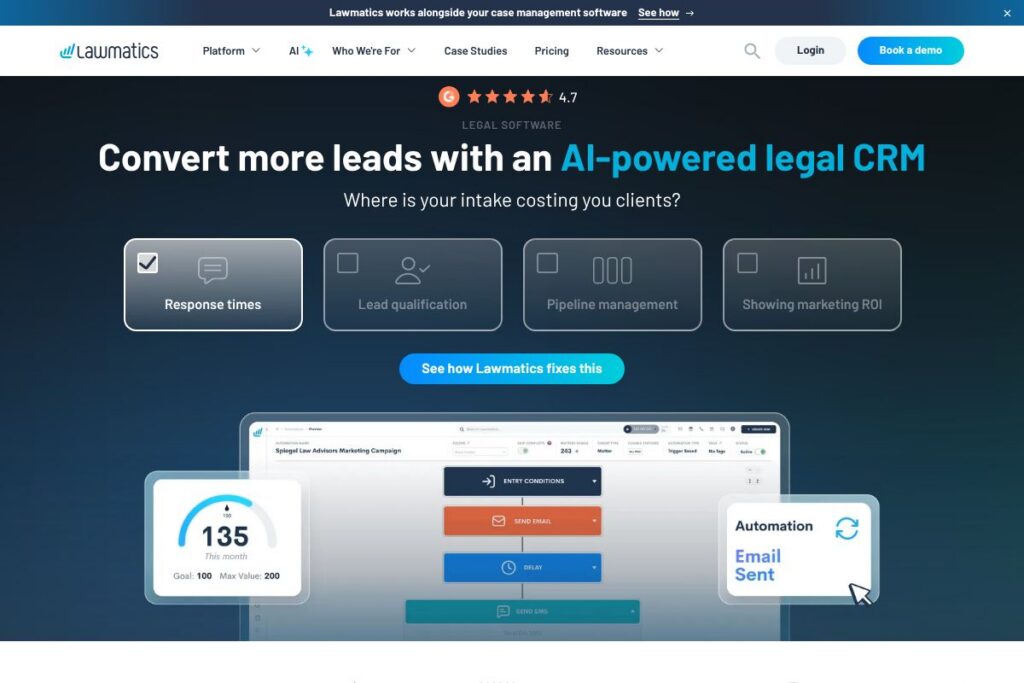
Lawmatics is a SaaS platform focused on client intake, legal CRM, and lifecycle automation for law firms of varied sizes. It combines intake forms, automated follow-ups via email and text messaging, appointment scheduling, e-signature, and reporting into a single timeline-driven interface so teams can move leads from inquiry to retained client with fewer manual steps.
Compared with competitors, Lawmatics sits between practice-management suites and pure CRMs. Compared to Clio, which emphasizes full matter and billing management, Lawmatics concentrates more explicitly on lead intake, conversion workflows, and marketing automation. Versus PracticePanther and MyCase, which balance billing and case management, Lawmatics emphasizes automated intake, client relationship tracking, and marketing analytics that help firms quantify which lead sources generate revenue.
Lawmatics does particularly well at intake-to-signature conversion and marketing-driven reporting, and it is best suited for small to mid-size firms and growth-focused practices that need a single tool to capture leads, automate outreach, and reliably convert prospects into clients. Firms that already require advanced matter accounting or timekeeping may pair Lawmatics with a dedicated practice-management system.
How Lawmatics Works
When a prospective client submits an inquiry, Lawmatics records the lead in a centralized timeline and triggers configurable automations such as immediate text or email follow-up, intake qualification questions, and appointment scheduling. That timeline stores calls, messages, intake forms, and uploaded documents so every team member can see the full context of an inquiry.
Automations can be chained to move leads through stages in a kanban-style pipeline, automatically creating tasks, sending reminders, and generating branded engagement agreements with e-signature when the lead indicates intent to hire. Reporting dashboards and campaign analytics let firms track conversion rates, monitor marketing ROI, and spot drop-offs in the intake funnel so processes can be refined.
Lawmatics’ main Features
Lawmatics bundles intake automation, CRM, scheduling, e-signatures, and marketing tools around a timeline-based client record. Core capabilities include customizable intake forms, automated email and SMS workflows, calendar and appointment management, document generation with e-signature, audience segmentation for targeted campaigns, conflict checking, and reporting dashboards that surface conversion metrics and productivity data.
Intake Forms and Automated Follow-Up
Customizable intake forms allow firms to capture lead details across practice areas and embed forms on websites or landing pages. Submissions trigger immediate, personalized email or text responses and can start drip sequences so no lead goes unattended.
Legal CRM and Timeline
A single timeline aggregates client interactions including calls, emails, files, and intake responses so teams have a unified client view. Segmentation and tagging help sort leads by behavior, stage, or practice area to prioritize outreach and tailor messaging.
Scheduling and Calendar Sync
Clients can self-schedule consultations using integrated booking links that sync with common calendar providers, reducing back-and-forth. Automated confirmations and reminders improve show rates and free staff from manual scheduling tasks.
Document Generation and E-signatures
Generate branded retention agreements and engagement documents automatically from intake data, then send them for electronic signature within the same workflow. This reduces friction between agreement and signature and speeds conversion.
Marketing Automation and Drip Campaigns
Create multi-step email campaigns that nurture leads with relevant content based on tags and behavior. Reporting ties campaign performance back to conversion metrics so firms can optimize spend and messaging.
Conflict Checking and Compliance Features
Built-in conflict checks scan your contact and matter database when a new lead is added to flag potential conflicts early, preserving ethical compliance while keeping intake efficient.
Pipeline and Reporting Dashboards
Kanban-style pipelines visualize intake stages, while custom dashboards surface conversion rates, productivity metrics, and marketing ROI. These views help managers reallocate resources and identify process bottlenecks.
With these capabilities, Lawmatics focuses on reducing manual intake work, improving lead follow-up, and giving firms data to make better marketing and staffing decisions.
Lawmatics pricing
Lawmatics uses a subscription-based SaaS pricing model with tiered plans and enterprise options that scale with firm size and feature needs. Many firms choose between standard subscription tiers for growing practices or custom enterprise agreements for larger organizations requiring advanced integrations and SLAs.
For current pricing and plan comparisons, review the official pricing and plans on Lawmatics’ site or contact their sales team to discuss seat counts, onboarding, and enterprise features. Enterprises typically receive custom quotes that reflect user counts, integration scope, and support requirements.
What is Lawmatics Used For?
Lawmatics is commonly used to automate and manage client intake from initial inquiry through signed engagement. Law firms use it to capture website leads, respond instantly with automated messages, schedule consults, deliver agreements for signature, and maintain a unified client timeline that reduces dropped leads.
Beyond intake, firms rely on Lawmatics for audience segmentation and drip marketing campaigns to nurture prospects and past clients, as well as reporting to measure which marketing channels deliver revenue. The platform is particularly useful for firms that want to increase conversion rates without adding administrative headcount.
Pros and Cons of Lawmatics
Pros
- Comprehensive intake automation: Intake forms, immediate SMS/email follow-up, automated scheduling, and e-signature combine to reduce manual steps and increase conversion. This helps firms respond faster and move leads through a predictable workflow.
- Timeline-driven CRM: A unified timeline for each contact keeps communications and documents in one place, improving handoffs between staff and preserving context during intake and case handoff.
- Marketing and reporting focus: Built-in drip campaigns, audience segmentation, and dashboards surface which sources drive cases so firms can optimize marketing spend and forecast revenue.
- Workflow automation: Rule-based automations create tasks and reminders automatically as leads change stage, keeping teams aligned without manual coordination.
Cons
- Limited matter billing features: If you need deep timekeeping, trust accounting, or billing workflows, Lawmatics is not a full practice-management suite and may require pairing with a billing-focused product. This can introduce integration work to maintain a single source of truth.
- Customization and setup effort: Robust automation and templating require initial configuration and process design; smaller firms without defined intake processes may need time or professional services to get the most value.
- Integration coverage varies: While the platform integrates with common calendar and automation tools, firms with specialized legacy systems may need custom integrations or middleware like Zapier.
Does Lawmatics Offer a Free Trial?
Lawmatics offers demos and trial access for prospective customers. Firms can schedule a product demo and request trial access to test core intake, CRM, scheduling, and e-signature features; contact Lawmatics through their demo request and trial sign-up options on the Lawmatics website.
Lawmatics API and Integrations
Lawmatics provides API access and prebuilt integrations to connect with calendars, scheduling, e-signature flows, and automation platforms so firms can integrate Lawmatics into existing toolchains. Explore the platform’s integration options and developer resources on the Lawmatics site under developer or integrations sections.
Common integrations include calendar sync for Google and Microsoft calendars, automated workflows via platforms like Zapier, video conferencing and meeting links for consults, and connections to practice-management products for matter handoff. For details on endpoints and integration best practices, refer to the Lawmatics developer resources linked from their site.
10 Lawmatics alternatives
Paid alternatives to Lawmatics
- Clio — Practice management platform that includes matter management, billing, and a marketplace of integrations for firms seeking end-to-end case and business operations.
- PracticePanther — All-in-one practice management with billing, calendaring, and client communication tools aimed at small to mid-size firms.
- MyCase — Combines case management, client communication, and billing with client-facing portals for document sharing and messaging.
- Rocket Matter — Practice and billing management software with time and expense tracking plus client intake capabilities.
- Actionstep — Workflow-centric practice management designed for firms that need powerful automation across matters and billing.
- Smokeball — Case management focused on small firms with automated time capture and document automation for high-volume practice areas.
- CosmoLex — Built-in trust accounting and practice management for firms that need integrated billing and compliance.
Open source alternatives to Lawmatics
- SuiteCRM — Open source CRM with extensible modules that can be adapted for legal client tracking and intake workflows.
- Odoo Community — Modular ERP/CRM with community editions that include web forms, CRM pipelines, and email automation which can be configured for legal intake use cases.
- ERPNext — Open source business suite with CRM and document management functionality that can be customized to support intake and client lifecycle processes.
Frequently asked questions about Lawmatics
What is Lawmatics used for?
Lawmatics is used for client intake, CRM, and marketing automation for law firms. It centralizes lead capture, automated follow-up, scheduling, document generation, and reporting to improve conversion rates.
Does Lawmatics integrate with calendars and email?
Yes, Lawmatics integrates with calendar and email systems. It supports calendar sync and appointment booking that work with common calendar providers and email delivery for automated follow-ups.
How much does Lawmatics cost?
Lawmatics uses tiered subscription plans and custom enterprise pricing. For specific plan details and to request a tailored quote, see the official pricing and plans on their site.
Can Lawmatics run conflict checks for new leads?
Yes, Lawmatics includes automated conflict checking. When a new lead is entered, the system scans existing contacts and matters to flag potential conflicts early in the intake workflow.
Is there an API for Lawmatics?
Yes, Lawmatics provides API access and integration options. Developer documentation and integration details are available through Lawmatics’ developer and integrations resources linked from their website.
Final Verdict: Lawmatics
Lawmatics is a focused intake and CRM platform that excels at converting inquiries into consults and signed agreements through automated follow-up, scheduling, and e-signature. Its timeline-centered CRM and reporting make it a strong choice for firms that want visibility into marketing performance and intake efficiency without layering multiple point solutions.
Compared with Clio, which offers a broader suite for matter management and billing, Lawmatics prioritizes intake automation and marketing analytics; Clio typically charges per-user subscription rates for full practice management while Lawmatics offers tiered subscriptions and enterprise pricing geared toward intake and conversion workflows. For firms that prize faster lead conversion and clearer marketing attribution, Lawmatics is a focused option that pairs well with a billing or matter-management system if full accounting features are required.