LawPay: An Overview
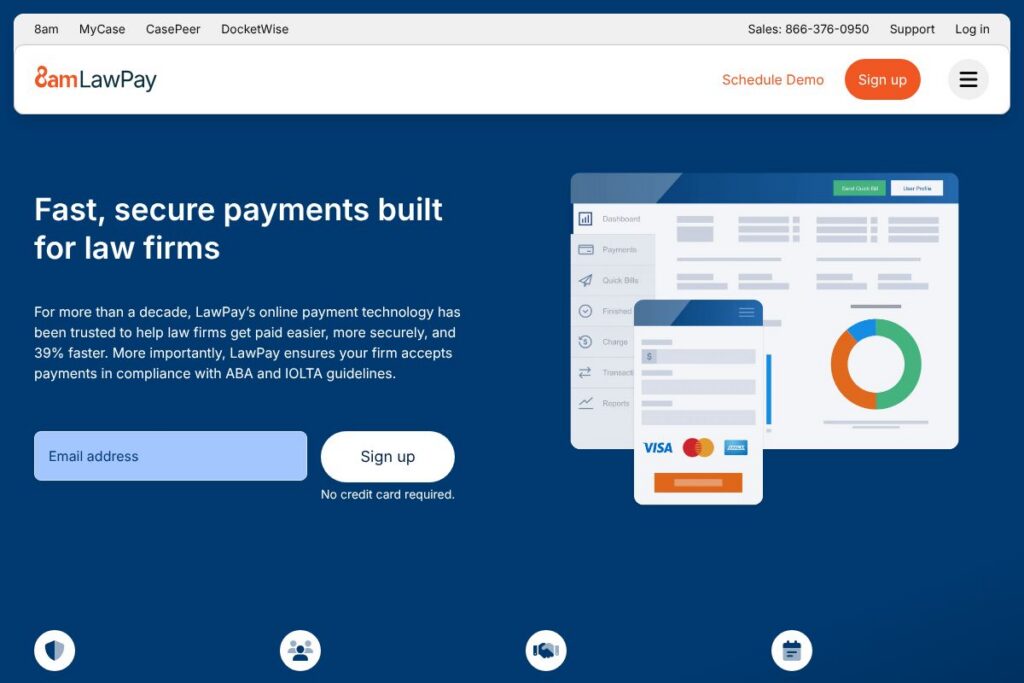
LawPay is a payments platform built specifically for legal practices, focused on processing credit card and electronic check payments while maintaining client trust account compliance. The product bundles payment acceptance, invoicing, and reporting with controls designed to meet ABA and IOLTA rules for handling client funds, and it is offered through state and local bar programs as a recommended solution. See the LawPay homepage for an overview of capabilities and bar program availability.
Compared with general-purpose processors, LawPay emphasizes ethical compliance and legal-industry controls. For example, Clio combines practice management and payments as one package, which can be attractive to firms that want a single vendor for matter, billing, and payment workflows. QuickBooks Payments and Stripe provide flexible payment rails and pricing for many industries but require additional configuration or bookkeeping controls to meet trust accounting standards. MyCase and CosmoLex also include payment options inside broader practice-management suites, positioning them as direct competitors when firms prefer bundled systems.
All of this makes LawPay well suited to firms that need payment acceptance tightly aligned with trust accounting rules, and to firms that prefer a payments-first vendor which integrates with multiple practice management systems. LawPay performs particularly well for small to mid-size firms, solo practitioners, and bar association programs that require vetted payment providers.
How LawPay Works
LawPay connects to a law firm’s billing process, allowing invoices to include secure payment links that accept credit cards or eChecks from clients. Firms can send payment requests by email, embed payment links on invoices, or use virtual terminals and mobile card entry for in-person or remote collections.
Transactions route through LawPay’s compliance-aware processing layer which separates earned funds from trust funds and adds configurable safeguards to prevent improper deposits. Integration with case and billing systems keeps payment and matter records synchronized, so collected fees appear against the correct client ledgers and trust balances when applicable.
The platform also supports administrative workflows like refunds, recurring billing, and payment reconciliation; many firms connect LawPay to practice management systems to reduce manual posting and to speed collections. For integration details, consult the LawPay partners and integrations listing.
LawPay features
LawPay focuses on secure, compliance‑aware payment acceptance and reconciliation for legal practices. Core capabilities include card and eCheck processing, trust‑account safeguards, invoicing and payment links, integrations with major practice management systems, and reporting tools that make trust accounting and firm financial tracking easier to manage.
The platform includes several powerful capabilities worth highlighting:
Trust-account compliance
Built-in safeguards are designed to help firms accept client funds in ways that align with ABA and IOLTA guidance. These controls include segregation of trust and operating transactions and configurable workflows to reduce the risk of misapplied funds, which benefits firms that must adhere to strict ethical rules.
Card payments and eChecks
Support for major card brands and ACH/eCheck enables firms to accept the payment methods clients prefer. Offering both card and eCheck improves collection flexibility and can reduce friction for clients paying retainers, invoices, or court fees.
Invoicing and payment links
Create and send invoices with embedded secure payment links so clients can pay online without manual entry. That reduces time spent on collections and gives clients a self-serve option to settle bills promptly.
Integrations with practice management systems
Native integrations connect LawPay to widely used legal practice management systems, allowing payment events to post automatically to matters and ledgers. That reduces duplicate data entry and improves accuracy in billing and trust accounting reconciliation.
Reporting and reconciliation
Financial dashboards and transaction reports provide visibility into trust balances, firm revenue, and collections activity. These reports support month‑end reconciliation and help firms monitor cash flow without relying on spreadsheets.
Security and compliance
LawPay uses PCI-compliant processing and data protection practices designed for payment security in regulated environments. Security controls combined with audit trails support the documentation many firms need for compliance reviews.
Bar programs and vetted status
LawPay is offered through numerous state and local bar programs and is recommended in many legal circles, which simplifies procurement for firms that require vendor vetting or bar-endorsed providers. Check LawPay’s information on bar programs via the LawPay bar programs overview.
Pay Later and specialty payment options
Optional services such as financing or virtual card solutions are available to address specific payment needs, for example helping firms accept virtual card payments for government filing fees. Features like these help firms accommodate client preferences and agency requirements.
With these features, LawPay aims to reduce time spent on billing and collections while keeping payments compliant with legal trust standards. The biggest benefit is the combination of payment acceptance and trust accounting controls that address a common pain point for law firms.
LawPay pricing
LawPay uses a fee-based pricing approach centered on transaction processing and optional account services rather than a single public, per-user subscription tier. Pricing typically depends on payment method, transaction volume, and the services a firm needs, and exact rates are provided during account setup.
For current rates and plan options tailored to your firm, review the LawPay homepage and reach out via the LawPay contact page to discuss pricing and any bar-program pricing that may apply to your organization.
What is LawPay Used For?
LawPay is used primarily to accept client payments while maintaining ethical handling of client funds. Common uses include collecting retainers, paying invoices online, processing eChecks for lower-cost transfers, and accepting credit card payments for earned fees.
Firms also use LawPay to simplify trust accounting and reconciliation, since payment events can be mapped back to matters and client ledgers. It is a common choice for immigration attorneys facing virtual card requirements for agency fees, solo practitioners who need easy online payments, and mid-size firms that want a payments solution endorsed by bar programs.
Pros and Cons of LawPay
Pros
- Trust-focused compliance: Built-in safeguards and workflows help firms follow ABA and IOLTA requirements when accepting client funds, reducing manual trust-account controls.
- Legal-industry integrations: Works with many practice management systems so payments, invoices, and matter records remain synchronized to reduce bookkeeping overhead.
- Bar program availability: Offered through state and local bar programs and recommended by many legal organizations, which simplifies adoption for firms that prefer vetted vendors.
- Multiple payment methods: Accepts credit cards and eChecks, and supports virtual card workflows that solve specific use cases like government filing fees.
Cons
- Fee-based costs: Transaction fees apply, and total processing costs depend on payment mix and volume; firms should compare rates and fee structures to alternatives.
- Not a full practice management suite: Firms seeking an all-in-one practice management and payments bundle may prefer vendors that package payments with case management rather than a payments-first provider.
- Potential setup complexity for large firms: Enterprise deployments with many trust accounts or complex client workflows may require more onboarding and configuration.
Does LawPay Offer a Free Trial?
LawPay is a paid service and does not offer a permanent free plan; trial or demo access varies and is typically provided through direct demos with sales. You can request a demo or discuss trial availability by contacting LawPay through the LawPay contact page or by visiting the LawPay homepage.
LawPay API and Integrations
LawPay provides integrations with major legal practice management systems and payment tools to keep invoices, matters, and payments in sync. For a list of supported partners and integration details, see the LawPay partners and integrations page.
For firms that need developer-level connections, LawPay offers APIs and developer resources to automate payment capture and reconciliation; contact sales or the support team for access to API documentation and sandbox environments.
10 LawPay alternatives
Paid alternatives to LawPay
- Clio — A legal practice management platform with integrated payments via Clio Payments, combining matter management, billing, and payments in one product.
- MyCase — Practice management with built-in payment acceptance and client portal features for invoicing and collections.
- CosmoLex — Legal practice management with integrated trust accounting and payments, aimed at replacing separate accounting systems.
- QuickBooks Payments — Payment processing tightly integrated with QuickBooks accounting workflows, useful for firms already using QuickBooks.
- Stripe — A general-purpose payment processor with extensive developer tools and customizable flows that firms can adapt to legal workflows.
- Square — Simple card-present and online payment tools, useful for firms that need mobile or in-person card acceptance in addition to online invoicing.
- PayPal — Widely used online payments tool with invoicing and client payment links, suitable for smaller firms seeking simple online collection.
Open source alternatives to LawPay
- Kill Bill — An open-source billing and payment orchestration platform for organizations that need a highly customizable billing engine and control over payment flows.
- ERPNext — Open-source ERP and accounting software that includes invoicing and payment integrations; requires configuration for trust-account workflows.
- Odoo (Community) — An open-source suite with invoicing, accounting, and payment modules that can be extended to handle legal billing requirements.
- InvoicePlane — Open-source invoicing software for firms that want a simple, self-hosted invoice-and-payment collection solution.
Frequently asked questions about LawPay
What is LawPay used for?
LawPay is used to accept client payments and manage trust-account compliance. Firms use it to collect retainers, process invoices, and reconcile payments while applying controls for ABA and IOLTA rules.
Does LawPay integrate with Clio?
Yes, LawPay integrates with several practice management systems including Clio. Integrations allow payments to post to matters and client ledgers to reduce manual bookkeeping.
How does LawPay handle trust account compliance?
LawPay includes built-in safeguards to segregate trust and operating transactions and to support trust-account reconciliation. Those controls are designed to help firms adhere to ABA and IOLTA guidance when accepting client funds.
How much does LawPay cost?
LawPay uses a fee-based pricing model with transaction fees and account-specific setup options. Exact rates depend on payment types, volume, and services requested; contact LawPay via the LawPay contact page for a customized quote.
Does LawPay support eCheck and virtual card payments?
Yes, LawPay supports eCheck (ACH) payments and virtual card workflows in addition to traditional credit card processing. These payment methods can lower transaction costs or fulfill specific payer requirements, such as certain government filing fee processes.
Final verdict: LawPay
LawPay excels at combining payments processing with legal-industry compliance controls, making it a practical choice for firms that need to protect client funds while reducing time spent on collections. Its strengths lie in trust-account safeguards, bar program availability, and integrations that keep payments and matters aligned, which together reduce reconciliation work and ethical risk.
Compared with Clio, which bundles practice management with payments, LawPay focuses more narrowly on payment processing and compliance. Clio also provides an integrated platform at a starting price often quoted around $39/user/month for core practice management tiers, while LawPay’s cost model focuses on transaction fees and account services rather than a per-user subscription. Firms that prioritize a single-vendor practice-management suite may prefer Clio, while firms that want a payments-first solution with deep trust-account controls and broad partner integrations typically choose LawPay.
Overall, LawPay is a strong choice for legal practices that require payment acceptance aligned with trust accounting and ethical rules, and for firms that want a vetted payments provider recommended by bar programs. For pricing specifics, demo requests, and integration details, visit the LawPay homepage or contact their sales team via the LawPay contact page.