What is LogRocket
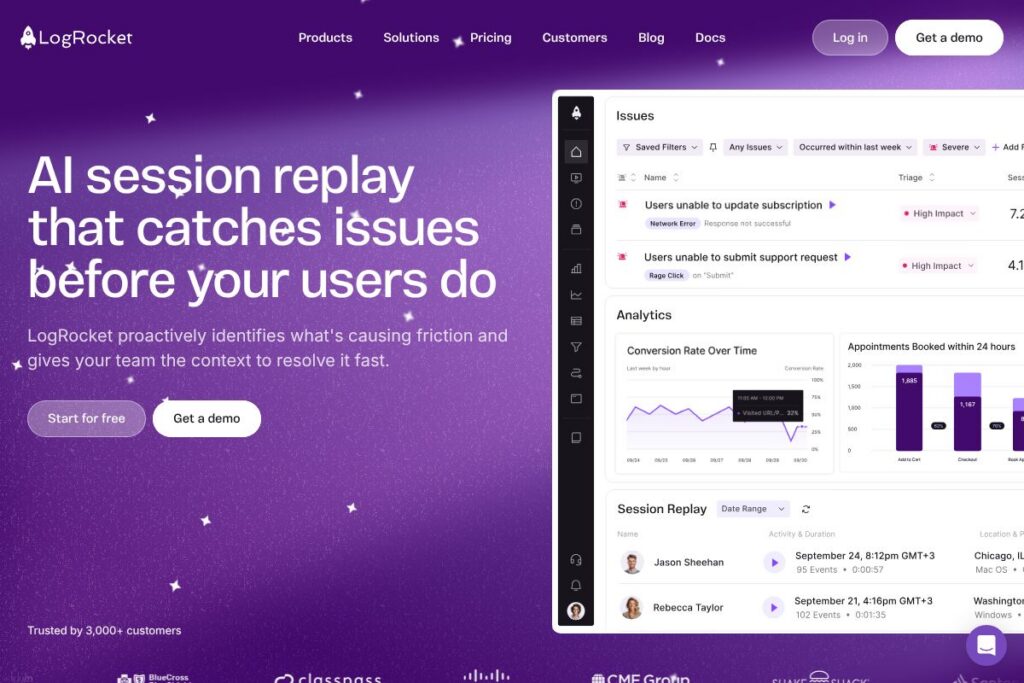
LogRocket is a front-end observability and product analytics platform that records deterministic session replays, captures telemetry, and combines that data with analytics and error reporting to help teams reproduce and fix issues faster. It collects DOM playback, console and network logs, performance metrics, and user events so engineers and product managers can move from symptom to root cause without asking users for screenshots or long bug reports.
Compared to FullStory, LogRocket places a stronger emphasis on developer-focused telemetry such as console logs, network traces, and frontend performance monitoring in addition to session replay. Against Sentry, LogRocket adds a rich visual replay and product-analytics layer on top of error tracking, making it easier to see the user-facing context around crashes and exceptions. Versus Hotjar, LogRocket targets engineering and product teams that need deeper debugging signals rather than only heatmaps and simple feedback tools.
LogRocket excels where session replay, performance telemetry, and error context need to be linked to product analytics and prioritized using AI. It is best suited for engineering, QA, and product teams that need deterministic reproductions of bugs, prioritize UX regressions, and want to reduce time-to-fix for customer-impacting issues.
How LogRocket Works
LogRocket integrates a small SDK into web or mobile front ends that captures user interactions, DOM mutations, console output, network requests, and performance telemetry. Data is recorded and indexed so teams can search sessions, replay exact user flows, and jump from an analytics segment or error event straight into a session that shows what the user experienced.
Typical workflows combine product analytics funnels and path analysis with session replays to validate hypotheses, and use AI-surfaced issues to triage which errors or UX problems deserve immediate attention. Teams often link sessions to issue trackers and collaboration tools as part of their incident debugging and retrospective workflows.
LogRocket features
LogRocket organizes capabilities around session replay, product analytics, AI-assisted issue detection, error tracking, and frontend performance monitoring. Recent product direction emphasizes AI-driven insights that surface high-impact issues and connect quantitative funnels to qualitative session evidence.
Session Replay
Session replay captures a deterministic playback of user interactions including DOM changes, mouse and keyboard input, and route transitions. Replays include console logs, network requests, and error traces so engineers can see both what the user saw and the underlying runtime signals that accompanied it.
Product Analytics
Product analytics offers funnel creation, path analysis, and time series to measure conversions and behavioral trends across user segments. You can drill from aggregated charts into individual sessions to validate why users drop off or succeed in a flow.
Issues (AI-assisted)
AI proactively analyzes captured data to surface technical and UX problems that have measurable business impact. The system highlights high-impact regressions and groups related sessions so teams focus on the most relevant areas of the app.
Error Tracking
Error tracking aggregates the most frequent exceptions, network failures, and crashes affecting users and links them to session context. Error records include stack traces, user metadata, and the exact replay that reproduces the fault for faster debugging.
Frontend Performance Monitoring
Performance monitoring correlates frontend metrics like load time, long tasks, and resource timings with user behavior and conversion outcomes. Dashboards and charts let teams observe performance trends and drill into sessions where slowdowns affected user experience.
UX Analytics
UX analytics combines qualitative replays with quantitative metrics to show how users experience flows at both the individual and cohort level. This combined view helps product teams identify design issues, prioritize fixes, and measure the impact of changes over time.
SDKs and Installation
LogRocket provides SDKs and a script-based installer that work across major frameworks and languages so you can get recording data in minutes. The SDKs capture events automatically and offer configuration options for sampling, privacy controls, and selective recording.
With these features combined, LogRocket helps teams reduce time-to-diagnosis by linking observable user behavior, errors, and performance telemetry to prioritized insights.
LogRocket pricing
LogRocket uses a subscription-based, enterprise-focused pricing model with tiers tailored to project scale, retention, and required features. Public, itemized plan prices are not exposed on a dedicated pricing page; instead, LogRocket provides tailored plans and usage-based options to match different business needs.
Plan categories
Individual and Small Team options: LogRocket typically offers entry-level plans aimed at single projects or small teams with basic session replay and analytics, with limits on monthly sessions and data retention. For exact availability and limits, view LogRocket’s subscription options in their pricing overview linked below.
Team and Enterprise: Larger teams can choose plans with extended retention, advanced performance monitoring, AI issue detection, and priority support. Enterprise agreements include custom SLAs, single sign-on, and dedicated onboarding for organizations with complex compliance requirements.
For specific plan details and current offerings, consult the LogRocket pricing and plans information on their site or contact sales for a quote and tailored options.
What is LogRocket Used For?
Engineering teams use LogRocket to reproduce bugs reliably by inspecting session replays alongside console and network traces, cutting the back-and-forth normally required to root-cause front-end issues. Product and UX teams use it to validate funnel hypotheses, analyze drop-offs, and see exactly where users encounter friction in flows.
LogRocket is also used for performance monitoring and incident triage, where correlating frontend telemetry and user behavior helps prioritize work. Organizations adopt it when they need a single source that links analytics, errors, and qualitative evidence for faster decision making.
Pros and cons of LogRocket
Pros
- Comprehensive session context: Logs, network traces, and DOM replays are captured together so teams can reproduce problems without needing extra user input. This saves time during debugging and reduces ambiguity between product and engineering.
- Integrated analytics and replay: Funnels and path analysis can be drilled down into actual sessions, which helps validate why behavioral patterns occur and prioritize fixes based on user impact. Teams can move from aggregated metrics to individual evidence in a few clicks.
- AI-assisted issue detection: AI surfaces high-impact regressions and noisy groups, helping teams focus on real business impact rather than sifting through low-value alerts. This improves signal-to-noise in incident response.
Cons
- Data volume and cost considerations: Capturing detailed replays and telemetry generates significant data; managing sampling and retention is important to control usage and costs. Organizations must plan recording policies to avoid unexpected bill increases.
- Privacy and compliance setup required: Detailed session captures may include sensitive data, so teams need to use built-in masking and privacy controls and align configurations with internal policies. Additional governance is required for regulated industries.
- Learning curve for advanced features: Getting full value from product analytics, performance monitoring, and AI issue triaging requires configuration and integration with existing workflows; smaller teams may need time to adopt best practices.
Does LogRocket Offer a Free Trial?
LogRocket offers a free plan and a free trial so teams can evaluate session replay, product analytics, and error tracking before committing to paid options. The free tier provides basic recording capabilities suitable for small projects, while the trial unlocks broader feature access for evaluation; check the LogRocket documentation for details on limits and trial specifics.
LogRocket API and Integrations
LogRocket provides SDKs and a developer API for capturing and annotating session data, plus a comprehensive set of integrations for common engineering and collaboration tools. The LogRocket SDK documentation outlines available SDKs, configuration options, and API endpoints for session, user, and event management.
Key integrations include issue trackers, alerting, and analytics platforms so you can forward errors and link sessions to tools like Jira, Slack, Segment, and observability platforms for end-to-end debugging. Review LogRocket’s integrations list on their site for connectors relevant to your stack.
10 LogRocket alternatives
Paid alternatives to LogRocket
- FullStory — Session replay and behavioral analytics focused on product insights and customer experience, with strong search and segmentation capabilities.
- Sentry — Error and performance monitoring with deep error aggregation, stack traces, and developer workflows focused on crash and exception resolution.
- Hotjar — User feedback, heatmaps, and session recordings geared toward qualitative UX research and conversion optimization.
- New Relic Browser — Frontend performance monitoring that ties browser metrics to broader application observability and infrastructure telemetry.
- Mixpanel — Product analytics platform specialized in event-based funnels, cohort analysis, and experimentation for product-led teams.
- Datadog RUM — Real user monitoring combined with logs and traces to provide full-stack visibility into performance and user impact.
- AppDynamics — Application performance monitoring with end-to-end transaction tracing and business transaction analysis for larger enterprise environments.
Open source alternatives to LogRocket
- OpenReplay — An open source session replay platform that captures user interactions and provides replay and developer tooling without vendor lock-in. It can be self-hosted to control data and retention.
- PostHog — Event and product analytics with optional session recording and self-hosting capability for teams that want full data ownership and extensibility. It combines analytics, feature flags, and experimentation.
- rrweb — A lightweight recording library that captures DOM changes for building custom replay solutions, useful for teams that want to integrate replay into bespoke tools.
Frequently asked questions about LogRocket
What types of applications does LogRocket support?
LogRocket supports web and mobile front ends through SDKs and script-based installers that work with major frameworks and languages. The SDKs capture events, DOM changes, and telemetry for both single-page and multi-page applications.
Does LogRocket provide session replay and analytics in one product?
Yes, LogRocket combines session replay with product analytics and error tracking so teams can move from aggregated funnels and path analysis down to individual session replays and associated runtime logs.
Can LogRocket help reduce time-to-fix for front-end bugs?
Yes, LogRocket reduces diagnostic time by linking console logs, network traces, and performance telemetry directly to session replays, allowing engineers to reproduce and resolve issues faster.
Is there an API for exporting LogRocket data?
LogRocket provides SDKs and API endpoints for accessing session metadata and annotations; see the LogRocket SDK documentation for developer details and export options.
Does LogRocket integrate with error tracking and collaboration tools?
Yes, LogRocket integrates with common tools such as issue trackers, communication platforms, analytics providers, and observability tools to fit into existing developer workflows. Check LogRocket’s integrations page for specific connectors.
Final verdict: LogRocket
LogRocket is a practical choice for teams that need deterministic session replays combined with error and performance telemetry so debugging and product analysis happen from the same dataset. Its strength is in connecting quantitative analytics with qualitative session evidence and surfacing high-impact issues with AI, which reduces the time teams spend reproducing and validating bugs.
Compared to FullStory, which emphasizes behavioral analytics and product insights, LogRocket adds deeper developer signals such as console and network logs plus frontend performance metrics at parity in functionality. Pricing tends to follow an enterprise-oriented, usage-based model, so evaluate both solutions with your expected session volume and retention needs when comparing cost and coverage.
Overall, LogRocket is well suited for engineering and product teams that require high-fidelity replays, integrated error context, and performance telemetry to speed up troubleshooting and improve user experience. For detailed plan options and to discuss enterprise requirements, review LogRocket’s subscription information on their site or contact their sales team via the LogRocket pricing and plans page.