What is MyCase
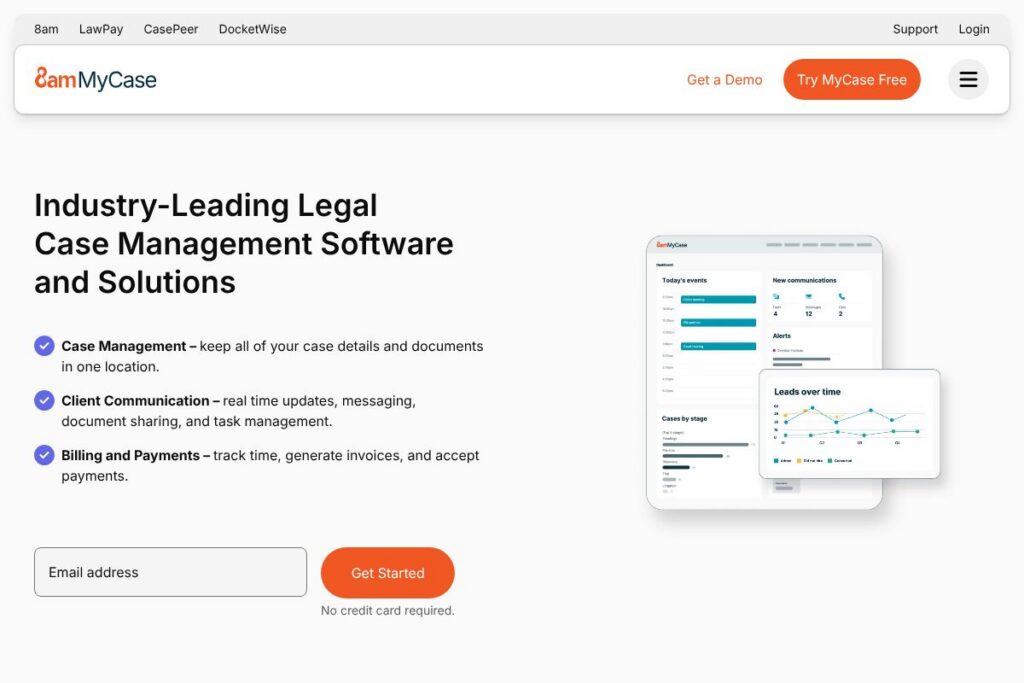
MyCase is a web-based legal practice management platform that centralizes case information, client communication, calendaring, document management, timekeeping, and billing into a single system. It is aimed at solo attorneys and small to mid-sized law firms that need an all-in-one solution to manage intake through invoicing while giving clients a secure portal for collaboration.
Compared with competitors, MyCase emphasizes an integrated client portal and built-in billing: Clio focuses on an extensive third-party app ecosystem and marketplace integrations, PracticePanther favors streamlined automation and templates for high-volume firms, and Rocket Matter emphasizes timekeeping and billing features for firms tracking complex hourly work. Those differences make MyCase appealing to practices that want a unified, client-facing workflow with less reliance on external add-ons.
All of this makes MyCase especially useful for firms that need simple onboarding, secure client communication, and consolidated financial reporting. It works well for general practice, family law, immigration, personal injury, and small business law firms that want to reduce tool switching while keeping client-facing workflows centralized.
How MyCase Works
MyCase organizes work around matters and clients. Users create a matter, attach contacts and documents, assign tasks, and track time at the matter level so billing and case files stay connected. The secure client portal gives clients access to documents, messages, invoices, and calendar events from a single place, reducing call volume and scattered email trails.
Intake and lead tracking typically start with a web intake form that creates a new contact and matter automatically. Time entries and expenses are captured by staff or attorneys, then rolled into invoices that can be delivered through the client portal and paid online. Firms use built-in reports to monitor receivables, productivity, and case status, and integrate accounting or payment processors as needed to reconcile collections.
What does MyCase do?
MyCase groups client, matter, calendar, document, billing, and communication tools into a single platform so firms can manage cases from intake through closure without stitching multiple apps together. Recent additions emphasize client messaging, online payments, and intake automation to reduce administrative steps.
The platform includes several powerful capabilities:
Case management
Matter records store contacts, case notes, deadlines, custom fields, and related documents so the entire matter history is searchable. This reduces lost emails and ensures all matter-relevant items are visible to authorized staff.
Client portal and messaging
The secure client portal supports document sharing, two-way messaging, invoices, and online payments in a single client-facing view. That keeps client communication centralized and auditable while improving response times.
Billing and payments
Time, flat fees, and expenses are combined into invoices that can be sent electronically and paid through integrated processors. Built-in billing tools also support retainer management, trust accounting workflows, and automated invoice reminders.
Time entry and expense tracking
Time entries can be created via timers or manual input and tagged to matters, tasks, and billing codes for accurate invoicing. Expense capture and categorization feed directly into matter costs and financial reports.
Document management and automation
Document storage, versioning, and template-based document generation reduce duplication and accelerate drafting. Documents can be assembled from templates, shared with clients securely, and tracked for signatures.
Intake and lead management
Customizable web intake forms capture prospective client data and convert leads into matters with automated workflows for retainer generation and e-signature. This provides a 360-degree view of the pipeline from first contact to signed engagement.
Calendaring and task management
A unified calendar shows court dates, deadlines, and internal tasks with reminders and text notifications for events. Users can assign tasks with due dates and track completion across the firm.
Reporting and analytics
Financial and operational reports provide insight into receivables, lawyer productivity, caseload distribution, and billing performance to inform business decisions. These reports help firms identify bottlenecks and track collections efficiency.
Security and compliance
MyCase applies industry-standard security controls to protect client data and support regulatory requirements for legal practices. This includes encrypted storage, role-based access controls, and audit logging to maintain client confidentiality.
With these capabilities MyCase reduces administrative overhead and provides a single place for case lifecycle management, client communications, and billing operations.
MyCase pricing
MyCase uses a subscription SaaS pricing model with plans tailored to firm size and feature needs; detailed plan pricing is not published in a dedicated pricing document. For current options, plan tiers, and discounts contact MyCase sales or view the available plan details on the MyCase website via the MyCase pricing and plans page.
What is MyCase Used For?
MyCase is commonly used for managing client intake, maintaining matter documentation, tracking time and expenses, and sending invoices with online payment options. Firms use it to move away from dispersed spreadsheets and email threads toward a single source of truth for each matter.
Attorney and staff workflows that benefit most include intake automation, client communication via a secure portal, end-to-end billing and trust accounting, and centralized calendaring for deadlines. It is particularly useful for small to mid-sized firms that need a straightforward, integrated practice management system without assembling many third-party tools.
Pros and Cons of MyCase
Pros
- Integrated client portal: The client portal consolidates messages, documents, invoices, and payments, reducing email back-and-forth and improving client transparency. This tends to reduce administrative load and improves client satisfaction.
- All-in-one billing and payments: Time tracking, invoicing, trust accounting, and online payments are available without separate accounting platforms, simplifying back-office workflows and reconciliation.
- Intake and lead tracking: Custom web intake forms and lead pipelines let firms convert prospects into matters quickly and measure intake performance across channels.
- User-friendly onboarding: Built-in migration and training resources streamline setup for small firms and solo practitioners, lowering the barrier to adoption.
Cons
- Limited deep integrations compared to some competitors: Larger firms that rely on a wide marketplace of third-party apps may find MyCase’s native integration catalog less extensive than competitors with more expansive app marketplaces. This can require custom integration work for specialized needs.
- Enterprise-level customization constraints: Very large practices with complex, multi-office deployments may need custom features or integrations that require additional professional services or third-party tools.
- Reporting depth: While reporting covers common financial and operational needs, firms with advanced BI requirements may need to export data into external analytics platforms for deeper analysis.
Does MyCase Offer a Free Trial?
MyCase offers a free trial so firms can test core features including matter management, the client portal, time tracking, and invoicing; trial sign-up and details are available through MyCase’s trial sign-up resources.
MyCase API and Integrations
MyCase provides integration options with common law-firm tools and payment processors and supports developer access for custom workflows. Key integrations typically include payment processors such as LawPay, accounting tools like QuickBooks, calendar sync with Google Workspace and Microsoft 365, and automation through connector services; explore MyCase integrations for specific partner details on the MyCase integrations page.
If custom automation is required, MyCase also exposes developer endpoints and documentation for programmatic access to matters, contacts, and billing records; see the MyCase API documentation for developer guides and available endpoints.
10 MyCase alternatives
Paid alternatives to MyCase
- Clio — Cloud-based practice management with an extensive app marketplace and strong ecosystem for third-party integrations suitable for growing firms.
- PracticePanther — Automation-focused practice management with templates and workflow automation for high-volume firms and intake-heavy practices.
- Rocket Matter — Timekeeping and billing-centered platform with robust invoice and trust accounting features for hourly billing practices.
- CosmoLex — Combines practice management with built-in legal accounting to avoid separate accounting software for small firms.
- Smokeball — Document automation and practice-specific productivity tools tailored for small firms handling high volumes of documents.
- Zola Suite — Email-centric practice management with built-in CRM and strong financial reporting for firms that need integrated accounting workflows.
- LegalFiles — Matter and document management geared toward mid-size organizations that require matter-based collaboration and record-keeping.
Open source alternatives to MyCase
- Casebox — Open source case and document management that can be self-hosted and customized for firm-specific workflows and data control.
- OpenLaw — Project focused on legal automation and templates that can be extended for document-driven legal workflows and contracts.
- Nextcloud — General-purpose open source file sync and collaboration platform often used by law firms for secure document storage and sharing when paired with case management add-ons.
Frequently asked questions about MyCase
What is MyCase used for?
MyCase is used for end-to-end practice management including intake, matter management, client communication, billing, and reporting. Firms rely on it to keep case files, invoices, and client communications consolidated in one system.
Does MyCase integrate with accounting software like QuickBooks?
Yes, MyCase supports integrations with common accounting tools such as QuickBooks and with payment processors like LawPay. These integrations help reconcile payments and streamline financial workflows.
Can MyCase handle trust accounting and retainers?
MyCase includes tools for managing retainers and trust accounting workflows. Firms can track retainer funds, apply them to invoices, and generate reports for compliance.
Does MyCase provide a mobile app for attorneys?
Yes, MyCase offers mobile apps so attorneys and staff can access matters, track time, and communicate with clients while away from the office. Mobile access helps maintain responsiveness and billable time capture on the go.
How much does MyCase cost?
MyCase uses subscription plans tailored to firm size and needs rather than a single public price list. For detailed plan comparisons and current pricing options, view MyCase’s plan information or contact their sales team through the MyCase pricing and plans page.
Final Verdict: MyCase
MyCase is a capable, lawyer-focused practice management platform that bundles matter management, client communication, billing, and intake into a single product. It does particularly well at providing a secure client portal and integrated billing workflows that reduce cross-system handoffs and make client communication auditable and trackable.
Compared with Clio, which emphasizes a large third-party marketplace and a well-documented per-user pricing structure, MyCase tends to favor a more consolidated, client-facing workflow with built-in payments and intake features. Firms that prioritize a unified client experience and simplified billing will find MyCase a pragmatic choice, while firms that require an extensive third-party ecosystem or heavy customization may evaluate Clio or other alternatives for broader integration options.