Piazza: An Overview
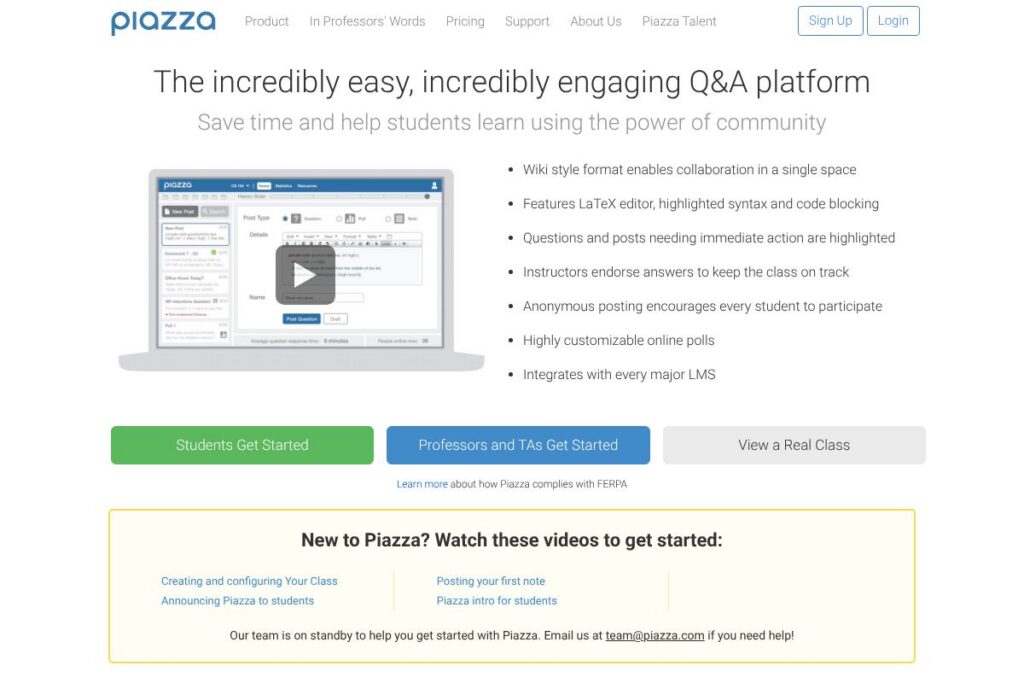
Piazza is a dedicated class discussion and Q&A platform where students can ask questions, other students can answer, and instructors or TAs can endorse or expand answers. The interface organizes posts into threads with the option for anonymous student posts, instructor endorsements, and a collaborative answer area that surfaces the most useful responses for the class.
Compared with broader learning management systems, Piazza focuses on threaded, searchable Q&A rather than course content delivery. Compared with Canvas, which is a full LMS that includes grading, assignments, and modules, Piazza concentrates on discussion and question resolution. Compared with team chat tools like Slack, Piazza provides a structured question-and-answer flow and instructor moderation features that are better suited for academic courses.
Piazza is particularly effective for large classes, STEM courses with technical questions, and any setting where students benefit from collective answers vetted by instructors. Its design encourages peer-to-peer help while keeping instructors in control of accuracy and tone.
How Piazza Works
Students post questions to a course space and other students or instructors reply inside the same thread; answers can be combined, edited, and endorsed so the best response is easy to find. Threads are searchable and taggable, letting instructors organize material by topic, lecture, or assignment.
Instructors and TAs can post official answers, endorse student replies, create polls, and pin important threads as announcements. Courses can be connected to campus rosters and single sign-on systems so class membership and permissions sync with institutional systems.
Typical workflows include: instructors posting a weekly FAQ and using endorsements to mark the authoritative answer, TAs triaging incoming questions during office hours, and students searching past threads before asking a duplicate question. Piazza integrates these activities into a single course feed so classroom discussion stays centralized and archived.
Piazza features
Piazza is built around structured Q&A, instructor endorsement, anonymous posting, and class-wide knowledge building. Core capabilities include threaded Q&A, collaborative answers that merge contributions, instructor endorsement, file and image attachments, LaTeX support for technical notation, and LMS integrations for roster and single sign-on.
The platform includes several powerful capabilities worth highlighting:
Threaded Q&A
Students submit questions that become threads; replies appear underneath and can be expanded or collapsed for focused reading. Threaded Q&A keeps follow-ups and clarifications grouped so context is preserved and search returns complete conversations.
Collaborative Answers
Multiple contributors can add to one consolidated answer so the class converges on a single, high-quality response rather than several fragmented replies. This reduces duplication and produces a clearer canonical answer for future reference.
Instructor Endorsement and Moderation
Instructors and TAs can endorse answers, correct content, and convert useful threads into class resources. Endorsement signals authoritative information and helps students identify vetted responses quickly.
Anonymous Posting
Students can opt to post anonymously to lower barriers when asking sensitive or confidence-sensitive questions. Instructors still see the poster identity for moderation and record keeping while the class sees an anonymous label.
LaTeX and Code Support
Built-in LaTeX rendering and code block support let STEM classes display equations and code snippets natively, which makes technical Q&A readable without external tooling. That feature helps students share precise formulas and debugging examples.
Attachments and File Sharing
Users can attach images, PDFs, and other files to threads so examples, screenshots, and assignment artifacts can be shared within the question context. Attachments make it easier for responders to diagnose problems and provide accurate guidance.
With these capabilities, Piazza helps courses capture institutional knowledge, reduce repeated questions, and keep instructor guidance visible. The biggest benefit is a centralized, searchable Q&A record that reduces redundant work for instructors and accelerates student answers.
How Piazza Works
Instructors create a course space and invite students via roster sync or enrollment links; students log in, browse existing threads, search the archive, and post new questions when needed. The platform timestamps activity, tracks endorsements, and allows sorting by popularity or recency.
Course teams typically use Piazza during lectures to collect follow-up questions, during labs for debugging help, and between classes for assignment clarifications. Professors can export participation data for grading or identify recurring misconceptions to address in class.
What is Piazza Used For?
Piazza is commonly used for class Q&A, community-sourced study help, and instructor-moderated discussion. It is especially helpful in large lecture courses where face-to-face office hours cannot scale to all student needs.
Course staff use Piazza to publish announcements, gather questions before class, and circulate model solutions while preserving student authorship. It is also used as a collaborative FAQ where common problems and their solutions are retained for future cohorts.
Pros and cons of Piazza
Pros
- Centralized course Q&A: Students and instructors keep questions and answers in one searchable place, reducing repeated queries and preserving helpful responses for later use.
- Instructor moderation and endorsement: Instructors can correct, endorse, and synthesize answers so students can quickly find accurate information and TAs can coordinate responses.
- Support for technical content: Native LaTeX and code blocks make Piazza well suited to STEM courses that require equations, code snippets, or formatted technical content.
- Anonymous posting option: Students who hesitate to post publicly can ask anonymously, which can increase participation and surface questions that might otherwise go unasked.
Cons
- Limited course management features: Piazza focuses on discussion and Q&A rather than full course administration, so it is not a substitute for an LMS that handles grading and assignment workflows.
- Variable student adoption: The platform relies on student participation; if a class does not adopt it widely, threads can remain unanswered or sparse compared with high-use courses.
- Institutional provisioning needed for campus features: LMS integration, roster sync, and institution-level analytics typically require administrative setup and coordination with campus IT.
Does Piazza Have a Free Version?
Piazza offers a free version for instructors and students to use in individual courses. The free course-level offering supports threaded Q&A, endorsements, attachments, and basic LMS integration; institutions can contact Piazza for enterprise options and enhanced support. Check the Piazza homepage for current availability and administrative offerings.
Piazza API and Integrations
Piazza supports integrations with learning management systems for roster sync, single sign-on, and course provisioning; common integrations include Canvas, Blackboard, and Moodle through standard LMS connector tools. Technical and deployment details are covered in the Piazza support center which outlines setup for institutional IT teams.
For institutions that need deeper automation or data exports, Piazza provides partner and institutional integration paths; administrators can find developer and integration guidance via the support resources linked above.
10 Piazza alternatives
Paid alternatives to Piazza
- Canvas — A complete learning management system with discussion boards, assignments, grading, and course modules used by many institutions.
- Blackboard — Enterprise LMS with integrated discussion forums, assessment tools, and administrative controls for large institutions.
- Ed Discussion — A Q&A and discussion tool built specifically for higher education that emphasizes instructor moderation and threaded conversations.
- Slack — Team chat platform adapted by some classes for real-time discussion, though it lacks built-in instructor endorsement and threaded Q&A structure.
- Microsoft Teams — Offers channels and threaded conversation for classes with strong integration into Office 365 and institutional identity management.
- Google Classroom — Combines announcements and class discussion with assignment workflows and Google Drive integration for K-12 and higher education.
- Discord — Community chat tool used by some classes for voice and text communication, good for informal collaboration but less structured for Q&A moderation.
Open source alternatives to Piazza
- Discourse — Open source forum software with robust threading, moderation, and search that can be adapted for course discussions.
- Moodle — Open source LMS with forum and Q&A activity modules, plus wide plugin support for educational workflows.
- Flarum — Lightweight open source forum platform with a modern interface that can host course discussions and Q&A.
- NodeBB — Open source forum with real-time notifications and plugin architecture for classroom discussion setups.
Frequently asked questions about Piazza
What is Piazza used for?
Piazza is used for class discussion and Q&A where students ask questions and instructors endorse answers. It centralizes course-related questions so the class can search past answers and reduce duplicated questions.
Does Piazza cost money for students and instructors?
Piazza is free to use at the course level for students and instructors. Institutions can also engage Piazza for enterprise services and support; contact Piazza via the Piazza homepage for institutional options.
Can instructors moderate or edit student posts on Piazza?
Yes, instructors and TAs can moderate, edit, and endorse posts. They retain tools to merge answers, mark correct responses, and manage visibility of content for the class.
Does Piazza integrate with Canvas and other LMS platforms?
Yes, Piazza integrates with major LMS platforms via roster sync and single sign-on. Setup and configuration details are available in the Piazza support center for campus IT teams.
Can students post anonymously on Piazza?
Yes, Piazza supports anonymous posting for students while showing identities to instructors. This option is intended to increase participation on sensitive or confidence-sensitive topics.
Final Verdict: Piazza
Piazza excels as a focused Q&A and discussion platform that keeps class questions, answers, and instructor guidance centralized and searchable. It is particularly useful for large lectures and technical courses where threaded Q&A, LaTeX support, and instructor endorsement reduce redundant explanations and speed up student problem solving.
Compared with Canvas, which is licensed institutionally and provides a fuller LMS feature set including grading and content modules, Piazza is free at the course level and concentrates exclusively on high-quality Q&A and discussion. For instructors who want a dedicated space for student questions without replacing their LMS, Piazza is a practical, low-friction choice with clear moderation controls and useful integrations.