Picarto: An Overview
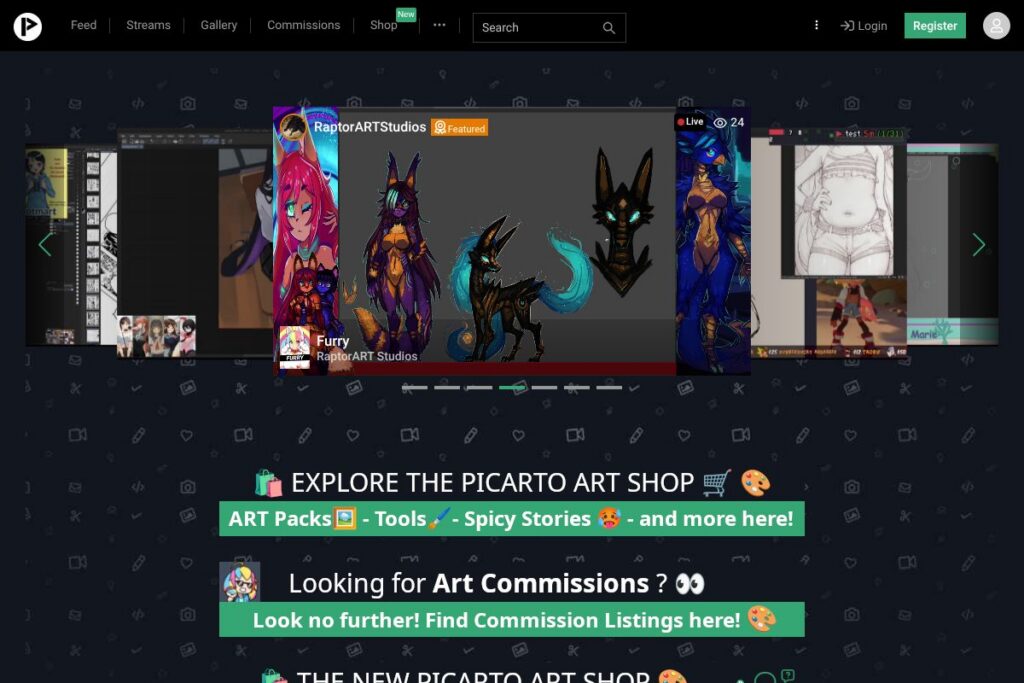
Picarto is a live-streaming platform built specifically for artists and creative communities. The service centers on real-time drawing, painting, animation, and craft sessions, and it provides channels where creators can stream using standard broadcasting tools, host chats, and archive recorded sessions for later viewing. Picarto also supports paid subscriptions and direct support mechanisms so creators can monetize their work while engaging audiences.
Compared with general-purpose streaming platforms like Twitch and YouTube Live, Picarto places a stronger emphasis on art-focused categories, tighter community moderation tools, and features that match artists workflows such as explicit content controls and archived timelapses. Twitch offers a much larger audience and broader discovery mechanics, while YouTube Live benefits from search and long-term discoverability across Google; Picarto narrows scope to deliver a platform tailored to creators who need art-centric moderation, community features, and monetization suited to independent artists.
All of this makes Picarto particularly well suited for illustrators, animators, comics creators, digital painters, and small studio collectives who want a streaming environment designed around art practice and audience support. Its artist-first feature set and community orientation make it a practical choice when the primary goal is ongoing creative work and direct fan relationships, rather than general entertainment broadcasting.
How Picarto Works
Artists sign up for a channel, configure streaming software such as OBS Studio, and pick an art category to broadcast under. Streams can be public or subscriber-only depending on the creator’s settings, and real-time chat provides the main interaction channel for viewers to ask questions, request demos, and share feedback.
Creators can accept direct financial support through subscriptions, donations, or external links, and channels typically include panels with social links and links to stores or commissions. Practical workflows include scheduling regular drawing sessions, running timed speedpaints for patrons, and saving VOD archives to build a portfolio of process videos; see Picarto’s channel pages and help resources for setup guidance and recommended encoder settings.
Picarto features
Picarto centers on live broadcasting, audience interaction, monetization for creators, and community moderation. Core capabilities include real-time chat, channel subscriptions, VOD archiving, and artist-oriented controls such as content categorization and subscriber-only streams.
Let’s talk Picarto’s Features
Chat and community tools
Live chat is the central place for viewer interaction, with moderation controls to manage toxic behavior and subscriber-only modes to limit access during paid sessions. Channel moderators and tools help creators maintain a constructive environment during long streams or crowded events, which is useful for both teaching and collaborative streams.
Channel subscriptions and creator support
Viewers can support channels through recurring subscriptions and one-time donations, with creators able to set subscriber-only content or perks. These mechanisms let small creators build steady income from fans who want exclusive access or direct recognition.
VOD archiving and galleries
Streams can be archived as VODs so visitors can watch past sessions on demand, which helps creators build a library of process videos and timelapses for portfolio use. Archiving improves discoverability for teaching content and lets creators repurpose material across other platforms or galleries.
Streaming protocol and encoder compatibility
Picarto works with standard streaming protocols and encoders such as RTMP, making it straightforward to broadcast from tools like OBS Studio or Streamlabs Desktop. This compatibility lets creators use custom overlays, multi-camera setups, and screen capture for drawing tablets or animation software.
Monetization and payments
Creators receive payments through subscriptions and tips, and channels commonly include panels linking to stores and commission pages for direct sales. The platform supports typical creator monetization flows so artists can combine streaming income with sales and commission work.
NSFW and content controls
Picarto provides category and age-restriction controls to separate adult content from general art streams and to comply with platform policies. These controls are valuable for creators who work across different subjects and need clear boundaries for what is visible to general audiences.
With these capabilities Picarto offers an environment tuned for artists: live broadcast tools plus subscription-driven support, curated community features, and archiving that helps creators build a process-first portfolio.
Picarto pricing
Picarto uses a free-to-access streaming model combined with optional paid subscriptions and donations that creators set for their channels. Pricing for viewer subscriptions and any creator payout terms vary by channel and region, and Picarto may offer account-level options or partner programs that affect fees.
For the most accurate and up-to-date information about subscription tiers and any platform fees, check Picarto’s official site on the Picarto homepage for current pricing details and creator payout policies.
What is Picarto Used For?
Picarto is used primarily for live art demonstrations, step-by-step tutorials, speedpaints, and animation sessions where audiences can watch the creative process unfold in real time. Creators use it to teach, workshop, show work-in-progress, and hold Q&A sessions with collectors and fans.
It is also used as a direct monetization channel for independent artists who want recurring support via subscriber access, or one-off donations during streams. Small studios, collaborative art groups, fan artists, and niche craft creators use Picarto to build community, test new techniques live, and sell commissions to engaged viewers.
Pros and Cons of Picarto
Pros
- Artist-focused categories: The platform groups streams around art and creative subcategories, which makes discovery easier for audiences specifically looking for drawing, animation, or craft content.
- Monetization built for creators: Channel subscriptions and donation tools let artists generate recurring revenue and connect paying supporters with subscriber-only streams or perks.
- Strong moderation and content controls: Creators have tools to manage chat and enforce age-restricted content rules, which helps maintain a safe environment for both public and adult-oriented channels.
- Encoder compatibility: Works with common streaming software such as OBS Studio, allowing flexible production setups and custom overlays.
Cons
- Smaller audience reach than major platforms: Compared with large services like Twitch and YouTube Live, Picarto has a more niche user base, which can limit organic discovery and rapid audience growth.
- Limited cross-platform discovery tools: Picarto focuses on in-platform community rather than broad search or recommendation systems, so creators often need to drive external promotion to grow their channels.
- Variable monetization terms: Payout rules and subscription benefits can vary and may require creators to manage external payment or store integrations to fully monetize their work.
Is Picarto Free to Try?
Picarto offers a free streaming and viewing experience with optional paid subscriptions and donations available on creator channels. Creators can stream and viewers can watch and chat at no cost; paid subscriptions and tipping are optional ways to support individual artists, and specific channel pricing is set by each creator.
Picarto API and Integrations
Picarto does not position itself as a developer platform with a broad public API; instead it integrates with standard streaming tools and protocols so creators can broadcast using encoders like OBS Studio. For setup and encoder instructions see the OBS Studio download and documentation.
Channels commonly use external services for payments, galleries, and social linking, and creators embed external storefronts or portfolio links inside their channel panels. For detailed channel setup and options, refer to Picarto’s help and support pages on the Picarto homepage.
10 Picarto alternatives
Paid alternatives to Picarto
- Twitch – A large-scale streaming platform with massive audience reach, channel subscriptions, and strong discoverability for creators across categories including art.
- YouTube Live – Live streaming integrated with YouTube’s long-form content and search ecosystem, useful for creators who want long-term discoverability and repurposing of recordings.
- Vimeo Livestream – Focuses on higher-production broadcasts and paid event streaming, suitable for professional presentations and monetized live events.
- DLive – A decentralized-style streaming platform that has attracted creators seeking alternative monetization and community features.
- Trovo – A growing general-purpose live streaming platform that supports subscriptions and monetization and aims to capture emerging streaming audiences.
Open source alternatives to Picarto
- Owncast – A self-hosted, open source live video streaming server you can run on your own infrastructure to host creative broadcasts with full control over content and monetization.
- PeerTube – A federated, open source video platform for hosting and streaming recordings and live events across a distributed network of instances.
- OBS Studio – While not a hosting platform, OBS Studio is an open source encoder and production tool that creators pair with streaming servers to manage high-quality broadcasts.
Frequently asked questions about Picarto
What is Picarto used for?
Picarto is used for live streaming art and creative work. Artists broadcast drawing, painting, animation, and craft sessions to interact with viewers, teach techniques, and build a fan base.
Does Picarto charge viewers for subscriptions?
Yes, viewers can pay subscription fees set by individual creators. Subscription amounts and perks are determined by each channel, and creator payout details are handled according to Picarto’s terms.
Can creators stream on Picarto using OBS Studio?
Yes, Picarto supports streaming with standard encoders such as OBS Studio. Creators use RTMP settings and common broadcasting software to send video and audio to their Picarto channel.
Does Picarto allow age-restricted or adult content?
Picarto provides content controls that separate adult-oriented streams from general content. Creators must use the platform’s category and safety settings to ensure appropriate access and comply with platform rules.
Is Picarto suitable for teaching art classes live?
Yes, many creators use Picarto for live tutorials, workshops, and interactive lessons. The chat, subscriber modes, and VOD archives make it practical for scheduled classes and follow-up review.
Final verdict: Picarto
Picarto excels as a niche live-streaming platform tailored to artists and creative communities, offering the primitives creators need to broadcast process work, moderate chat, and receive direct support from fans. Its focus on art categories, content controls, and VOD archiving makes it a practical choice for illustrators, animators, and independent creators who prioritize a like-minded audience over mass reach.
Compared to Twitch, which offers larger audience potential and a mature subscription marketplace, Picarto is more focused on art-specific workflows and creator support features suited to visual practice. Twitch subscriptions commonly start around $4.99/month, whereas Picarto centers its economics on per-channel subscription and donation setups that are set by creators; for exact rates and payout terms, consult the Picarto homepage. Overall, Picarto is worth considering for artists who want a streaming environment designed around creative work and community-first interaction.