What is Pipedrive
Pipedrive is a sales-focused customer relationship management platform built around a visual pipeline and activity-based selling. It centers workflows on deals and the human activities that move deals forward, rather than on records alone, which helps salespeople stay focused on revenue-generating actions.
Compared with competitors, Pipedrive emphasizes simplicity and pipeline visualization. Compared with HubSpot CRM, which provides a broad free CRM with marketing and service modules, Pipedrive prioritizes focused sales features and a lightweight interface. Compared with Salesforce, which is highly configurable and enterprise oriented, Pipedrive offers quicker onboarding and fewer layers of configuration for small teams.
All of this makes Pipedrive a practical choice for sales teams that need clear pipeline visibility, lightweight automation, and fast time to value. It is particularly useful for teams that want an approachable CRM without an extensive setup process.
How Pipedrive Works
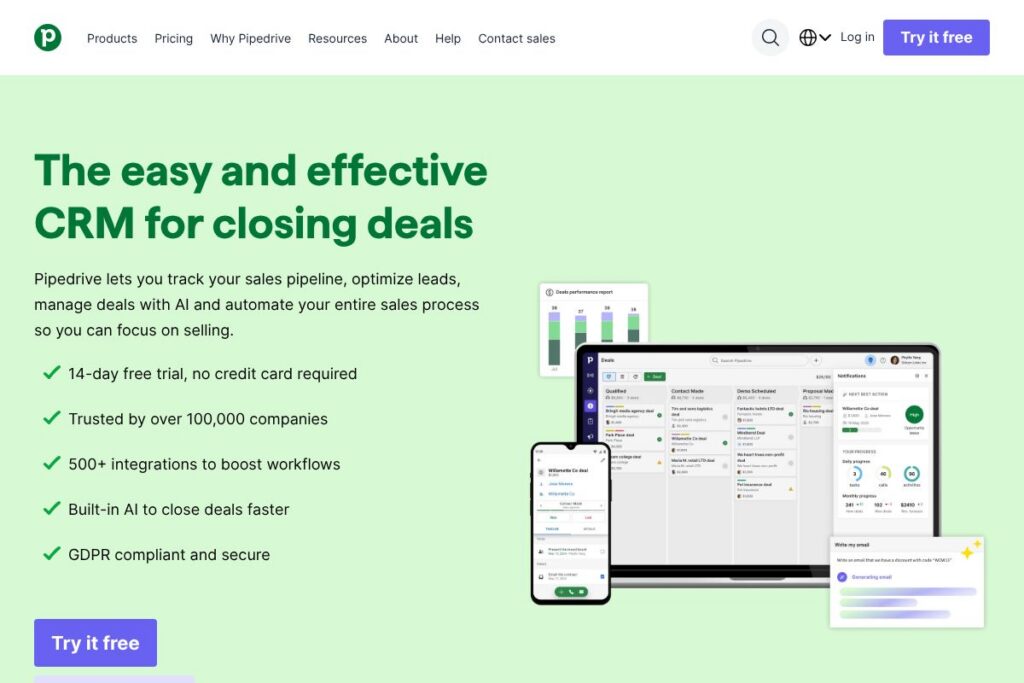
Pipedrive organizes work around a Kanban-style pipeline where each card represents a deal and moves across stages as opportunities progress. Users log activities, attach emails, and set follow-up reminders directly on deals so the next steps are always visible and trackable.
The platform automates repetitive tasks through workflow automations that trigger actions when deals or activities change state. Built-in reporting and forecasting aggregate activities and deal values to show conversion rates and expected close dates, which supports data-driven sales planning.
Teams typically start by importing contacts and deals from spreadsheets or another CRM, customizing pipeline stages and fields to match their sales process, and then connecting email to capture communication. Ongoing workflows use automations, activity reminders, and AI prompts to ensure follow-ups are made on time and high-value opportunities receive attention.
Pipedrive features
Pipedrive centers its functionality on pipeline management, activity tracking, automation, reporting, and integrations. Key additions in recent updates include AI-assisted deal suggestions and expanded marketplace integrations to connect sales data with other business systems.
The platform includes several powerful capabilities worth highlighting:
Pipeline view and deal board
The visual deal board shows deals as cards that you move across stages, making it easy to see progress at a glance. Custom stage names, multiple pipelines, and drag-and-drop adjustments help teams model different sales motions and monitor pipeline health.
Activity and email tracking
Built-in activity scheduling and two-way email sync let reps keep all interactions tied to deals and contacts. Email open and click tracking, templates, and scheduling reduce manual steps and make it easier to maintain consistent outreach.
Automation and workflow builder
Automations let you create rules that trigger emails, task creation, or field updates when conditions are met, which saves time on repetitive tasks. Workflow logic can be applied to deals, contacts, and activities to enforce process consistency across the team.
Built-in AI and deal insights
AI features help summarize deal status, suggest next steps, and generate draft outreach to speed responses. These capabilities prioritize actions and provide quick insights that help reps focus on the most promising opportunities.
Reporting, forecasting, and goals
Real-time reports and customizable dashboards show pipeline velocity, conversion rates, and revenue forecasts. Goal tracking and team performance metrics help managers measure progress against targets and identify bottlenecks.
Integrations and Marketplace
Pipedrive connects with hundreds of apps through its Marketplace to extend CRM capabilities across finance, marketing, and support stacks. Native integrations and Zapier connectors are commonly used to sync contacts, automate lead capture, and push closed deals into billing systems.
With these features combined, Pipedrive helps teams move deals forward consistently, automate routine work, and surface the data needed to make quicker sales decisions.
Pipedrive pricing
Pipedrive uses a subscription pricing model with multiple tiers tailored to individual users and teams, and it offers a free trial to evaluate the product. Plans are organized to scale from single-user setups to team and enterprise deployments, with higher tiers including advanced automation, reporting, and access controls.
Monthly Billing:
Individuals – Available on a monthly subscription that includes core pipeline management, activity tracking, and email integration; pricing varies by region and feature selection. See Pipedrive’s pricing and plans for the latest monthly options.
Teams – Monthly team plans add advanced automations, reporting, and multi-user features; exact monthly rates depend on chosen tier and billing cycle. Visit Pipedrive’s pricing and plans to compare team options.
Annual Billing:
Individuals – Annual billing typically reduces the monthly equivalent cost and includes the same core features as monthly subscriptions when paid yearly. Check Pipedrive’s pricing and plans for current annual discounts and plan inclusions.
Enterprise – Enterprise-level subscriptions provide organization-wide controls, SSO, and priority support; these are usually handled through a custom agreement and annual billing. For tailored enterprise details see contacting Pipedrive sales.
What is Pipedrive used for
Pipedrive is used to manage and visualize sales pipelines, ensuring that follow-ups and revenue opportunities are tracked consistently. Sales reps use it to record activities, schedule follow-ups, send tracked emails, and move deals through predefined stages.
Managers and operations teams use Pipedrive for forecasting, tracking conversion metrics, and creating automations that reduce administrative overhead. Marketing and customer success teams also use Pipedrive to centralize contact histories and coordinate handoffs throughout the buyer journey.
Pros and cons of Pipedrive
Pros
- Clear pipeline focus: The interface centers on visual pipeline and activity management, which makes it fast for salespeople to see what to work on next and to keep pipelines moving.
- Easy to adopt: Setup and onboarding are straightforward for small teams, with simple imports, customizable fields, and an intuitive board view that reduces training time.
- Automation and AI assistance: Built-in automations and AI-driven prompts reduce manual follow-ups and help surface the highest priority deals.
- Extensive integrations: A large Marketplace and connectors make it easier to fit Pipedrive into existing sales and marketing stacks.
Cons
- Limited out-of-the-box marketing features: Compared with CRM platforms that include native marketing automation, Pipedrive focuses on sales and requires integrations for deeper marketing workflows.
- Less suited for complex enterprise customization: Organizations needing extensive record-level customization or advanced CRM platform capabilities may find tools like Salesforce more configurable.
- Reporting depth varies by tier: Advanced analytics and custom reporting are typically available only on higher-level plans, which may require an upgrade for more sophisticated reporting needs.
Does Pipedrive Offer a Free Trial?
Pipedrive offers a 14-day free trial with no credit card required. The trial provides full access to core CRM features so teams can test pipeline management, email sync, automations, and reporting before committing to a paid subscription.
Pipedrive API and Integrations
Pipedrive provides a developer API for building custom integrations and automations; the Pipedrive API documentation lists endpoints for deals, persons, organizations, activities, and more. Developers can use the API to read and write CRM data, create webhooks, and integrate with external systems.
For non-developers, the Pipedrive Marketplace offers ready-made integrations with email providers, marketing tools, and accounting software to connect CRM data across tools without custom code.
10 Pipedrive alternatives
Paid alternatives to Pipedrive
- HubSpot CRM — A free CRM with add-on marketing and service suites, strong inbound features, and paid tiers for advanced sales automation.
- Salesforce — Highly configurable enterprise CRM with extensive automation, custom objects, and a broad partner ecosystem.
- Zoho CRM — Flexible CRM with modules for sales, marketing, and help desk, often chosen for price-to-feature balance.
- Microsoft Dynamics 365 — Enterprise-grade CRM integrated tightly with Microsoft 365 and Power Platform for automation and analytics.
- Freshsales (Freshworks CRM) — Sales-first CRM with built-in phone, email, and AI features aimed at mid-market teams.
- Copper — CRM designed for Google Workspace users, with native G Suite integrations and contact-centric workflows.
- Insightly — CRM with project management features and workflow automation tailored to growing businesses.
Open source alternatives to Pipedrive
- SuiteCRM — Open source CRM forked from SugarCRM, offering a wide range of modules and customization potential.
- EspoCRM — Lightweight open source CRM focused on simplicity and extensibility for custom workflows.
- Odoo CRM — Part of the broader Odoo ERP suite, providing CRM functionality within an integrated business app ecosystem.
- Vtiger CRM — Community edition available as open source, with sales automation and customer support modules.
- CiviCRM — Open source CRM focused on non-profits and community organizations with contact and contribution tracking.
Frequently asked questions about Pipedrive
What is Pipedrive used for?
Pipedrive is used for managing sales pipelines, tracking activities, and closing deals. Teams use it to visualize deal progress, schedule activities, and automate follow-ups to maintain consistent sales discipline.
Does Pipedrive have an API?
Yes, Pipedrive provides a public API for developers. The Pipedrive API documentation describes endpoints, authentication, and webhooks for integrating with external systems.
Can Pipedrive integrate with other tools?
Yes, Pipedrive integrates with hundreds of third-party apps through its Marketplace. Common integrations include email providers, marketing platforms, billing systems, and connectors via Zapier.
Is there a free way to try Pipedrive?
Yes, Pipedrive offers a 14-day free trial with no credit card required. The trial includes access to core features so teams can evaluate pipeline management, automations, and reporting.
How secure is Pipedrive for business data?
Pipedrive maintains industry-standard security and privacy measures, and it is GDPR compliant. Details on data protection, compliance, and security practices are available on Pipedrive’s site and security resources.
Final verdict: Pipedrive
Pipedrive stands out for its focused, pipeline-first approach that makes daily sales work more visible and actionable. It does well at reducing administrative friction with activity-centric workflows, automations, and straightforward reporting, which helps sales teams spend more time selling.
Compared with HubSpot CRM, Pipedrive is more narrowly focused on sales processes and tends to be faster to adopt, while HubSpot CRM offers a broader free tier with integrated marketing and service features. For teams that want a clear pipeline interface and built-in sales automation without the ecosystem overhead, Pipedrive is a strong, cost-effective option; for teams that need a free entry point combined with deep marketing capabilities, HubSpot CRM may be the better choice for initial adoption.