What is Provide Support
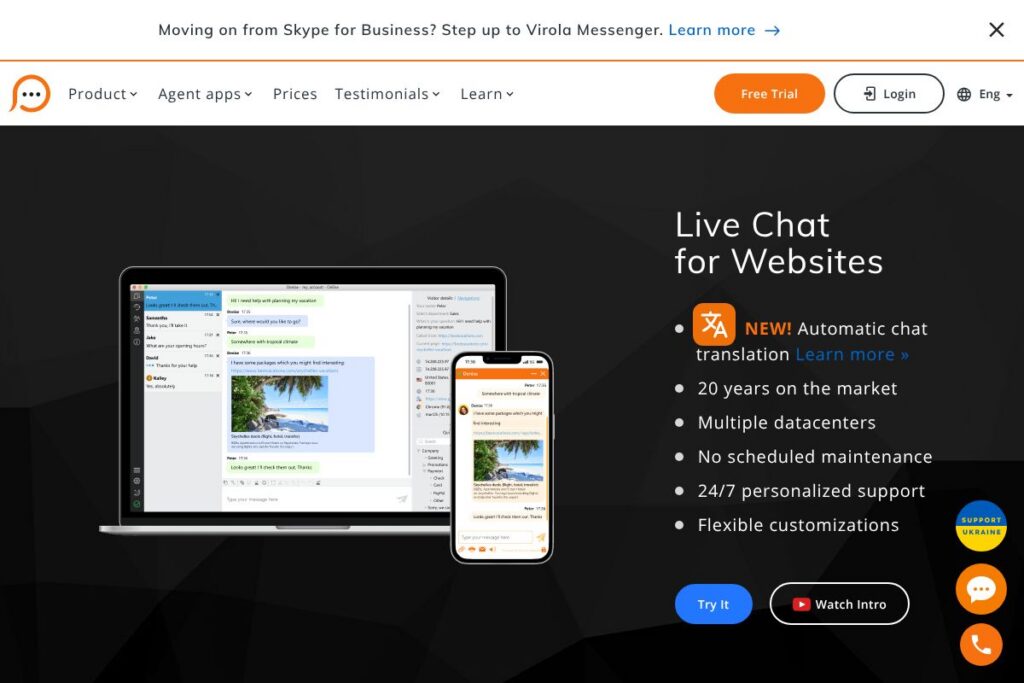
Provide Support is a hosted live chat platform for websites that connects site visitors with support agents in real time. Core capabilities include a customizable chat widget, cross-platform agent applications (desktop, mobile, and web), automatic chat translation, session transcripts sent via encrypted channels, and reporting on agent performance and visitor behavior.
Compared with competitors, Provide Support is positioned as a focused live chat product with decades in the market. LiveChat emphasizes polished agent workflow and extensive marketplace integrations, Intercom bundles chat with product messaging and a broader growth toolset, and Olark targets small teams with simple setup and reporting. Provide Support stands out by including the full feature set across its plans and by offering flexible agent-count licensing rather than feature-tier gating.
All of this makes Provide Support a practical choice for businesses that need reliable, multilingual live chat across multiple domains, with predictable plan structure and 24/7 personalized support.
How Provide Support Works
Provide Support installs as a small JavaScript widget you add to your site source; the widget can be customized and positioned and works across multiple domains without per-domain fees. Agents run the service from desktop apps for Windows, Mac, and Linux, or mobile apps for Android and iOS, and can also use the web app to monitor visitors and answer chats.
Visitor sessions arrive in the agent app with contextual details, geo location, and the page where the chat button was clicked. Agents can send proactive invitations, use predefined messages, transfer sessions between agents, and send encrypted chat transcripts to email addresses for record keeping.
Integrations and platform-specific tutorials simplify adding the widget to CMS and e-commerce sites. For step-by-step guidance, see the vendor’s integration tutorials and the account area where chat button codes are provided.
Provide Support features
Provide Support groups its capabilities around real-time chatting, multilingual support, developer-friendly integration, agent productivity, and security. The vendor notes recent additions such as automatic chat translation and expanded datacenter coverage, while maintaining the same feature set across plans and allowing customers to scale by adding agent profiles.
Automatic chat translation
Converts messages between visitor and agent languages in real time so teams can support visitors in different languages without bilingual agents. This helps companies reduce response friction and expand support coverage to international visitors.
Cross-platform agent apps
Native apps are available for Windows, Mac, Linux, iOS, and Android, plus a web app for browser access. Having multiple client types allows agents to work from desktop or mobile and remain logged in simultaneously when needed.
Live chat widget customization
The widget can be styled, positioned, and configured with pre-chat surveys or skipped to start chat immediately. Custom fields and drop-down lists in the pre-chat form capture visitor context and route conversations effectively.
Integrations and easy install
Provide Support offers ready-made instructions for platforms such as Magento, Shopify, Wix, WordPress, and Joomla, plus straightforward chat button code you paste into your site. Integration tutorials accelerate setup and reduce developer time for common platforms.
Security and encryption
Chat conversations, transcripts, and offline messages are transmitted via advanced encryption and are not stored on the vendor’s servers when delivered to customer mailboxes. Secure connection is enabled by default for new accounts and can be managed in account settings.
Unlimited domains and chats
Accounts can add the live chat button to an unlimited number of domains at no extra cost, and there is no built-in limit on chats per agent. This is useful for agencies and businesses operating multiple sites under one account.
Proactive messaging and eye-catcher bubble
Agents can send manual chat invitations, and the system can display an eye-catcher bubble to draw attention to the chat button automatically. These features increase engagement and help convert visitors who need assistance.
Reporting and agent statistics
Provide Support supplies detailed statistics on agent performance, visited pages, and where visitors clicked the chat button, enabling managers to track workload and quality of service.
With these capabilities, the biggest benefit is a full-featured live chat platform that keeps configuration simple while supporting multilingual, multi-domain deployments and agent mobility.
Provide Support pricing
Provide Support uses a subscription pricing model based on the number of agent profiles in an account rather than gating features. All payment plans include the same feature set; they differ only by how many agent profiles are allowed. The vendor offers standard monthly and annual billing cycles for small packages and custom enterprise plans for larger deployments.
For details on the current plan options and billing cycles, view the provider’s current pricing options. If you need a larger deployment, the vendor provides enterprise packages and support to match higher agent counts and tailored SLAs.
What is Provide Support used for
Provide Support is commonly used for customer service, lead qualification, and on-site technical support where real-time conversation shortens resolution time. Teams use it to handle inbound visitor questions, route chats to agents with the right expertise, and capture prospect data before handing contacts off to sales systems.
It is also used by agencies and multi-site operators because of the unlimited-domain policy and the ability to manage several websites under a single account. The platform suits small help desks that need a simple subscription model as well as larger teams that require enterprise-scale agent counts and round-the-clock personalized support.
Pros and cons of Provide Support
Pros
- All features included per plan: Every subscription tier provides the full feature set so teams do not need to upgrade to unlock core capabilities such as translation, reporting, or integrations.
- Multilingual support and automatic translation: Built-in translation and multi-language UI options allow teams to serve international visitors without hiring bilingual agents.
- Cross-platform agent apps: Native desktop and mobile apps plus a web client let agents stay online from multiple devices and locations.
- Unlimited domains and chats: Add the chat button to as many domains as needed without extra domain fees and run as many concurrent chats per agent as you can handle.
- 24/7 personalized support and multiple datacenters: Around-the-clock vendor support and distributed datacenters reduce downtime and improve response times.
Cons
- Agent-count licensing model: Pricing is tied to agent profiles rather than seats with finer-grained usage controls, which may not match all organizations’ budget models.
- No public pricing page: The absence of a public, detailed pricing matrix requires contacting the vendor or visiting the account area to see plan options and comparisons.
- Web app has feature differences: The desktop client provides a more stable experience with features like screenshots and flexible notifications, whereas the web app is slightly more limited.
Does Provide Support Offer a Free Trial?
Provide Support offers a free trial and a 30-day money-back guarantee. The free trial includes access to all live chat features and allows creation of any number of agent profiles and adding the chat button to multiple domains so you can test functionality fully before committing.
Provide Support API and Integrations
Provide Support provides easy integrations for common platforms and publishes integration tutorials to guide installation on systems such as Magento, Shopify, Wix, WordPress, and Joomla. Use the vendor’s integration tutorials to access chat button codes and step-by-step instructions.
Developers can retrieve chat button scripts from the account Control Panel and extend functionality using available developer resources in the account area. For automation and deeper connections, contact the vendor or check the account documentation for API access and technical endpoints.
10 Provide Support alternatives
Paid alternatives to Provide Support
- LiveChat — A widely used hosted chat system with a polished agent interface, marketplace integrations, and built-in ticketing features.
- Intercom — Combines chat with product messaging, customer data, and automation tools aimed at growth and engagement workflows.
- Zendesk Chat — Integrates tightly with Zendesk support tickets and knowledge base tools for a combined helpdesk and live chat experience.
- Olark — Simple live chat focused on small teams, with straightforward setup and essential reporting.
- Tidio — Chat and chatbot platform that combines live chat with automated bot flows and email integrations.
- Freshchat — Part of the Freshworks suite, offering modern messaging features, automation, and multi-channel support.
- Drift — Conversational marketing and sales-focused chat solution with advanced routing and bot capabilities.
Open source alternatives to Provide Support
- Chatwoot — Open source customer engagement platform with live chat, inbox routing, and API-driven integrations for self-hosting.
- Mibew Messenger — A lightweight open source live support application that you can host and customize on your own servers.
- Rocket.Chat — Primarily a team chat platform with live chat capabilities and self-hosting options for full data control.
- Live Helper Chat — An open source live support system with agent dashboards, proactive chat, and customization for developers.
Frequently asked questions about Provide Support
What features does Provide Support include?
Provide Support includes a customizable chat widget, cross-platform agent apps, automatic chat translation, encrypted transcripts, and reporting. The vendor also supports unlimited domains and proactive invitations to engage visitors.
Does Provide Support support automatic chat translation?
Yes, Provide Support offers automatic chat translation for real-time multilingual conversations. That feature helps teams communicate with visitors in many languages without requiring bilingual agents.
How much does Provide Support cost?
Provide Support uses subscription plans based on the number of agent profiles with monthly and annual billing options. All plans include the same feature set; contact the vendor or view the current pricing options for exact plan availability and enterprise packages.
Can I integrate Provide Support with WordPress?
Yes, Provide Support provides integration tutorials for WordPress and other common platforms. Chat button code is available in your account Control Panel and can be inserted into site templates or added via platform-specific guides.
Does Provide Support offer an API for developers?
Provide Support offers developer resources within the account area and access to chat button scripts for customization. For API endpoints and automation capabilities, consult the account documentation or contact the vendor for developer access.
Final verdict: Provide Support
Provide Support is a reliable, pragmatic live chat solution that focuses on giving every customer access to the full feature set regardless of plan. It excels at multilingual support, unlimited domain usage, and providing cross-platform agent apps with encrypted transcript delivery, making it well suited for businesses that operate internationally or across multiple sites.
Compared with Intercom, which positions itself as a combined product messaging and growth platform with usage-based pricing, Provide Support centers on straightforward agent-count subscriptions and includes core chat capabilities without feature tiers. That makes Provide Support a cost-effective option for teams that primarily need live chat and predictable billing rather than a broader customer messaging suite.