Pusher: An Overview
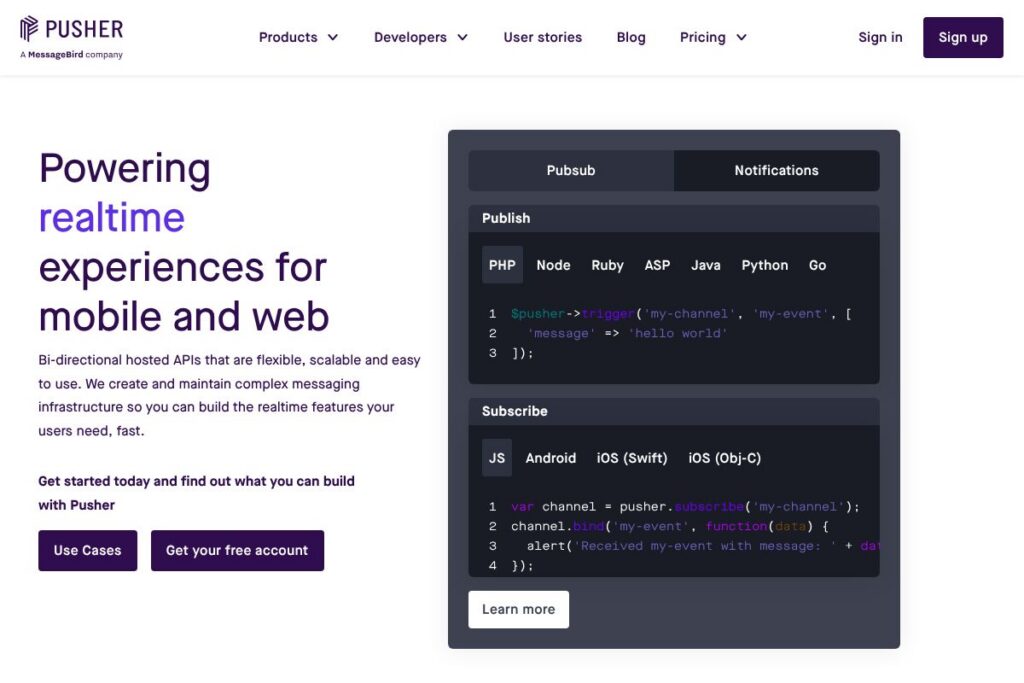
Pusher is a suite of hosted realtime APIs that includes channel-based realtime messaging and a dedicated push notifications product. The platform is designed so developers can publish events from servers and have connected clients receive updates immediately without managing low-level socket infrastructure. Typical components are Pusher Channels for websocket-style pub/sub and Pusher Beams for mobile and web push delivery; both are supported by language SDKs and a web dashboard.
Pusher sits alongside services such as Firebase Realtime Database and Cloud Messaging, PubNub, and Ably. Compared with Firebase, Pusher focuses on event delivery and developer ergonomics rather than offering a full realtime database; compared with PubNub and Ably, Pusher emphasizes simple SDKs and clear patterns for channels, presence, and push notifications. All of these providers use usage-based or tiered pricing, but they differ in API surface, SDK maturity, and specialty features such as message persistence and geo-routing.
Pusher is especially well suited for engineering teams that need to add live features quickly without operating realtime servers. It does the most work for frontend and backend developers who prefer simple publish/subscribe primitives, integrated push notifications, and out-of-the-box presence and authentication patterns.
How Pusher Works
Pusher Channels implements a publish/subscribe model where servers publish named events to channels and client SDKs subscribe to channels that match their interests. Authentication and channel authorization are handled via short-lived server-signed tokens so presence and private channels can enforce access control. Event delivery is low-latency and incremental, making it appropriate for dashboards, collaborative apps, and multiplayer interactions.
Pusher Beams is a separate API for push notifications that maps interests or device registrations to push payloads, delivering platform-specific payloads for APNs and FCM. You can publish to interests from server SDKs or the REST API and include both APNs and FCM payloads in a single request. The developer workflow typically involves registering devices client-side, storing device identifiers or interests, then calling the Beams API to publish notifications when events occur on the server. See the Pusher Beams documentation for concrete code samples and SDK usage.
What does Pusher do?
Pusher provides two core capabilities: realtime event delivery and push notification delivery. Channels gives you websocket-style pub/sub with presence notifications, while Beams handles mobile and web push with platform-specific payloads. Both products are exposed through language SDKs, REST endpoints, and a web console for monitoring, diagnostics, and credential management.
Let’s talk Pusher’s Features
Realtime Channels
Channels offers pub/sub over persistent connections so clients receive events as they happen. It supports public, private, and presence channels, which lets you implement multi-user presence indicators, typing notifications, and room-based messaging without custom socket infrastructure.
Beams push notifications
Beams sends push notifications to interests or individual device registrations with payloads tailored for Apple Push Notification Service and Firebase Cloud Messaging. It includes server SDKs and REST endpoints that let you publish a single payload containing both APNs and FCM structures, simplifying cross-platform notification delivery.
SDKs and language support
Pusher provides client and server SDKs across major languages and platforms including JavaScript, iOS, Android, Ruby, Python, Java, Go, and more. The SDKs handle connection lifecycle, reconnection, and event binding so teams can integrate realtime features quickly. Refer to the developer documentation for specific library references and setup guides.
Presence and authentication
Built-in presence channels and an authentication model let clients prove membership and reveal presence metadata securely. Server-side authentication hooks allow you to tie channel access to application-level permissions and user identities, which is useful for private messaging and admin-only channels.
Webhooks and event hooks
Pusher exposes webhooks and diagnostics events for server-side monitoring of connection states, failed deliveries, and channel activity. These hooks enable automated alerting and integration with operational tooling for large-scale deployments.
Dashboard and monitoring
The Pusher dashboard provides metrics, event logs, and connection data so teams can inspect usage patterns and troubleshoot issues. Live metrics help you identify spike patterns and optimize channel design or subscription strategies.
With Channels and Beams together you get both in-band realtime events and out-of-band push notifications, which simplifies implementing consistent live experiences across browsers and mobile devices.
Pusher pricing
Pusher uses a tiered SaaS pricing approach that combines free usage tiers with paid plans and usage-based add-ons; specific plan limits and costs vary by product and scale, and Pusher publishes the most up-to-date options on its site. For the latest plan details, capacity tiers, and enterprise options, review Pusher’s current pricing options.
What is Pusher used for?
Pusher is commonly used to add live functionality to applications without running custom socket infrastructure. Common use cases include live dashboards, real-time analytics, in-app chat, collaborative editing, multi-user games, and presence-aware features such as who is online or typing indicators.
Development teams also use Pusher for notifications and alerts where immediate delivery matters; combining Channels with Beams lets you drive in-app updates and fallback push notifications for offline or backgrounded clients. It’s appropriate for startups prototyping realtime features, product teams shipping collaborative experiences, and enterprises that want hosted reliability with developer-friendly APIs.
Pros
- Low integration friction: The SDKs and clear publish/subscribe model let teams add realtime features quickly using familiar client and server languages.
- Combined realtime and push: Channels plus Beams provide both in-app event delivery and push notifications, which simplifies cross-platform live workflows.
- Presence and auth support: Built-in presence channels and server-signed authentication make implementing secure private and presence-aware experiences straightforward.
- Operational visibility: Dashboard metrics, event logs, and webhooks provide actionable telemetry for debugging and scaling.
Cons
- Usage-based costs for scale: Heavy realtime or push usage can become expensive at scale because billing is tied to connections, messages, or notification volume. Planning capacity and patterns is necessary to control costs.
- Less suitable as a full realtime data store: Pusher focuses on event delivery rather than acting as a realtime database with long-term persistence, so additional storage services are often required for historical data.
- Vendor dependency: Relying on a hosted realtime provider means less control over routing and on-prem deployment; teams with strict self-hosting needs may prefer open-source alternatives.
Is Pusher Free to Try?
Pusher offers a free tier with usage limits and trial options for paid plans. The free tier covers basic development and low-volume production needs, while paid plans add higher connection and message quotas and enterprise features; you can sign up or compare plan limits on the Pusher signup and plan pages.
Pusher API and Integrations
Pusher exposes REST APIs and official SDKs for Channels and Beams; the API documentation details endpoints for publishing events, managing device registrations, and authenticating private channels. Server SDKs shown in product samples include Node.js, Python, Go, Java, Ruby, PHP, and more.
Key integrations include standard platform ecosystems and deployment platforms like AWS, Heroku, and serverless frameworks, plus the ability to forward events into logging and analytics pipelines via webhooks. Developers commonly integrate Pusher with backend frameworks and message queues to trigger realtime updates from application events.
10 Pusher alternatives
Paid alternatives to Pusher
- Firebase — Realtime database, Cloud Messaging, and broader app platform services that combine data sync and push notifications for mobile/web apps.
- PubNub — Global realtime messaging network with additional features like message persistence and data streaming tailored for high-scale applications.
- Ably — Realtime platform focused on guaranteed delivery, advanced failover, and protocol support for enterprise-grade realtime delivery.
- Twilio — Programmable messaging and notifications suite that includes chat and push capabilities, with broad communications features.
- SendBird — Chat and messaging platform that provides higher-level chat features and moderation tools on top of realtime delivery.
- Amazon SNS — Managed notification service for push and pub/sub messaging with deep integration into AWS infrastructure.
- Azure SignalR Service — Managed SignalR offering from Microsoft for ASP.NET and other real-time app scenarios hosted on Azure.
Open source alternatives to Pusher
- Socket.IO — A JavaScript library for realtime web applications based on WebSockets with a large ecosystem and the option to self-host.
- Action Cable — Rails-native framework for real-time features, suitable for Ruby on Rails applications that want built-in websocket support.
- Mosquitto (MQTT) — Lightweight MQTT broker used for pub/sub messaging in IoT and constrained environments; typically self-hosted.
- NATS — High-performance messaging system for cloud-native architectures that supports pub/sub and request/reply patterns, usually self-hosted.
Frequently asked questions about Pusher
What is Pusher used for?
Pusher is used to add realtime updates and push notifications to web and mobile applications. Developers use it for chat, live dashboards, presence indicators, and delivering push notifications across platforms.
Does Pusher provide an API for push notifications?
Yes, Pusher offers Beams, a dedicated push notifications API. Beams supports publishing payloads that include both APNs and FCM structures and offers server SDKs and REST endpoints for publishing to interests and device registrations.
Can Pusher handle presence and user authentication?
Yes, Pusher Channels includes presence channels and a server-side authentication flow. You can issue signed authentication responses from your backend so only authorized clients join private or presence channels.
How does Pusher integrate with backend systems?
Pusher integrates via server SDKs, REST APIs, and webhooks. Typical integrations publish events from application servers, message queues, or background jobs and use webhooks for diagnostics and operational automation.
Is Pusher suitable for production-scale applications?
Yes, Pusher is designed for production use with scaling and monitoring features. For high-volume use cases you should plan capacity and review the available paid tiers or enterprise options for SLA and support requirements.
Final Verdict: Pusher
Pusher stands out for making realtime features approachable: its Channels product gives a straightforward pub/sub model with presence and authentication, while Beams covers cross-platform push notifications with unified publish calls. The combination reduces engineering overhead when adding live updates and notifications to web and mobile apps.
Compared with PubNub, which also targets global realtime delivery and large-scale messaging, Pusher emphasizes developer ergonomics and clear SDK patterns. Pricing for both providers follows usage-based and tiered models, so chosen provider often depends on required guarantees, global routing, and feature trade-offs; evaluate Pusher and PubNub’s pricing and feature lists on their respective sites before committing. For teams that prioritize fast integration and readable SDKs, Pusher is a practical choice that balances capability and developer experience.