What is Quiz Maker
Quiz Maker is a web-based quiz creation platform that helps teachers, marketers, trainers and content creators design and publish quizzes, personality tests, polls and exams. The tool combines an editor with more than 40 question types, theme customization, lead capture and sharing options so quizzes can be embedded or distributed via direct links.
Compared with Typeform, Quiz Maker focuses more on assessment features such as auto-grading, certificates and LMS-style course linking rather than long-form survey logic. Against Google Forms, Quiz Maker adds dedicated lead capture, themes, leaderboards and AI-assisted quiz generation. Compared with Kahoot!, Quiz Maker is less focused on live classroom game play and more on asynchronous testing, embedding and lead-driven quizzes.
All of this makes Quiz Maker useful for educators building auto-graded exams, marketers who want quizzes that convert into leads, and training teams that need certificates and course-style grouping of quizzes. It is especially well suited to users who need an easy way to collect respondent data and issue completion certificates without assembling multiple tools.
How Quiz Maker Works
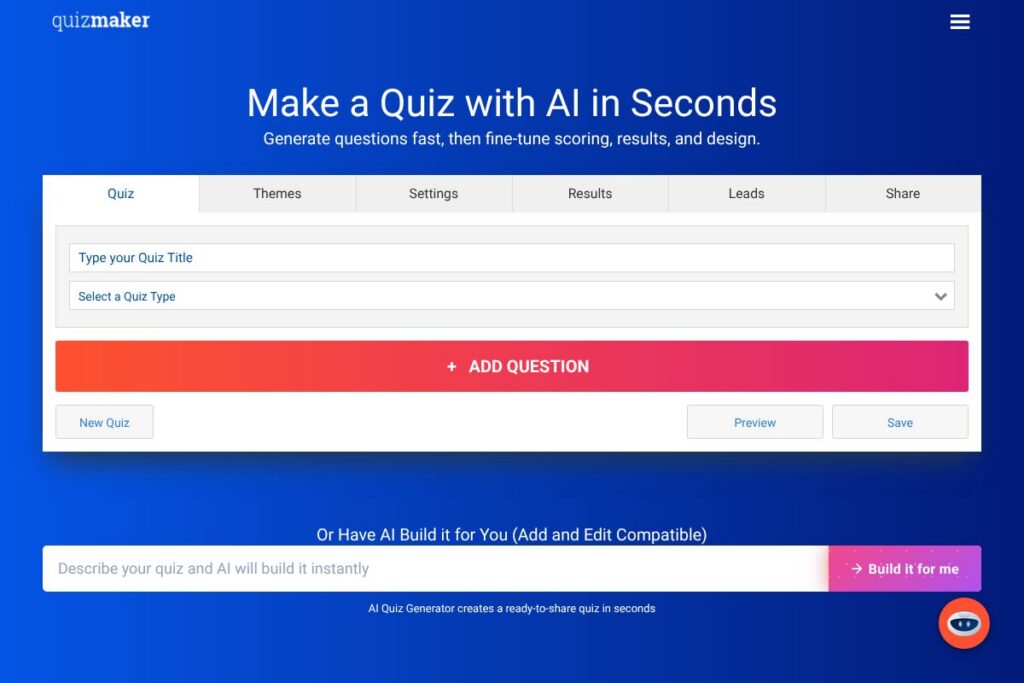
The platform uses a browser-based editor where you add questions, choose a quiz type and configure results. Question fields support images and media, answer scoring, and advanced types such as multiple choice, checkboxes, and weighted answers; you can mark correct answers for automatic grading or assign types for personality-style outcomes.
After building a quiz you set results behavior, such as certificates, leaderboards, redirects or email notifications. Publish options include a shareable link, embedded code for websites, email distribution, unique access codes for one-time responses and optional full-screen previews for testing.
Workflows often look like this: create the quiz with the AI generator or manual input, enable lead capture and authentication if needed, publish the quiz, and connect notifications or exports so responses are delivered to your team. For classroom use you can link multiple quizzes into a course and have students log in to track progress and completion.
Quiz Maker features
Quiz Maker organizes functionality around quiz creation, audience capture and results management. Core capabilities include the visual quiz editor, AI Quiz Generator, lead capture, auto-grading and certificates, embedding options, and LMS-style course linking. Recent additions emphasize AI-assisted generation and flexible sharing mechanics.
Top Features of Quiz Maker:
AI Quiz Generator
The AI Quiz Generator can auto-create a ready-to-edit quiz from a short brief, speeding initial setup for trivia, personality or assessment quizzes. This helps teams iterate quickly and provides a baseline they can edit and refine before publishing.
Question Types and Media
More than 40 question types cover standard formats plus advanced options like weighted scoring and image-based answers; each question can include uploaded or searched images. This flexibility supports exams, surveys and engaging personality tests across use cases.
Lead Capture
Lead capture can be required or optional and supports skip logic; you can require an email to view results to collect leads for newsletters or sales follow-up. Lead settings integrate with the quiz flow so capturing contact information is part of completion rather than a separate form.
Auto-Grading and Certificates
Quizzes can be auto-graded and configured to email certificates based on score thresholds or types, with support for multiple certificates per quiz. Certificates can be sent automatically to participants and attached to completion workflows for training programs.
Embedding and Sharing
Publish options include embeddable code for websites, fullscreen embeds, direct share links, and email distribution, plus preview embeds for testing. Unique codes and embed settings help control access and ensure single-use voting or assessment integrity.
Courses and LMS Features
You can link multiple quizzes into a course structure, assign weights, and track student progress through a central dashboard. Students log in to a learning portal to complete coursework and receive certificates without manual grading.
Security and Authentication
Quiz Maker supports quiz-level login so respondents must authenticate before taking assessments; you can import user lists or allow signups on first attempt. These features help prevent manipulation of results and tie responses to identified users.
Leaderboards and Timers
Add leaderboards to display relative performance and enable countdown timers to encourage completion within a set window. These gamification elements are useful for motivating participation and managing timed exams.
Collaboration and Team Access
Team features allow shared dashboards, collaborative editing and centralized management of quizzes in premium plans. Admins can add team members to a shared account so content is governed and reusable across groups.
Result Notifications and Exports
Each response can trigger email notifications to one or more addresses; results can be exported or integrated with other systems via webhooks and third-party connectors. This supports immediate sales follow-up or integration with CRM and analytics tools.
Quiz Maker’s strongest benefit is that it combines lead-focused sharing, assessment features and easy embedding into one editor, which reduces the number of separate tools needed to run quizzes and training programs.
Quiz Maker pricing
Quiz Maker uses a freemium subscription model with a free tier and paid upgrades for higher response limits and advanced features. Free accounts are limited to 25 responses, and the service offers a free trial period for paid features so you can test functionality before committing.
Monthly Billing:
Free Plan – 25 responses (basic editor, ads, limited exports).
Paid Plans – Monthly subscriptions are available to increase response limits, remove ads, enable team collaboration, certificates and course features; exact monthly rates vary by plan and user count.
Annual Billing:
Paid Plans (annual) – Annual billing typically reduces the effective monthly cost and includes the same feature set as monthly plans with higher quotas, priority support and account-level controls.
Enterprise
Enterprise – Custom pricing for large organizations that need SSO, dedicated account management, higher throughput and SLAs; enterprise customers get custom onboarding and deployment options.
For the latest details and any available promotions, view the official Quiz Maker homepage to see current plan descriptions and sign-up options.
What is Quiz Maker Used For?
Quiz Maker is commonly used for classroom tests and training assessments where auto-grading and certificates are required. Educators create timed exams, assign them to students, and track completion without manual marking.
Marketers use quizzes to generate leads and segment audiences by requiring email capture before showing results, while content teams build viral personality quizzes to increase social sharing and site traffic. Training teams use the course linking and certificate features to manage onboarding and compliance programs.
The platform also supports internal surveys, polls and interactive content for websites, making it suitable for small businesses, agencies and community organizations that need a single tool for engagement and data collection.
Pros and Cons of Quiz Maker
Pros
- Wide range of question types: The editor supports more than 40 question formats, which allows precise assessment design and varied interactive content.
- Lead capture and sharing options: Built-in lead capture, embedding, unique codes and preview embeds make it easy to publish quizzes that gather emails and protect response integrity.
- Assessment and certification features: Auto-grading, multiple certificates, email delivery and course linking make it suitable for formal training and classroom use.
- AI-assisted quiz creation: The AI Quiz Generator speeds quiz production by producing a ready-to-edit quiz from a short prompt.
- Collaboration for teams: Premium plans enable shared dashboards and collaborative editing so teams can manage quizzes centrally.
Cons
- Free tier response limits: The free plan caps responses at 25, which is restrictive for larger classes or marketing campaigns without upgrading.
- No openly published pricing: Specific plan prices are not displayed in the available site content, so organizations must consult the homepage or contact sales for exact rates.
- Feature fragmentation across plans: Some advanced capabilities such as team seats, heavy API usage and enterprise controls require higher-tier or enterprise subscriptions.
Does Quiz Maker Offer a Free Trial?
Quiz Maker offers a free plan and a 7-day free trial for paid features. The free account is limited to 25 responses and displays ads; the trial unlocks higher response limits and premium features for a short evaluation period before you need to upgrade.
Quiz Maker API and Integrations
Quiz Maker exposes integrations via webhooks and third-party connectors so you can send responses to Google Sheets, CRMs and email platforms. The platform also integrates with automation services like Zapier for building custom workflows and syncing leads.
Developers and technical teams can consult the integration guides on the Quiz Maker site for webhook setup and connector configuration, or contact support for guidance on enterprise integrations and single sign-on.
10 Quiz Maker alternatives
Paid alternatives to Quiz Maker
- Typeform – Conversational forms and quizzes with a focus on user experience, logic jumps and a polished design library for lead generation and surveys.
- SurveyMonkey – Established survey platform with advanced analytics, question branching and enterprise-grade reporting for research and feedback collection.
- Kahoot! – Game-based learning platform suited to live classroom engagement and gamified quizzes with real-time leaderboards.
- Google Forms – Simple, free form and quiz tool tightly integrated with Google Workspace for quick polls and basic assessments.
- ProProfs Quiz Maker – Feature-rich quiz and assessment maker with certificates, analytics and training-focused capabilities.
- Interact – Quiz builder aimed at marketers, offering lead capture, segmentation and quiz funnels optimized for conversions.
- Outgrow – Interactive content platform for calculators, quizzes and assessments with built-in conversion tools and templates.
Open source alternatives to Quiz Maker
- Moodle Quiz module – Part of Moodle LMS, the Quiz module supports a wide range of question types, grading methods and course integration for education institutions.
- LimeSurvey – Open source survey and quiz platform with advanced branching, multilingual support and self-hosting options for full control over data.
- H5P – Interactive content framework that integrates with CMS and LMS systems, allowing you to build quizzes, interactive videos and course activities.
- Quiz and Survey Master (WordPress plugin) – WordPress-based plugin for building quizzes and surveys on a self-hosted site, with add-ons for certificates and leaderboards.
Frequently asked questions about Quiz Maker
How do I make my own online quiz with Quiz Maker?
Create a quiz using the visual editor or the AI Quiz Generator. Choose a quiz type, add questions from over 40 available formats, configure results and publish via a share link or embed code.
Does Quiz Maker offer a free plan and trial?
Yes, Quiz Maker includes a free plan limited to 25 responses and a 7-day free trial for paid features. The free tier shows ads and has lower quotas; the trial provides access to premium features for evaluation.
Can Quiz Maker issue certificates and auto-grade quizzes?
Yes, Quiz Maker supports automatic grading and certificate issuance. You can assign certificates by score or type and configure email delivery to recipients after completion.
Can I capture leads with Quiz Maker?
Yes, Quiz Maker has built-in lead capture. Require an email before showing results or make lead capture optional, and send responses to your email or connected systems for follow-up.
Does Quiz Maker support team collaboration and enterprise features?
Yes, team collaboration and enterprise controls are available in paid plans. Higher tiers include shared dashboards, additional seats, single sign-on and priority support for organizations.
Final verdict: Quiz Maker
Quiz Maker is a practical choice when you need a single tool that covers quiz creation, lead capture and assessment workflows. Its auto-grading, certificate issuance and course linking make it better suited to educators and training teams than basic form builders, while the embedding and unique-code features are valuable for marketers running lead-gen quizzes.
Compared with Google Forms, which is free, Quiz Maker provides dedicated features for certification, lead capture and gamification that Google Forms lacks, at the cost of moving to a paid plan for higher response volumes. For teams that need assessment-grade features and marketing integrations in a single interface, Quiz Maker is a focused option that reduces the need for separate tools.