Remind: An Overview
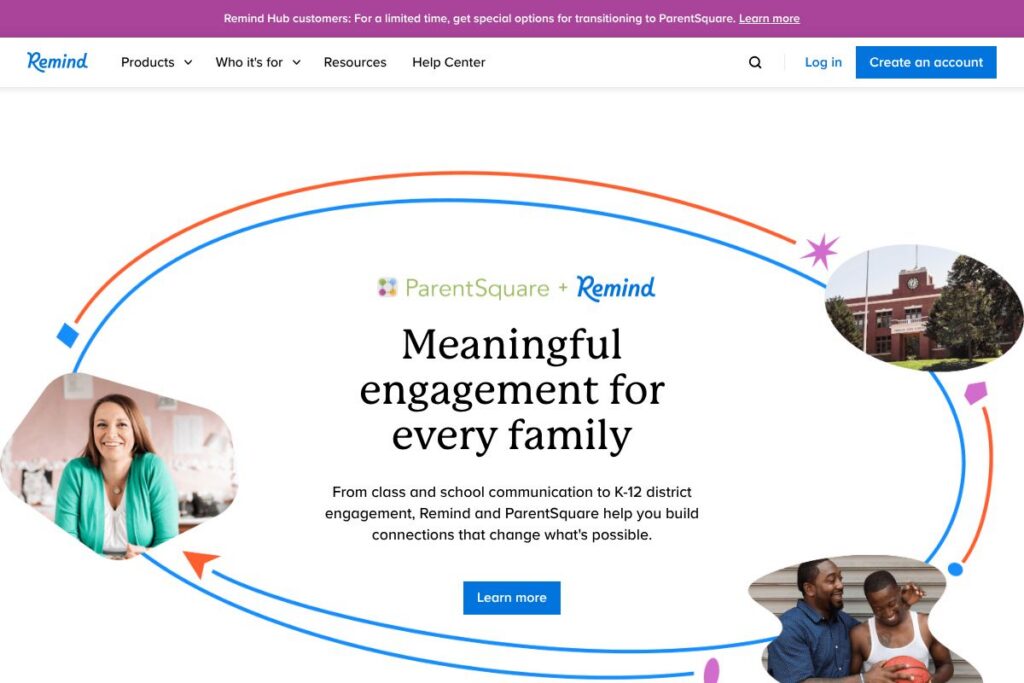
Remind is a communication platform built for K-12 schools and districts to connect teachers, students, and families. The product centers on short-form messaging, attachments, and phone-based delivery with automatic translation into more than 90 languages so schools can reach households where they are and support learning outside the classroom.
Remind compares directly to parent-communication and classroom platforms such as ClassDojo, Bloomz, and SchoolMessenger. Compared with ClassDojo, which emphasizes classroom culture and student portfolios, Remind focuses more narrowly on reliable messaging and school-to-home logistics. Compared with SchoolMessenger, which is often deployed district-wide for mass alerts, Remind offers a lighter daily messaging workflow designed for teachers as well as administrators.
Remind’s strengths are broad device support, translation, and high adoption in U.S. schools. That combination makes it a practical choice for districts and teachers who need dependable, multilingual communication without heavy setup or multiple tools.
How Remind Works
Teachers create classes and contacts inside the Remind app or web console and send text-style messages to students and family members. Messages can include attachments, links, and voice recordings; recipients receive communications on phones, tablets, or via email depending on their preferred settings.
Automatic translation converts messages into the recipient’s preferred language at delivery so teachers can send a single message and reach multilingual households. Districts can manage rosters and permissions centrally, and teachers use simple workflows to schedule messages, create group announcements, and follow up one-to-one when needed.
Remind features
Remind focuses on concise, reliable communication and accessibility features that reduce friction for educators and families. Core capabilities include one-to-many and one-to-one messaging, automatic translation, attachment support, and administrative tools for roster management and usage analytics. The platform emphasizes ease of use for classroom teachers while providing district controls for larger deployments.
The platform includes several powerful capabilities worth highlighting:
Messaging and announcements
Teachers and admins can send targeted messages to classes, groups, or individual contacts with scheduled delivery. The messaging interface mirrors SMS-style conversations, which lowers the learning curve for families and helps increase response and read rates.
Automatic translation
Outgoing messages are automatically translated into over 90 languages for recipients, removing the need for teachers to create separate messages per language. This reduces manual translation work and supports equitable communication across diverse school communities.
Attachments and multimedia
Remind supports sending photos, PDFs, and voice notes, which teachers use to share homework, forms, schedules, and quick lesson resources. Multimedia support helps reach families who prefer different formats and makes it easier to share clear instructions without long text blocks.
Roster and district management
Districts can sync student and family rosters from SIS systems and set administrative controls for messaging policies. Central roster management reduces duplicate work for teachers and ensures school-level consistency in contact data.
Read receipts and engagement tracking
Senders can see whether messages were delivered and read, which helps teachers follow up with families who may need another contact method. Engagement metrics also let administrators monitor communication patterns across classrooms and schools.
With these features, Remind helps schools maintain a single, accessible channel for routine communications, translation needs, and lightweight document sharing.
Remind pricing
Remind offers flexible pricing and deployments tailored to district, school, and individual educator needs. Because specific plan tiers and district agreements vary, you should review Remind’s current options for accurate cost details and available feature bundles.
Check Remind’s plans and offerings on the Remind homepage for the latest on district contracts, school subscriptions, and any educator-level options.
What is Remind Used For?
Remind is used primarily for school-to-home communication, daily announcements, homework reminders, scheduling updates, and parent-teacher check-ins. Its short-message format and translation capabilities make it a common choice for teachers who need to reach families quickly and consistently.
Districts also use Remind for attendance follow-ups, emergency notifications at the school level, and coordinating logistics for events and programs. The platform fits situations where reliable, trackable messaging and broad language support are required.
Pros and Cons of Remind
Pros
- Wide language coverage: Automatic translation into more than 90 languages helps schools reach multilingual families without manual translation work.
- Simple teacher workflows: The interface mimics SMS and is familiar to most users, which reduces onboarding time and increases day-to-day adoption among teachers and families.
- High adoption in K-12: With broad usage across U.S. schools, Remind integrates well into existing school communication practices and prioritizes accessibility for families on basic phones.
Cons
- Limited deep classroom management features: While strong for messaging, Remind is not a full-featured LMS; schools that need gradebooks and detailed assignment workflows will often use it alongside a learning management system.
- District-level customization may be required: Large deployments often need custom integration with SIS systems and policy configuration, which can require coordination with central IT or account teams.
Does Remind Offer a Free Trial?
Remind offers a free plan for core classroom messaging and family communication. The free option covers basic messaging, translations, and class-level features; districts and schools can contact Remind for expanded or enterprise-level services and deployment details on the Remind homepage.
Remind API and Integrations
Remind supports roster syncs and integrations with common education systems to simplify user management and single sign-on. Typical integrations include Google Classroom, Clever, and other SIS providers so schools can connect existing rosters and authentication.
For developer and integration details, consult Remind’s official integration resources and documentation linked from the Remind integrations and developer resources section of their site.
10 Remind alternatives
Paid alternatives to Remind
- ClassDojo — A classroom communication and behavior management app that combines messaging with student portfolios and classroom culture tools.
- Bloomz — A parent communication platform that includes messaging, event scheduling, volunteer coordination, and family engagement features.
- SchoolMessenger — A district-grade notification system focused on mass alerts, attendance messaging, and automated outreach at scale.
- ParentSquare — A family engagement platform with two-way messaging, translation, and district-level workflows for announcements and forms.
- Blackboard Connect — An emergency and notification system tailored for districts that need large-scale alerting capabilities.
- Powerschool Unified Classroom — A broader SIS and classroom solution that includes parent messaging as part of a larger student information and instructional suite.
Open source alternatives to Remind
- Moodle — An open source learning platform that can be extended with plugins for messaging and notifications, useful for schools that self-host and customize features.
- OpenSIS — An open source student information system that can be configured to handle notifications and parent messaging with integrations or custom development.
- Sakai — A community-developed LMS that supports communication tools and can be adapted for school messaging through custom modules.
Frequently asked questions about Remind
What is Remind used for?
Remind is used for school-to-home communication and classroom messaging. Teachers and administrators use it to send announcements, homework reminders, schedules, and one-to-one follow-ups with students and families.
Does Remind translate messages into other languages?
Yes, Remind provides automatic translation into more than 90 languages. That translation happens at delivery so a single message can reach multilingual households in their preferred language.
Can Remind integrate with Google Classroom?
Yes, Remind integrates with Google Classroom and other roster providers. Integration simplifies roster syncs and reduces duplicate setup for teachers.
Is Remind suitable for district-wide deployments?
Yes, Remind supports district-level administration and roster management. Districts can configure policies, sync SIS data, and manage permissions centrally for consistent communication.
Does Remind offer analytics on message engagement?
Yes, Remind provides delivery and read status indicators and basic engagement tracking. Administrators and teachers can use those metrics to follow up with families who do not engage with messages.
Final verdict: Remind
Remind excels at straightforward, reliable messaging for K-12 environments, with wide language coverage and simple workflows that drive adoption among teachers and families. Its translation and phone-based delivery model make it especially effective in districts with diverse populations and varying device access.
Compared with ClassDojo, which emphasizes classroom behavior and student-facing portfolios, Remind is stronger for district and teacher-to-family logistics and multilingual outreach. For organizations comparing pricing and features, check Remind’s options on the Remind homepage and review vendor proposals for district-level pricing and integration details.