Seesaw: An Overview
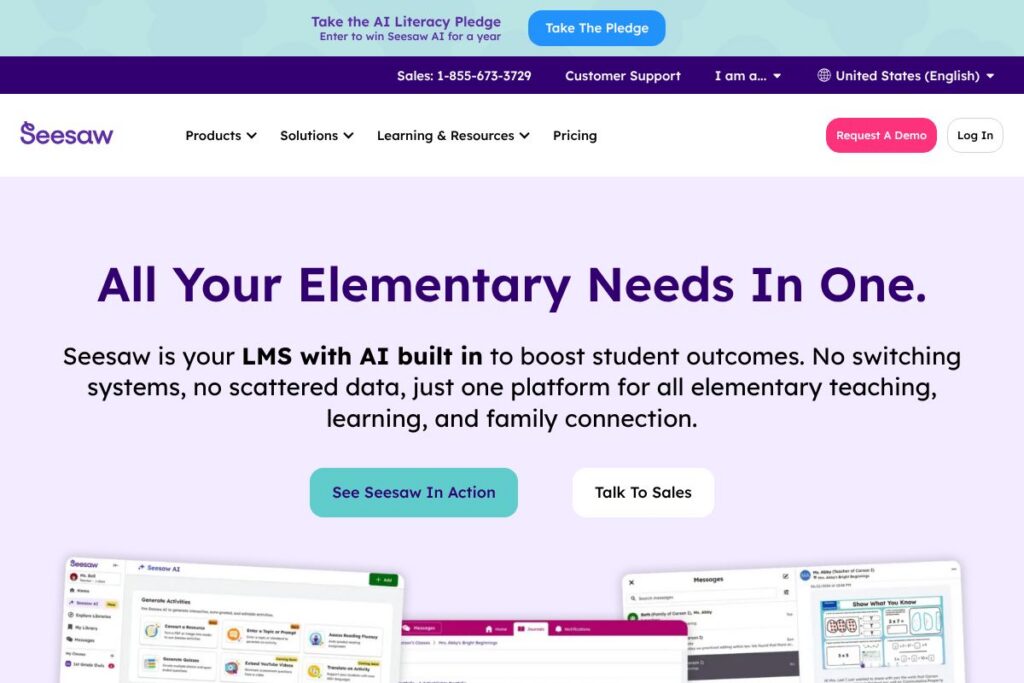
Seesaw is a learning experience platform built for elementary classrooms that combines student portfolios, instructional resources, and family communication into one environment. Teachers can assign activities, collect student work, provide feedback, and share progress with families while administrators get district-level visibility into usage and learning outcomes.
Compared with Google Classroom, Seesaw places more emphasis on student-facing portfolios and family engagement rather than being a general assignment inbox. Compared with ClassDojo, Seesaw focuses less on behavior points and more on artifacts of learning and assessment. Compared with Canvas, Seesaw targets PreK-6 with a simpler, more visual workflow that reduces setup time for elementary teachers.
All of this makes Seesaw a practical choice for elementary schools and districts that need a single platform to show student thinking, support literacy and MTSS workflows, and keep families connected throughout the school year.
How Seesaw Works
Seesaw organizes the classroom around student work and teacher-led activities. Teachers create or assign activities from a library, students submit photos, drawings, text or voice recordings to their digital portfolio, and teachers provide written or audio feedback directly on the student item.
Family engagement is handled by private family connections; families receive notifications or a stream of their childs posts and teacher feedback without needing a teacher-managed distribution list. Administrators can view aggregated participation and assessment indicators to monitor adoption and intervention needs across classrooms.
In practice, a typical workflow looks like this: the teacher assigns a short literacy task, students submit responses in class or remotely, the teacher reviews submissions, tags proficiency or standards, and families receive a notification with teacher comments and examples of progress.
Seesaw features
Seesaw centers on classroom portfolios, activity libraries, assessment tagging, family communication, rostering integrations, and district reporting. Recent emphasis includes built-in supports tied to Universal Design for Learning, MTSS enabling tools, and guidance for ethical AI adoption in K-6 settings.
Student portfolios
Student portfolios let each child collect work samples across media types, making learning visible over time. Portfolios support teacher feedback and family viewing, which helps document growth for conferences and formative assessment.
Family communication
Families get continuous visibility into classroom activity with private streams and notifications that highlight student work and teacher comments. These communication channels reduce manual emailing and keep family engagement tied directly to learning artifacts.
Instructional activity library
Seesaw offers a searchable library of teacher-created and standards-aligned activities that can be customized and assigned. Teachers can reuse activities across classes or adapt materials to different learner needs to save prep time.
Assessment tagging and standards alignment
Teachers can tag student work to standards or proficiency levels to track mastery over time. Tagged items can be filtered for reporting, which supports progress monitoring and data-driven instruction.
Administrative reporting and insights
District leaders can access adoption metrics, classroom usage, and aggregated assessment indicators to inform professional development and resource allocation. These insights support district goals such as literacy outcomes and MTSS implementation.
Rostering and single sign-on integrations
Seesaw connects with rostering services and SSO providers to simplify user management at scale. Integrations reduce manual account setup and support secure sign-on flows for teachers, students, and families.
Accessibility and UDL alignment
The platform holds third-party recognitions for accessibility and alignment with UDL principles, and it includes features that support learner variability. These capabilities help teachers deliver differentiated instruction for diverse classrooms.
MTSS and evidence-based instructional supports
Seesaw includes tools and workflows to support Multi-Tiered System of Supports, providing resources for tiered interventions and monitoring. These features are designed to help districts implement evidence-based supports consistently.
With its combination of visible student work, family-facing communication, and district analytics, the biggest benefit of Seesaw is reducing fragmentation: instruction, assessment, and family engagement live in one classroom-centered experience that elementary teachers can adopt quickly.
Seesaw pricing
Seesaw uses a school- and district-level subscription model with licensing tiers tailored to classroom needs, and it does not publish a single flat-rate pricing page for all customers. Pricing and licensing details are typically provided through district sales or procurement channels, and available purchase routes include marketplace options and cooperative purchasing agreements.
For purchasing and licensing details, see the Seesaw purchasing options. Districts can also explore procurement via the OMNIA Partners cooperative or direct marketplace listings such as the AWS Marketplace listings that support AWS procurement. For a tailored quote or to request a demo, contact Seesaw sales through the contact options on the Seesaw site.
Seesaw Use Cases
Elementary teachers use Seesaw to collect evidence of student learning, deliver short formative tasks, and make student thinking visible through multimedia artifacts. The platform works well for daily literacy checks, math problem explanations, and show-and-tell projects that illustrate growth over time.
Administrators use Seesaw to monitor adoption, review district-wide engagement, and evaluate the impact of curricular adjustments or intervention programs. Family engagement use cases include routine sharing of classroom highlights and structured portfolio updates for conferences and celebrations.
Seesaw also supports special programs such as MTSS, structured literacy aligned to the Science of Reading, and district initiatives that require evidence-based tools and centralized reporting. These features help schools coordinate instruction, intervention, and family communication around student outcomes.
Pros and Cons of Seesaw
Pros
- Student-centered portfolios: The platform makes student thinking visible through multimedia portfolios that document work over time and support formative assessment. Students can show process and reflection, which helps teachers assess deeper understanding.
- Family engagement built in: Families receive direct visibility into their childs classroom work and teacher feedback, which increases home-school communication and reduces administrative friction for teachers who would otherwise send individual emails.
- Elementary-focused design: Features and workflows are tuned for PreK-6, from age-appropriate interfaces to activity libraries designed for early learners, which lowers the learning curve for elementary teachers.
- District reporting and MTSS support: Aggregated insights and intervention tools help districts implement Multi-Tiered System of Supports and monitor the effectiveness of tiered interventions.
Cons
- Custom pricing and procurement: Pricing is handled via district licensing and procurement channels, which can require time and coordination with purchasing departments rather than instant signups. This can slow small-scale trials or rapid adoption by single teachers.
- Less suited for older grades: The platform is optimized for elementary workflows and portfolio formats, so middle and high school teachers seeking robust LMS features for secondary coursework may find other systems like Canvas more appropriate.
- Feature parity across plans: Some administrative and district-level analytics are gated behind school- or district-level subscriptions, so individual teachers using the free tier may not see all reporting capabilities.
Can You Test Seesaw Before Buying?
Seesaw offers a free basic plan and district subscription options. Teachers can start with the free teacher plan to use core portfolio and activity features, while schools and districts can request demos or quotes to evaluate district-level analytics and MTSS workflows. For procurement or to request a trial period that includes administrative features, contact Seesaw through the Seesaw purchasing options.
Seesaw API and Integrations
Seesaw supports rostering and single sign-on through common school services and offers integrations with rostering providers such as Clever and ClassLink. These integrations simplify account provisioning and class rosters at scale.
The platform also integrates with classroom ecosystems like Google Classroom and supports SSO with identity providers; for developer or integration guides, review Seesaw’s resources and help center on the Seesaw site.
10 Seesaw alternatives
Paid alternatives to Seesaw
- Google Classroom – A free-to-use classroom tool for schools using Google Workspace for Education that handles assignments, grading, and basic communication and scales across grades.
- ClassDojo – A classroom communication app focused on behavior, parent messaging, and class stories that is popular in early grades for family updates.
- Nearpod – An interactive lesson delivery platform with live lessons, formative assessment and student-paced activities for class interaction and formative checks.
- Canvas – A full-featured LMS used widely in K-12 and higher education that supports course management, grading, and advanced analytics for older students.
- Schoology – An LMS that combines learning management with assessment and communication tools, often used in districts needing gradebook and course management features.
- Brightspace – A learning platform from D2L that offers adaptive learning features and robust analytics for larger districts and blended learning programs.
- Edmodo – A class communication and assignment platform with teacher, student, and parent-facing functionality aimed at K-12 environments.
Open source alternatives to Seesaw
- Moodle – A flexible open-source LMS that supports courses, activities, and plugins; requires hosting and configuration but offers full control over features and data.
- OpenSIS – An open-source student information system with core rostering and grading features; often paired with other tools for portfolio capabilities.
- Sakai – An open-source learning management and collaboration platform used mainly in higher education but adaptable for K-12 deployments with custom work.
- Open edX – An open-source education platform for delivering course content and assessments; more commonly used for large-scale or custom initiatives.
Frequently asked questions about Seesaw
What is Seesaw used for?
Seesaw is used to collect student work, provide formative feedback, and keep families informed about classroom learning. It centralizes student portfolios, teacher activities, and family communication for PreK-6 classrooms.
Does Seesaw integrate with Google Classroom?
Yes, Seesaw can integrate with Google Classroom. Integrations help synchronize rostering and simplify workflows when schools use Google Workspace for Education.
Can Seesaw support Multi-Tiered System of Supports (MTSS)?
Yes, Seesaw includes tools and workflows to support MTSS implementation. Districts can use its monitoring and intervention features to track progress and manage tiered supports.
Is Seesaw aligned with accessibility and UDL principles?
Yes, Seesaw has received third-party recognition for accessibility and UDL alignment. The platform includes features and design practices that support learner variability and inclusive instruction.
How does Seesaw handle family communication?
Seesaw provides private family connections and notification streams tied to student work. Families receive updates and examples of learning directly from the classroom without separate email workflows.
Final Verdict: Seesaw
Seesaw excels at making student thinking visible in elementary classrooms while linking teachers, families, and administrators in a single platform. Its portfolio-first approach, family-facing streams, and district reporting make it particularly effective for PreK-6 use cases where regular family communication and formative evidence are priorities.
Compared to Google Classroom, which is broadly free for schools using Google Workspace, Seesaw typically requires district licensing for full administrative and MTSS features but delivers deeper portfolio, family engagement, and early-literacy supports out of the box. For elementary-focused districts that need structured literacy, UDL-aligned tools, and centralized family engagement, Seesaw offers a focused feature set that aligns with those priorities.
Overall, Seesaw is a strong option for elementary schools seeking an integrated classroom platform to manage instruction, assessment, and family partnerships in one place. To evaluate how it fits your district budget and deployment needs, review the Seesaw purchasing options and contact sales for a tailored quote.