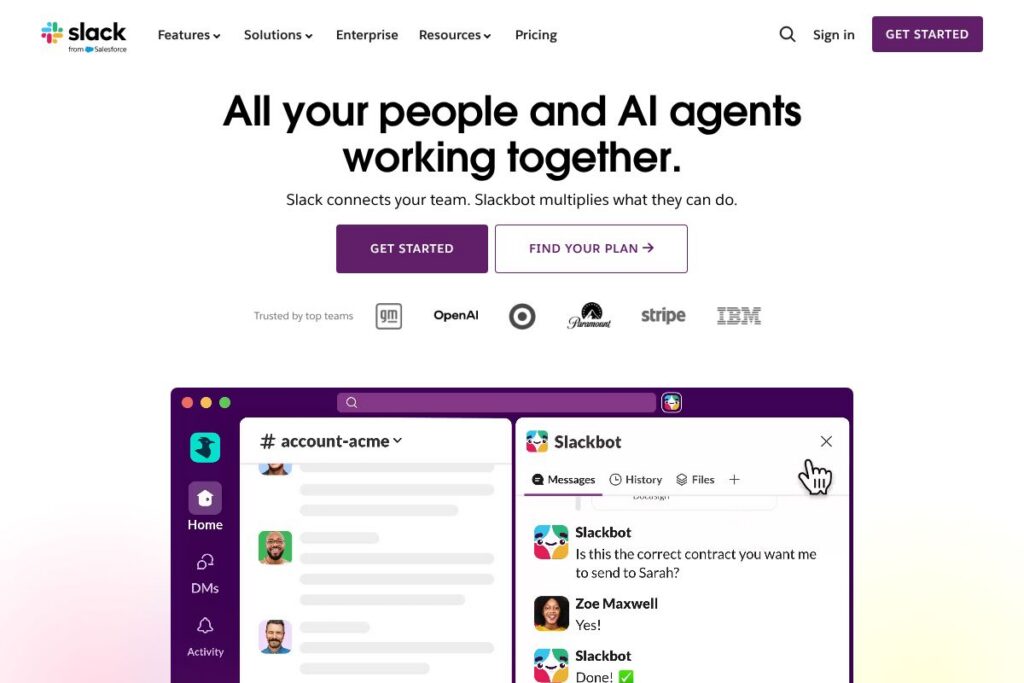
Slack: An Overview
Slack is a messaging-first collaboration platform that organizes team communication into channels, direct messages, and threads, while connecting those conversations to apps, automations, and knowledge. Its core aim is to reduce email clutter and make work conversations searchable and actionable by linking context, files, and third-party tools into one place.
Compared with Microsoft Teams, Slack focuses on threaded conversations and a large ecosystem of third-party integrations, while Teams emphasizes deep integration with Microsoft 365 and bundled licensing for organizations already using Microsoft’s suite. Against Asana, Slack is stronger on real-time conversation and integrations, while Asana centers on structured task and project tracking. Against developer-focused chat tools such as Discord, Slack provides enterprise-grade controls, compliance features, and purpose-built workflow tooling for business use cases.
Slack performs best when teams need a persistent, searchable hub for conversations that tie directly to work systems. It suits product teams, customer support, marketing, and distributed companies that require real-time collaboration, app integrations, and lightweight automation to keep projects moving.
How Slack Works
Channels group conversations by team, project, or topic, and remain visible to anyone invited so work stays transparent. Within channels users post messages, attach files, start threads to keep discussions organized, and surface decisions and outcomes for later reference.
Slack connects to external systems via apps and bots, and Slackbot or third-party agents can act on commands, run automations, and fetch data into a conversation. Huddles provide lightweight audio and screen sharing for quick syncs, with optional AI note-taking to capture meeting highlights and action items.
Slack features
Slack centers on searchable conversation, integrations, and automation, and recent additions emphasize AI capabilities such as conversation summaries, AI-powered search, and assistant agents that surface context from apps. Core functionality includes channels, direct messages, huddles, Slackbot, workflow automation, a large app directory, and enterprise security controls.
The platform includes several powerful capabilities worth highlighting:
Slackbot and AI assistants
Slackbot acts as a built-in assistant that answers simple questions, runs commands, posts reminders, and coordinates with connected agents to pull data from apps. AI features extend Slackbot with conversation summaries, thread recaps, and contextual answers that reduce time spent catching up and searching for decisions.
Channels and threaded conversations
Channels provide transparent, topic-focused spaces where teams, stakeholders, and bots collaborate together, and threads keep replies attached to the originating message. This structure makes it easier to follow multiple parallel discussions without losing context or cluttering the main channel timeline.
Huddles and AI note-taking
Huddles are lightweight audio and screen-sharing sessions that can be started instantly inside a channel or DM, with options for automatic note capture and transcription when AI note-taking is enabled. This lowers friction for quick standups and informal syncs while preserving a searchable record of decisions.
Slack Connect and external collaboration
Slack Connect extends channels to external partners, vendors, and clients so organizations can collaborate across company boundaries without email. It supports secure, permissioned access and keeps external conversation in a familiar channel-first format.
Workflows and automation
Workflows let non-developers automate routine tasks using a point-and-click builder, while developers can create custom automations and apps using the Slack API. Automations range from simple form-driven approvals to multi-step integrations that react to events and update systems.
Integrations and app ecosystem
Slack integrates with hundreds of services across productivity, CRM, CI/CD, and file storage, allowing teams to surface notifications and take actions from tools such as Google Drive, Salesforce, GitHub, Zoom, and many more. The app ecosystem reduces context switching by bringing relevant data into conversations.
Search and knowledge
AI-enhanced search indexes messages, files, and app content to make a company’s institutional knowledge findable from one place. Search results surface relevant conversations and attachments, which helps new hires and cross-functional teams get up to speed faster.
Security and compliance
Slack provides enterprise security controls including SSO, SAML, data loss prevention, and audit logging so organizations can meet compliance requirements and control data sharing. These features are designed to support regulated industries and large deployments without compromising collaboration.
With this mix of conversational UX, automation, and integrations, Slack’s biggest benefit is reducing the friction between discussion and action so teams spend less time switching contexts and more time moving work forward.
Slack pricing
Slack uses a subscription-based pricing model with a freemium entry point and paid tiers for additional features, workspace controls, and enterprise functionality. Pricing varies by team size, required controls, and whether an organization needs enterprise-grade compliance and support; for the most accurate plan breakdown see Slack’s official pricing and plans.
What is Slack Used For?
Slack is used for team communication, incident response, project coordination, and connecting business systems into conversational workflows. Teams use channels to centralize status updates, escalate issues, and run approvals while keeping a searchable record of decisions and attachments.
Organizations also use Slack to automate routine processes, embed customer and CRM data into conversations to speed sales cycles, and create internal knowledge hubs with AI-enhanced search. It is well suited for distributed teams, cross-functional projects, and any group that benefits from fast, context-rich communication.
Pros and Cons of Slack
Pros
- Real-time collaboration: Slack’s conversational model and threaded replies make it easy to carry out fast back-and-forth discussions while preserving context.
- Extensive app ecosystem: The platform supports a wide range of integrations that bring notifications and actions from tools like Google Drive, Salesforce, GitHub, and Zoom into channels.
- Accessible automation: Workflows and Slackbot let non-developers automate approvals, reminders, and routine tasks, reducing manual work and speeding common processes.
- Searchable company knowledge: AI-enhanced search and conversation summaries help teams find decisions, files, and context without digging through email.
Cons
- Information overload risk: Without clear channel governance and notifications management, teams can experience message fatigue and fragmented attention.
- Cost at scale: For large organizations requiring advanced compliance and administrative controls, paid tiers and enterprise features can add up when purchased per seat.
- Limited structured project tracking: While Slack has lists and lightweight task features, teams that require full-featured project management may still need a dedicated tool alongside Slack.
Is Slack Free to Try?
Slack offers a free plan and paid tiers. The free plan includes core messaging, limited message history, and app integrations, while paid subscriptions add features like extended message retention, advanced security controls, and enterprise functionality; check Slack’s pricing and plans for current details and comparisons.
Slack API and Integrations
Slack provides a developer-focused API and extensive documentation for building apps, bots, and custom integrations; see the Slack API documentation for endpoints, SDKs, and event-driven patterns. The platform also maintains an App Directory where teams can discover and install connectors for Google Drive, Salesforce, Zoom, GitHub, Asana, and many other services.
If you need to automate workflows at scale, the API supports granular permissioning, webhooks, events, and interactive components so developers can embed Slack features directly into internal systems and customer workflows. Explore the Slack App Directory to find prebuilt integrations that match your stack.
10 Slack alternatives
Paid alternatives to Slack
- Microsoft Teams — Chat, meetings, and collaboration tightly integrated with Microsoft 365 and Office apps, often bundled with Microsoft licensing.
- Google Chat — Messaging and rooms integrated with Google Workspace for organizations standardizing on Google services.
- Discord — Real-time voice and text chat with rich media features; popular with developer teams and communities that value lower-latency voice channels.
- Mattermost — Self-hosted team messaging aimed at teams needing on-premise deployment and strict control over data.
- Workplace from Meta — Social-style collaboration and groups with familiar Facebook-like interfaces for company-wide communication.
- Flock — Team messaging with built-in productivity features and native app integrations for SMBs.
- Zoho Cliq — Messaging tied to the Zoho suite with collaboration features and business process integrations.
Open source alternatives to Slack
- Zulip — Open source chat with topic-based threading and server or cloud hosting options for teams that want control over data.
- Mattermost — Open source and self-hostable, suitable for organizations that require regulatory control and custom deployments.
- Rocket.Chat — Community-driven, customizable messaging platform that can be self-hosted and extended with integrations.
- Matrix / Element — Decentralized, open standard for real-time communication with clients like Element that support federation and end-to-end encryption.
Frequently asked questions about Slack
What is Slack used for?
Slack is used for team communication and collaboration. It centralizes conversations, integrates with external tools, and provides automation to make routine tasks more efficient.
Does Slack have a free plan?
Yes, Slack offers a free plan. The free tier includes core messaging, limited message history, and access to many integrations; paid plans add retention, compliance, and administrative features.
Can Slack integrate with Salesforce?
Yes, Slack integrates with Salesforce. The integration surfaces CRM context inside channels so sales and support teams can view and update deal information without leaving the conversation.
Does Slack provide an API for developers?
Yes, Slack offers a full developer API. The Slack API documentation includes guides, SDKs, and reference endpoints for building apps, bots, and automation that interact with workspace data.
Is Slack secure for enterprise use?
Slack includes enterprise-grade security and compliance features. It supports single sign-on, audit logs, data loss prevention, and administrative controls to help meet organizational requirements.
Final Verdict: Slack
Slack excels at turning conversations into actionable work by combining channels, bots, and a broad app ecosystem that reduces context switching. Its AI features, searchable history, and workflow tools help teams capture institutional knowledge and automate routine coordination so people spend less time chasing status updates.
Compared with Microsoft Teams, Slack emphasizes an open integrations ecosystem and a conversation-first UX, while Teams often makes sense for organizations already invested in Microsoft 365 licensing. From a cost perspective, Slack sells per-seat subscriptions and may require paid tiers for enterprise controls, whereas Teams is commonly available as part of Microsoft 365 bundles, which can be more cost-effective for customers using Microsoft apps. Choose Slack when real-time, app-driven collaboration and a flexible automation layer are priorities.