What is TouchBistro
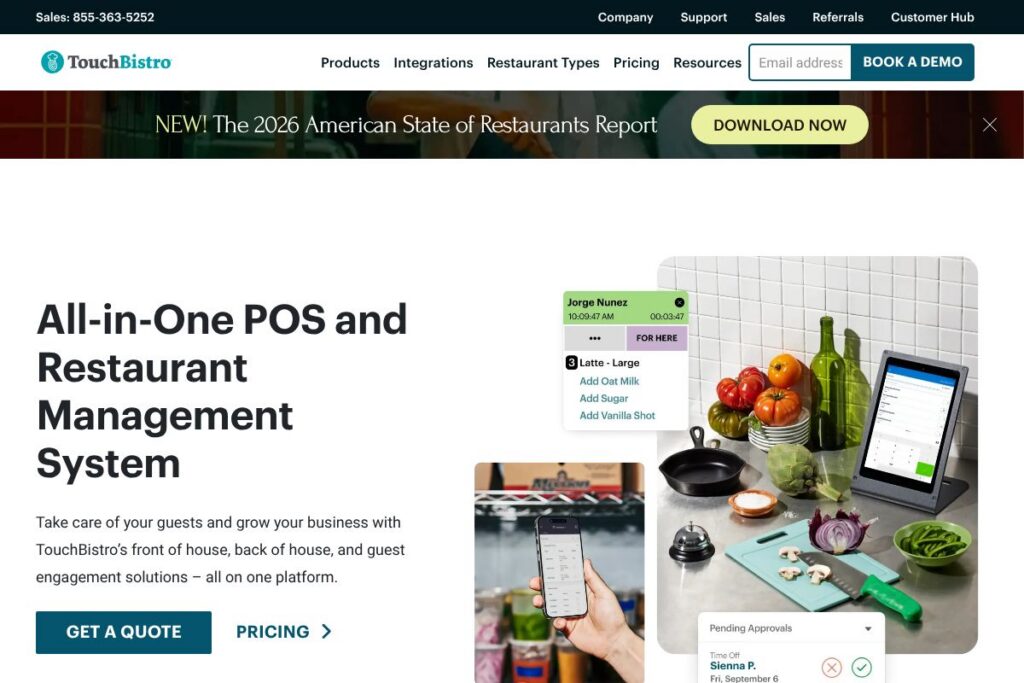
TouchBistro is a purpose-built restaurant POS and management platform that combines point-of-sale, table management, kitchen routing, inventory, reporting, and guest engagement features in one package. The product targets full-service restaurants, quick service, bars, cafes, and multi-location groups that need a single system to run both front of house and back of house operations.
Compared with competitors, TouchBistro focuses on restaurant workflows rather than general retail. For example, Toast emphasizes integrated payments and an ecosystem tailored to US hospitality operations and larger multi-location chains, while Square for Restaurants offers a lower-cost entry point and a wider set of payment tools that appeal to small operators. Lightspeed provides a feature-rich commerce platform that converges retail and hospitality needs, often adding deeper inventory and e-commerce capabilities.
All of this makes TouchBistro especially suited for restaurants that need industry-specific features such as table-side ordering, kitchen display systems, and integrated guest engagement, while offering configuration options and integrations that fit independent operators and growing groups.
How TouchBistro Works
TouchBistro runs on iPad hardware with cloud-based management for settings, reporting, and integrations while allowing local operation if connectivity drops. Teams use the iPad POS to take orders table-side, apply modifiers, split checks, and send orders directly to kitchen printers or a kitchen display system for faster routing.
Managers access centralized controls to manage menus, pricing, staff permissions, and inventory counts, then use built-in reports to review sales, labor, and food cost. Integrations with third-party scheduling, accounting, and delivery partners let restaurants connect TouchBistro to payroll, accounting, and third-party delivery channels for an end-to-end workflow.
TouchBistro features
TouchBistro groups POS, operations, and guest engagement tools so restaurants can run service, manage back-of-house tasks, and analyze performance from a single system. Recent product updates emphasize streamlining order flow, improving offline resilience, and expanding integrations for accounting, scheduling, and online ordering.
Key functionality includes:
POS and Order Management
The table-side iPad POS supports multi-seat orders, modifiers, course timing, voids, and quick check-splitting. It improves order accuracy and speed of service by letting servers ring items at the point of service and send orders directly to the kitchen for immediate preparation.
Table Management and Floor Plans
TouchBistro offers configurable floor plans, table statuses, and section management so hosts and managers can visually monitor table turns and server loads. This helps optimize seating, reduce wait times, and balance server assignments during busy periods.
Menu Management and Modifiers
Menu controls let you configure items, portion sizes, and conditional modifiers with pricing rules. The system supports timed menus, happy hour pricing, and item-level availability to reflect stock and daily specials.
Payments and Integrated Processing
Integrated payments allow in-POS card acceptance with tip handling, split payments, and support for EMV and contactless transactions when paired with supported payment processors. Payment processing setup typically combines hardware, merchant services, and secure transaction handling within the platform.
Kitchen Display System and Routing
Orders can be routed to kitchen printers or a digital kitchen display system to streamline food preparation and minimize manual handoffs. KDS features include ticket prioritization, routing by station, and real-time order status updates for better FOH-to-BOH communication.
Inventory and Cost Control
Inventory tools provide stock tracking, recipe-level costing, and purchase order workflows so managers can monitor usage and reduce food waste. Cost reports link purchases to sales to give clearer visibility into margins and menu profitability.
Staff Management and Reporting
Staff scheduling, clock-in/out, and shift-level reporting help track labor costs and individual performance. Built-in sales and labor reports let managers compare actual labor to sales and make informed staffing decisions.
Guest Engagement and Loyalty
TouchBistro supports guest profiles, order histories, and loyalty programs to encourage repeat visits and targeted promotions. Integration options extend reach to online ordering, delivery partners, and reservation systems for a consistent guest experience.
Integrations and Extensibility
A marketplace of third-party integrations covers accounting, payroll, staff scheduling, delivery, online ordering, and loyalty systems. Those integrations enable TouchBistro to connect with standard restaurant back-office tools for a fuller operations stack.
With these capabilities, TouchBistro aims to reduce manual work, improve order accuracy, and give operators the reporting they need to control costs and increase throughput.
TouchBistro pricing
TouchBistro uses a subscription pricing model that is typically tailored to restaurant size, feature set, and hardware needs. Costs commonly include a software subscription, optional hardware purchases or leases, and separate merchant processing fees for payments.
Because TouchBistro’s plans and hardware bundles are customized for different restaurant types and locations, review TouchBistro’s pricing and sales information on TouchBistro’s website to compare options for single-location operations versus multi-site deployments. For an accurate quote and to discuss supported payment processors and hardware bundles, contact sales through TouchBistro’s pricing and sales information.
What is TouchBistro Used For?
TouchBistro is used to run daily restaurant operations including order taking, payments, table management, and kitchen routing. Restaurants use it to replace paper tickets and disconnected systems with a single interface that coordinates FOH and BOH workflows.
Operators also use TouchBistro for back-office tasks like inventory tracking, menu engineering, labor management, and reporting. It is useful for businesses that need to integrate online ordering, delivery partners, accounting, and staff scheduling into one operational flow.
Pros and Cons of TouchBistro
Pros
- Restaurant-focused workflows: The POS is designed around table-side ordering, modifiers, and course timing which reduces friction for servers and kitchens.
- All-in-one operations: Centralized menu, inventory, staff, and reporting tools minimize the need for multiple disconnected apps.
- Robust integrations: A marketplace of third-party integrations lets restaurants add accounting, scheduling, delivery, and loyalty tools to their setup.
- Offline resilience: Local iPad operation with cloud sync improves reliability if internet connectivity is intermittent.
Cons
- Hardware dependence: The system is optimized for iPad hardware, so restaurants that want cross-platform hardware alternatives may face additional costs.
- Custom pricing for larger accounts: Enterprise and multi-location pricing is typically bespoke which means you must contact sales for an accurate quote.
- Learning curve for complex setups: Advanced features like recipe costing and multi-location management take time to configure correctly for maximum value.
Does TouchBistro Offer a Free Trial?
TouchBistro offers a free demo and trial options for prospective customers. Restaurants can request a live demonstration, trial the POS, and discuss hardware and processing bundles with sales. To arrange a demo or trial, contact TouchBistro through TouchBistro’s website.
TouchBistro API and Integrations
TouchBistro provides an integration marketplace and developer options so restaurants can connect accounting, scheduling, delivery, loyalty, and payroll systems. Explore the TouchBistro integrations page for a list of supported partners and categories.
For development teams, TouchBistro offers API access and partner programs to build custom integrations and data connections. Review TouchBistro’s integrations page to find documentation and integration partners that match your workflow needs.
10 TouchBistro alternatives
Paid alternatives to TouchBistro
- Toast — Full-service restaurant POS with an ecosystem focused on payments, online ordering, and enterprise restaurant needs; commonly used by larger multi-location operations.
- Square for Restaurants — A cost-conscious POS option with an accessible free tier and paid upgrades, popular with quick-service and small full-service restaurants.
- Lightspeed — A commerce platform with strong inventory and e-commerce features that suits venues needing deeper retail and hospitality convergence.
- Clover — Flexible POS hardware and app marketplace that suits single-location restaurants that want modular payment and add-on apps.
- Revel Systems — Enterprise-capable POS with advanced reporting and multi-location management suited to high-volume operations.
- Upserve — Restaurant-specific platform with POS, payments, and analytics designed to unify front-of-house and back-of-house data.
Open source alternatives to TouchBistro
- uniCenta — Open source POS that can be adapted for hospitality use with community and commercial support options.
- Floreant POS — A restaurant-focused open source POS with basic order management and kitchen printing workflows.
- Chromis POS — Open source point-of-sale software that supports touchscreen operation and printing for small hospitality setups.
- Odoo (Community POS) — The community edition of Odoo includes a POS module that can be extended with open-source apps for inventory and accounting integration.
Frequently asked questions about TouchBistro
What is TouchBistro used for?
TouchBistro is used to manage restaurant operations including order taking, payments, table management, kitchen routing, inventory, and reporting. Operators rely on it to coordinate FOH and BOH tasks and to consolidate back-office reporting.
Does TouchBistro have an API for developers?
Yes, TouchBistro supports integrations and developer access via partner programs. The TouchBistro integrations page lists supported third-party partners and integration options for accounting, scheduling, and delivery.
Can TouchBistro handle offline service during internet outages?
Yes, TouchBistro supports local iPad operation with cloud sync so the POS continues to function during temporary connectivity losses. Sales and order data sync to the cloud once the connection is restored.
How does TouchBistro handle payments and processing?
TouchBistro integrates with payment processors and supports in-POS card acceptance with EMV and contactless options when paired with supported hardware. Payment processing fees and hardware bundles are typically arranged through sales and merchant services.
Is TouchBistro appropriate for multi-location restaurants?
Yes, TouchBistro supports multi-location setups with centralized menu management, reporting, and user permissions. Larger deployments typically involve custom pricing and hardware planning through TouchBistro sales.
Final verdict: TouchBistro
TouchBistro excels at mapping restaurant workflows into an iPad-first POS and operations platform that ties together front-of-house, back-of-house, and guest engagement features. It delivers strong table management, KDS support, inventory controls, and an integrations ecosystem that helps small and growing restaurants replace multiple disconnected systems.
Compared to Square for Restaurants, which offers a clear entry price point and a free tier with optional paid upgrades, TouchBistro is positioned toward operators who need deeper restaurant-specific controls and are willing to evaluate bundled hardware and processor options. For restaurants that prioritize restaurant-first features and kitchen efficiency, TouchBistro is a strong choice; for businesses focused on minimal initial cost and a broad payments feature set, Square for Restaurants may be a more economical starting point. For detailed pricing and to compare hardware bundles, visit TouchBistro’s pricing and sales information.