Vidyard: An Overview
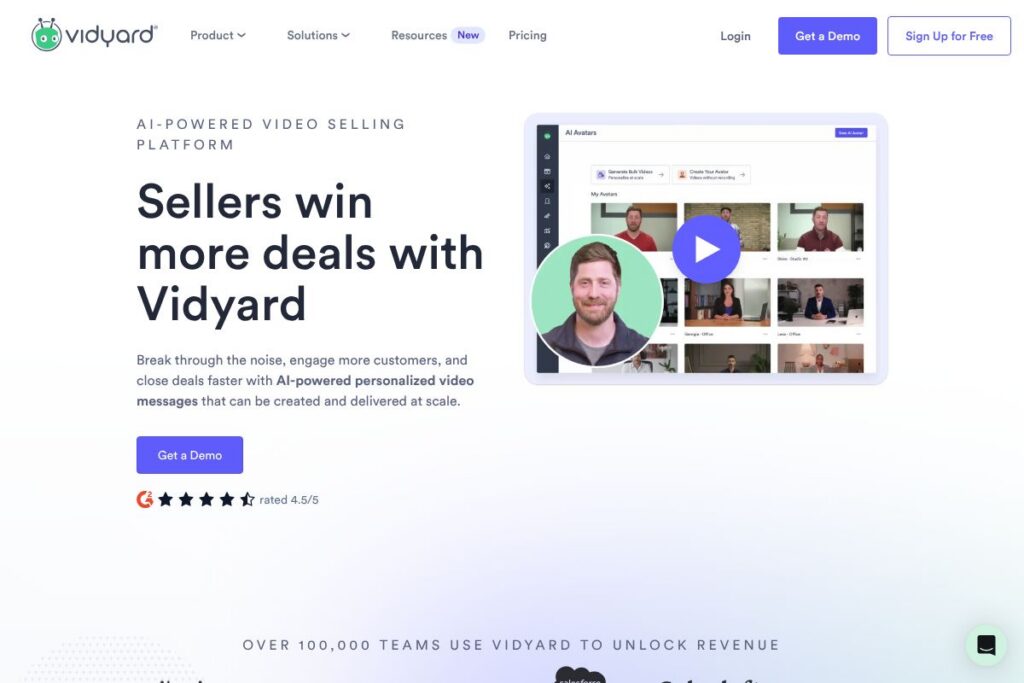
Vidyard is a video platform built for sales, marketing, and customer teams to create, host, and measure business video content. It focuses on personalized video messages for outreach, video hosting for campaigns, and viewer analytics that feed into CRM and marketing systems. The product is used by individual sellers through to enterprise revenue teams that need visibility into who watches video content and how viewers engage.
Compared with Loom, Vidyard emphasizes analytics, CRM integration, and enterprise controls rather than just quick internal screen recordings. Against Wistia, Vidyard places more emphasis on sales workflows and one-to-one personalization for outreach, while Wistia often focuses on marketing video hosting and lead capture. Compared with BombBomb, Vidyard expands the use case beyond email-first video messages into hosted content, player customization, and deeper engagement tracking.
Vidyard does particularly well at tying viewer behavior back into sales processes, enabling reps to send personalized videos and track opens, watch time, and heatmaps inside the CRM. All of this makes it a practical choice for revenue teams that need personal outreach at scale alongside campaign-level video hosting and performance measurement.
How Vidyard Works
Users record videos from a browser extension, the Vidyard web app, or a mobile device, choosing webcam, screen, or combined captures. Recordings can be trimmed, annotated, and published to a hosted player with shareable links or embedded in emails, landing pages, and social posts.
When a video is shared, Vidyard captures viewer data such as who watched, how long they watched, and which parts they rewatched; those engagement events can be pushed to CRMs and marketing platforms. Sales reps typically use personalized video messages to open conversations, while marketers use hosted players with CTAs and gated content to capture leads.
What does Vidyard do?
Vidyard’s main capabilities center on video creation, hosting, personalization, and analytics. Core functions include browser-based recording, a hosted video player with customization, viewer heatmaps and engagement data, integrations with CRM and marketing automation systems, and security controls for enterprise deployments. The platform has expanded features aimed at scaling personalized outreach, including templates and automated video generation for teams.
The platform includes several powerful capabilities worth highlighting:
Video Recording and Editing
Record webcam, screen, or both from the browser or mobile device, then trim and add basic edits before publishing. This allows sales reps to produce short, focused messages without a separate editing tool, and marketers can create demo clips or tutorials quickly.
Hosted Video Player and Embedding
Videos are delivered through a customizable player that can be embedded on websites or shared via links; players support CTAs, forms, and password protection. This central hosting reduces dependency on third-party players and keeps view data consolidated.
Viewer Analytics and Heatmaps
Detailed engagement metrics show who watched, average view time, and which sections were rewatched, providing actionable insights for follow-up. Those metrics help prioritize leads and understand content performance across campaigns.
CRM and Marketing Integrations
Native integrations and connectors push view events into systems like Salesforce and HubSpot, enabling automated workflows based on engagement. Integrations make it possible to trigger tasks, adjust lead scores, or start follow-up sequences when a prospect watches a video.
Personalization and Scale (Video Agent and Templates)
Tools for recording personalized videos or generating many tailored messages help sellers reach prospects with individualized content at scale. Templates and automated workflows reduce repetitive work while preserving a personal touch.
Security and Enterprise Controls
Enterprise features include single sign-on, domain-restricted sharing, and access controls to keep content secure and compliant. These controls are useful for regulated industries and larger organizations managing many users and videos.
With these features combined, Vidyard provides sales and marketing teams a way to produce personalized video outreach, host campaign assets, and measure viewer behavior to inform sales and marketing actions.
Vidyard pricing
Vidyard uses a tiered SaaS pricing model with options that range from free individual use up to enterprise agreements tailored to large organizations. The company combines self-serve plans for small teams with custom pricing and packages for revenue organizations that require advanced features and SLAs.
For the most accurate and current breakdown of plans and enterprise options, review the Vidyard homepage for pricing and plan details. Sales-led tiers and enterprise agreements are commonly handled through direct engagement with Vidyard’s team, while individual and small-team plans can be explored from the vendor site.
What is Vidyard used for?
Sales teams use Vidyard to send personalized video messages for outreach and follow-up, replacing or augmenting text email with recorded walkthroughs, introductions, or proposal explanations. The recorded videos increase context and help build rapport before a live call.
Marketing teams use Vidyard to host product videos, demos, and gated content, and then rely on engagement metrics to score leads and optimize campaigns. Customer success and onboarding teams use short videos for feature walk-throughs and troubleshooting to reduce support friction.
Pros and cons of Vidyard
Pros
- Personalized outreach at scale: Vidyard lets reps send individual video messages and scale that approach with templates and automation, improving response rates compared with plain email.
- Deep viewer analytics: Engagement metrics and heatmaps provide clear signals for follow-up, and those signals can be pushed into CRMs for workflow automation.
- CRM-native integrations: Native connectors to platforms like Salesforce and HubSpot make it straightforward to feed video engagement into existing sales processes.
- Enterprise controls: Single sign-on, domain restrictions, and access management support compliance and governance for larger organizations.
Cons
- Cost and packaging for larger teams: Enterprise-grade features are typically sold in custom packages which can be more expensive than simple per-user video tools. This means smaller teams may find advanced features out of reach without a larger budget.
- Learning curve for analytics: Extracting maximum value from engagement data requires configuration and process changes in sales and marketing systems, which can add setup time.
- Feature overlap with simpler tools: For teams that only need internal screen recordings or short demos, lighter tools may be easier and cheaper to adopt.
Does Vidyard Offer a Free Trial?
Vidyard offers a free plan and paid trial options for higher tiers. The free plan supports basic recording and sharing, while trials or demos for advanced, sales-focused features are typically available through Vidyard’s sign-up flow or a sales conversation; see the Vidyard homepage to start a free account or request a demo.
Vidyard API and Integrations
Vidyard provides developer APIs and webhooks for uploading videos, retrieving analytics, and embedding players; the Vidyard API documentation describes available endpoints and usage patterns. Those APIs support automation and custom integrations for workflows that need programmatic access to video assets and engagement events.
Integrations include major CRMs and marketing platforms such as Salesforce and HubSpot, email clients like Gmail and Outlook, and marketing automation platforms. The Vidyard integrations hub lists connectors and partner apps for common workflows.
10 Vidyard alternatives
Paid alternatives to Vidyard
- Loom — Focuses on quick screen and webcam recordings for internal communication and light external use, with easy sharing and a simple editor.
- Wistia — Hosts marketing videos with robust analytics and lead capture tools for marketing teams running campaigns.
- BombBomb — Emphasizes video email for sales outreach, with inbox-friendly workflows and tracking for one-to-one messages.
- Vimeo Pro — Offers professional hosting, customization, and distribution controls for creators and businesses needing polished playback and privacy options.
- Brightcove — An enterprise-grade video platform for large-scale distribution, monetization, and broadcast-quality workflows.
- Hippo Video — Combines recording, hosting, and sales-focused workflows with integrated analytics and CRM connectivity.
- CloudApp — Simple screen capture and short video sharing focused on collaboration and lightweight tutorials.
Open source alternatives to Vidyard
- PeerTube — A federated, open source video hosting platform suited to organizations that want self-hosted control over video distribution.
- Kaltura Community Edition — An open source video platform that can be self-hosted, offering wide-ranging features for media management and playback.
- Opencast — Designed for educational and media workflows, Opencast provides tools for recording, processing, and distributing video content in a self-hosted environment.
Frequently asked questions about Vidyard
What is Vidyard best used for?
Vidyard is best used for sales and marketing video that needs tracking and CRM integration. Teams use it for personalized outreach, hosted campaign videos, and analytics-driven lead qualification.
Does Vidyard integrate with Salesforce?
Yes, Vidyard integrates with Salesforce. Integration sends view events into Salesforce records so reps can act on engagement signals in their regular workflows.
Can Vidyard be used for internal training and onboarding?
Yes, Vidyard can be used for internal training and onboarding. Its recording, hosting, and analytics help teams distribute how-to videos and measure employee engagement.
Is there a free version of Vidyard?
Yes, Vidyard offers a free plan. The free tier supports basic recording and sharing, while paid tiers add advanced analytics, integrations, and enterprise controls.
Does Vidyard provide an API for developers?
Yes, Vidyard provides a developer API and webhooks. The Vidyard API documentation explains available endpoints for automation and custom integrations.
Final verdict: Vidyard
Vidyard is a strong choice for revenue teams that need to combine personalized video outreach with measurable engagement data. It does well at connecting video view behavior to sales and marketing systems, enabling teams to prioritize follow-up and tailor conversations based on what prospects actually watched.
Compared with a simpler tool like Loom, which publishes straightforward per-user pricing and targets quick internal recordings, Vidyard targets full sales and marketing use cases with deeper analytics and enterprise controls; that difference means Vidyard can cost more for advanced features but provides capabilities that directly support pipeline and revenue workflows. For teams prioritizing measurable, CRM-integrated video outreach and hosted campaign video, Vidyard is a practical platform to evaluate further via its on-demand demo and sign-up options on the Vidyard homepage.