VSee: An Overview
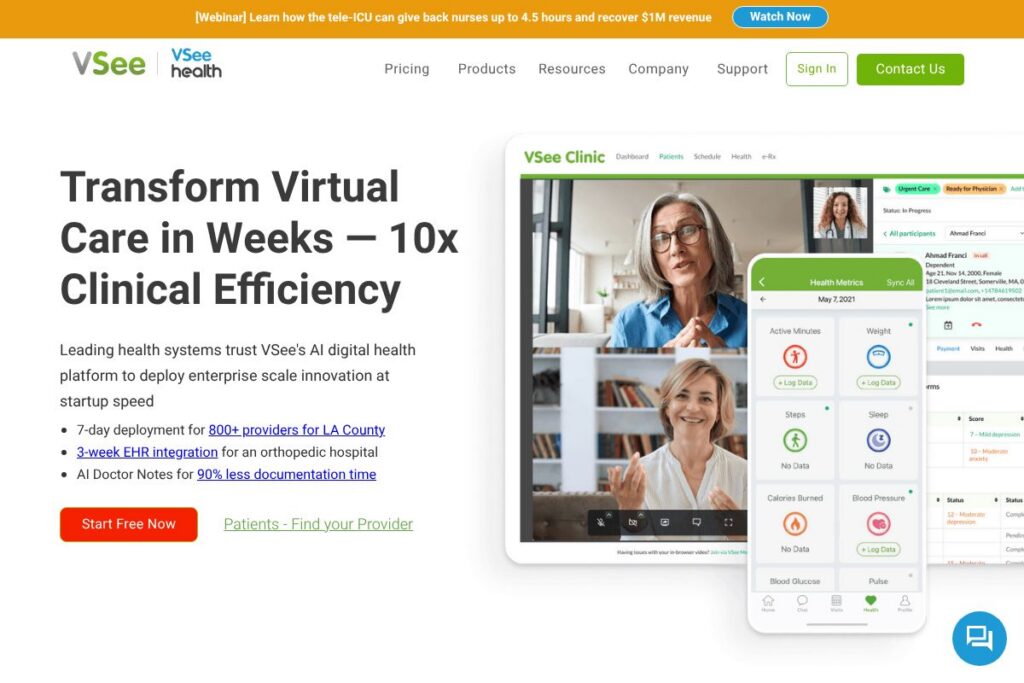
VSee is a telemedicine platform designed for secure video visits, clinical collaboration, and configurable patient workflows. It emphasizes low-bandwidth video performance and HIPAA-compliant features that support remote clinical exams, multi-party calls, and patient intake forms. The platform is used across healthcare organizations and by mission-critical customers including NASA, retail health deployments, and large provider networks.
Compared with competitors, VSee focuses on enterprise and clinical workflows rather than consumer-first direct-to-patient marketplaces. Compared to Doxy.me, which emphasizes a simple browser-based experience and a free tier for small practices, VSee prioritizes integrations and workflow automation for larger deployments. Compared to Teladoc and Amwell, which provide broad telehealth marketplaces and virtual care services, VSee positions itself as a customizable telemedicine toolkit that providers can deploy under their own brand and compliance controls.
VSee does well at delivering reliable video under constrained network conditions, flexible intake and consent tooling, and clinical integrations that fit enterprise deployment models. That combination makes it a practical choice for health systems, occupational health programs, remote clinics, and specialized telemedicine programs that require secure, customizable workflows and enterprise-grade support.
How VSee Works
VSee delivers telemedicine through a combination of web, desktop, and mobile clients that connect patients and clinicians in HIPAA-compliant video sessions. Video sessions, chat, file sharing, and multi-party calls are initiated from the platform, with options to invite interpreters, family members, or remote specialists into the same session.
Intake and assessment workflows use a flexible form builder to collect patient history, consent, and screening data before, during, or after a visit. Form branching logic, templates, and automated routing allow teams to match patients to providers by specialty and licensure, and to route patients in a virtual waiting room to the appropriate workflow.
For enterprise deployments, VSee integrates with scheduling systems, EHRs, and device-monitoring tools so that encounter data and remote monitoring feeds can flow into existing clinical systems. Administrators manage users, permissions, and security controls centrally, and workflows can be adapted to telepsychiatry, primary care, urgent care, and chronic care management.
VSee features
VSee bundles secure video, configurable intake, clinical collaboration, and integrations into a single telehealth platform. Core capabilities include low-bandwidth video optimized for unreliable networks, a flexible form builder for intake and consent, workflow automation for waiting rooms and provider matching, plus integrations that connect to EHRs and device telemetry. The platform also offers templates for common telemedicine workflows to reduce setup time.
Secure low-bandwidth video
VSee’s video stack is optimized for constrained networks so clinicians can conduct visits over slow or spotty connections with fewer dropped sessions. That reliability is useful for rural care, home visits, and deployments where connectivity is limited. Multi-party calling and screen sharing are supported for consults, family meetings, and specialist input.
Flexible form builder
The form builder creates intake forms, patient history questionnaires, consent documents, satisfaction surveys, and clinical assessments with pre-built templates. Forms support branching logic so questions adapt to prior answers, and administrators can choose when to send forms: before a visit, during intake, or after a session for follow-up. That reduces manual data entry and standardizes clinical documentation.
Workflow routing and waiting room logic
Automated routing sends patients to the correct queue based on specialty, state licensure, symptoms, or other form answers, improving match rates and clinician efficiency. Virtual waiting rooms hold patients until a provider is ready, and triage rules can escalate urgent cases. These capabilities help large clinics and retail health programs manage volume and compliance.
Integrations and EHR connectivity
VSee connects to scheduling systems, electronic health records, and third-party clinical tools so encounter notes and form data move into clinical records. Integrations reduce duplicate entry and support existing clinical workflows for billing and documentation. Integration options can be explored through VSee’s integrations resources.
Remote patient monitoring and device support
The platform supports device data collection and remote monitoring workflows to capture vitals and telemetry from home devices. Clinicians can review device readings alongside visit notes, which is useful for chronic disease management and post-discharge follow-up. Device support helps extend care beyond the clinic visit.
Security, compliance, and administration
VSee provides HIPAA-aligned features such as encrypted communications, administrative controls, audit logs, and role-based access to meet regulatory and privacy requirements. Centralized administration and reporting tools help IT teams manage users, permissions, and policy enforcement. The platform is appropriate for organizations that need strict access controls and auditability.
With these features combined, VSee’s biggest benefit is delivering a single platform that pairs reliable clinical video with configurable intake and routing tools. That makes it easier for healthcare organizations to deploy telemedicine across multiple specialties while keeping patient information secure and integrated with clinical systems.
VSee pricing
VSee uses a custom enterprise pricing model tailored to organization size, deployment complexity, and feature needs; the company typically provides quotes for health systems, clinics, and retail deployments. For specifics on plans, subscriptions, and volume licensing, contact VSee directly via VSee’s contact page for current pricing and options.
What is VSee Used For?
VSee is used for clinical telemedicine visits, remote consultations, and multi-party clinical collaboration where secure video and controlled workflows are required. Common deployments include primary care televisits, telepsychiatry, occupational health, specialty consults, and urgent care clinics.
Beyond visits, VSee handles patient intake, consent, screening, and satisfaction surveys through its flexible form builder, which reduces administrative work and standardizes data collection. Large-scale use cases include retail health programs, dialysis provider workflows, remote monitoring programs, and mission-critical environments where bandwidth is limited.
Pros and Cons of VSee
Pros
- Low-bandwidth video reliability: The platform maintains video quality on constrained networks, making it suitable for rural care, home visits, and mission-critical use cases where connectivity varies.
- Flexible form and workflow builder: Intake, consent, and assessment forms support logic and templates, and can trigger routing and provider matching to streamline clinical workflows.
- Enterprise-grade compliance and controls: Role-based access, encryption, and audit capabilities support HIPAA and enterprise security requirements, which is essential for large providers.
- Multi-party collaboration: Enables consultations with remote specialists, interpreters, or family members in the same session, supporting complex clinical workflows.
Cons
- Custom pricing model: Enterprise-focused pricing requires contacting sales for a quote, which can be a barrier for small practices seeking transparent, self-serve pricing options.
- Implementation overhead for large deployments: Integrations with EHRs and device systems may require professional services and IT coordination during rollout.
- Feature set geared to clinical deployments: Organizations looking for a consumer-facing telehealth marketplace may find VSee’s enterprise focus heavier than needed.
Does VSee Offer a Free Trial?
VSee offers demo and trial options for prospective customers. Organizations can request a demo or a trial through VSee’s contact page, where sales and support can arrange trial access, feature walkthroughs, and evaluations tailored to clinical workflows and compliance needs.
VSee API and Integrations
VSee provides integration options and developer access to connect the platform with scheduling systems, EHRs, and device telemetry for seamless clinical workflows. Explore VSee’s integrations list to see supported systems and connectors, or contact the team for custom integration options.
The platform also exposes developer resources and API endpoints for automation and data exchange; consult VSee’s developer documentation to review available endpoints, authentication methods, and example workflows for embedding video or syncing encounter data.
10 VSee alternatives
Paid alternatives to VSee
- Teladoc — Virtual care marketplace and clinician network focused on on-demand and scheduled telehealth services for employers, health plans, and health systems.
- Amwell — Enterprise telehealth platform with a marketplace model, clinical services, and integrations for health systems and payers.
- Doxy.me — Browser-based telemedicine platform with a free tier and paid plans focused on small practices and individual clinicians.
- Zoom for Healthcare — Video communications platform with HIPAA-compliant offerings and a focus on flexible meeting and webinar capabilities for telehealth.
- MDLive — Virtual care platform offering clinician access for urgent care, behavioral health, and telemedicine services through enterprise partnerships.
- Updox — Patient communication and telehealth platform that bundles secure messaging, forms, and video for outpatient practices.
- Epic Telehealth — Telemedicine features embedded in the Epic EHR for organizations already on Epic, providing native scheduling and documentation.
Open source alternatives to VSee
- Jitsi — Open source video conferencing that can be self-hosted and integrated into telehealth workflows, with flexibility for custom deployments.
- OpenEMR — Open source electronic medical record system that can be extended with telehealth plugins and custom integrations for clinical workflows.
- OpenMRS — An open source medical record platform used in many global health projects, adaptable to telemedicine and remote care use cases.
- BigBlueButton — An open source web conferencing system designed for real-time sharing and collaboration that can be adapted for clinical use with appropriate security controls.
- LibreHealth — A community-driven open source health IT ecosystem that includes modules for patient management and can be extended for telehealth scenarios.
Frequently asked questions about VSee
What is VSee used for?
VSee is used for secure telemedicine visits, clinical collaboration, and configurable patient intake workflows. Healthcare organizations use it to run video visits, collect consent and assessments, and connect encounter data with clinical systems.
Does VSee integrate with electronic health records?
Yes, VSee supports integrations with EHRs and scheduling systems. Integration options vary by customer and deployment, and technical details are available through VSee’s integrations resources.
Can VSee handle remote patient monitoring?
Yes, VSee supports remote monitoring workflows and device telemetry. Device data can be brought into clinical sessions and reviewed alongside encounter notes for chronic care and post-discharge monitoring.
Is VSee HIPAA compliant?
VSee offers HIPAA-aligned security features, including encrypted communications and administrative controls. These features support compliance requirements for protected health information when configured and used with appropriate agreements.
How can I trial VSee before committing?
VSee provides demo and trial arrangements for prospective customers. Request a trial or demo through VSee’s contact page to evaluate features, perform clinical tests, and discuss deployment options.
Final verdict: VSee
VSee is a pragmatic telemedicine platform for organizations that need reliable, HIPAA-compliant video and configurable clinical workflows. Its strengths are low-bandwidth video performance, a flexible form builder for intake and consent, and workflow automation that supports enterprise deployments and complex routing rules. Those capabilities make it suitable for health systems, retail health programs, and remote monitoring initiatives.
Compared to Doxy.me, which offers a simple, browser-first experience with a free tier suitable for small practices, VSee targets larger organizations and custom deployments with enterprise integrations and professional services. Pricing for VSee is custom and arranged through sales, while Doxy.me provides transparent entry-level options; organizations should weigh the need for advanced integrations and enterprise controls against budget and self-serve requirements.
To explore deployment options, request a demo, or get a tailored quote, contact VSee through VSee’s contact page and review their integrations documentation to understand how the platform will fit your clinical systems and workflows.