What is WP Support Chat
WP Support Chat refers to the set of WordPress plugins and integrations commonly indexed under the search term “wp-support-chat” on WordPress.org. These tools add live chat widgets, AI-assisted chatbots, and multi-channel contact buttons to WordPress sites so site owners can respond to visitors in real time, capture leads, and route inquiries to messaging apps such as WhatsApp, Telegram, and Facebook Messenger.
Compared with full-service SaaS chat platforms like Intercom and Drift, WP Support Chat plugins are typically WordPress-first, lightweight, and plugin-driven. They provide easier installation inside a WordPress site, lower initial costs, and more control over on-site placement. Against hosted chat services such as LiveChat and Zendesk Chat, these plugins trade enterprise-grade analytics and built-in CRM for simplicity and direct integration with WordPress themes and shortcodes.
All of this makes WP Support Chat a useful approach for small businesses, content sites, and WooCommerce stores that need rapid visitor communication without complex platform migrations. It is particularly valuable for site owners who want multi-channel contact buttons, quick WhatsApp integration, and basic ticketing or chatroom features directly inside WordPress.
How WP Support Chat Works
These plugins insert a chat frontend into your site via a widget, floating button, or shortcode, and forward messages to either an in-dashboard chat interface or a third-party messaging app. Installation usually involves adding the plugin from WordPress.org, configuring the channels you want enabled, and customizing the widget appearance and availability hours.
Common workflows include: visitor clicks a floating chat button, the plugin opens a messenger widget or launches a selected channel such as WhatsApp Business, the visitor submits a message or selects FAQ options, and the message is delivered to either the site admin dashboard, connected mobile apps, or an external inbox. Advanced plugins add AI response suggestions, canned replies, offline forms, and visitor tracking so agents can prioritize active sessions.
WP Support Chat features
WP Support Chat functionality centers on live chat widgets, channel connectors, and basic support workflow components. Core capabilities across popular entries in this category include multi-channel chat buttons, WhatsApp and Messenger connectors, real-time visitor messaging, basic ticketing, translation support, and optional mobile apps for agents.
What Makes WP Support Chat Stand Out
AI chatbot and live chat
Several WP Support Chat plugins bundle an AI-assisted chat agent that suggests replies and handles simple FAQ flows, combined with a live chat fallback to human agents. This reduces response time for common questions while still letting agents take over complex conversations when needed.
WhatsApp and multi-channel connectors
Plugins in this group offer one-click integration with WhatsApp and WhatsApp Business, plus connectors for Facebook Messenger, Telegram, Instagram, TikTok, Line, WeChat, and SMS. These connectors let visitors contact you in the channel they prefer while preserving a consistent widget appearance on the site.
Floating sticky chat button and widgets
A customizable floating button appears on every page and can be configured to show multiple channel icons, pre-filled messages, availability status, and smart routing. This increases visibility and gives users immediate contact choices without intrusive overlays.
Real-time messaging and chat rooms
Some implementations provide in-dashboard real-time messaging with support for private conversations and public or private chat rooms, including basic voice and video call options for direct support or community interaction.
CRM, lead capture, and forms
Built-in lead capture forms, visitor notes, and lightweight CRM fields let teams collect contact details, tag conversations, and convert chats into follow-up tasks. This functionality plugs into common form builders or exports data for external CRM systems.
Ticketing and help desk features
Basic ticketing systems transform chat sessions and submitted forms into support tickets, with status tracking, assignee assignment, and email notifications to ensure nothing is missed when agents are offline.
Multilingual support and translation
Many plugins integrate with Google Translate or multilingual plugins to provide UI translations and to present pre-set messages in the visitor’s language, improving accessibility for international audiences.
Security and SSL tools
Some WordPress chat plugin bundles include or recommend SSL checks, HTTPS redirect helpers, and security settings to ensure chat endpoints and webhooks run over secure connections.
With these capabilities, the biggest benefit of WP Support Chat solutions is their flexibility: choose a lightweight, free chat widget or expand with paid connectors and add-ons to match your support volume and preferred messaging channels.
WP Support Chat pricing
WP Support Chat plugins typically follow the WordPress plugin model where a core plugin is available for free on WordPress.org with optional paid add-ons or premium upgrades sold by the plugin author. Pricing approaches vary per plugin; some offer fully free functionality while others add paid modules for CRM, advanced multichannel routing, or enterprise features.
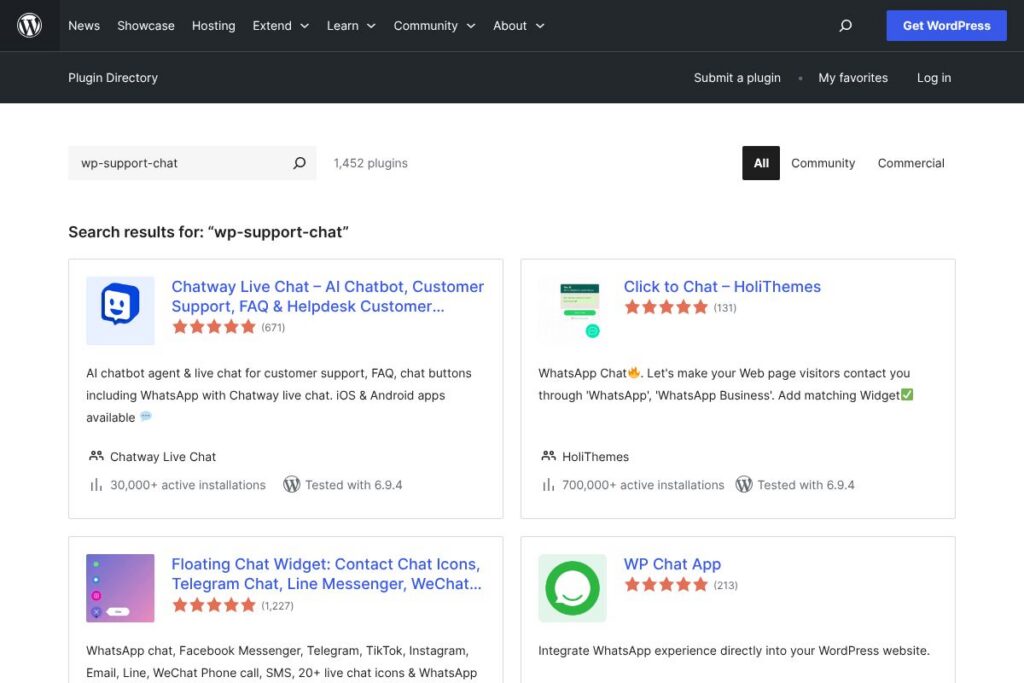
For exact pricing and available tiers, check the WP Support Chat search results on WordPress.org to find the specific plugin listing and links to the vendor pages where premium plans and add-on pricing are published. Individual plugin pages often document which features are free and which require a paid license.
What is WP Support Chat Used For?
Site owners use WP Support Chat plugins to provide immediate contact options on marketing sites, blogs, and e-commerce stores. Common tasks include answering product questions, capturing leads, triaging technical issues, and routing conversations to mobile messaging apps such as WhatsApp or Telegram for agent convenience.
These plugins are also used to add localized support via translation features, to run community chat rooms, and to create a lightweight help desk inside WordPress that turns chat requests into tickets. They are well suited to small teams that prefer on-site solutions over subscription-based help desk platforms.
Pros and cons of WP Support Chat
Pros
- Multi-channel reach: Many plugins let you show WhatsApp, Messenger, Telegram, and other contact options together so visitors choose their preferred channel. This improves contact rates and meets users where they already message.
- Low barrier to entry: The core plugin approach is often free and installs like any WordPress plugin, making it straightforward for non-technical site owners to add live chat quickly.
- Flexible deployment: Widgets, floating buttons, shortcodes, and dashboard messaging are common, which lets teams add chat to specific pages or across the entire site with granular control.
- Mobile agent support: Plugins that connect to mobile apps or messaging platforms allow agents to reply from their phones without logging into WordPress constantly.
Cons
- Fragmented ecosystem: Functionality varies widely between plugins, which means you may need multiple add-ons or paid modules to get feature parity with hosted chat platforms. This can complicate maintenance and upgrades.
- Limited enterprise features: Compared with dedicated SaaS vendors, WordPress chat plugins typically lack advanced analytics, large-scale routing, and deep CRM integrations out of the box.
- Support and updates vary: Plugin quality, security updates, and vendor support levels differ by author, so plugin selection and active maintenance are important to avoid compatibility issues.
Does WP Support Chat Offer a Free Trial?
WP Support Chat is available as a free plugin on WordPress.org with optional paid add-ons or premium upgrades. The core features for adding a chat widget, channel buttons, and basic messaging are commonly free; premium features such as advanced CRM, AI credits, or priority support are sold by individual plugin authors and may include trials or money-back guarantees. See the WP Support Chat search results on WordPress.org to open the plugin listing and the vendor’s site for trial terms.
WP Support Chat API and Integrations
Many WP Support Chat plugins provide webhook support or integration points to connect with external services, and several list native connectors for WhatsApp, Facebook Messenger, Telegram, Instagram, and SMS. For specific developer documentation, consult the plugin’s listing on WordPress.org or the vendor’s integration docs.
Popular integrations you will commonly see include Tidio, LiveChat, and CRM connectors; for example, see the Tidio Live Chat plugin page on WordPress.org for an example of a third-party chat integration that also offers API and webhook capabilities.
10 WP Support Chat alternatives
Paid alternatives to WP Support Chat
- Tidio — A hosted chat platform with a WordPress plugin, live chat, chatbot automation, and multi-channel inbox that combines email and messenger streams.
- LiveChat — A full-featured hosted chat solution with built-in ticketing, analytics, and integrations to help desks and CRMs.
- Zendesk — Provides chat as part of a broader customer service suite, with ticketing, routing, and enterprise features.
- Intercom — A customer messaging platform focused on product-led growth, with advanced automation, user segmentation, and help center features.
- Drift — Conversational marketing and sales chat focused on lead qualification and routing to sales teams.
- Olark — Simple hosted live chat with automation rules and integrations for small businesses.
- HubSpot Chat — Part of HubSpot CRM, combining live chat and bots with contact records synchronized to the CRM.
Open source alternatives to WP Support Chat
- Chatwoot — An open source customer messaging platform that supports chat widgets, multi-channel inboxes, and self-hosting options; suitable for teams that want full control. See the Chatwoot project site for details.
- Rocket.Chat — A self-hosted messaging platform with chat widgets and extensive customization for teams that require full data control. Explore the Rocket.Chat website for deployment options.
- Mibew Messenger — An open source live support chat application built for hosting on your own server, focused on simple real-time chat.
- LiveHelperChat — A PHP-based open source live support and chat system that can be integrated into websites for self-hosted chat functionality.
Frequently asked questions about WP Support Chat
What is WP Support Chat used for?
WP Support Chat is used to add live chat widgets and multi-channel contact options to WordPress sites. Site owners deploy it to capture leads, answer visitor questions, and route messages to mobile messaging apps or an in-dashboard chat interface.
Does WP Support Chat integrate with WhatsApp and Messenger?
Yes, many WP Support Chat plugins include WhatsApp and Facebook Messenger connectors. These integrations let visitors open conversations in their preferred app or route messages through the plugin to an agent inbox when supported.
Can WP Support Chat be extended with CRM or help desk tools?
Yes, several plugins offer CRM fields, ticketing modules, or integration hooks for external help desk systems. You may need premium add-ons or vendor-specific connectors to sync conversations into enterprise CRMs.
Is WP Support Chat free to use?
WP Support Chat plugin cores are often free on WordPress.org with optional paid extensions. Core chat and widget features are commonly available without cost; advanced features such as AI credits, analytics, or priority support may require purchasing a license.
How do I choose the right WP Support Chat plugin?
Choose a plugin based on required channels, support workflow, and maintenance profile. Prioritize plugins that natively support the messaging channels your customers use, provide clear upgrade paths for premium features, and receive regular updates on WordPress.org.
Final verdict: WP Support Chat
WP Support Chat-style plugins are a practical, WordPress-native way to add live chat and multi-channel contact options without moving to a hosted help desk. They work well for small teams and stores that need fast setup, WhatsApp or Messenger connectors, and straightforward visitor-to-agent workflows inside WordPress.
Compared to a competitor like Tidio, which offers a hosted multi-channel inbox and in-app automation with a free tier plus paid plans, WP Support Chat gives more on-site control and a lower initial barrier since core plugins are often free. However, for advanced analytics, enterprise routing, and a unified hosted inbox, Tidio and other SaaS vendors may offer a more integrated experience that costs more but reduces plugin maintenance.
Overall, WP Support Chat is worth considering if you prefer WordPress-centric tools, want direct channel buttons such as WhatsApp, and need flexible deployment. For businesses that require enterprise-level reporting, deep CRM synchronization, or dedicated SLAs, evaluate hosted alternatives alongside plugin-based options before deciding.