Zipy: An Overview
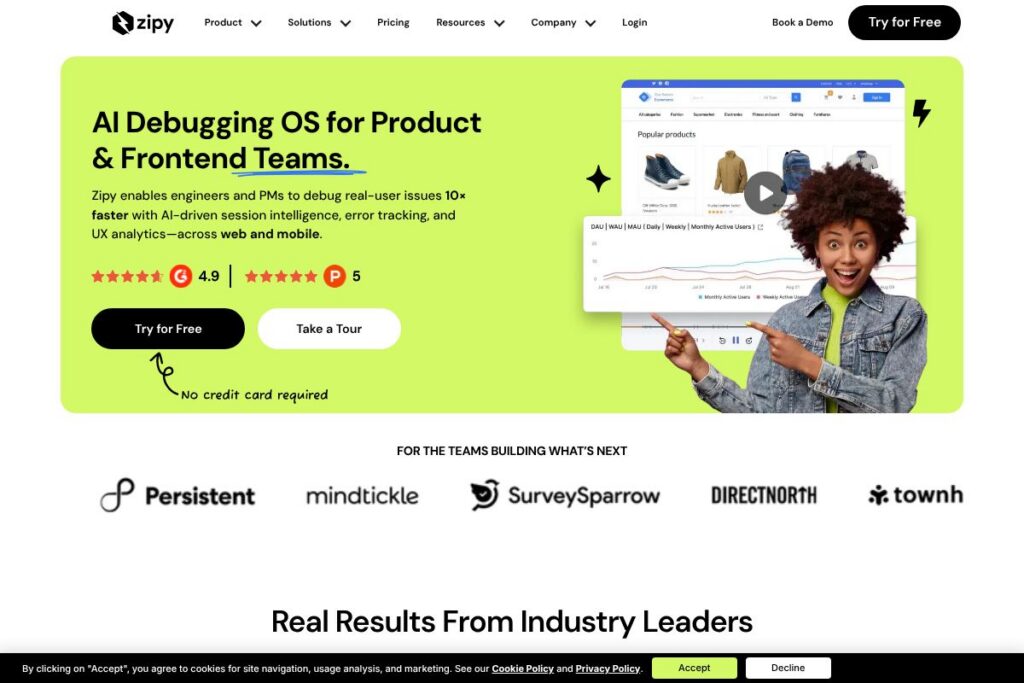
Zipy is an AI debugging operating system designed for product and frontend teams that need faster issue discovery and resolution. The platform centralizes session replays, error tracking, performance metrics, and product analytics so engineers and product managers can correlate user behavior with technical failures without switching tools. Zipy supports web, PWA, and major mobile stacks to give a unified view of production incidents.
Compared with tools that focus on a single layer, Zipy sits at the intersection of session recording and observability. For example, LogRocket focuses on session replay and user experience monitoring, Sentry specializes in error monitoring and crash aggregation, and FullStory emphasizes behavioral analytics and conversion funnels. Zipy blends these capabilities and adds AI-driven summarization and repro steps to reduce time spent reproducing issues.
All of this makes Zipy particularly well suited for engineering teams that need to triage production issues faster and product teams that want to connect UX problems with technical root causes. Organizations that require integrated session context, automated issue prioritization, and multi-platform support will find Zipy most valuable.
How Zipy Works
Zipy captures user interactions, console logs, network traffic, and stack traces, then links that telemetry to session replays so a single incident shows both the user journey and the underlying technical signals. Events and errors are enriched with AI analysis that surfaces likely root causes, reproducible steps, and an urgency score so teams can focus on what matters.
Teams typically install a lightweight SDK for web or mobile, filter the events they care about, and configure alerting to route high-priority issues to engineers or Slack channels. From the Zipy dashboard you can jump from a prioritized error to the exact session replay, inspect logs and network traces, and use built-in AI tools to generate repro steps or suggested fixes.
What does Zipy do?
Zipy’s feature set is organized around debugging workflows and product insight. Core capabilities include AI-driven session intelligence, DOM-based session replay, error aggregation with stack traces, network and performance monitoring, and out-of-the-box product analytics. Recent additions emphasize automated AI summaries and agent-driven issue prioritization that reduce the manual effort of inspecting every session.
Let’s talk Zipy’s Features
Oopsie AI Agent
The Oopsie AI Agent continuously watches sessions and errors, surfaces the incidents that matter most, and recommends priorities for engineering and product teams. This agent reduces noise by flagging sessions with high impact, and its recommendations help teams concentrate on fixes that move the most user-facing metrics.
Session Replay
Zipy records DOM-level interactions, console logs, and network activity to reconstruct exactly what users experienced at the moment of failure. Session replay is available for web, mobile, and PWA environments, and it lets developers visually correlate UI actions with errors and backend traces.
Error Tracking
Error tracking captures JavaScript exceptions, API errors, crash reports, and custom logs with full stack traces and context. Combined with session replay, this provides a reproducible story for each incident so developers can reproduce and fix issues faster.
AI Summaries
AI-generated session summaries highlight key actions, probable frustration points, and any errors encountered, enabling triage without watching entire replays. These concise summaries accelerate incident review and help non-technical stakeholders understand the problem quickly.
Repro Steps
Zipy generates step-by-step reproduction instructions for prioritized issues so QA and engineering teams can reproduce bugs without manual experimentation. Repro Steps save developer time by turning playback and logs into actionable steps that can be followed in local or staging environments.
Ask AI
A conversational interface lets teams query captured sessions, events, and analytics to answer questions like where dropoffs occur or which errors correlate with revenue loss. Ask AI removes the need to manually build funnels or write queries for common investigation tasks.
Product Analytics
Zipy provides behavioral metrics such as DAU/WAU/MAU, feature adoption, funnels, and cohort analysis combined with session context. Teams can use these analytics to connect usability problems with technical issues and prioritize product work that improves retention and conversion.
Heatmaps and Usability Insights
Heatmaps and quantitative signals such as rage clicks and dead clicks help pinpoint where users struggle, while session replays provide the qualitative context needed to decide on UI fixes. These insights are useful for UX teams and product managers planning improvements.
Performance Monitoring
Real-time API latency and error tracking highlight page performance bottlenecks with diagnostic data to trace the root cause. This includes network logs, backend error correlation, and suggestions that help reduce time to resolution for performance regressions.
With these capabilities, Zipy’s biggest benefit is collapsing the gap between UX and engineering by delivering a single interface where replays, logs, errors, and AI-driven context live together. That combination reduces reproducibility time and improves the efficiency of triage workflows.
Zipy pricing
Zipy uses a SaaS pricing model with flexible plans tailored to different team sizes and enterprise needs; however, detailed public pricing is not published on a dedicated pricing page. For specifics on seat counts, event volumes, and enterprise features, view the Zipy homepage and contact sales through their site for a quote.
What is Zipy Used For?
Zipy is used to reproduce and resolve production issues faster by linking session replays to error and performance telemetry. Engineering teams use it for root cause analysis, developers for rapid repro and fixes, and QA teams to validate bug fixes against real sessions.
Product and growth teams rely on Zipy to understand where users get stuck and to measure the impact of UX changes using combined quantitative and qualitative signals. The platform is also used for mobile debugging across iOS, Android, React Native, and Flutter, making it suitable for apps with multi-platform releases.
Pros and Cons of Zipy
Pros
- AI-assisted triage: The Oopsie AI Agent and AI Summaries reduce time spent watching sessions by highlighting high-impact issues and summarizing session context. This speeds up prioritization and helps non-technical stakeholders understand problems.
- Unified observability: Session replay, error tracking, network logs, and performance metrics are integrated so teams can move from symptom to root cause without context switching. This reduces the friction between product, QA, and engineering workflows.
- Cross-platform support: The platform supports web, PWA, and major mobile SDKs including iOS, Android, React Native, and Flutter, which simplifies debugging for teams with multiple client platforms.
- Actionable repro steps: Automatically generated reproduction instructions help QA and developers reproduce bugs reliably, shortening mean time to resolution.
Cons
- Custom pricing model: Pricing is tailored and typically requires contacting sales, which can slow evaluation for small teams that prefer transparent self-serve pricing. Teams evaluating alternatives may need to engage with the vendor to understand volume and seat costs.
- Learning curve for advanced features: Advanced AI tools and analytics require configuration and team practices to extract their full value, which may need initial setup and tuning.
- Potential data volume costs: Heavy session capture and long retention windows can increase costs depending on plan limits, so teams should plan capture filters and retention policies carefully.
Does Zipy Offer a Free Trial?
Zipy offers a free trial for new users. Trial access typically includes core session replay, error tracking, and AI summaries so teams can evaluate debugging workflows; for enterprise-grade retention and feature tiers, Zipy asks organizations to contact sales via the Zipy homepage.
Zipy API and Integrations
Zipy provides SDKs for web and major mobile platforms and exposes APIs and developer guides to ingest events, export data, and customize capture behavior. See the developer documentation for SDK setup, API endpoints, and best practices for filtering and session sampling.
The product commonly integrates with issue trackers and collaboration tools to route prioritized incidents into engineering workflows; teams typically connect Zipy with ticketing systems and notification hubs to close the loop on production issues.
10 Zipy alternatives
Paid alternatives to Zipy
- LogRocket — Session replay combined with performance monitoring and user insights, focused on reproducing front-end bugs and correlating them with console and network data.
- FullStory — Behavioral analytics and session replay designed for product teams to measure UX and conversion funnels with rich playback capabilities.
- Sentry — Error monitoring and observability platform that aggregates exceptions and performance traces, commonly used for backend and frontend error tracking.
- Datadog — Comprehensive observability with APM, logs, and real-user monitoring that is strong on infrastructure and backend traces as well as frontend performance.
- New Relic — Full-stack observability including browser monitoring and backend APM, focused on performance diagnostics across large systems.
- Bugsnag — Error monitoring with stability scores and automated grouping that helps prioritize releases and regressions.
- Amplitude — Product analytics platform with behavioral cohorting and funnel analysis for teams focused on growth metrics and feature adoption.
Open source alternatives to Zipy
- OpenReplay — Open source session replay and product analytics platform you can self-host to retain full control over data and instrumentation.
- Sentry (self-hosted) — Provides an open source version for error monitoring that teams can host themselves to avoid vendor lock-in and control retention.
- PostHog — Open source product analytics and session recording that supports self-hosting and feature flags, useful for teams that want full data ownership.
Frequently asked questions about Zipy
What is Zipy used for?
Zipy is used for debugging production issues and understanding user behavior through session replay, error aggregation, and product analytics. Teams use it to reproduce bugs, priority incidents, and correlate UX problems with technical failures.
Does Zipy support mobile apps?
Yes, Zipy supports major mobile SDKs for iOS, Android, React Native, and Flutter. Mobile SDKs capture sessions, crashes, and performance metrics so you can debug across platforms from a single dashboard.
Can Zipy generate steps to reproduce errors?
Yes, Zipy provides Repro Steps that outline the exact actions needed to reproduce prioritized issues. These steps are generated from session data and logs to help QA and developers validate fixes quickly.
Does Zipy integrate with developer workflows?
Yes, Zipy integrates with common ticketing and notification systems and exposes developer APIs and SDKs. Integration lets teams route high-priority incidents into their existing issue trackers and alert channels.
Is Zipy suitable for small teams and enterprises?
Zipy serves both small engineering teams and large enterprises but uses a tailored pricing model for higher-volume or enterprise needs. Small teams can evaluate via the free trial, while larger organizations typically engage sales for custom plans and retention policies.
Final Verdict: Zipy
Zipy stands out by combining session replay, error tracking, performance monitoring, and product analytics with AI-driven summaries and automated repro instructions. It is particularly effective for teams that want a single tool to connect UX signals with technical telemetry and reduce the manual work of reproducing and prioritizing issues.
Compared with LogRocket, which focuses primarily on session replay and publishes self-serve pricing for smaller teams, Zipy emphasizes AI-assisted triage and broader observability capabilities that usually come with flexible enterprise pricing and tailored retention options. If your priority is reducing mean time to resolution through automated analysis and cross-platform coverage, Zipy is a strong candidate; if you need transparent per-seat pricing and a simple session recorder, tools like LogRocket may be easier to evaluate quickly.