Zulip: An Overview
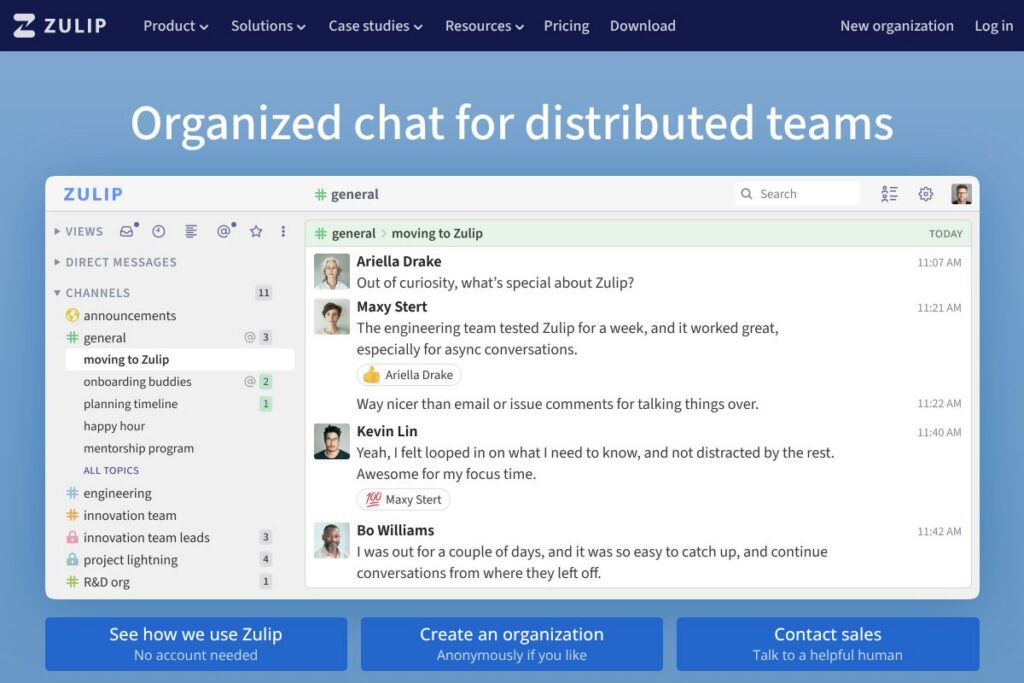
Zulip is a chat platform that organizes team conversations around streams and short-lived topics so users can follow and reply to specific threads without losing context. Messages are grouped by topic within streams, which makes it straightforward to review unread conversations and to jump back into discussions that continued over hours or days.
Compared with tools like Slack and Microsoft Teams, Zulip emphasizes persistent, threaded conversations rather than a flat channel feed. Where Slack focuses on real-time chat and Teams bundles meetings and Office integrations, Zulip is positioned for asynchronous collaboration and long-running conversations with a strong open-source option for self-hosting.
All of this makes Zulip particularly well suited to remote and distributed teams that need clear thread separation while retaining a searchable archive of past discussions. It works for small teams up to large organizations that require auditability, compliance controls, or the ability to self-host the platform.
How Zulip Works
Zulip structures communication using streams and topics. A stream is like a high-level channel for a team or project, and each message is posted to a specific topic inside that stream so replies stay grouped with the original context.
Users see an inbox that surfaces unread messages across streams and topics, then focus on one topic at a time for threaded replies. Messages can be delivered in real time but are also easy to pick up later, which supports async workflows across time zones.
Clients are available as web, desktop, and mobile apps that sync message history and notifications. Administrators can configure user authentication, retention policies, and integrations to align Zulip with existing workflows.
What does Zulip do?
Zulip centers on organized, topic-based messaging and provides tools for search, integrations, administration, and deployment. Core capabilities include persistent threading, robust search across message history, open-source deployment for self-hosting, and a developer-friendly API that supports bots and custom integrations.
Here are some key features worth highlighting:
Topic-based threading
Messages are grouped into topics within streams so related replies stay together. This reduces noise and makes it easier to follow multiple conversations in parallel, which benefits teams working across time zones and asynchronous schedules.
Streams and access controls
Streams let teams partition conversations by project, team, or subject with configurable visibility. Admins can create public and private streams and control membership and posting permissions to manage information flow.
Powerful search and message history
Full-text search covers messages, topics, and attachments so users can retrieve context from past conversations quickly. Threads are persistent, which helps with onboarding and audits since historical discussions remain accessible.
Integrations, bots, and webhooks
Zulip supports incoming and outgoing webhooks, bots, and a well-documented API to connect with CI systems, issue trackers, and other services. This makes it straightforward to route notifications and automate routine updates into topical streams.
Open-source and self-hosting
Zulip’s server code is available for teams that need to self-host or modify the platform. Self-hosting gives full control over data, custom deployments, and compliance-related configuration while the community and official documentation provide setup guidance.
Admin, compliance, and security
Administrative features include user provisioning, SSO options, access controls, retention policies, and audit logs. Transport encryption is used to protect messages in transit, and larger organizations can configure deployment and backup strategies for compliance.
Desktop and mobile clients
Native desktop apps and mobile apps provide native notifications, offline access, and a responsive interface for triaging topics. Keyboard shortcuts and message formatting speed up message composition and navigation for power users.
With these capabilities, Zulip helps teams reduce noise while preserving the context of conversations. Its topic-first model is the standout: it keeps threads tidy and searchable so teams can collaborate asynchronously without losing continuity.
Zulip pricing
Zulip uses a dual approach: an open-source server you can self-host for free, and commercially hosted offerings and support for organizations that prefer a managed service. Self-hosting avoids subscription costs and lets teams run Zulip on their own infrastructure with full control over data and retention.
Hosted options and enterprise
Hosted (Zulip Cloud): Zulip offers managed hosting and professional support for teams that do not want to self-host. Hosted plans and enterprise agreements are available with feature sets such as SSO, priority support, and administrative controls; pricing is provided by Zulip sales based on organization needs. View Zulip’s hosted deployment and support options to contact sales or request details.
Self-hosted (open source)
Self-hosted edition: The server source code is available on Zulip’s GitHub under an open-source license so you can deploy without subscription fees. Refer to the Zulip server repository and the installation guide for deployment instructions and system requirements.
What is Zulip Used For?
Zulip is commonly used for remote team communication, project coordination, and technical discussions where preserving the structure of a conversation matters. It is especially effective for engineering teams, product groups, and distributed organizations that need threads to stay organized across asynchronous work.
Teams also use Zulip for incident communication, documentation-adjacent conversations, and community support channels where long-lived threads and searchable history improve follow-up and knowledge transfer. Organizations that require self-hosting for compliance or data residency often choose Zulip for the combination of open-source access and managed hosting options.
Pros and Cons of Zulip
Pros
- Topic-first organization: Messages are grouped into topics so related replies remain together, which reduces noise and makes asynchronous work more manageable.
- Self-hosting available: The open-source server allows organizations to host Zulip on-premises or in private clouds for full data control and compliance needs.
- Rich integrations and API: Built-in webhooks, bots, and a developer-friendly API make automation and integration with CI/CD, monitoring, and ticketing systems straightforward.
- Persistent, searchable history: Full-text search and persistent threads make it easy to find past decisions and onboarding material.
- Cross-platform clients: Fully featured web, desktop, and mobile apps keep teams synced and support offline access and native notifications.
Cons
- Different mental model: Topic-based threading has a learning curve for teams used to flat channel chat; initial adoption can require guidance and norms.
- Hosted plan details through sales: Managed hosting and enterprise pricing are provided through Zulip’s commercial channels rather than a public price grid, which requires contacting sales for exact quotes.
- Smaller ecosystem than some rivals: While integrations are strong, the marketplace and third-party app ecosystem are not as extensive as the largest competitors.
Does Zulip Offer a Free Trial?
Zulip offers a free self-hosted edition and commercially hosted plans with trial or demo options. The self-hosted server is free to run from the Zulip server repository, while teams that prefer a managed service can contact Zulip for trials, demos, or hosted onboarding; see the Zulip homepage to request a demo or trial information.
Zulip API and Integrations
Zulip provides a full developer API for sending messages, managing users, and building bots. The API documentation describes endpoints, authentication, and common usage patterns for automations and integrations.
Key integrations include CI systems, issue trackers, repository hooks, and identity providers such as SSO solutions. For self-hosted deployments, webhooks and native bots are frequently used to route alerts and automate workflows; see Zulip’s integration guide for setup examples.
10 Zulip alternatives
Paid alternatives to Zulip
- Slack — Popular hosted chat with threaded conversations, app directory, and enterprise features optimized for real-time collaboration.
- Microsoft Teams — Integrated with Microsoft 365 apps, includes meetings, file collaboration, and enterprise identity management.
- Discord — Community and team voice/text chat with topic channels and persistent history, popular for both casual and developer communities.
- Flock — Team messaging with built-in productivity tools and app integrations geared toward SMBs.
- Twist — Designed for async communication with a focus on long-form conversations and reduced notification noise.
- Google Chat — Integrated with Google Workspace, suitable for teams that rely on Google’s productivity suite.
Open source alternatives to Zulip
- Mattermost — Open-source team chat with self-hosting, enterprise features, and a Slack-like interface for private deployments.
- Rocket.Chat — Self-hosted chat platform with rich customization, federation options, and enterprise support.
- Element (Matrix) — Decentralized, open protocol-based chat (Matrix) with the Element client, designed for secure, federated communication.
- Matrix Synapse — The open-source server implementation behind Matrix, suitable for organizations building custom chat infrastructure.
Frequently asked questions about Zulip
What is Zulip best used for?
Zulip is best used for topic-oriented team communication and async collaboration. Its stream and topic model helps teams follow multiple concurrent discussions without losing context.
Does Zulip offer a self-hosted option?
Yes, Zulip provides a free self-hosted server under an open-source license. The server source and deployment guides are available on Zulip’s GitHub and documentation pages.
Can Zulip integrate with CI/CD and issue trackers?
Yes, Zulip supports integrations, webhooks, and bots for CI/CD, source control, and ticketing systems. The API and webhook examples in the documentation make it straightforward to route build notifications and issue updates into topical streams.
Is Zulip suitable for large enterprises?
Yes, Zulip can be used by large organizations with enterprise needs. Managed hosting, SSO support, admin controls, and deployment options allow it to scale to organizational requirements.
How does Zulip handle message search and history?
Zulip provides full-text search across messages, topics, and attachments. Persistent threaded history makes it easy to find previous conversations and decisions for reference or onboarding.
Final verdict: Zulip
Zulip stands out for its topic-first approach to team chat, which helps teams keep conversations organized and easy to resume after delays. The combination of persistent threads, strong search, and available self-hosting makes it a solid choice for distributed teams and organizations with compliance or data residency needs.
Compared with Slack, Zulip offers a more structured conversation model and a free self-hosted server option, while Slack focuses on a larger ecosystem of apps and flatter realtime chat. From a pricing perspective, Zulip lets organizations avoid subscription costs by self-hosting, whereas Slack and similar hosted competitors generally charge per-seat subscription fees for their hosted services.
If your team values long-lived, organized threads and wants the option to self-host or run a managed instance with enterprise controls, Zulip is a practical, well-documented choice that reduces conversational noise while keeping historical context intact.