Eventgroove: An Overview
Eventgroove is an online ticketing and event management platform that helps organizers create event pages, sell tickets, process payments, and handle attendee check-in. The service is positioned toward community groups, arts organizations, small venues, and independent promoters that need straightforward ticketing without a heavy enterprise footprint.
Compared with Eventbrite, Eventgroove focuses on simpler event setup and a lower-cost model for hosts; Eventbrite offers broader discovery and a larger marketplace for public events. Compared with Ticketmaster, Eventgroove is far more suitable for small-to-mid-size events since Ticketmaster targets large venues and box office integrations. Compared with Brown Paper Tickets, Eventgroove offers similar host-friendly pricing and basic promotional tools while also providing tools for virtual events.
Eventgroove does well at low-friction ticket creation and integrated payments, and it works best for organizers who want a straightforward way to sell tickets online without complex configuration. It is especially suitable for local arts events, fundraisers, classes, and small concerts where ease of setup and low overhead are priorities.
How Eventgroove Works
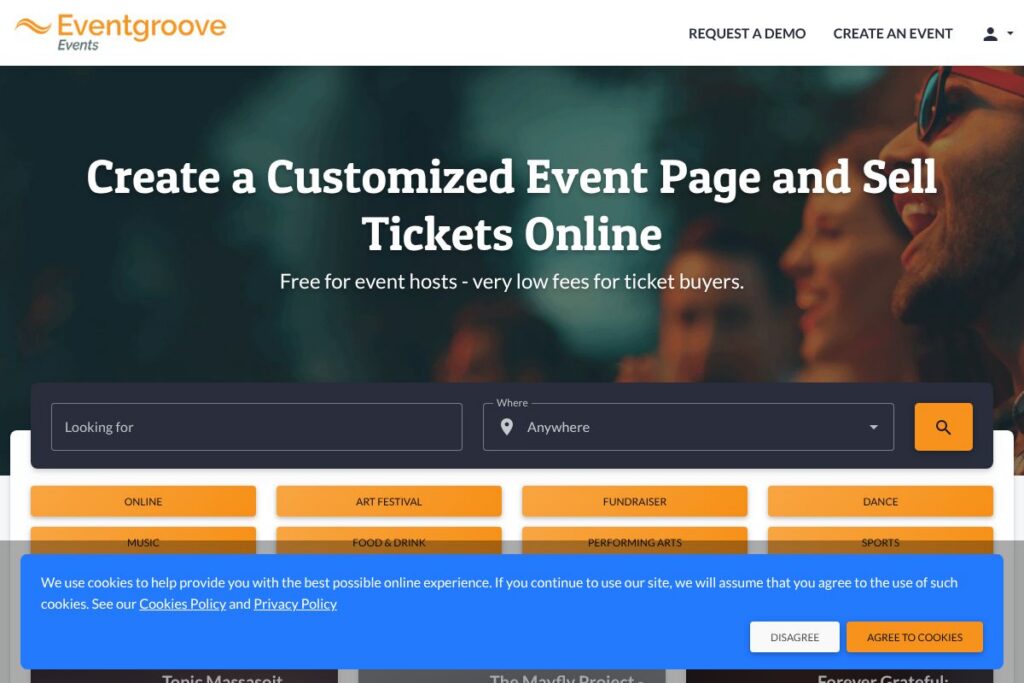
Organizers start by creating an event page in Eventgroove’s dashboard, adding event details, ticket types, and pricing. The platform generates a shareable event page and ticketing widget that can be distributed by email, social media, or embedded on a website.
Payments are processed through Eventgroove’s payment flow so organizers can collect ticket revenue without a separate merchant account; attendees receive electronic tickets and QR codes that are scanned at the door with a mobile device. Organizers can export attendee lists, issue refunds, and manage access at the door using the platform’s mobile check-in or box office features.
Eventgroove supports both in-person and online event workflows, so you can set up virtual events with links or physical events with reserved seating and multiple ticket tiers. For recurring or multi-day events, organizers can create series or multiple sessions and manage capacity per session.
Eventgroove features
Eventgroove centers on ticket sales and attendee management with features that cover online payments, ticket types, event pages, and basic reporting. It emphasizes low barriers to setup and tools that match common event types like festivals, music, dance, fundraisers, and free community events.
Online ticket sales
Create multiple ticket types, set capacities, and sell admission online via the Eventgroove-hosted event page or an embeddable widget. This capability benefits organizers who need to offer general admission, reserved seating, early-bird pricing, or donation add-ons.
Payment processing and payouts
Eventgroove handles payments so organizers do not need a separate payment gateway; ticket revenue is collected and disbursed according to the platform’s settlement policies. The integrated payments workflow reduces setup time for organizers and simplifies reconciliation.
Custom event pages and registration forms
Event pages can include event descriptions, images, schedules, and custom registration questions to capture attendee data. This helps organizers gather information for marketing, seating, or compliance purposes.
Mobile check-in and box office tools
Use the mobile check-in app or a web-based scanner to validate QR-coded tickets at the door and manage walk-up sales from a box office interface. These tools reduce manual entry and speed up entry for events with large attendee flows.
Discount codes and promotions
Create promo codes and discounts to manage advance sales, membership pricing, or sponsor codes. This feature supports revenue strategies like early-bird pricing, group discounts, and targeted promotions.
Reporting and attendee exports
Basic reporting includes ticket sales summaries, attendee lists, and transaction records with CSV export for accounting and email marketing. Exported attendee data can be used for check-in, post-event follow-up, or CRM imports.
Support for virtual events
List online events and deliver access details or streaming links via secure ticket pages and confirmation emails. Virtual event support helps organizers run webinars, online performances, and hybrid events with ticketed access.
With Eventgroove you get the essentials for selling tickets, managing attendees, and processing payments without extensive setup. The platform’s strongest benefit is its simplicity and host-friendly setup for common event types.
Eventgroove pricing
Eventgroove uses a fee-based ticketing model that is friendly to event hosts; hosts can create and list events for free while fees are applied on a per-ticket basis or to buyers. For the most accurate breakdown of host versus buyer fees and payout timing, review Eventgroove’s ticketing and fees information on the Eventgroove website.
For details on how fees are applied to paid tickets, and any optional paid upgrades like reserved seating or advanced reporting, visit the Eventgroove ticketing and fees page.
What is Eventgroove Used For?
Eventgroove is commonly used to sell tickets for community arts events, small concerts, theater performances, and festivals. Its workflow supports single-session tickets, multi-day festivals, and recurring programming like classes or lecture series.
The platform is also used for fundraisers, food and drink events, sports events, and free events that require RSVP tracking. Organizers running online events such as webinars or livestreamed performances can use Eventgroove to deliver access links and capture registrations.
Pros and Cons of Eventgroove
Pros
- Low barrier to entry for hosts: Eventgroove allows organizers to create events and sell tickets without a paid host subscription, reducing upfront costs for small events.
- Integrated payments: The platform handles payment processing so organizers do not need to configure a separate merchant account, simplifying payouts and reconciliation.
- Simple attendee tools: Mobile check-in, CSV exports, and basic reporting cover the needs of most small and medium events without extra complexity.
Cons
- Limited marketplace discovery: Eventgroove does not offer the same public marketplace reach as larger platforms, so organizers must drive ticket sales through their own channels.
- Fewer advanced features for large venues: For extensive seat maps, enterprise-level reporting, or complex access control, Eventgroove may lack some of the advanced functionality that larger ticketing systems provide.
Does Eventgroove Offer a Free Trial?
Eventgroove offers a free plan for event hosts where creating and listing events carries no host subscription fee; fees are applied per ticket or to buyers depending on the event configuration. Organizers can use the free account to set up events, test ticket flows, and run free or paid events; full fee details and optional paid features are available on the Eventgroove site.
Eventgroove API and Integrations
Eventgroove supports common integrations for marketing and analytics and provides export and integration options for attendee data. See the Eventgroove integrations page for specifics on connecting with services like email marketing and analytics platforms.
For automations and custom workflows Eventgroove offers CSV export and developer-facing endpoints for order and attendee retrieval; developers can consult the platform’s developer resources for available API endpoints and examples. The Eventgroove help center is the recommended starting point for integration and API documentation.
10 Eventgroove alternatives
Paid alternatives to Eventgroove
- Eventbrite — A broadly used ticketing marketplace with strong discovery, promotional tools, and scalable paid plans for organizers.
- Ticketmaster — Enterprise-grade ticketing and box office solutions for large venues and major promoters with integrated seating and distribution.
- Brown Paper Tickets — A host-friendly ticketing service focused on community events, festivals, and fundraisers with in-person support options.
- Cvent — Enterprise event management and registration built for conferences, large meetings, and corporate events with advanced reporting.
- Universe — Modern ticketing platform with embeddable widgets, promo tools, and promoter-focused features.
- Tito — Developer-friendly ticketing with a focus on technical events, customizable checkout flows, and strong API support.
- Showpass — Ticketing and pass solutions with a focus on festivals, attractions, and season passes.
Open source alternatives to Eventgroove
- Pretix — Open source ticketing system with flexible plugins, self-hosting options, and a robust feature set for complex events.
- Attendize — Self-hosted ticketing and event management software aimed at organizers who want full control over deployment and fees.
- Odoo Events (Odoo) — The Odoo open source ERP includes an events module for registration and ticketing as part of a broader suite of business applications.
Frequently asked questions about Eventgroove
What is Eventgroove used for?
Eventgroove is used for online ticket sales and attendee management for small to mid-sized in-person and virtual events such as festivals, concerts, fundraisers, and classes.
Does Eventgroove charge event hosts to create an event?
No, Eventgroove allows hosts to create events without an upfront subscription fee. Fees are generally applied per ticket or to buyers depending on how the organizer configures ticketing and payment responsibilities.
Can Eventgroove sell tickets for online events?
Yes, Eventgroove supports virtual events. Organizers can sell access to online events and distribute secure links or streaming details to ticket holders.
Does Eventgroove integrate with email marketing and analytics platforms?
Yes, Eventgroove provides integrations and data export options so organizers can connect attendee lists to email marketing and analytics tools; check the Eventgroove integrations page for supported connectors.
How do refunds and cancellations work with Eventgroove?
Eventgroove supports issuing refunds and managing cancellations through the organizer dashboard. The refund process follows the platform’s transaction and payout policies, and organizers can refund orders or issue partial refunds as needed.
Final Verdict: Eventgroove
Eventgroove is a practical ticketing option for organizers who need an uncomplicated way to sell tickets, manage attendees, and accept payments without a subscription fee. Its strengths are ease of setup, integrated payments, and tools tailored to small to mid-size events and community organizations.
Compared with Eventbrite, Eventgroove typically presents a lower-cost, simpler option for hosts who do not require a large marketplace presence or advanced enterprise features. Eventbrite offers broader discoverability and more advanced promotional tools, while Eventgroove focuses on straightforward ticketing with lower friction for hosts. For local arts groups, fundraisers, small venues, and organizers of virtual events, Eventgroove is worth evaluating as a cost-conscious, practical ticketing solution.