BillingOrchard: An Overview
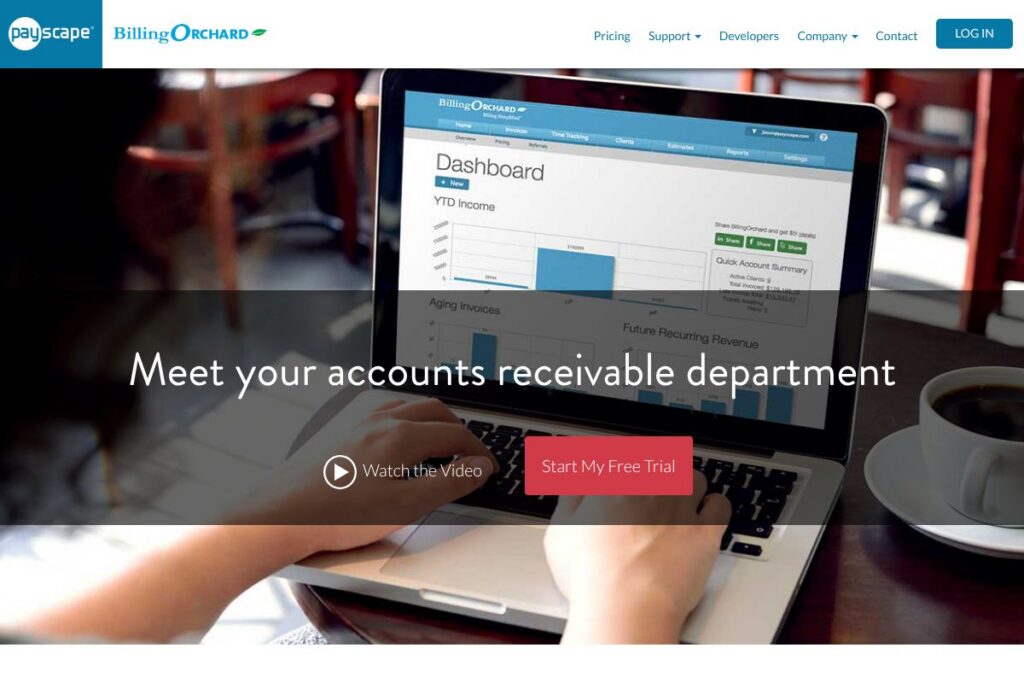
BillingOrchard is an online invoicing and electronic billing system that combines dynamic HTML invoices, scheduled recurring billing, time tracking, and integrated payment processing into a single platform. The product is aimed at businesses that bill clients regularly and need a customer-facing portal for payments and account management. Its distinguishing elements include HTML invoices that do not require PDF downloads, automated late fee calculations, and tools to convert tracked time into billable invoices.
Compared with established accounting and invoicing platforms, BillingOrchard is narrower in scope but deeper in billing automation. QuickBooks Online focuses on full accounting, payroll, and tax workflows; FreshBooks highlights simple invoicing and time tracking for freelancers; Xero targets small businesses that need accounting plus third-party app ecosystems. BillingOrchard places more emphasis on electronic bill presentment, recurring schedules, and direct payment collection by eCheck or card inside the invoice.
All of this makes BillingOrchard a practical choice for service firms that need reliable recurring invoicing, client self-service, and faster collections. It works particularly well for businesses that prefer a billing-first solution rather than a full accounting package, and for teams that need to turn billable time into approved invoices quickly.
How BillingOrchard Works
BillingOrchard runs as a web-based invoicing and billing application where administrators configure customers, billing schedules, payment options, and user permissions. Once clients and billing items are set up, you can create single invoices or set up a recurring invoice schedule that generates and delivers invoices automatically each period.
Invoices are delivered as dynamic HTML so clients view and pay bills inside their browser without downloading attachments. Payments can be processed from inside the invoice using integrated credit card and eCheck flows, and recurring payment profiles can be attached to customer records for automated charges.
Time tracking is available for employees and contractors to log billable hours against client projects; managers can approve time entries and convert approved hours directly into invoices. Administrators use the reporting dashboard to monitor recurring revenue, accounts receivable, and cash flow projections based on scheduled invoices.
What does BillingOrchard do?
BillingOrchard focuses on electronic invoicing and billing automation with an emphasis on recurring revenue and client self-service. Core capabilities are HTML-based online invoices, automated recurring schedules, auto-calculated late fees, and integrated payment acceptance to speed collections.
The platform also provides a customer portal where clients can review invoice and payment history, update billing or banking information, initiate payments, and communicate about billing items. For teams, role-based permissions allow staff and contractors to log time and create or approve invoices on behalf of clients.
Schedule Recurring Invoices
Create custom recurring billing schedules and attach them to client accounts so invoices are generated and delivered automatically according to your billing cadence. Automated customer notifications for upcoming and past due invoices reduce manual follow up, and late fee rules can auto-apply based on your terms.
Online Invoicing (Dynamic HTML)
Send professional, trackable invoices as dynamic HTML rather than PDF attachments, so clients can view their bill instantly in a browser. HTML invoices include integrated Pay Now buttons for faster reconciliation and avoid extra clicks for recipients.
Customer Portal
Provide clients with a portal to access invoice and payment history, complete transactions online, update billing and banking information, and communicate directly with your billing team. The portal helps offload routine account management tasks from staff.
Integrated Payments: Cards and eChecks
Process credit card and eCheck payments directly inside the invoice to shorten collection cycles and reduce manual reconciliation. The platform supports one-off payments and recurring charge setups for stored payment methods, with funds deposited according to your processor timelines.
Time Tracking and Billing
Allow employees and contractors to log billable hours against projects or clients, with configurable user permissions to control who can record, approve, and invoice time. Approved hours convert directly into invoice line items so billing follows work with minimal administrative overhead.
Reporting and Cash Flow Forecasting
The reporting dashboard aggregates recurring revenue and outstanding balances to provide a rolling view of expected cash flow. Use the reports to forecast earnings, identify collection issues, and prioritize accounts receivable work.
Website Design Add-on
As an optional add-on, BillingOrchard offers custom web site design services to build or refresh a business website that complements your billing portal and client workflows. This is intended for customers who want a cohesive public presence tied to their billing experience.
With BillingOrchard you get a billing-focused platform that reduces time spent creating invoices, follows up on past due items automatically, and gives clients a self-service payment experience. The biggest benefit is reducing manual AR work while keeping billing fully under your control.
BillingOrchard pricing
BillingOrchard uses a SaaS model with tiered offerings and optional add-ons, and pricing is provided through their website and sales channels. For current plan structures, available features, and any processing fees, view the BillingOrchard homepage and contact options to request a quote or see the latest pricing information.
What is BillingOrchard Used For?
BillingOrchard is commonly used for recurring invoicing, collections management, and converting billable time into invoices for service-oriented businesses. Typical users include law firms, marketing agencies, consultants, IT service companies, and other organizations that issue frequent client invoices and need reliable payment capture.
It is also used to reduce administrative billing tasks through automation: scheduling recurring invoices, auto-applying late fees, and providing a customer portal for client-initiated payments and account updates. Teams with distributed contractors benefit from role-based time entry and approval workflows that feed directly into invoicing.
Pros and Cons of BillingOrchard
Pros
- HTML invoices and embedded payments: Dynamic invoices let clients view and pay bills without attachments, which typically increases payment completion rates and reduces friction.
- Recurring billing automation: Schedule custom recurring invoices and automatic notifications to lower manual billing effort and improve on-time payments.
- Time tracking linked to billing: Convert approved billable hours into invoices quickly, which helps organizations invoice more accurately and reduce billing lag.
- Customer portal for self-service: Clients can update billing info, view history, and make payments, cutting down on routine support interactions.
Cons
- Limited full accounting features: BillingOrchard is billing-focused and does not replace full accounting suites for payroll, tax filing, or detailed ledger management.
- Potential need for integrations: Organizations that require deep bookkeeping workflows may need to sync data to platforms like QuickBooks Online or Xero, which might require additional configuration.
- Customization and add-ons: Some features such as custom web design are offered as add-ons, which can add to total cost compared with out-of-the-box alternatives.
Does BillingOrchard Offer a Free Trial?
BillingOrchard offers paid SaaS plans; trial and freemium availability may be provided on request. For specifics about free trials, demo accounts, or trial durations, check the BillingOrchard contact and demo options to arrange access or speak with sales.
BillingOrchard API and Integrations
BillingOrchard supports integrations for payment processing and third-party accounting exports, and the platform can be connected to payment gateways for credit card and eCheck acceptance. For developer-oriented automation and programmatic access, review the BillingOrchard developer or API documentation on their site via the BillingOrchard developer resources.
10 BillingOrchard alternatives
Paid alternatives to BillingOrchard
- QuickBooks Online — A full accounting suite that includes invoicing, payroll, tax tools, and a large app ecosystem for expanding functionality. Check QuickBooks pricing and plans.
- FreshBooks — Invoicing and time tracking aimed at freelancers and small teams, with client portals and payment processing built in. See FreshBooks features and pricing.
- Xero — Cloud accounting with invoicing, bank reconciliation, and strong integration options for payments and payroll.
- Zoho Invoice — A focused invoicing product that includes time tracking, recurring billing, and client portals as part of the Zoho suite.
- Bill.com — Specialized in accounts payable and receivable automation for mid-market companies, often used alongside accounting platforms.
- Stripe Billing — A developer-forward billing engine for subscriptions and invoices with robust payment routing and programmable billing logic.
- Wave — Free invoicing and accounting tools with paid payment processing, suitable for very small operations.
Open source alternatives to BillingOrchard
- InvoicePlane — Self-hosted invoicing and billing software with recurring invoices, client management, and simple customization.
- ERPNext — An open source ERP that includes invoicing, accounting, projects, and time tracking for organizations wanting a broader system.
- Odoo (Community Edition) — The community edition offers invoicing and project apps that can be self-hosted and extended with modules.
- Dolibarr — Open source ERP and CRM with invoicing and billing capabilities for small to mid-sized organizations.
Frequently asked questions about BillingOrchard
What payment methods does BillingOrchard accept?
BillingOrchard accepts credit cards and eChecks for invoice payments. Payments are processed inside the invoice and the platform supports recurring charge setups for stored payment methods.
Can BillingOrchard handle recurring billing for subscription customers?
Yes, BillingOrchard supports custom recurring billing schedules. You can automate invoice generation, customer notifications, and recurring payment collection based on configured schedules.
Does BillingOrchard provide time tracking for billing purposes?
Yes, BillingOrchard includes time tracking that converts billable hours into invoices. Role-based permissions allow employees and contractors to log time, with approval workflows before invoicing.
Can BillingOrchard integrate with accounting software like QuickBooks?
BillingOrchard can be integrated with accounting and payment systems. Export and integration options allow you to sync invoices and payments into bookkeeping tools such as QuickBooks Online or other general ledger systems.
Is there a customer portal in BillingOrchard?
Yes, BillingOrchard provides a customer portal for self-service. Clients can view invoice and payment history, update billing information, and complete transactions online.
Final verdict: BillingOrchard
BillingOrchard is a billing-first platform that excels at electronic invoice presentment, scheduled recurring billing, and client self-service through a customer portal. Its dynamic HTML invoices and integrated card and eCheck processing help reduce collection friction, while time tracking and approval workflows make it practical for service businesses that bill by the hour.
Compared to FreshBooks, which publishes tiered plans and focuses on freelancer-friendly simplicity, BillingOrchard places heavier emphasis on recurring enterprise-style billing and a customer portal for account management. If you need robust billing automation and embedded payments rather than full accounting and payroll, BillingOrchard is a focused and practical choice; organizations that need complete bookkeeping may pair it with a platform like QuickBooks Online or Xero for ledger-level accounting.