ZipBooks: An Overview
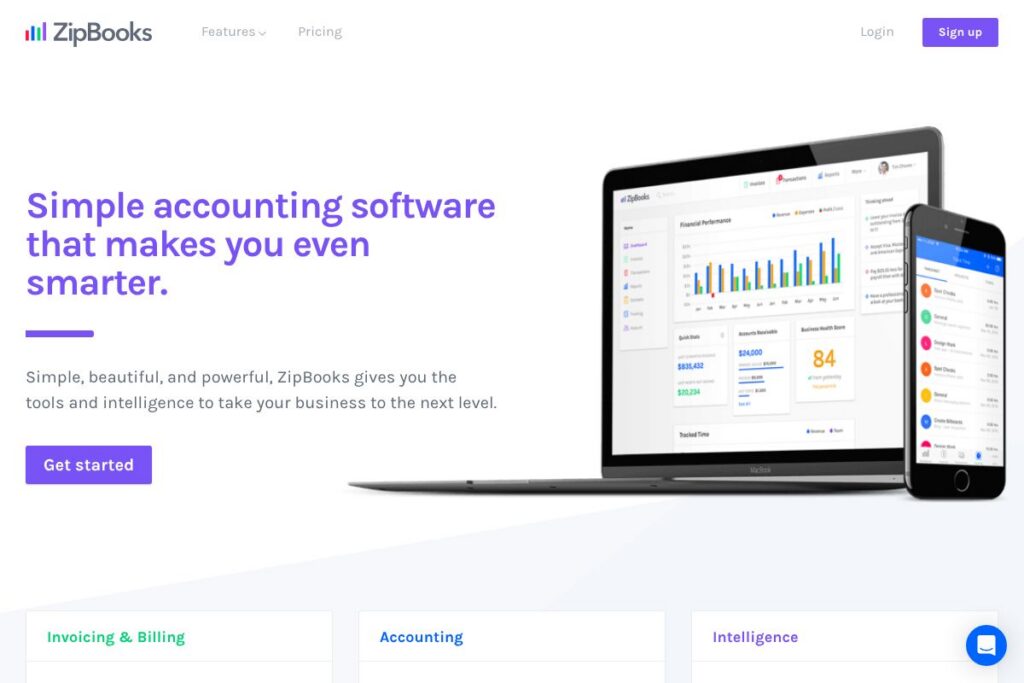
ZipBooks is a cloud accounting app focused on small businesses and freelancers that need straightforward bookkeeping, invoicing, and basic financial reports. It combines a clean user interface with features like bank connections, time tracking, tagging, and online payments to reduce manual data entry and make regular accounting tasks faster.
Compared with QuickBooks Online, Xero, and FreshBooks, ZipBooks places stronger emphasis on simplicity and a more guided, less technical user experience. QuickBooks Online and Xero offer deeper tax and payroll reporting and broader third-party ecosystems, while FreshBooks focuses heavily on invoicing and time tracking for service businesses; ZipBooks fills the niche for users who want easy invoicing, clear reports, and smart transaction categorization without a steep learning curve.
All of this makes ZipBooks particularly well suited for sole proprietors, consultants, small agencies, and creative studios who need to handle invoicing, payments, and basic accounting without a large accounting team. Its simplicity and tagging-based reports are useful for businesses that want quick financial clarity without advanced ERP complexity.
How ZipBooks Works
ZipBooks connects to your bank and credit card accounts to import transactions automatically, then suggests categories and tags to speed reconciliation. You can review a single transactions interface, accept or edit suggested categorizations, and apply tags for customers, projects, or locations to keep records organized.
For billing, create invoices or estimates using templates, attach logos, and send them by email. Clients can pay online via integrated payment processors, and payments are matched back to invoices automatically to keep your books up to date.
Project work and time tracking are tied into billing: track time on tasks, assign to projects, then pull billable hours into an invoice with one click. Reporting tools let you run profit and loss, balance sheets, and tag-based income statements to analyze business segments.
ZipBooks features
ZipBooks centers on a small set of core accounting features built to be easy to use while adding intelligence that reduces manual bookkeeping. Core capabilities include bank connection and reconciliation, invoicing and estimates, time tracking, smart tagging, simple reports, and integrated payments. The product messaging emphasizes data-driven insights that recommend actions and highlight opportunities to improve cash flow.
Bank Connect
Connect bank accounts and credit cards to import transaction feeds daily. Automatic imports reduce manual entry, and transaction matching simplifies reconciliation between bank activity and recorded invoices or expenses.
Time Tracking
Track time by project and task inside the app and convert billable hours into invoices with a single action. This is useful for agencies and consultants who bill clients by the hour and want to avoid separate time-sheets.
Smart Tagging
Apply custom tags to transactions, customers, or projects to slice financial reports by location, service line, or campaign. Tag-based reporting makes it easy to see profitability for specific segments without complex account restructuring.
Team Management
Invite employees, contractors, or your accountant and set permissions for invoicing, time tracking, and reporting. Role controls help you share access safely while keeping sensitive functions like billing restricted.
Mobile Accounting
Manage invoices, categorize expenses, and store receipts from a mobile-optimized interface or native app. Mobile workflows keep books current while you are on the road and simplify expense capture.
Invoicing and Estimates
Create branded invoices and estimates quickly, include a company logo, and enable online payments for faster collection. Recurring billing and automated reminders help maintain steady cash flow and reduce late payments.
Auto-categorization and Single Transactions Interface
ZipBooks suggests categories based on past transactions and shows everything in one place for quick review and edits. That interface lowers the friction of bookkeeping and reduces the time required to keep accounts current.
Reports and Insights
Run basic profit and loss, balance sheet, and cash flow reports, plus tag-focused income statements to analyze specific business segments. The platform highlights actionable insights to help you prioritize where to improve margins or accelerate collections.
With these features, ZipBooks aims to let small business owners spend less time on routine accounting and more time on running their business. The biggest benefit is the combination of simple workflows and tagging/reporting flexibility that surfaces useful financial clarity without complex configuration.
ZipBooks pricing
ZipBooks uses a subscription pricing model with plans tailored to different business sizes and needs; pricing details and plan comparisons are provided on their site. For the most accurate and up-to-date plan details and to see which tier fits your business, visit the ZipBooks homepage and review the current pricing options.
(See the ZipBooks homepage for current pricing and plan details: ZipBooks homepage)
What is ZipBooks Used For?
ZipBooks is primarily used for bookkeeping, invoicing, and basic financial reporting for small businesses, freelancers, and solo professionals. Common tasks include sending invoices and estimates, accepting online payments, categorizing and reconciling bank transactions, and running monthly profit and loss summaries.
Service firms and agencies use ZipBooks to track time by project and convert billable hours into client invoices, while small retailers and contractors use the payment and invoice features to speed collections. It is also used as a light accounting tool for tax preparation and for sharing clean reports with external accountants or bookkeepers.
Pros and Cons of ZipBooks
Pros
- Simple, clean interface: ZipBooks presents accounting workflows in an uncluttered layout that lowers the learning curve for non-accountants, making everyday bookkeeping faster.
- Fast invoicing and payments: Create branded invoices quickly and enable online payments to shorten cash collection cycles and reduce manual payment reconciliation.
- Smart tagging and segmented reporting: Custom tags let you generate income statements and reports by project, customer, or location without complex chart of accounts changes.
- Integrated time tracking: Built-in time tracking that flows into invoices simplifies billing for service businesses and freelancers.
- Mobile-friendly workflows: The mobile experience and receipt capture make it practical to manage expenses and invoices while away from the office.
Cons
- Limited advanced accounting features: Businesses that need payroll, inventory management, or multi-entity consolidation will find ZipBooks less comprehensive than full ERP or larger accounting suites.
- Fewer third-party integrations than market leaders: While ZipBooks covers common payments and tools, its ecosystem is not as extensive as QuickBooks or Xero for specialized add-ons.
- Reporting depth: Standard reports cover the basics well, but advanced custom reporting and deep financial analysis tools are limited compared with larger accounting platforms.
Does ZipBooks Offer a Free Trial?
ZipBooks offers a free plan and trial access to paid features. The free tier provides core invoicing and basic bookkeeping capabilities, while trials or demos of paid tiers typically allow short-term access to advanced features such as enhanced reports, automated reminders, and integrated payments; check the ZipBooks homepage for exact trial length and what’s included.
ZipBooks API and Integrations
ZipBooks integrates with common payment processors and third-party connectors to accept online payments and automate workflows. For a list of supported connections and payment partners, see the ZipBooks integrations page.
Developers can extend ZipBooks through available APIs and automation tools; the developer resources and API documentation describe endpoints for invoicing, customers, transactions, and reporting. For integration details and developer guidance, consult the ZipBooks developer resources and integration listings.
(Explore supported connections at the ZipBooks integrations page: ZipBooks integrations)
10 ZipBooks alternatives
Paid alternatives to ZipBooks
- QuickBooks Online — Full-featured accounting with payroll, inventory, advanced reporting, and a large add-on ecosystem, aimed at small and midsize companies.
- Xero — Cloud accounting with strong bank reconciliation, multi-currency support, and a robust app marketplace for expanding functionality.
- FreshBooks — Invoicing-first platform with integrated time tracking and client portal features for service-based businesses.
- Sage Business Cloud Accounting — Accounting and compliance tools designed for growing small businesses, with payroll and advanced reporting add-ons.
- Zoho Books — Part of the Zoho suite, offering invoicing, inventory, and automation at competitive pricing with CRM integrations.
- Wave (Paid services available) — Free core accounting and invoicing with optional paid payment processing and payroll add-ons for small businesses.
- Kashoo — Simple bookkeeping and invoicing with an emphasis on usability for very small businesses and freelancers.
Open source alternatives to ZipBooks
- GnuCash — Desktop double-entry accounting software that is free and suitable for small businesses wanting a self-hosted solution.
- ERPNext — Open source ERP with accounting, inventory, and project modules for small to medium businesses that want an integrated stack.
- Odoo Community — Modular open source ERP that includes accounting and invoicing modules, suitable for teams that can manage an open source platform.
- Akaunting — Web-based open source accounting platform for small businesses, with invoicing and expense tracking features.
Frequently asked questions about ZipBooks
What is ZipBooks used for?
ZipBooks is used for invoicing, bookkeeping, and basic small business accounting. It helps users send invoices, accept payments, categorize transactions, and run simple financial reports.
Does ZipBooks support bank reconciliation?
Yes, ZipBooks supports bank connections and transaction matching. You can link bank and credit card accounts, import transactions daily, and reconcile them against recorded invoices and expenses.
Can ZipBooks accept online payments from clients?
Yes, ZipBooks integrates with payment processors to accept credit card payments and ACH. Client payments are matched to invoices automatically to simplify accounts receivable management.
Does ZipBooks offer an API for developers?
Yes, ZipBooks provides API access and integration options. The developer documentation covers endpoints for invoices, customers, transactions, and reports to automate workflows and connect external systems.
Is ZipBooks suitable for freelancers and small agencies?
Yes, ZipBooks is well suited for freelancers and small agencies. Its time tracking, project tagging, and quick invoicing workflows are designed for service businesses that bill by the hour or by project.
Final verdict: ZipBooks
ZipBooks stands out for its focus on simplicity, clear user experience, and features that matter most to small businesses, such as easy invoicing, time tracking, and tag-based reporting. It reduces bookkeeping overhead with automatic transaction imports and intuitive categorization, which helps owners spend less time on routine accounting.
Compared with a larger competitor like QuickBooks Online, which offers deeper payroll, tax, and inventory features and typically targets businesses with more complex accounting needs, ZipBooks is better suited to small teams and solo operators who prioritize usability and faster invoicing workflows. If you need advanced compliance features or a large app ecosystem, QuickBooks or Xero may be preferable; if you want straightforward accounting with built-in billing and insights, ZipBooks is a strong, user-friendly option to evaluate.