What is Zoom
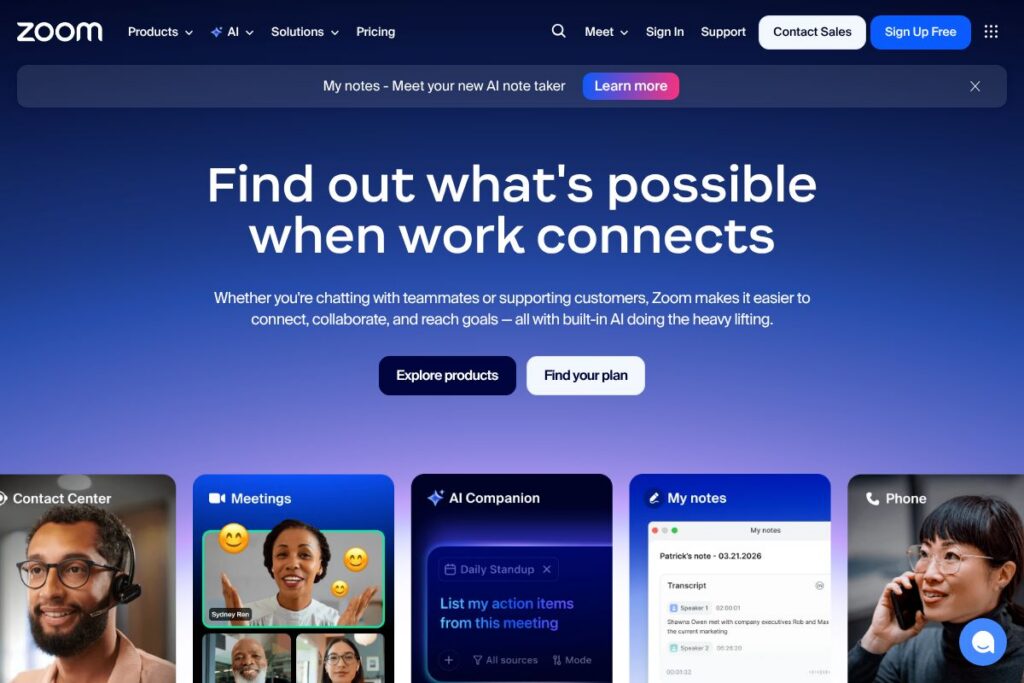
Zoom is a unified communications platform that combines video meetings, persistent team chat, cloud phone services, webinars, virtual event management, and an integrated whiteboard into a single service. It is designed for organizations that need reliable synchronous and asynchronous collaboration across distributed teams, customers, and external partners.
Compared with competitors, Microsoft Teams focuses on deep Office and Microsoft 365 integration and built-in collaboration inside Microsoft subscriptions, while Google Meet emphasizes browser-first simplicity and Google Workspace connectivity. Cisco Webex targets enterprise customers with advanced security controls and complex meeting room hardware support. Zoom sits between these options by prioritizing video quality, scalability for webinars and events, and an extensible developer platform.
Zoom does particularly well at large-scale webinars, simple user experience for meeting participants, and extensibility through SDKs and APIs, making it a good fit for companies that need reliable video, hybrid events, and programmable real-time communications. It is suitable for customer support centers, sales and marketing teams running webinars, remote-first product teams, and academic institutions running hybrid classes.
How Zoom Works
Zoom connects users through a combination of cloud-hosted services and client apps for desktop, mobile, and meeting-room hardware. Users schedule or start meetings from the desktop or mobile apps, join with a single click or link, and access built-in meeting controls such as screen sharing, breakout rooms, polling, live transcription, and recording.
Persistent team chat provides asynchronous messaging, file sharing, and searchable history alongside meetings so conversations stay linked to work. Zoom Phone routes business calls over VoIP with enterprise features like call routing, auto-attendants, and E911 support, while Zoom Webinars and Events scale to large audiences with registration, moderation, and analytics.
AI features are embedded to reduce manual work: automated meeting summaries, searchable transcripts, and contextual assistance for follow-ups and action items. Developers and integrators extend functionality with the Zoom Developer Platform documentation, which covers APIs, SDKs, and marketplace apps for custom workflows.
Zoom features
Zoom groups core collaboration capabilities into meetings, messaging, phone, webinars, events, and developer tools. Recent product focus includes enhanced AI assistance and deeper integrations across the platform to automate meeting prep, capture context, and speed up documentation.
Meetings
High-quality video and audio meetings support up to large participant counts depending on plan, with features such as gallery and speaker views, breakout rooms, and meeting recording. These capabilities help teams run workshops, stand-ups, and customer demos with flexible moderation controls.
Zoom AI Companion
AI Companion captures conversation context, generates summaries, and produces follow-up items and draft documents from meetings and chats. This reduces manual note-taking and helps teams turn discussions into actionable deliverables faster.
Zoom Phone
Cloud-native VoIP with business calling features, number provisioning, call routing, and desk phone support. It replaces legacy PBX systems for organizations that want a single vendor for voice and video communication.
Team Chat
Persistent chat channels, 1:1 messaging, file sharing, and searchable history integrate with meeting workflows so teams can move from discussion to face-to-face collaboration without context loss. Chat supports thread organization and file previews to streamline asynchronous work.
Webinars and Events
Tools for public-facing broadcasts and virtual conferences include registration, attendee management, monetization options, and post-event analytics. These features are built to scale for marketing events, training, and all-hands meetings.
Whiteboard
A collaborative whiteboard with real-time drawing, sticky notes, and templates that works inside meetings and independently for brainstorming and planning. Whiteboard content can be saved, shared, and integrated into meeting summaries.
Contact Center
A cloud contact center solution that brings voice, chat, and digital channels together with CRM integrations and routing rules to streamline customer support workflows. It is designed to reduce tab switching and keep customer context visible during interactions.
Developer Platform and SDKs
APIs and SDKs let teams embed Zoom’s real-time audio, video, and chat into custom apps or build integrations with CRM, LMS, and other business systems. This is useful for product teams that need tailored meeting experiences or in-app communications.
With these capabilities, Zoom offers a practical single-platform approach for organizations that require dependable video quality, scalable event tools, and programmable options to integrate communications into existing systems.
Zoom pricing
Zoom uses a subscription-based pricing model offering plans for individuals, small teams, business customers, and enterprise deployments, with add-ons for webinars, large meetings, and advanced phone or contact center functionality. Packaging is tiered by capability and scale rather than a single per-minute fee structure.
For current plan details, available add-ons, and licensing options, see Zoom’s plans and deployment options on the company website. The site describes which features are included at each tier and outlines enterprise purchasing and volume licensing for larger organizations.
What is Zoom Used For?
Zoom is commonly used for internal team meetings, external client calls, virtual events and webinars, remote training, and telehealth consultations. Its combination of meeting features and scalability makes it a convenient choice for synchronous communication across remote, hybrid, and onsite teams.
Customer-facing teams use Zoom to run support calls and video-enabled contact center workflows, while marketing and product teams use webinars and events to reach large audiences. Educational institutions use Zoom for synchronous classes, office hours, and recorded lectures to support hybrid learning models.
Pros and Cons of Zoom
Pros
- Unified platform: Zoom brings meetings, chat, phone, webinars, whiteboard, and contact center into a single environment which reduces context switching for users. This makes workflows simpler for teams that need multiple communication modes.
- Strong video and meeting experience: Video quality, participant controls, and features like breakout rooms and polling support interactive sessions for training, sales, and large-scale events. These meeting-focused capabilities help hosts run structured sessions with minimal setup.
- Developer extensibility: Comprehensive APIs and SDKs allow organizations to embed Zoom into products and build custom integrations, enabling tailored user experiences and deeper CRM or LMS connections. This supports bespoke workflows and branded meeting interfaces.
- AI-driven productivity: Integrated AI features like meeting summarization and action-item extraction reduce manual follow-up work and help teams capture context without extra administrative effort.
Cons
- Pricing complexity: Plans, add-ons, and enterprise licensing are split across different product lines which can make total cost calculation difficult for mixed deployments. Organizations often need to compare plans carefully to match feature needs and scale requirements.
- Feature overlap and decision-making: With many overlapping capabilities across meetings, webinars, and events, teams can be unsure which product or add-on is the appropriate fit without reviewing documentation or consulting sales. This can slow adoption for some groups.
- Privacy and compliance considerations: Large enterprises and regulated industries must evaluate specific security and compliance features for data residency and regulatory requirements. Careful configuration and policy controls are needed for sensitive deployments.
Does Zoom Offer a Free Trial?
Zoom offers a free Basic plan and trial or demo options for paid tiers. The free Basic plan includes one-to-one unlimited meetings and group meetings with a time limit, plus core chat and collaboration features. Paid plans and enterprise purchases commonly include trial periods or demo options through sales channels, and advanced AI features such as Zoom AI Companion are included with eligible paid Workplace plans; contact Zoom for exact trial availability and terms.
Zoom API and Integrations
Zoom provides a developer platform with REST APIs, webhooks, and SDKs for embedding audio, video, and chat into web or mobile applications. The Zoom Developer Platform documentation outlines endpoints for meetings, recordings, chat, phone, and user management along with examples.
Zoom also offers marketplace integrations with major business systems and identity providers, including Slack, Microsoft Teams, Google Workspace, Salesforce, Dropbox, and Okta, enabling single sign-on, calendar sync, CRM context, and file sharing within meeting workflows.
10 Zoom alternatives
Paid alternatives to Zoom
- Microsoft Teams — An integrated collaboration suite that combines chat, meetings, and Office apps with strong document collaboration and Microsoft 365 licensing options. Ideal for organizations already invested in Microsoft infrastructure.
- Google Meet — A browser-first video conferencing tool tightly integrated with Google Workspace calendars and documents, good for teams that rely on Google apps for productivity.
- Cisco Webex — An enterprise-grade meeting and calling platform with extensive security controls, device ecosystem, and hardware integrations for conference rooms.
- RingCentral — A cloud communications platform that combines phone, meetings, and messaging with strong telephony features for contact centers and distributed offices.
- GoTo (formerly GoToMeeting) — A reliable meetings product focused on simplicity and recording features, often used by SMBs for webinars and remote collaboration.
- BlueJeans by Verizon — A video-first conferencing service with Dolby audio and event management features designed for professional broadcasts.
- Zoho Meeting — Part of the Zoho suite, this is a cost-effective option that integrates with Zoho CRM and other business apps.
Open source alternatives to Zoom
- Jitsi — An open source video conferencing stack that you can self-host for basic meeting needs, with support for secure rooms and browser-based meetings. It is suitable for privacy-conscious teams that want control over infrastructure.
- BigBlueButton — Focused on online learning, it provides whiteboard, breakout rooms, polling, and recording for virtual classrooms and is commonly embedded in LMS platforms.
- Element (Matrix) — A decentralized chat and VoIP system built on Matrix, supporting real-time communication and self-hosting for organizations that need federated control.
- Nextcloud Talk — Part of the Nextcloud suite, it provides self-hosted audio and video calls integrated with file sharing and collaboration tools.
- Apache OpenMeetings — A web conferencing project that supports meetings, whiteboard, and collaborative document sharing intended for self-hosted deployments.
Frequently asked questions about Zoom
What is Zoom used for?
Zoom is used for video meetings, team chat, cloud phone, webinars, whiteboard collaboration, and virtual events. Organizations use Zoom to run internal meetings, client demos, large-scale webinars, and customer support workflows that require video and voice.
Does Zoom have an API?
Yes, Zoom provides REST APIs, webhooks, and SDKs. The Zoom Developer Platform documentation describes endpoints for meetings, recordings, chat, and phone so developers can automate and embed Zoom capabilities.
Can Zoom replace a traditional PBX?
Yes, Zoom Phone can replace legacy PBX systems for many organizations. It offers cloud-native VoIP features such as number provisioning, call routing, auto-attendants, and E911 support as part of the Zoom platform.
Is Zoom suitable for large webinars and events?
Yes, Zoom’s Webinars and Events products are designed to scale to large audiences. They include registration, host controls, analytics, and moderation tools that help marketing and training teams run polished virtual events.
Does Zoom offer AI meeting summaries?
Yes, Zoom includes AI-driven meeting summaries and contextual assistance through Zoom AI Companion. AI Companion captures conversation context, generates summaries, and creates follow-ups to reduce manual note-taking and improve meeting outcomes.
Final Verdict: Zoom
Zoom stands out as a broadly adopted platform for video-first collaboration that combines meetings, persistent chat, VoIP phone, webinars, whiteboard, and contact center capabilities in a single product family. Its strengths are reliable video quality, a straightforward meeting experience for participants, scalable webinar and events features, and an extensible developer platform for embedding communications into custom applications.
Compared with Microsoft Teams, which is bundled with Microsoft 365 subscriptions starting at $6.00/user/month for basic business plans, Zoom focuses more on video and event scalability and offers a wider array of meeting-specific features out of the box. For organizations that already rely heavily on Microsoft 365, Microsoft Teams provides tighter document and identity integration, while Zoom offers stronger standalone meeting, webinar, and programmable communications options. Choose Zoom if video quality, large-scale events, and extensibility are core requirements; choose Microsoft Teams if deep Office integration is the priority.