What is Chaport
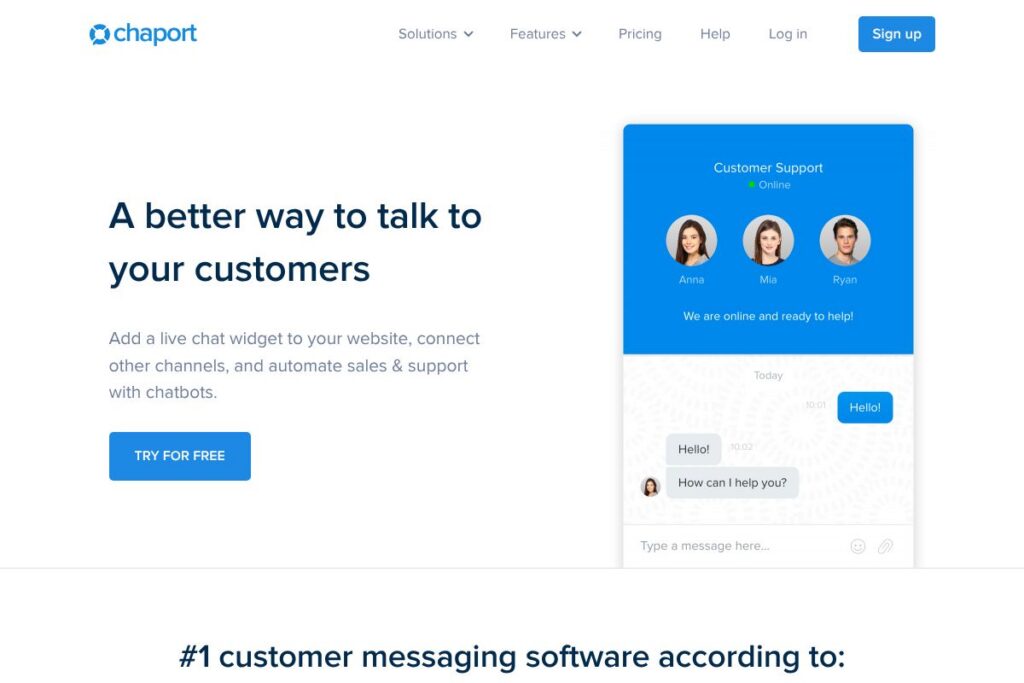
Chaport is a customer messaging platform that combines live chat, chatbots, multi-channel messaging, and a searchable knowledge base in a single interface. It aims to let support and sales teams handle conversations from websites and messaging apps without switching tools, and includes desktop and mobile apps for real-time response.
Compared with alternatives, Chaport focuses on simplicity and straightforward setup. Compared with Intercom, Chaport is positioned as a lighter, easier to deploy option for small and mid-sized teams. Compared with Zendesk or Freshdesk, Chaport emphasizes conversational workflows and real-time chat rather than a ticket-first support model.
Chaport works particularly well for small businesses, e-commerce stores, and SaaS companies that need live chat plus basic automation. Its combination of multi-channel inbox, chatbots, and a public knowledge base makes it a practical choice for teams that want to reduce response times and encourage self-service.
How Chaport Works
The Chaport widget is embedded on your website and routes incoming messages into a shared operator inbox that is accessible via web, desktop, and mobile apps. Operators can view customer details, website behavior, and chat history to provide context-rich responses.
Chatbots automate common replies, qualify leads, and collect contact details when operators are offline, and suggested knowledge base articles are offered in-chat to encourage self-service. Integrations and an API let you push or pull customer data from CRMs and automation platforms, so conversation context can be synced with your other systems.
Chaport features
Chaport is organized around real-time messaging with automation and multi-channel consolidation. Core capabilities include a customizable live chat widget, rule-based chatbots, a shared inbox for website chat and messaging apps, saved replies, visitor tracking, and a public knowledge base with an FAQ bot.
Live chat widget
The widget embeds on websites and supports customization of colors, text, position, and operator photos. It displays visitor activity so agents can join conversations proactively and offer auto-invitations based on rules.
Chatbots and automation
Bots can answer routine questions, capture leads, and route conversations to the right team or operator. This reduces manual handling for common queries and provides 24/7 coverage when live operators are offline.
Multi-channel inbox
Chaport consolidates chats from the website, email, Facebook, Telegram, and Viber into one inbox for agents to manage. Having all channels in one view reduces context switching and shortens response times.
Knowledge base and FAQ bot
Create public help articles and link them to the chat so the FAQ bot can suggest relevant content during conversations. This encourages self-service and decreases repetitive tickets for common issues.
Desktop and mobile apps
Native apps for Windows, macOS, iOS, and Android keep teams connected beyond the browser and synchronize conversations instantly across devices. This enables remote agents to respond whenever needed without losing context.
Saved replies and typing insights
Agents can use saved replies for common answers to speed up responses, and typing insights let agents preview customer messages before they are sent for faster follow-up. These features reduce average handle time and improve consistency.
Reporting and analytics
Real-time reports track incoming and missed chats, operator activity, and response performance. Basic analytics help teams identify coverage gaps and measure the impact of chat on support and sales metrics.
Integrations and API
Chaport offers integrations with Zapier and direct API access to connect with CRMs and other tools. Integrations allow automatic contact enrichment and event-driven workflows that keep customer records synchronized.
With these features, Chaport gives teams a lightweight but complete messaging stack for conversational support and lead capture. The biggest benefit is combining real-time chat, automation, and self-service resources into one compact platform.
Chaport pricing
Chaport uses a subscription-based SaaS model with tiered plans that scale from individual users to larger teams, and it also provides a free access option for testing core functionality. For the most current plan details and billing options, check Chaport’s pricing and plan information on the official site.
What is Chaport Used For?
Chaport is commonly used for website live chat support, lead capture via chatbots, and consolidating messages from multiple channels into a single operator inbox. Marketing and sales teams use it to qualify visitors and pass leads to CRM systems, while support teams use it for quick issue triage and resolution.
It is also used to build a public knowledge base and enable an FAQ bot that suggests help articles during chats. Organizations that need fast implementation and real-time customer conversations without a heavy ticketing workflow find Chaport particularly suitable.
Pros and cons of Chaport
Pros
- Simple setup and interface: The platform installs quickly on websites and offers a clean operator UI that is easy to learn, so teams can start chatting with minimal training.
- Multi-channel messaging: Chaport consolidates website chat, email, and messengers like Facebook, Telegram, and Viber into one inbox, which reduces tool switching for agents.
- Built-in automation and knowledge base: Chatbots, auto-invitations, and an FAQ bot help handle repetitive queries and provide 24/7 basic support without human intervention.
- Cross-platform apps and sync: Native apps for desktop and mobile keep conversations synchronized and let agents respond from any device.
Cons
- Advanced enterprise features limited: Larger organizations with complex routing, advanced SLA management, or deep analytics may find Chaport less feature-rich than enterprise-grade alternatives like Zendesk or Intercom.
- Customization and reporting depth: While widget customization is flexible, reporting and dashboarding are more basic compared with full customer service suites, which can limit long-term analytics for larger support organizations.
Does Chaport Offer a Free Trial?
Chaport offers a free plan and trial options for new users. The free access lets you evaluate live chat, basic chatbot behavior, and multi-device apps before committing to a paid subscription; for full plan details and any trial limits, view Chaport’s signup and plan pages on the website.
Chaport API and Integrations
Chaport provides an API for developers to retrieve chat history, send messages, and integrate conversations with back-office systems; see the Chaport API documentation for specific endpoints and authentication methods. The platform also connects with automation tools like Zapier and common messaging channels to sync contacts and trigger workflows from conversations.
Key integrations include email, Facebook, Telegram, Viber, Zapier, and popular CRMs; check Chaport’s integration list for connectors and third-party integration guides.
10 Chaport alternatives
Paid alternatives to Chaport
- Intercom — Conversational support and product messaging platform with advanced routing, in-app messages, and scalability for growing product teams.
- Zendesk — Broad customer service suite that combines ticketing, messaging, and knowledge management for enterprise customer support operations.
- Drift — Focused on conversational marketing and sales with AI routing and account-based messaging for B2B teams.
- Freshdesk — Omnichannel support platform that includes ticketing, chat, and automation for support teams of all sizes.
- LiveChat — Dedicated live chat solution with robust integrations, agent console, and a marketplace of add-ons.
- Tidio — Chat and chatbot tool aimed at e-commerce businesses that combines live chat with email and messenger automation.
- HelpCrunch — All-in-one customer communication platform that bundles live chat, email automation, and knowledge base features.
Open source alternatives to Chaport
- Chatwoot — Open source customer messaging platform with multi-channel inbox, automation, and self-hosting options for teams that need control over data.
- Zammad — Open source helpdesk with ticketing and chat functionality that can be self-hosted and extended via APIs.
- Live Helper Chat — Self-hosted live chat solution that supports visitor tracking, proactive invitations, and basic bot flows.
- Mibew Messenger — Lightweight open source live chat that can be embedded in websites and self-hosted to keep conversations on your infrastructure.
Frequently asked questions about Chaport
What is Chaport used for?
Chaport is used for live chat, chatbots, and multi-channel customer messaging. Organizations use it to respond to website visitors, capture leads, and centralize messages from several channels into one operator inbox.
Does Chaport support integrations with CRMs?
Yes, Chaport supports CRM integrations through native connectors, Zapier, and its API. You can push contact data or conversation events into a CRM to keep customer records synchronized.
Can Chaport work across desktop and mobile devices?
Yes, Chaport offers native apps for Windows, macOS, iOS, and Android. Conversations synchronize instantly so agents can respond from any device without losing context.
Is there an API for Chaport?
Yes, Chaport provides a developer API for messaging and chat data access. The API documentation describes endpoints for retrieving chat history, sending messages, and managing operators.
Can Chaport handle multiple messaging channels in one inbox?
Yes, Chaport consolidates web chat, email, Facebook, Telegram, and Viber into a single shared inbox. This centralization helps agents handle conversations from different channels without switching applications.
Final Verdict: Chaport
Chaport delivers a practical, easy-to-deploy messaging stack that combines live chat, chatbots, a knowledge base, and multi-channel inboxing into a compact platform. Its strengths are fast setup, a clear operator interface, multi-device apps, and basic automation that reduce repetitive work for small and mid-sized teams.
Compared with Intercom, Chaport is simpler and often more cost-effective for teams that need straightforward live chat plus bots without the broader product-messaging features or advanced enterprise tooling. If you need deep analytics, sophisticated routing, or large-scale SLA controls, enterprise platforms like Zendesk or Intercom may offer a stronger fit, but for most small to medium support and sales teams, Chaport provides a focused, efficient messaging solution.
For plan specifics and to start a trial, review Chaport’s signup and plan pages on the official site.