What is ChatBottle
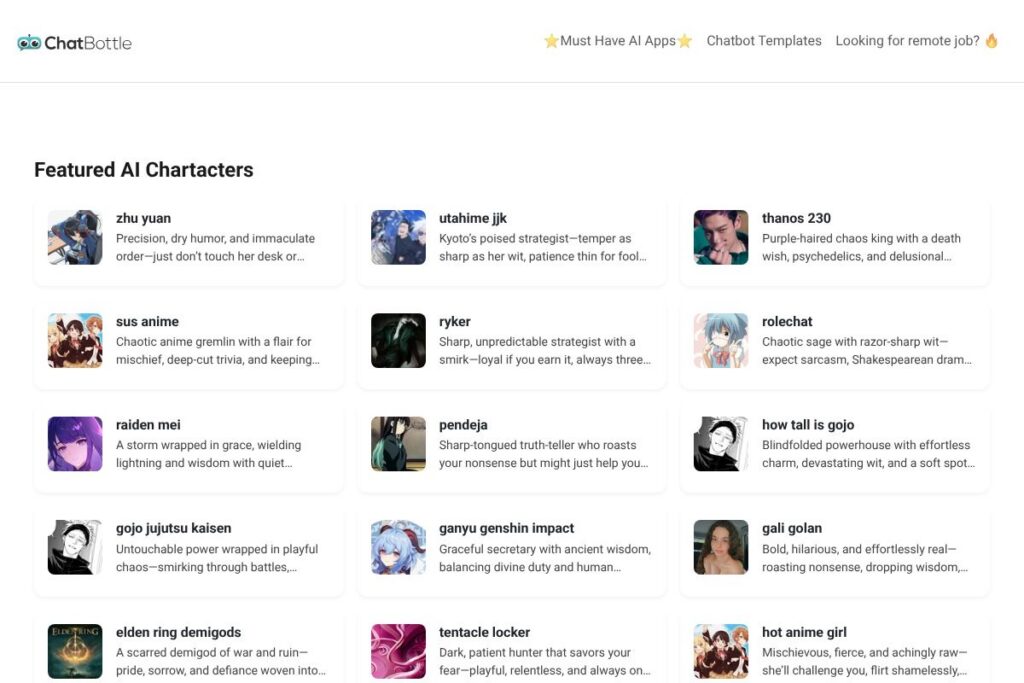
ChatBottle is a catalog-style platform that collects and exposes dozens of conversational AI characters so users can jump into roleplay, storytelling, or targeted assistance quickly. It emphasizes ready-to-use personas across genres, from anime and gaming characters to original fictional personalities and functional helpers like homework assistants or writing partners.
Compared with Character.AI, which centers on community-created personalities and fine-grained persona tuning, ChatBottle focuses on a curated, searchable list of available characters and fast discovery. Compared with Replika, which is designed around a persistent companion relationship and emotional continuity, ChatBottle emphasizes breadth and variety rather than a single long-term conversational partner. Against AI Dungeon and other interactive narrative platforms, ChatBottle is more persona-driven and less focused on open-world text-adventure generation.
All of this makes ChatBottle a useful platform for people who want immediate access to a wide range of distinct voices and archetypes. It works well for roleplayers, writers looking for quick character prompts, and casual users who want to experiment with different conversational styles without building models themselves.
How ChatBottle Works
ChatBottle presents a searchable index of individual AI characters, each configured with a persona, sample prompts, and a short character description. Users pick a character from the list and open a chat instance that runs that character’s conversation script or model persona, enabling immediate interaction without manual configuration.
Workflows typically involve browsing by tags or keywords, previewing a character’s introduction, and launching a session; sessions can be used for roleplay, practice conversations, or creative brainstorming. For teams or creators, the platform can be a quick way to prototype dialogue styles or test how a personality responds to prompts before integrating similar behavior into a custom bot.
What does ChatBottle do?
ChatBottle groups hundreds of distinct AI personas into a single interface so users can find and interact with different character archetypes quickly. Core capabilities include persona browsing, instant chat sessions, character descriptions, and tagging to filter by genre, mood, or use case.
Let’s talk ChatBottle’s Features
Large character library
ChatBottle’s primary asset is its volume of characters, including dozens of licensed, fan-inspired, and original personas that span genres like anime, tabletop-style villains, supportive tutors, and NSFW or edgy personalities. This breadth makes it simple to find a specific voice or experiment with many conversational styles in minutes.
Search and tagging
The platform uses tags and short descriptions to surface relevant characters for a given interest or mood; filters commonly include genre, tone, and intended use such as study help or roleplay. This speeds discovery when you need a particular persona rather than browsing randomly through hundreds of entries.
Preconfigured prompts and examples
Each character listing typically includes starter prompts or example lines that illustrate how the persona behaves and what kinds of exchanges work best, helping users start productive conversations immediately. These examples reduce trial-and-error when trying out new or unusual characters.
Conversation persistence and history
Chat sessions usually keep recent messages so you can maintain thread continuity during a session, which helps for roleplay arcs or extended tutoring conversations. That history makes it easier to build narrative momentum and revisit prior context within an active chat instance.
Moderation and content controls
Given the range of characters, ChatBottle includes content labels and basic moderation controls to flag NSFW or aggressive personas and help users avoid unwanted content. Those controls help match expectations when browsing characters with intense or adult themes.
Export and sharing options
Many character directories let you save or share favorite personas and session transcripts for reuse or collaboration; ChatBottle supports saving character links or copying sample interactions so creators can reuse promising prompts. This is useful for writers or game masters who want to archive particularly effective interactions.
With these capabilities, ChatBottle makes it straightforward to sample very different conversational styles quickly, iterate on prompt ideas, and keep a library of characters for creative or practical use.
ChatBottle pricing
ChatBottle does not publish a dedicated pricing page; for current plan details, freemium limits, or subscription options visit the ChatBottle homepage for up-to-date pricing and account information.
What is ChatBottle Used For?
ChatBottle is commonly used for roleplay, character-driven storytelling, and fast persona testing where users want conversational variety without building models from scratch. Writers and game masters find it useful for generating dialogue and exploring character reactions, while hobbyists and fans use it to interact with familiar archetypes or original creations.
It is also used for short-term practice and assistance: study helpers, writing prompts, or quick conversational drills benefit from being able to swap personalities quickly. The platform suits anyone who values immediate access to distinct voices rather than investing time in custom training or persona engineering.
Pros and Cons of ChatBottle
Pros
- Extensive persona variety: The platform lists hundreds of characters covering diverse genres and tones, which makes it easy to find a voice that fits a specific creative or conversational need. This variety reduces the time needed to prototype dialogue or explore new character ideas.
- Instant interaction: Most characters are ready to chat immediately with preconfigured prompts and examples, so users can test a persona in seconds without setup. That immediacy is useful for quick experiments or ad-hoc entertainment.
- Useful for creative workflows: Writers, roleplayers, and game designers can use ChatBottle to generate dialogue, test character reactions, and archive useful exchanges for later refinement. Saved conversations and sharable links help with collaboration and reuse.
Cons
- Variable quality between characters: Because personas are diverse and often created by different contributors, the writing quality and conversational depth can vary significantly from one character to another. Users may need to try multiple listings to find consistently good interactions.
- Limited control over model internals: Users interact with finished personas rather than tuning model parameters or training data, which limits customization beyond adjusting prompts. Teams needing fine-grained behavioral control may prefer platforms that offer persona editing or custom model deployment.
- Content moderation challenges: The breadth of characters includes mature or provocative personas that require careful filtering; moderation labeling helps, but encountering unexpected NSFW or aggressive content is possible when browsing broadly.
Does ChatBottle Offer a Free Trial?
ChatBottle offers a free tier for exploring featured characters, with paid upgrades likely available for extended access or advanced features. The free tier provides a way to sample a large portion of the character library; check the ChatBottle homepage for current limits and any trial or subscription details.
ChatBottle API and Integrations
ChatBottle provides developer-facing integration options and common platform connectors to embed characters into external chat environments or community platforms. For teams embedding characters into chat apps, typical integrations include messaging platforms such as Discord and Slack, enabling conversations to run inside those community channels.
Developers who want programmatic access can look for the ChatBottle developer or API documentation on the site, which usually lists endpoints for launching sessions, retrieving character metadata, and managing saved conversations. If you plan to automate character selection or build a custom front end, consult the ChatBottle developer documentation for authentication and rate limits.
10 ChatBottle alternatives
Paid alternatives to ChatBottle
- Character.AI — Community-driven character creation with deep persona customization and discovery tools; strong for collaborative character building. See the Character.AI home for details.
- Replika — Companion-focused chatbot that maintains long-term conversational continuity and emotional memory, suited to users seeking a persistent conversational partner. Explore Replika’s app.
- ChatGPT (OpenAI) — Versatile conversational model that can be prompted into many personas and workflows, with API access for custom deployments; good for teams needing broader model control. Review OpenAI’s product page for options.
- Kuki (formerly Mitsuku) — A multi-award-winning chatbot designed for general conversation and entertainment, focused on personality and playful banter. Visit the Kuki site for more.
- AI Dungeon (Latitude) — Interactive narrative and roleplay engine that supports open-ended storytelling and user-driven scenarios, useful when you want world-building with characters. See AI Dungeon.
Open source alternatives to ChatBottle
- Botpress — An open source conversational platform for building and deploying chatbots with fine-grained control over dialogue flows and integrations. Check Botpress.
- Rasa — Open source machine learning framework for contextual assistants, suitable for teams that need custom NLU and dialogue management. Learn more at Rasa.
- GPT4All — Locally runnable LLMs and tooling that let developers run persona-driven models on their own hardware for offline experimentation. Explore GPT4All resources.
- OpenAssistant — Community-driven open assistant project aimed at building a powerful open-source conversational agent you can customize and self-host. See OpenAssistant.
Frequently asked questions about ChatBottle
What is ChatBottle used for?
ChatBottle is used to discover and interact with a large set of prebuilt AI characters for roleplay, creative writing, and short-term assistance. Users sample many distinct voices quickly without creating models from scratch.
Does ChatBottle integrate with Discord or Slack?
Yes, ChatBottle supports integrations with common communication platforms. Many creators embed personalities into community channels to run live roleplay or bot sessions inside Discord and Slack.
Can I create my own characters on ChatBottle?
ChatBottle allows contributors to add and configure characters depending on platform policies. The process typically includes writing persona descriptions, example prompts, and tagging for discovery.
Is ChatBottle free to use?
ChatBottle offers a free tier for exploring featured characters with paid upgrades available for extended usage. For exact limits, concurrent session rules, and subscription options, consult the ChatBottle homepage.
Does ChatBottle provide an API for developers?
Yes, ChatBottle provides developer APIs and integration points for embedding characters. Developer documentation on the site explains endpoints, authentication, and rate limits for programmatic access.
Final verdict: ChatBottle
ChatBottle excels as a discovery-first directory of character-focused AI personas, making it fast to find and interact with a very wide range of voices, from playful anime archetypes to functional study helpers. Its main strength is the curated volume of ready-to-chat personalities, which reduces setup time for writers, roleplayers, and casual users who want instant, varied conversation partners.
Compared to Character.AI, ChatBottle leans more toward curated listings and immediate session access, while Character.AI offers more community-driven creation tools and persona tuning. In pricing and access models, both platforms typically use freemium approaches with paid upgrades for priority access; for specific plan details and limits, check the ChatBottle homepage and the Character.AI home before deciding which fits your workflow best.