What is Chatlio
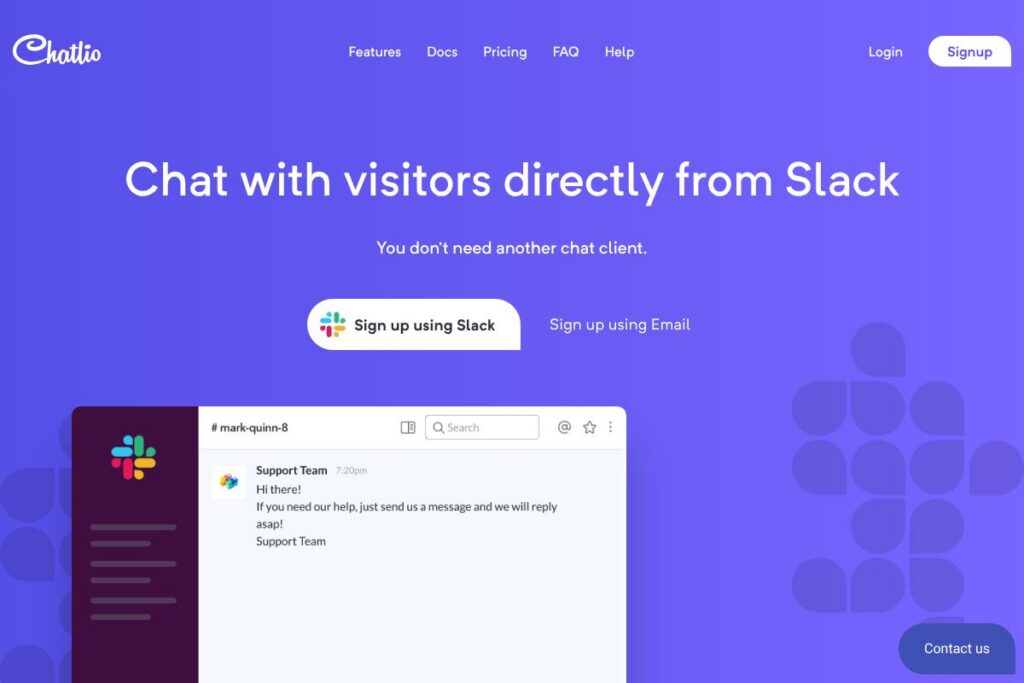
Chatlio is a live chat tool that connects a website chat widget directly into Slack so support, sales, and engineering teams can converse with visitors without leaving their Slack workspace. It delivers visitor context such as location, browser, operating system, and the page the visitor is on, and pushes conversations into Slack channels or direct messages where teammates can collaborate in real time.
Compared with broader customer messaging platforms like Intercom and Drift, Chatlio focuses on being Slack-first, avoiding an additional web dashboard and leaning on Slack for routing, notifications, and multi-agent collaboration. Against legacy chat tools such as Zendesk Chat and LiveChat, Chatlio trades advanced built-in workflows for a lightweight Slack-native experience that is faster to deploy for teams already using Slack.
Chatlio is best for teams that use Slack as their primary communication hub and want a minimal maintenance chat option that brings website conversations into channels where teammates already work. It does particularly well for small to mid-size teams that need multiple teammates to handle a single visitor session quickly and without a separate client.
How Chatlio Works
When a visitor starts a chat on your website, Chatlio captures contextual details and creates a live conversation inside Slack. Messages from the visitor appear in a Slack channel or direct message, and multiple teammates can join the conversation, forward messages, or create private threads to coordinate responses.
Installation typically involves adding the Chatlio widget to your site, connecting Chatlio to your Slack workspace via OAuth, and configuring routing rules to send chats to specific channels or users. From there you can use Slack features such as mentions, threads, file uploads, and integrations to handle requests without switching to another dashboard.
What does Chatlio do?
Chatlio centralizes website chat into Slack and provides a compact set of features that cover visitor context, multi-agent handling, and basic customization of the chat widget. Core functionality includes visitor metadata, Slack-based routing, and a WordPress plugin for quick setup on sites. Chatlio is built to remove the need for a separate chat client by using the Slack apps you already have installed on desktop and mobile.
Live chat inside Slack
Chat messages from website visitors appear directly in Slack channels or DMs so teams respond using their existing Slack clients on desktop, web, or mobile. This reduces context switching and takes advantage of Slack notification and presence features.
Visitor context and metadata
Chatlio displays visitor location, local time, browser and operating system, and the current page the visitor is on, helping agents diagnose issues and personalize replies. You can also pass additional custom fields to store customer identifiers or session data for later reference.
Multi-agent conversations
Multiple teammates can participate in a single visitor conversation simultaneously, hand off chats, or escalate to other channels inside Slack. This model enables shared ownership of support rather than routing every chat to one dedicated agent.
Customizable chat widget
The widget can be customized to match site styling, set operating hours, and present pre-chat forms to collect visitor details. Widget settings let you control when the chat appears and what information is required before a conversation starts.
WordPress plugin
Chatlio offers a WordPress plugin that simplifies adding the chat widget to WordPress sites without manually editing templates. The plugin streamlines installation for teams running WordPress and links directly to your Slack workspace.
Message history and transcripts
Conversations are retained so teams can review past messages, share transcripts, and follow up when needed. Transcript sharing works through Slack message actions and export options depending on workspace retention settings.
Notifications and routing
Routing rules send chats to specific channels or users based on configured criteria, and Slack notifications alert agents to new messages. You can use Slack workflows and built-in automations to extend routing logic and post-chat follow-up steps.
With Chatlio you get a lean live chat solution that brings visitor conversations into Slack, reducing the number of tools agents need to monitor while keeping essential visitor context at hand.
Chatlio pricing
Chatlio uses a subscription model and offers a 30-day free trial for new users, with paid monthly or annual plans for teams. Specific plan pricing is not published on a separate pricing page, and options can change, so review Chatlio’s current pricing and plan details on their site to find the right plan for your team.
For up-to-date options and any enterprise or team discounts, check Chatlio’s current pricing options.
What is Chatlio Used For?
Chatlio is commonly used for website customer support, pre-sales conversations, and live troubleshooting where teams want to respond from Slack. It is suitable for teams that need quick, conversational responses and value immediate collaboration among multiple people on a single chat session.
Tech teams and small businesses use Chatlio to convert site visitors, answer product questions, and triage technical issues before creating tickets or sharing details with other systems. Its Slack-first approach fits organizations that prefer to keep notifications and conversations inside Slack rather than adopting an additional support platform.
Pros and Cons of Chatlio
Pros
- Slack-native routing: Chat messages arrive in Slack channels or DMs so teams can reply using existing Slack workflows and mobile apps without a separate dashboard. This reduces context switching and leverages Slack notifications and presence.
- Visitor context: The widget supplies browser, OS, location, local time, and page data which helps agents diagnose issues fast and personalize answers. You can also pass custom fields for deeper context when needed.
- Multi-agent collaboration: Multiple teammates can join or monitor a single visitor session, making it easier to escalate or share knowledge in real time. This model supports collaborative troubleshooting and faster response times.
- Quick installation for WordPress: A dedicated WordPress plugin makes it simple to add Chatlio to WordPress sites without editing templates or writing custom code.
Cons
- Dependent on Slack: Organizations that do not use Slack cannot take full advantage of Chatlio, and teams that prefer a separate support dashboard may find the Slack-first model limiting. It requires a Slack workspace for operation.
- Limited advanced support features: Compared to full customer messaging platforms, Chatlio focuses on chat-to-Slack functionality and offers fewer built-in automation, targeted messaging, and analytics features. Teams needing sophisticated workflows may need a complementary tool.
- Pricing transparency: Plan details and pricing are not consolidated on a public pricing page, so teams will need to contact Chatlio or visit their site to view current options and any enterprise offerings.
Does Chatlio Offer a Free Trial?
Chatlio offers a 30-day free trial. The trial provides access to the chat widget and Slack integration so teams can evaluate live conversations, visitor context, and multi-agent handling before committing to a paid plan.
Chatlio API and Integrations
Chatlio connects primarily through Slack and provides a WordPress plugin plus webhook options for custom workflows. The Chatlio documentation outlines setup and integration steps; see the Chatlio documentation for implementation details and webhook usage.
For WordPress sites, the Chatlio WordPress plugin simplifies deployment and configuration; view the Chatlio WordPress plugin listing for installation instructions and compatibility notes.
10 Chatlio alternatives
Paid alternatives to Chatlio
- Intercom — A broader customer messaging platform that combines chat, product tours, and automated campaigns for customer engagement and support.
- Drift — Focused on conversational marketing and sales, with chatbots and routing designed to qualify leads and hand off to sales teams.
- Zendesk — A mature customer support platform with multichannel support, ticketing, and a dedicated chat product that integrates with broader helpdesk features.
- LiveChat — A standalone chat product with a rich feature set including canned responses, analytics, and apps for many platforms.
- Freshchat — Part of the Freshworks suite, offering chat, inbox management, and bot automation for support and sales teams.
- Tidio — Chat widget plus bot automation, messenger integration, and basic CRM features for small businesses.
- Olark — Simple chat tool with integrations and reporting aimed at small to medium businesses.
Open source alternatives to Chatlio
- Chatwoot — Open source customer engagement platform with live chat, inbox, and integrations for teams that want self-hosting and extensibility.
- Rocket.Chat — Primarily a team chat server with live chat capabilities you can host and extend for website conversations.
- Mibew — A lightweight open source live chat application that can be self-hosted and customized for basic chat needs.
- Live Helper Chat — An open source live support solution with visitor tracking, chat routing, and a self-hosted option.
Frequently asked questions about Chatlio
What is Chatlio used for?
Chatlio is used to route website chat conversations directly into Slack so teams can respond from their Slack clients. It helps support and sales teams manage live visitor conversations without adding another dashboard.
Does Chatlio integrate with Slack?
Yes, Chatlio is built around Slack integration. Conversations are created and managed inside Slack channels or direct messages and use Slack for notifications and collaboration.
How much does Chatlio cost?
Chatlio uses a subscription pricing model and offers a 30-day free trial. Specific plan pricing is listed on Chatlio’s site, so check the current pricing options for the latest rates and plan details.
Can I install Chatlio on a WordPress site?
Yes, Chatlio provides a WordPress plugin to add the chat widget to WordPress sites quickly. The plugin simplifies installation and links your widget to your Slack workspace.
Does Chatlio store chat transcripts?
Yes, Chatlio retains conversation transcripts that can be reviewed and shared via Slack. Retention and export options depend on Slack workspace settings and any configured integrations.
Final verdict: Chatlio
Chatlio is a pragmatic live chat choice for teams that use Slack heavily and want website conversations to flow into the same workspace where they already collaborate. It does the core job of embedding a chat widget, surfacing visitor context, and enabling multi-agent responses inside Slack with minimal setup and no separate client to monitor.
Compared with larger platforms such as Intercom, Chatlio delivers a narrower, Slack-first feature set and typically a simpler cost profile for teams that do not need advanced automation or full customer lifecycle tools. If your team lives in Slack and needs fast, collaborative responses to website visitors, Chatlio is a practical, low-friction option to evaluate; for organizations needing advanced messaging campaigns or extensive analytics, a broader customer messaging platform may be a better fit.