Dixa: An Overview
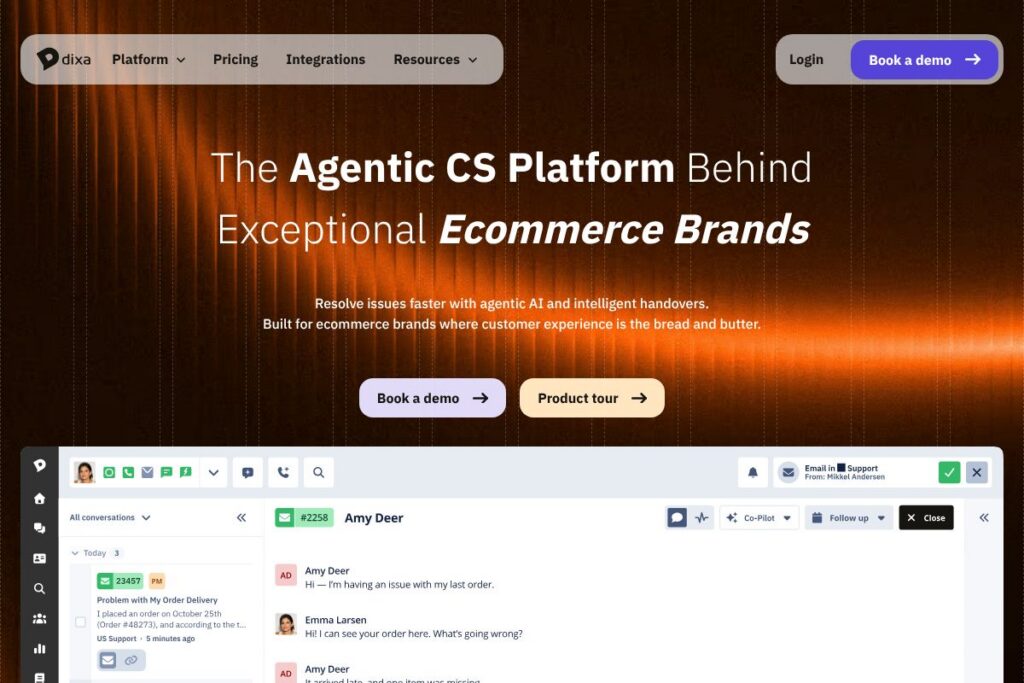
Dixa is a customer service platform built for ecommerce brands that combines an AI agent, intelligent routing, a unified agent workspace, and automated quality and performance tracking. It centralizes chat, email, phone, WhatsApp, and social conversations into a single view while applying automation to routine tasks so agents can focus on higher-value interactions.
Compared with legacy helpdesks such as Zendesk and Freshdesk, Dixa emphasizes conversation routing and live customer context rather than ticket queues. Against conversational platforms like Intercom, Dixa focuses more on full-resolution automation and enterprise-grade routing rules tailored to ecommerce operations. For teams choosing between these options, Dixa is notable for combining an AI agent that completes transactions with routing and QA features in one product.
All of this makes Dixa especially well suited to ecommerce teams that need high-volume automation plus the ability to route and coach human agents quickly. It does particularly well for retailers and multibrand groups who need consolidated reporting, fast ramp for seasonal staff, and automation that can complete refunds and order updates without manual handoffs.
How Dixa Works
Conversations arrive through customer channels and appear in a single unified inbox with full history and order context, so agents see prior interactions and purchase information before replying. The platform applies routing rules based on skills, language, VIP status, or custom criteria and assigns each conversation to the right agent or to the AI agent automatically.
Mim, Dixa’s AI agent, is configured from your existing knowledge base and backend connections so it can resolve routine inquiries such as refunds, tracking, and order changes. When Mim cannot complete a task it hands the conversation to a human agent with full context, suggested replies, and links to relevant knowledge articles.
Operational workflows are built visually without code using Dixa’s routing and automation builder, and leaders can use automated QA scoring to track trends and coaching opportunities across teams and channels. Implementation is designed for CX teams to configure without extensive engineering involvement, allowing most customers to go live in a matter of weeks.
What does Dixa do?
Dixa organizes customer service around conversations, automation, agent productivity, and analytics. Core capabilities include unified multichannel routing, an AI agent for self-service, an agent workspace with order and loyalty context, and automatic QA and performance reporting.
The platform includes several powerful capabilities worth highlighting:
Unified Conversations
All channels are consolidated into one timeline so agents never force customers to repeat themselves, with order, conversation, and loyalty data surfaced in the same view. This reduces handle time and improves response accuracy by keeping complete context at the agent’s fingertips.
Dixa Conversation Engine
Routing and automation direct conversations to the best agent based on skills, language, or priority using visual rules. This removes manual triage, handles seasonal peaks more predictably, and ensures VIP customers or time-sensitive issues reach the right person first.
Dixa Team Hub
Agents work from a single screen that displays orders, past conversations, loyalty status, and AI-suggested replies. The unified workspace shortens ramp time for new hires and accelerates resolution by bringing all the information needed into one place.
Dixa Discover
Conversations are automatically scored against QA criteria so managers spot trends and coaching opportunities without manual review. This continuous QA uncovers why customers contact support and measures agent performance across channels in real time.
Mim AI Agent
Mim handles routine inquiries across chat, email, and WhatsApp by learning from your knowledge base and backend systems to complete refunds, tracking lookups, and order changes autonomously. It reduces agent load by resolving a large share of repetitive requests and escalates complex issues with full context when necessary.
AI Co-Pilot
AI assistance appears directly in the agent workspace to suggest replies, improve drafts, translate messages on the fly, and surface relevant knowledge articles. These suggestions speed up responses and help maintain consistent policy-driven messaging across teams.
With these features combined, Dixa reduces manual triage, provides a consistent agent experience across channels, and offers measurable QA and performance insights that help teams scale without proportional headcount growth.
Dixa pricing
Dixa uses a SaaS, enterprise-focused pricing model with tailored plans based on company size, required features, and integrations. Pricing is typically quoted per account or group of brands rather than as a public per-seat table, reflecting the platform’s focus on larger ecommerce operations and multi-brand deployments.
For current plan options, trial offers, and enterprise pricing details visit Dixa’s website for the latest information and to request a demo via Dixa’s pricing and plans page.
What is Dixa used for?
Dixa is used to manage high-volume ecommerce customer service where reducing repetitive work and maintaining context across channels matters most. Typical use cases include order tracking and updates, refunds and returns processing, loyalty and subscription support, and handling seasonal surges with flexible agent pools.
The platform is ideal for ecommerce retailers, multibrand groups, and customer operations teams that need a single source of truth across channels. It also suits companies migrating from ticketing systems that want smarter routing, faster onboarding, and higher automation rates without rebuilding their backend systems.
Pros and Cons of Dixa
Pros
- Unified multichannel view: Consolidates chat, email, phone, WhatsApp, and social into a single conversation timeline so agents maintain context and customers do not repeat themselves.
- High automation potential: Mim can resolve routine tasks end to end, significantly reducing volume routed to human agents and handling off-hours queries automatically.
- Visual routing and no-code workflows: Teams can build routing rules based on skill, language, VIP status, or custom logic without engineering support, which shortens implementation time.
- Built-in QA and analytics: Auto-QA scoring and trend detection surface coaching opportunities and root causes of contact volume without manual sample reviews.
- Fast seasonal ramp: The unified workspace and AI suggestions reduce ramp time for temporary or seasonal agents.
Cons
- Enterprise pricing model: Pricing is custom and not published publicly, which can make initial budget comparisons harder for smaller teams evaluating options.
- Migration effort for legacy systems: While history imports are supported, large or fragmented archives may require planning to preserve and map data effectively.
- Dependence on integrations: Advanced automation requires backend integrations for refunds and order changes, which can add implementation steps for complex systems.
Does Dixa Offer a Free Trial?
Dixa offers proof-of-concept testing and demo trials rather than a permanent free tier. The company typically runs pilot projects or proof-of-concept tests that demonstrate automation rates and routing improvements using your data, after which customers move to a tailored subscription plan.
Dixa API and Integrations
Dixa provides developer-facing APIs and a catalog of integrations to connect to ecommerce platforms, CRMs, and order systems. The API documentation describes endpoints for conversation data, user management, and webhook events to integrate Dixa with backend systems.
Key integrations include ecommerce platforms and common CX tools; explore Dixa’s integration catalog for prebuilt connectors and integration guides. For developers, consult the API documentation to plan integrations that allow Mim to perform refunds, look up orders, and update order status programmatically.
10 Dixa alternatives
Paid alternatives to Dixa
- Zendesk — A widely used helpdesk and support suite with ticketing, messaging, and reporting that scales across industries.
- Freshdesk — A customer support platform with ticketing, automation, and omnichannel messaging suited to small and mid-market teams.
- Intercom — A conversational platform focused on live chat, product messaging, and automated bots for in-app and web support.
- Gorgias — Support platform built specifically for ecommerce, with strong Shopify integration and automation for order-related tickets.
- HubSpot Service Hub — Part of HubSpot’s CRM, Service Hub combines tickets, knowledge base, and customer feedback with CRM data.
- Kustomer — A CRM-centric customer support solution that emphasizes context and automation for service teams.
- Salesforce Service Cloud — An enterprise-grade customer service suite with broad CRM integration and customization options.
Open source alternatives to Dixa
- Zammad — An open source helpdesk with ticketing, chat, and reporting that can be self-hosted for teams that want full control.
- osTicket — A widely used open source ticketing system for basic ticket management and email-based support workflows.
- UVdesk — An open source ecommerce helpdesk that offers basic ticketing, automation, and marketplace integrations.
Frequently asked questions about Dixa
What is Dixa used for?
Dixa is used for ecommerce customer service that needs unified conversations, automation, and QA. Teams use it to handle refunds, tracking, returns, and high-volume inquiries across chat, email, phone, and messaging apps.
How does Dixa’s AI agent Mim work with human agents?
Mim resolves routine inquiries autonomously and escalates complex issues with full context. When escalation is needed, human agents receive the conversation history, suggested replies, and relevant order data to close the loop faster.
Can Dixa integrate with my ecommerce platform and backend systems?
Yes, Dixa integrates with common ecommerce platforms and offers APIs for deeper backend connections. Use the integration catalog and API documentation to connect orders, refunds, and CRM data so automation can complete transactions.
Does Dixa offer migration help from other platforms like Zendesk?
Yes, Dixa provides migration playbooks and imports conversation history from legacy platforms. Their onboarding includes implementation support and configuration to preserve access to past interactions while improving routing and reporting.
Is Dixa suitable for multi-brand or multi-market support teams?
Yes, Dixa supports multiple brands with separate routing rules, knowledge bases, and AI configurations while allowing a unified agent pool. This enables consolidated reporting across a portfolio of brands and flexible agent assignment during peaks.
Final Verdict: Dixa
Dixa stands out as a conversation-first customer service platform that pairs an AI agent capable of completing transactions with robust routing and automatic QA. It is particularly effective for ecommerce retailers and multibrand operators that need to reduce manual triage, improve agent ramp, and surface why customers contact support.
Compared with a competitor like Zendesk, Dixa shifts focus from ticket queues to real-time conversation routing and end-to-end automation, while Zendesk typically offers more traditional ticketing and a public per-seat pricing model. For teams that prioritize automation and a unified agent experience over an out-of-the-box ticketing workflow, Dixa offers a solution that can handle peak volumes and seasonal hires more efficiently, though organizations should evaluate pricing and integration requirements during procurement.
Discover how Dixa works for ecommerce by reviewing customer case studies and booking a demo to test automation against your own data via Dixa’s customer case studies and by scheduling a demo on Dixa’s demo page.