Frill: An Overview
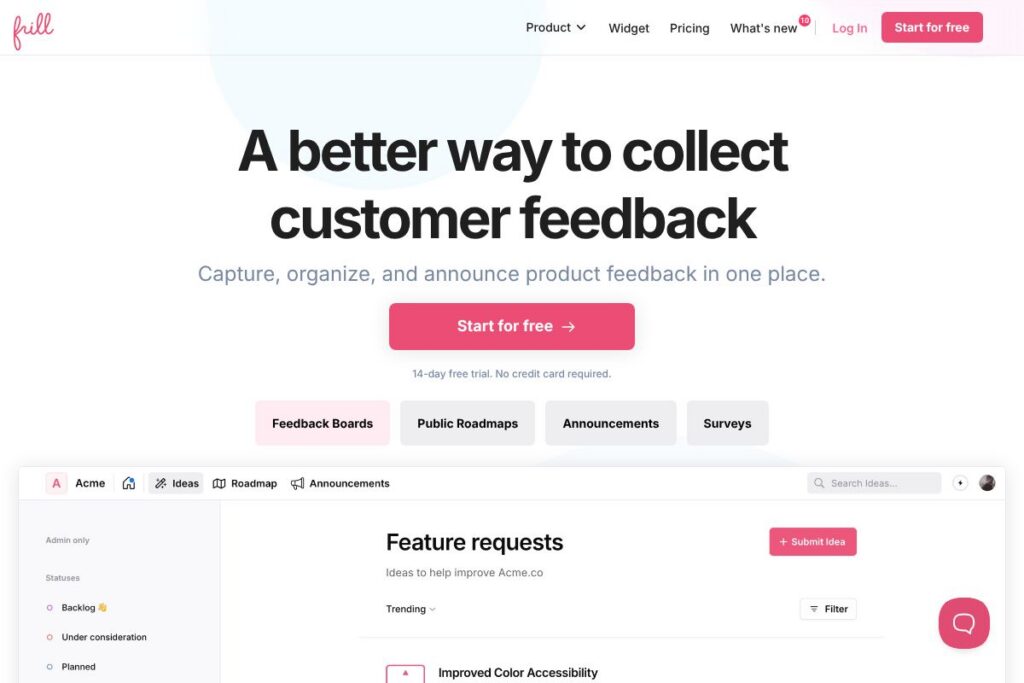
Frill is a lightweight feedback and roadmap platform that helps product teams collect customer requests, turn the best ideas into a public roadmap, and publish announcements for shipped features. It combines an embeddable widget for collecting ideas with a web app for planning and communicating status to users.
Frill sits between simple suggestion boxes and heavyweight product management suites. Compared to UserVoice, Frill is more focused on modern UX and streamlined workflows. Against Canny, Frill aims for simplicity and fast setup rather than deep enterprise integrations. Versus Productboard, Frill prioritizes an easy-to-publish public roadmap and announcement stream over complex product discovery workflows.
What Frill does particularly well is reduce friction between customers and product teams: collecting ideas through an embedded widget, surfacing high-impact suggestions, and publishing a clear roadmap. This makes it well suited for startups, small product teams, and companies that need a straightforward channel for listening to customers and keeping them informed.
How Frill Works
Teams install Frill either as a hosted web app or as an embeddable widget on their site or product. Customer ideas come in through the widget or direct submission in the web app, where they are surfaced for voting and discussion.
Inside the admin, product managers triage submissions, add internal notes, and convert high-priority items into roadmap entries. Roadmap items can be assigned statuses and scheduled, then published to a public roadmap view so users can see what is planned and what has shipped.
Frill also supports automated communications: when a roadmap item changes status or a new announcement is published, customers can receive status update emails. Teams can integrate single sign-on and style Frill to match their brand so the experience feels native to their product.
Frill features
Frill is organized around three core capabilities: capturing feedback, building a public roadmap, and sharing announcements. The platform emphasizes simple setup, an intuitive widget, and features that make prioritization and communication repeatable across teams.
Inline Admin
Manage your feedback board from within the same view where ideas are displayed. Inline Admin lets product managers edit entries, change statuses, and respond to comments without switching to a separate console, speeding up triage and reducing context switching.
Widget
The embeddable widget captures ideas and votes directly inside your product or website. Widgets can be customized and deployed across multiple pages, letting you place feedback capture where users already are and increase response rates.
Public Roadmap
Turn selected ideas into a public roadmap that shows planned work and timelines. The roadmap supports statuses and grouping so external stakeholders can see what is next, what is under review, and what has shipped.
Prioritization Scores
Customize Benefit and Cost scoring to reflect your business priorities and identify Quick Wins and Major Projects. These scoring fields help decision makers compare ideas using consistent criteria rather than subjective judgment alone.
Announcements (Changelog)
Publish release notes and product updates with an announcement stream that looks and feels like a changelog. Announcements keep users informed and can be linked to roadmap items to close the feedback loop.
SSO Authentication
Integrate SSO to provide a seamless login experience for your users, and to connect feedback activity to authenticated accounts. SSO support helps teams restrict access to certain boards or enable single-sign-on enrollment.
Translations and Themes
Translate every user-facing word and apply custom brand colours so Frill fits your product language and visual identity. Full translations and theming let global product teams support multiple locales without building separate feedback systems.
Automatic Status Updates
Automated emails notify customers when the status of an idea or roadmap item changes, reducing manual outreach. This keeps requesters engaged and informed as ideas move from suggestion to shipped feature.
With these features Frill focuses on lowering the effort required to collect feedback, prioritize work reliably, and close the loop with customers through clear public communications.
Frill pricing
Frill uses a subscription-based SaaS pricing model with plans tailored to different team sizes and needs. They provide options for self-serve teams and larger organizations that require SSO and advanced controls.
Exact plan names and pricing tiers are not listed here. View the Frill homepage for current pricing options, available discounts for startups and nonprofits, and any trial or free plan details that may apply to your organization.
What is Frill Used For?
Frill is used to collect customer feedback and convert that input into a visible product roadmap. Product managers and founders use it to surface the most requested improvements so roadmap decisions reflect actual user demand.
Teams also use Frill to announce releases and changes, maintaining transparency with customers and reducing support volume by posting updates externally. It is useful for B2B products, SaaS startups, and any team that wants a single place to centralize feature requests and status communication.
Pros and Cons of Frill
Pros
- Simple, modern UI: The interface is minimal and easy to navigate, which reduces onboarding time for both customers and internal users.
- Fast widget setup: The embeddable widget is straightforward to install and configure, letting teams start collecting feedback quickly on their site or in-app.
- Clear public roadmap and announcements: Roadmaps are easy to publish and announcements act as a built-in changelog, helping teams keep users informed without extra tooling.
- Flexible prioritization: Custom Benefit and Cost scores let teams rank ideas in a way that matches their business goals.
Cons
- Limited deep analytics: Advanced product discovery reporting and analytics are less comprehensive than enterprise product management suites.
- Enterprise feature gaps: Large enterprises that need extensive integrations and governance may find some features require custom work or standalone tools.
- Customization trade-offs: The focus on simplicity means fewer out-of-the-box workflow automations compared to heavier platforms, which could require integrations for complex processes.
Does Frill Offer a Free Trial?
Frill offers a free plan option and typically provides a time-limited trial for paid plans. The free tier is suited to small teams or projects and paid tiers add SSO, advanced controls, and team management features. Check the Frill homepage for exact trial durations and plan comparisons.
Frill API and Integrations
Frill provides developer-focused integration options including a public API and webhooks to automate workflows and sync feedback with other systems. The developer documentation explains available endpoints and webhook payloads for common automation needs.
Frill also connects with common tools for customer communication and workflow automation such as Slack, Intercom, and Zapier, and supports SSO providers for authentication. See the integration options to evaluate connectors for your stack.
10 Frill alternatives
Paid alternatives to Frill
- Canny – A focused feedback and roadmap product with voting, changelogs, and enterprise options that emphasize feedback-to-product workflows.
- Productboard – A product management platform built for discovery and roadmap planning, aimed at larger teams requiring in-depth prioritization and integrations.
- UserVoice – A long-standing feedback and ticketing solution that targets enterprise customers and includes support for complex workflows.
- Roadmunk – A roadmap-first tool that provides custom roadmap visualizations and strategy planning features.
- Pendo – Combines product analytics, in-app guidance, and feedback collection, useful when you need analytics alongside feedback capture.
- Aha! – A full-featured product management suite with strategy, roadmapping, and idea management aimed at enterprise product organizations.
Open source alternatives to Frill
- Fider – An open source feedback board built specifically for collecting and voting on feature requests, suitable for self-hosting.
- Erxes – An open source growth and customer engagement platform that includes inbox and feedback capabilities for teams that want a broader toolkit.
- Helpy – An open source helpdesk and community support platform which can be extended to capture feature requests and user suggestions.
Frequently asked questions about Frill
What is Frill used for?
Frill is used for collecting customer feedback, publishing a public roadmap, and announcing product updates. Teams use it to centralize feature requests, prioritize work, and inform users as items change status or ship.
Does Frill have an API for automation?
Yes, Frill provides an API and webhooks for integrations. The developer documentation outlines endpoints, authentication, and webhook formats for syncing feedback with other tools.
Can Frill be embedded into my own product?
Yes, Frill offers an embeddable widget that you can place in your website or application. Widgets are customizable and can be installed across multiple pages to capture feedback where users interact with your product.
Is Frill suitable for enterprise teams?
Frill can be used by enterprise teams, especially those needing SSO and access controls. Larger organizations should evaluate specific integration and governance requirements, and can contact Frill for custom options via the Frill homepage.
How does Frill help with prioritization?
Frill supports customizable Benefit and Cost scores for ranking ideas. These scoring fields let teams compare requests against business criteria, identify Quick Wins, and make prioritization more objective.
Final Verdict: Frill
Frill is a practical feedback, roadmap, and announcement tool that emphasizes simplicity, fast setup, and a pleasant user experience. Its embeddable widget, inline admin, and announcement stream make it easy to collect requests, plan work, and keep users informed without heavy process overhead.
Compared with heavier tools like Productboard, which target enterprise roadmapping and discovery with higher-priced plans, Frill is positioned as a more approachable and often more affordable option for small to mid-sized teams. If your priority is an elegant feedback channel, a clear public roadmap, and straightforward announcements, Frill is a solid choice; organizations that need deep analytics and enterprise-grade customization should compare feature sets and pricing carefully.