Stream: An Overview
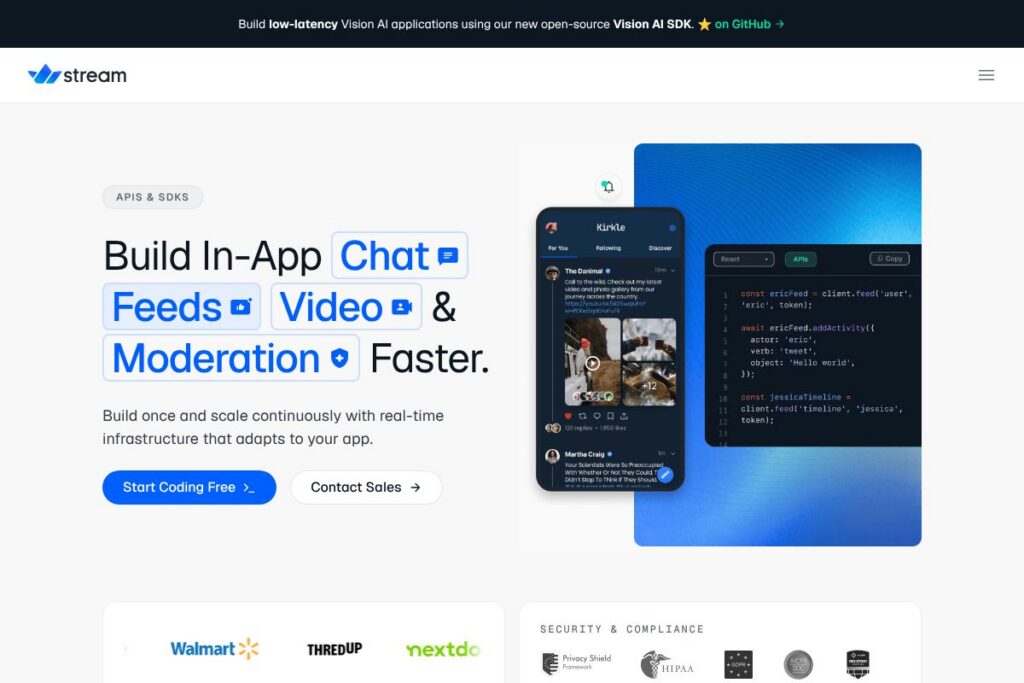
Stream is a platform that provides hosted APIs, SDKs, and pre-built UI components for activity feeds, real-time chat, video, and moderation. Its services focus on low-latency delivery through a global edge network so user-facing social features behave responsively at scale.
Compared with competitors, Stream places more emphasis on end-to-end developer tooling. Compared to Sendbird, which focuses strongly on messaging features and enterprise support, Stream combines feeds and chat into a single product family that can share identity and moderation tooling. Compared to Twilio, which exposes building blocks for communications across SMS, voice, and video, Stream supplies opinionated SDKs and UI components that shorten time to production for social apps.
Stream works well for product teams that need a managed, scalable foundation for social interactions, in-app messaging, and live or recorded video. Its mix of hosted APIs, client SDKs, and customizable UI components makes it suitable for startups building social features and larger teams that need a production-ready platform without designing real-time infra from scratch.
How Stream Works
Stream exposes RESTful and WebSocket-based APIs backed by regional edge points that reduce round-trip time for user-facing events. Developers authenticate via API keys, then use server-side endpoints to create feeds, messages, or channels and client SDKs to render and subscribe to updates in real time.
Typical workflows start with user identity and permissions, then wire feeds and chat into client apps using Stream’s SDKs and UI kits. For video, developers either use Stream’s integrated video APIs or connect a real-time media service while using Stream for orchestration, signaling, and moderation. The platform also supports server-side webhooks and event callbacks to integrate with backend systems and third-party services.
Stream features
Stream bundles several core capabilities that cover social feeds, messaging, multimedia, and content safety. Recent additions emphasize open-source SDKs such as a Vision AI SDK for low-latency on-device or edge inference, plus new UI kits for faster front-end assembly.
The Features That Make Stream Shine
Activity Feeds
Activity feeds let apps publish, rank, and deliver ordered lists of user events such as posts, likes, and follows. The API supports fan-out or aggregation patterns, read and unread state, and ranking rules so teams can implement timelines, personalized feeds, and notification streams with minimal infrastructure work.
Chat SDK and UI Components
Chat capabilities include persistent messaging, typing indicators, read receipts, reactions, attachments, and thread support. Stream provides client SDKs for major platforms and pre-built UI components that can be customized, which reduces front-end engineering time while allowing product teams to match their app’s style.
Video and Real-Time Communication
Stream supports live and recorded video workflows with APIs for session orchestration, signaling, and media management. Video features are designed to integrate with low-latency media providers or run on Stream’s infrastructure depending on the product configuration, enabling in-app calls, live streams, and moderated broadcasts.
Content Moderation and Safety
Built-in moderation tools cover automated filters, machine learning–based classifiers, and manual moderation flows. These controls help teams enforce content policies, remove abusive posts or messages, and integrate third-party moderation providers for compliance needs.
Vision AI SDK (Open Source)
The Vision AI SDK enables developers to build low-latency computer vision features such as object detection, face anonymization, or content analysis. The SDK is open source and intended for edge or on-device inference, which reduces round-trip cost and latency for visual moderation or augmented experiences.
Global Edge Network and Scalability
Stream routes traffic through a distributed edge to lower latency and improve reliability for geographically dispersed user bases. The platform is built to handle high write and read volumes for feeds and chat while preserving ordered delivery and consistency semantics where required.
Flexible SDKs and Custom UI
Client and server SDKs cover JavaScript, React, React Native, iOS, Android, and several server languages. Pre-built UI kits accelerate development, but teams can replace components or call raw APIs for full control over UX and data flows.
With these features, Stream provides a unified stack for building social feeds, messaging, and media-rich interactions while keeping integration paths open for custom business logic and third-party services.
Stream pricing
Stream offers flexible pricing tailored to development, production, and enterprise deployments, typically using tiered or usage-based plans that scale with activity, messages, and media consumption. For the most accurate and current details about monthly and annual options, quotas, and enterprise agreements, view Stream’s current pricing options on their site.
What is Stream Used For?
Stream is commonly used to add social features such as timelines, activity feeds, and notification streams to consumer and enterprise apps. Product teams use it to implement personalized recommendations, follow/unfollow models, and feed ranking without building the feed infrastructure in-house.
Stream also powers in-app messaging and group chat for communities, marketplaces, and collaboration apps, as well as live and recorded video experiences for streaming, telehealth, education, and social media features. Its moderation tools and Vision AI SDK support safety and compliance use cases across industries.
Pros and Cons of Stream
Pros
- Unified social stack: Stream combines activity feeds, chat, and video into one platform which simplifies product architectures and reduces the need to stitch multiple vendors together.
- Edge-first performance: The global edge network reduces latency for real-time interactions, improving perceived responsiveness for users across regions.
- Customizable UI and SDKs: Pre-built UI components accelerate development while SDKs allow full customization when product teams need a bespoke experience.
- Open-source Vision AI SDK: Developers can build low-latency vision features that run at the edge or on-device, which helps with privacy-sensitive or latency-critical applications.
Cons
- Enterprise onboarding required at scale: Large deployments often require custom contracts and implementation work for compliance, SLAs, and dedicated support, which adds time to procurement.
- Feature overlap with specialized vendors: Teams that only need one capability such as voice/video or pure messaging may find more specialized providers like Agora or Twilio offer deeper features in that narrow domain.
Does Stream Offer a Free Trial?
Stream offers a free tier and paid plans. The free tier is intended for development and early testing while production and enterprise usage typically move to paid or usage-based plans; check Stream’s current pricing options for quotas, trial length, and upgrade paths on their website.
Stream API and Integrations
Stream exposes a documented API and provides client SDKs for JavaScript, React, React Native, iOS, Android, and server SDKs for common backend languages. The Stream API documentation describes endpoints for feeds, chat, and video orchestration as well as authentication and webhooks.
For open-source tools and SDKs, Stream maintains repositories under its GitHub organization; the Vision AI SDK on GitHub is available for teams building low-latency vision features. Stream also offers integrations and common connectors for identity, storage, analytics, and third-party moderation systems.
10 Stream alternatives
Paid alternatives to Stream
- Sendbird — Messaging-first platform focused on chat and in-app communication with SDKs and moderation tools suitable for enterprises.
- Twilio — Communications platform offering programmable SMS, voice, and video building blocks for custom real-time features.
- Agora — Real-time engagement provider focused on low-latency voice and video at scale with SDKs for many platforms.
- PubNub — Real-time data streaming platform for messaging, presence, and device signaling with global network delivery.
- Pusher — Realtime APIs and Channels for lightweight pub/sub messaging and event-driven updates in web and mobile apps.
- Firebase (Realtime Database / Firestore) — Backend-as-a-service that provides real-time synchronization and hosted databases commonly used for chat and feeds in simple apps.
- Ably — Realtime messaging and event delivery platform with multi-region support for presence and pub/sub use cases.
Open source alternatives to Stream
- Matrix — Open standard and decentralized protocol for secure real-time communication with implementations like Synapse and client SDKs.
- Rocket.Chat — Self-hosted chat platform that offers messaging, channels, and integrations for teams that want control over infrastructure.
- Jitsi — Open-source video conferencing suite for web and mobile that can be self-hosted and extended for custom flows.
- Apache Kafka — Distributed event streaming platform often used for building feeds and activity pipelines when teams want full control of their streaming infrastructure.
Frequently asked questions about Stream
What is Stream used for?
Stream is used to add feeds, chat, and video to web and mobile applications. Teams use its APIs and SDKs to implement timelines, messaging, notifications, and live media without building real-time systems from scratch.
Does Stream have an API for chat and feeds?
Yes, Stream exposes REST and real-time APIs for chat and feeds. The Stream API documentation provides endpoint details, authentication methods, and SDK guides.
How does Stream handle moderation?
Stream provides built-in moderation tools and integrations with automated classifiers. Teams can apply filters, create manual review workflows, and connect third-party moderation services for compliance.
Can Stream support low-latency video for large audiences?
Stream supports video orchestration and can be used with low-latency media providers. For high-concurrency or large broadcast scenarios, Stream can be configured alongside specialized real-time media infrastructure or CDNs.
Is Stream’s Vision AI SDK open source?
Yes, Stream’s Vision AI SDK is open source. The SDK is intended for edge or on-device vision tasks and is available from Stream’s GitHub organization for developers to extend and integrate.
Final Verdict: Stream
Stream provides a practical, integrated approach for teams building social features, combining feeds, chat, video, and moderation into a single platform with extensible SDKs and UI components. Its edge network and open-source Vision AI SDK make it a solid choice for applications that prioritize low latency and safety.
Compared to Twilio, which offers granular communications primitives and per-use billing for voice and messaging, Stream is more opinionated about social UX and front-end assembly. For teams that want out-of-the-box feed and chat workflows plus expandable moderation, Stream reduces integration work, while Twilio may be preferable when the requirement is strictly telephony or programmable voice with usage-based pricing.