Gist: An Overview
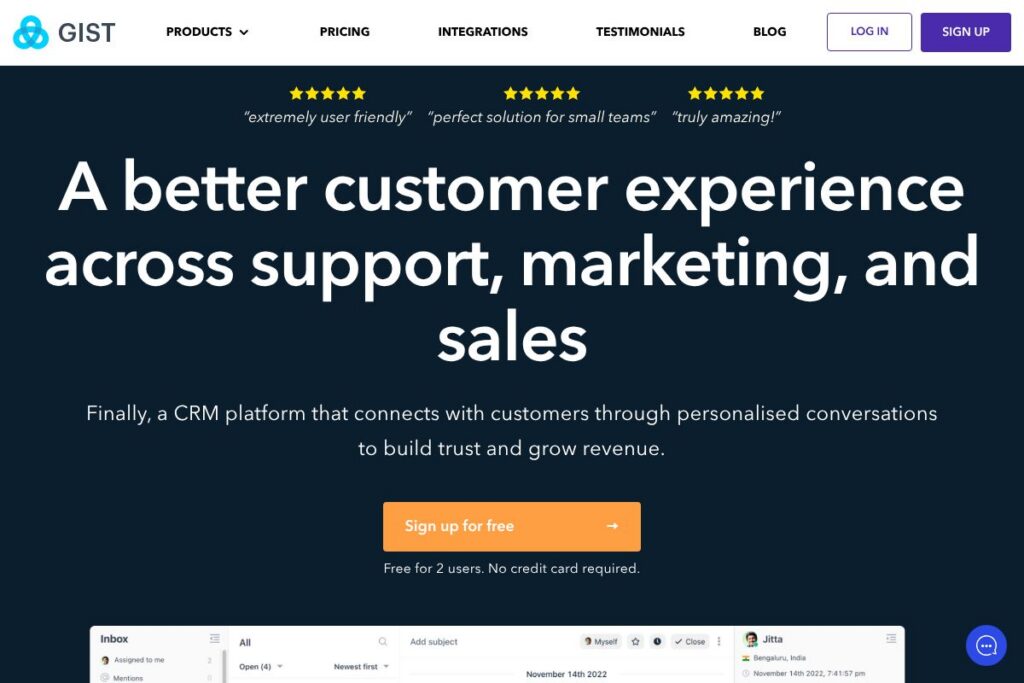
Gist is an integrated customer engagement platform that centralizes live chat, email marketing, help desk ticketing, and basic CRM features into a single application. It is designed for product-led teams, small businesses, and marketing-led sales organizations that prefer one unified place for customer conversations and marketing campaigns rather than a suite of disconnected tools.
Gist competes with dedicated point solutions such as Intercom, HubSpot, and Zendesk. Compared with Intercom, Gist focuses on a broader set of built-in marketing features alongside chat and support to reduce the need for multiple paid add-ons. Against HubSpot, Gist provides many core CRM and automation capabilities with simpler setup for small teams, while HubSpot scales toward enterprise marketing use cases. Compared with Zendesk, Gist trades some advanced ticketing and enterprise workflow depth for a tighter integration between chat, bots, and email marketing in one product.
All of this makes Gist particularly useful for small to mid-sized teams that want a single app to run lead capture, nurture sequences, in-app chat, and support workflows without stitching multiple vendors together. It is a practical choice when you want a compact platform that reduces context switching between marketing, sales, and support.
How Gist Works
Gist begins with a small JavaScript snippet you add to your website or embed inside your web app, which activates the Gist Messenger and any targeted popups or forms. Conversations, bot interactions, and captured leads flow into a single shared inbox and contact database so marketing, sales, and support can see the same history and context.
Automation and bots are built visually using a campaign or workflow builder; you can trigger sequences from form submissions, page behavior, or inbound messages. The CRM stores contacts, deals, and activity, and meeting links sync with Google Calendar or Office 365 to let prospects schedule time without email back-and-forth.
Typical implementation workflows include lead capture with popups or bots, automatic enrichment and routing to the right salesperson, follow-up email sequences from the marketing automation engine, and self-serve resolution through the knowledge base when chat is not required. That tight loop reduces handoffs and keeps customer context intact across teams.
Gist features
Gist groups communication and growth tools around a shared contact database and a single inbox. Core capabilities include live chat and messenger, customizable chatbots, email marketing and campaign automation, an integrated knowledge base, forms and popups, a lightweight CRM, meeting scheduling, and shared inbox/ticketing. Recent focus has been on making automation visual and reducing setup complexity so teams can deploy bots and sequences quickly.
What Makes Gist Stand Out
Live Chat and Messenger
Gist Messenger embeds on websites and web apps to capture conversations, route messages, and provide asynchronous chat on multiple devices. It saves full chat history to the contact record so agents and marketers see prior activity, which improves continuity during handoffs between departments.
Chat Bots
Custom Bots allow teams to qualify leads, triage support requests, and route conversations automatically without coding. You can target bots to specific pages or visitor behaviors and escalate to a human agent when a lead meets qualification criteria.
Knowledge Base
The knowledge base hosts help articles, guides, and interactive content that customers can search before starting a chat. Articles can include images, video, and call-to-action elements, and viewers can rate content so teams know which articles need improvement.
Forms & Popups
A visual form and popup builder lets you create mobile-responsive opt-ins and lead capture forms without code. Forms can be personalized using existing contact fields and shown conditionally based on page, referral source, or visitor history.
Email Marketing
Gist provides templates and a campaign editor for newsletters and automated series, with personalization and behavior-driven sends. The platform pairs email tools with deliverability support so you can reduce bounces and improve open rates across campaigns.
Marketing Automation
Visual automation workflows let you orchestrate multi-channel campaigns that include email, in-app messages, and follow-up tasks. Triggers, delays, and conditional logic help teams build nurture sequences that react to user behavior automatically.
CRM and Deal Tracking
A lightweight CRM stores contacts, notes, and deals with a drag-and-drop pipeline for tracking progress. Sales teams can create tasks, assign owners, and view revenue-related insights without leaving the platform.
Meetings and Calendar Sync
Gist Meetings lets prospects schedule appointments using a public booking link and syncs with Google Calendar and Office 365. This reduces scheduling friction and automatically creates meeting events tied to contact records.
Shared Inbox and Help Desk
A consolidated inbox centralizes email, chat, and ticketing so agents respond from one view. Tagging, assignment, and internal notes help teams coordinate responses across marketing and support.
Gist’s biggest benefit is bringing these capabilities into a single, connected product so data and conversation context follow the customer across marketing, sales, and support processes.
Gist pricing
Gist follows a freemium SaaS pricing model with a free entry tier for basic use and paid plans that expand capacity and advanced features for growing teams. Paid plans typically add more contacts, automation capacity, dedicated deliverability support, and access to advanced bots and workflows.
For the most accurate breakdown of features across plans and the latest pricing structure, see Gist’s current pricing options. The pricing page provides plan comparisons, limits for each tier, and guidance on which plan fits common team sizes and use cases.
What is Gist Used For?
Gist is used to centralize customer communication and automate lead capture and follow-up from a single platform. Teams use it to run website chat, qualify leads with bots, send behavior-driven email campaigns, and provide self-serve support via a knowledge base.
Common users include marketing teams that want simpler campaign automation than enterprise marketing suites, support teams that prefer a combined inbox over separate ticketing tools, and small sales teams that need an integrated CRM with meeting scheduling. Product teams also embed Gist Messenger inside apps to capture product feedback and engage users where they already work.
Pros and Cons of Gist
Pros
- Unified communication stack: Combining live chat, email, knowledge base, and CRM reduces context switching and simplifies administration. This lowers the number of vendors teams need to manage and keeps contact history in one place.
- Easy lead capture and automation: Visual builders for bots, forms, and campaigns let non-technical teams set up qualification flows and nurture sequences quickly. That speeds up time to value for small teams without dev resources.
- Shared inbox with context: Conversations from different channels land in a single shared inbox with contact timeline context, which improves handoffs between marketing, sales, and support.
- Integrated meeting scheduling: Built-in meeting links and calendar sync eliminate additional scheduling tools and reduce back-and-forth emails when booking demos or calls.
Cons
- Limited enterprise-grade ticketing: Advanced ticket workflows, fine-grained SLA controls, and very large-scale reporting are less mature than specialized enterprise help desk platforms. Organizations with complex support operations may need more robust ticketing features.
- Scalability trade-offs: Consolidating multiple functions into one product trades deep specialization for convenience; very large organizations may find specialized platforms provide more advanced analytics or integrations for unique workflows.
- Customization limits: Some advanced UI or routing customizations require workarounds or are available only on higher-tier plans, which can be a constraint for teams with complex automation needs.
Does Gist Offer a Free Trial?
Gist offers a free plan and provides trials of paid features for teams that need to evaluate advanced automation and higher usage limits. The free tier covers core messenger, basic email sends, and the knowledge base, while trial access to paid features lets teams test automation capacity and more advanced bots before upgrading. Visit the Gist signup flow to start using the free plan and request a trial of paid features at the point of signup.
Gist API and Integrations
Gist provides API access and developer tools so teams can extend the platform and synchronize data with external systems. The developer resources and API documentation explain endpoints for contacts, conversations, and automation workflows and how to authenticate and push or pull data.
Key built-in integrations include Google Calendar and Office 365 for meetings, common CMS plugins for website embedding, and third-party connectors via Zapier to link with CRMs, analytics, and ecommerce platforms. For developer details consult the Gist developer API documentation.
10 Gist alternatives
Paid alternatives to Gist
- Intercom — A customer messaging platform with strong in-app messaging, advanced bots, and lifecycle automation geared toward product-led companies. It is feature-rich but often more expensive at scale.
- HubSpot — A broad CRM and marketing suite that includes email marketing, automation, chat, and help desk additions; it scales well for inbound marketing operations and enterprise needs.
- Zendesk — Focused on support and ticketing, Zendesk provides powerful ticket workflows, SLAs, and enterprise reporting while offering messaging and help center features.
- Freshdesk — A support-first platform with multi-channel ticketing, automation, and self-service knowledge base, suitable for teams prioritizing help desk workflows.
- Drift — Conversational marketing and sales platform focused on real-time chat and intent-based routing with advanced enterprise features for revenue teams.
- ActiveCampaign — Email marketing and automation with CRM features, ideal for teams focused on deep email automation and segmentation.
- Help Scout — A simple shared inbox and knowledge base platform that is easy to use for small to mid-sized customer support teams.
Open source alternatives to Gist
- Mautic — Open source marketing automation that covers email campaigns, forms, and basic workflows, suited for teams that can self-host and customize.
- Chatwoot — An open source customer engagement suite with live chat, shared inbox, and agent tooling that teams can self-host or use via managed deployments.
- Zammad — Open source help desk and ticketing system with email integration and a web interface for agents, useful for teams seeking self-hosted support software.
- Rocket.Chat — Open source team and customer messaging platform with live chat and integration capabilities for embedding on websites.
Frequently asked questions about Gist
What is Gist used for?
Gist is used for customer engagement, combining live chat, email marketing, help desk, and lightweight CRM into one platform. Businesses use it to capture leads with bots and forms, run email campaigns, and manage customer conversations in a shared inbox.
Does Gist integrate with other tools?
Yes, Gist integrates with calendar systems like Google Calendar and Office 365 and supports Zapier for broader connectivity. It also offers plugins and developer endpoints to connect to common CMS platforms and analytics tools.
Is there a free version of Gist?
Yes, Gist offers a free plan that includes basic messenger, email sends, and a knowledge base. The free tier is suitable for small sites and early-stage teams while paid plans add capacity, advanced bots, and premium support.
Can I migrate contacts and conversations into Gist?
Yes, Gist supports data import of contacts and historical conversation data via CSV or API imports. Import tools and documentation guide common migration scenarios so teams can preserve contact history when switching platforms.
Does Gist provide an API for automation?
Yes, Gist exposes a developer API for contacts, conversations, and automation events. The API documentation details authentication, available endpoints, and examples for pushing or syncing data programmatically.
Final Verdict: Gist
Gist’s core strength is consolidating chat, email marketing, bots, and help desk functionality into a single product so small and mid-sized teams can manage customer engagement from one interface. That reduces vendor overhead and shortens setup time for common workflows like lead capture, nurture sequences, and basic support.
Compared with competitors such as Intercom, Gist trades some advanced enterprise ticketing and analytics for a simpler, more integrated stack that lowers the barrier to adoption. Pricing for Gist starts with a free tier and paid plans that expand capacity, which can make it more cost-effective for early-stage teams when compared with higher-cost solutions that charge per-seat or per-product add-on fees.
If your priority is a compact, connected platform to run chat, email, and support without juggling multiple vendors, Gist is a solid option. For very large organizations with complex ticketing and enterprise reporting needs, a specialized support or marketing suite may still be necessary.