What is Givecloud
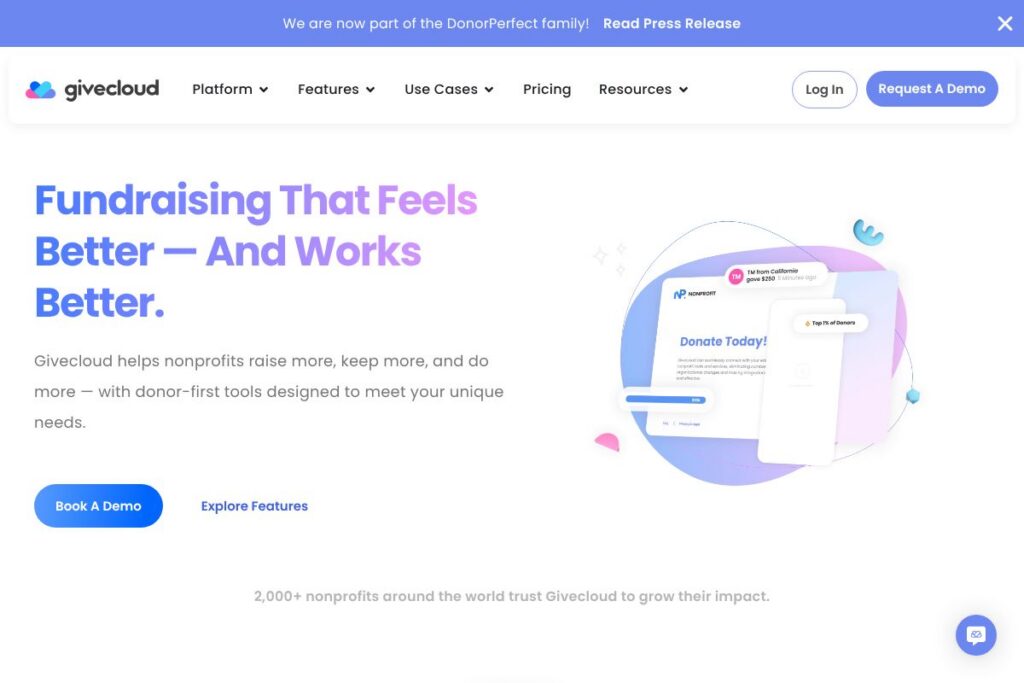
Givecloud is a fundraising platform aimed at nonprofits that want donor-focused online giving tools combined with integrations into existing CRMs and payment processors. It bundles donation pages, recurring giving management, event and peer-to-peer tools, payment handling, and donor reporting into a single system that sits alongside your current tech stack.
Compared with competitors, Givecloud places more emphasis on donor-facing donation flows and front-end giving experiences. For example, Blackbaud provides a broad suite of enterprise fundraising and constituent management tools focused on large organizations and institutional workflows. Bloomerang concentrates on donor retention and CRM features, while Classy emphasizes peer-to-peer and large-scale campaign tools for digital fundraising. Givecloud sits between these approaches by offering both polished donation experiences and flexible integrations.
All of this makes Givecloud especially well suited to mid-size and growing nonprofits that need a platform which handles payments and donor experience without replacing their CRM. Givecloud works well for teams that want a polished donor-facing checkout, built-in compliance, and the ability to connect to other systems with minimal custom work.
How Givecloud Works
Givecloud hosts customizable donation pages and forms that you can deploy as standalone pages or embed on your website. Those pages support one-time and recurring gifts, cover fees options, suggested amounts, and simple customization to match your brand.
Donations are routed through integrated payment processors and recorded in Givecloud’s donor records, where teams can segment supporters, track recurring schedules, and export donation data. The platform also supports events and peer-to-peer campaigns so registrations and fundraising pages feed into the same donor database for consolidated reporting.
In practice, a nonprofit would build a donation page, connect their Stripe or PayPal account, enable recurring gifts, and set up automated receipts and thank-you messages. For CRM-driven workflows, Givecloud pushes donation records to the connected CRM so gift accounting and stewardship actions continue in the organization’s primary donor-management tool.
Givecloud features
Givecloud combines donor-facing tools, integrations, and compliance features to support online fundraising, recurring giving, events, and reporting. Core capabilities include customizable donation pages, recurring gift management, event registration and ticketing, donor records with export options, and connectors for CRMs, marketing tools, and payment processors. The platform is SOC 2 Type II certified and PCI-DSS compliant which supports secure handling of donor payment data.
The platform includes several powerful capabilities worth highlighting:
Donation Pages and Forms
Givecloud provides templated, responsive donation pages with customization for suggested amounts, tribute gifts, cover-fees options, and embeddable forms. These pages are optimized to reduce friction in the checkout flow and can be published quickly without developer resources.
Recurring Giving Management
The recurring gifts feature lets you create subscription schedules, manage failed payments, and present donors with self-service options to update payment methods and schedules. This reduces manual follow-up and improves donor retention by keeping recurring revenue visible in a single place.
Payment Processor Integrations
Givecloud connects to major payment processors so donations are handled by your preferred gateway while donation data is captured in Givecloud. That separation lets finance teams reconcile payments in their existing merchant accounts while fundraising teams use Givecloud for donor engagement.
CRM and Marketing Integrations
The platform supports integrations with common CRMs and email platforms, allowing donation events to sync to your donor database and mail lists. This keeps stewardship and segmented outreach aligned with giving activity without double data entry.
Events and Peer-to-Peer Fundraising
Givecloud includes tools for event registration, ticket sales, and peer-to-peer campaign pages so teams can run hybrid fundraising programs from the same account. Registrations, tickets, and P2P donations are tracked alongside other gifts for consolidated reporting.
Reporting and Donor Analytics
Built-in reports let teams view revenue by campaign, recurring gift pipeline, donor retention metrics, and export raw donation data for accounting. Reporting is designed to support both program-level visibility and finance reconciliation workflows.
Security and Compliance
Givecloud maintains SOC 2 Type II certification and PCI-DSS compliance to protect donor payment data and internal controls. Those compliance measures help nonprofit teams meet audit requirements and reduce risk when handling sensitive donor information.
With these features, Givecloud helps organizations reduce friction at the point of giving, keep donor records in sync with existing systems, and maintain secure payment handling across fundraising channels.
Givecloud pricing
Givecloud does not publish a dedicated pricing page on its site; pricing is provided via direct contact and depends on organization needs. For current plan options and to discuss transaction or subscription pricing, visit Givecloud’s homepage to request a demo or contact their team.
What is Givecloud Used For?
Givecloud is used to accept and manage online donations, run recurring giving programs, host event registrations, and operate peer-to-peer campaigns while keeping donor data synchronized with an external CRM. Teams use it to replace fragmented form plugins and manual payment reconciliation with a single donor-centered workflow.
Typical users include mid-size nonprofits, faith-based organizations, schools, and project-based campaigns that need polished donation pages, recurring donor management, and secure payment handling without a complete CRM rip-and-replace. It is also useful for organizations that want to keep their existing CRM or accounting systems and add modern giving tools on top.
Pros and cons of Givecloud
Pros
- Donor-first donation pages: The platform makes it straightforward to build clean, responsive donation pages that reduce friction at checkout and support recurring gifts and cover-fees options.
- Flexible integrations: Givecloud integrates with payment processors and CRMs so fundraising teams can keep their existing systems and avoid complex migrations.
- Compliance and security: SOC 2 Type II certification and PCI-DSS compliance reduce risk when handling donor payment information and support audit readiness.
- All-in-one fundraising features: Built-in event ticketing, peer-to-peer pages, and recurring management mean organizations can run multiple fundraising types from one account.
Cons
- Custom pricing model: Pricing is handled via sales conversations rather than a public tiered page, which can slow initial budgeting for small organizations.
- Less CRM depth than dedicated platforms: While Givecloud integrates with CRMs, it does not replace full donor-management systems that offer advanced constituent management and complex workflows.
- Potential setup work for complex integrations: Organizations with custom CRMs or unusual payment flows may need developer support to fully integrate systems.
Does Givecloud Offer a Free Trial?
Givecloud provides demos and trial options on request for prospective nonprofit customers; organizations typically schedule a demo through Givecloud’s homepage to review features and discuss a trial or pilot. The demo process lets teams evaluate donation flows, integrations, and compliance details before committing.
Givecloud API and Integrations
Givecloud offers integration options so donation events and donor records can flow into CRMs, email platforms, and payment processors. For developer access and endpoint details, consult Givecloud’s developer documentation via their site to see supported connectors and API capabilities.
Common integration targets include payment gateways such as Stripe and PayPal, major CRM systems for donor management, and marketing tools for automated stewardship and appeals. These connections reduce manual data entry and keep fundraising, finance, and communications teams aligned.
10 Givecloud alternatives
Paid alternatives to Givecloud
- Blackbaud — A large, enterprise-focused fundraising and constituent management suite for complex institutional fundraising programs.
- Bloomerang — Donor retention and CRM-focused software with tools for engagement, email, and reporting aimed at small to mid-size nonprofits.
- Classy — A fundraising platform focused on peer-to-peer campaigns, event fundraising, and online fundraising tools for growth-oriented nonprofits.
- DonorPerfect — Donation management software with CRM capabilities and donor reporting for mid-size organizations.
- Network for Good — Turnkey fundraising and donor communication tools with a focus on small nonprofits and donor management services.
- Kindful — CRM-focused platform that emphasizes donor database management and integrations with fundraising tools.
- EveryAction — An integrated fundraising and advocacy suite often used by larger nonprofits and political organizations.
Open source alternatives to Givecloud
- CiviCRM — A free, open-source CRM built for nonprofits that includes contribution tracking, event management, and membership functions and can be hosted and extended by organizations.
- GiveWP — An open-source WordPress plugin for accepting donations with extensions for recurring gifts, payment gateways, and donor management via WordPress.
- Open Collective — A platform for transparent fiscal sponsorship and community funding that supports open budgets and donor transparency, often used by projects and collectives.
Frequently asked questions about Givecloud
What is Givecloud used for?
Givecloud is used for online fundraising and donor management workflows. Nonprofits use it to create donation pages, manage recurring gifts, run events, and sync donations to their CRM.
Does Givecloud integrate with common payment processors like Stripe?
Yes, Givecloud integrates with major payment processors. Connecting your Stripe or PayPal account lets donations be processed through your existing merchant setup while Givecloud captures donation data.
How much does Givecloud cost?
Givecloud uses a custom pricing model that varies by organization size and needs. To get detailed pricing, contact Givecloud through their homepage to request current options and any transaction fee structures.
Can Givecloud handle recurring donations and donor self-service updates?
Yes, Givecloud supports recurring giving and donor self-service. Donors can set up recurring payments and update payment methods, and teams can manage subscription schedules and failed-payment workflows.
Is Givecloud compliant with payment and data security standards?
Yes, Givecloud is SOC 2 Type II certified and PCI-DSS compliant. Those certifications indicate controls around data protection and secure payment handling suitable for organizations accepting online donations.
Final verdict: Givecloud
Givecloud is a practical choice for nonprofits that need polished, donor-focused online giving tools that integrate with existing CRMs and payment processors. Its strengths are in creating low-friction donation pages, supporting recurring gifts, and maintaining compliance for secure payment handling, which together reduce operational overhead for fundraising teams.
Compared with a CRM-first provider such as Bloomerang, Givecloud places more emphasis on the donor checkout experience and payment integrations, while Bloomerang centers on donor records and retention workflows with tiered pricing tied to contact volume. Organizations that need deep CRM features may pair Givecloud with a donor database, whereas teams prioritizing donor-facing fundraising pages and payments can use Givecloud as the primary fundraising interface.
For demos, integration details, and to discuss pricing specific to your organization, visit Givecloud’s homepage to request a walkthrough and connect with their team.