What is Google Chat?
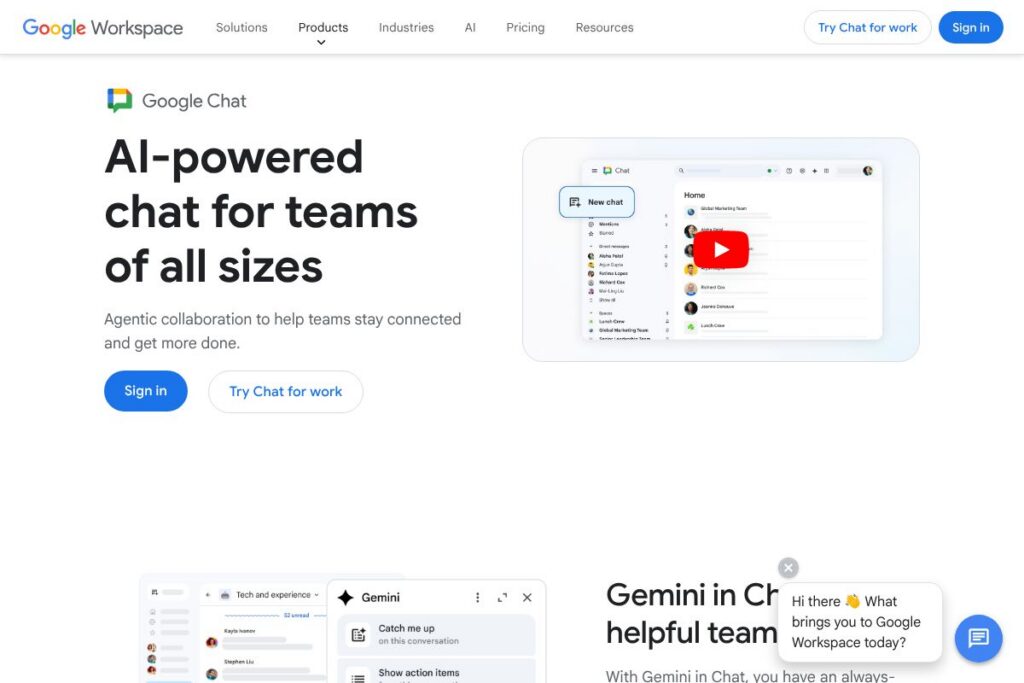
Google Chat is a messaging platform built to handle direct messages, group conversations, and topic-based Spaces as part of Google Workspace. It provides persistent chat, threaded conversations, and integrations with Gmail, Drive, Calendar, and Meet so teams can move from conversation to action without switching apps. See the Google Chat sign-in page to access the web app and mobile clients.
Google Chat sits alongside competitors focused on team messaging such as Slack and Microsoft Teams. Compared with Slack, Google Chat is tightly integrated with Google Workspace apps and uses Google account identity and admin controls. Compared with Microsoft Teams, Google Chat emphasizes a lighter, threaded chat experience that connects directly with Gmail and Meet rather than Outlook and Teams calling.
All of this makes Google Chat well suited for organizations already using Google Workspace and for individuals with Google accounts who want unified access to files, meetings, and messages. It works for small teams that need simple, searchable conversations and for larger organizations that require admin controls and data retention policies.
How Google Chat Works
Messages in Google Chat are organized into direct messages and Spaces, which are topic- or project-focused areas that can contain threaded conversations, files, and tasks. Users send messages from the web app at the Google Chat site, mobile apps, or from within Gmail when Chat is enabled, and messages sync across devices in real time.
Google Chat integrates with Google Drive for file sharing and with Google Meet for audio and video meetings, allowing users to launch a Meet session from a conversation. Administrators manage access, data retention, and security settings from the Google Workspace Admin console, and developers extend Chat with bots and apps via the Google Chat API documentation.
Google Chat features
Google Chat centers on threaded messaging, tight Workspace integrations, and admin controls. Core capabilities include direct messages, Spaces for group work, threaded replies to keep conversations organized, integrations with Drive/Meet/Gmail, basic automation and bot support, and enterprise security controls through Google Workspace.
The platform includes several powerful capabilities worth highlighting:
Threaded conversations
Threads keep replies grouped under a specific message so teams can discuss distinct topics without cluttering a channel. This helps teams track decisions and follow threads independently while maintaining a single Space for related work.
Spaces (group work areas)
Spaces allow teams to create persistent channels for projects or topics, with files, tasks, and threaded conversations in one place. Spaces can be public within an organization or private, and they support moderators and membership controls for larger groups.
Direct messages and presence
Direct messaging supports one-to-one and small group chats with presence indicators so you can see who is available. Messages sync across web and mobile clients, and users can set statuses to indicate availability or focus time.
Google Workspace integrations
Chat links natively to Gmail, Drive, Calendar, and Meet so users can share files, schedule meetings, and start video calls from a conversation. That integration reduces context switching and keeps shared items accessible directly within Chat.
Bots and automation
Organizations can add bots and custom apps that post notifications, run workflows, or connect external services into Spaces. The Google Chat API supports creating apps that respond to commands, post messages, and handle interactive cards.
Search and message history
Enterprise-grade search and message history let teams locate past conversations, files, and links quickly. Admins can configure retention settings and export options through Google Workspace compliance tools.
With these features combined, Google Chat helps teams keep conversations contextual, searchable, and closely connected to the documents and meetings they reference most.
Google Chat pricing
Google Chat is packaged with Google Workspace subscriptions rather than sold separately, so pricing follows Google Workspace’s subscription model. Plans are per user and scale from small teams to enterprise deployments, with enterprise options available for custom contracts. View the Google Workspace pricing details for the latest plan and billing options.
Monthly Billing:
Business Starter – $6/user/month (Custom email, secure team messaging, 30 GB cloud storage per user)
Business Standard – $12/user/month (All Starter features plus Meet recordings, 2 TB cloud storage per user)
Business Plus – $18/user/month (All Standard features plus advanced security and compliance tools, 5 TB cloud storage per user)
Annual Billing:
Annual billing is available for organizations that want committed-term pricing and often provides equivalent per-user rates billed yearly; consult the Google Workspace plans for details and current promotions.
Enterprise
Enterprise – Custom pricing (Advanced security, compliance, enterprise-grade admin controls, and higher storage quotas). For large organizations needing tailored contracts and SLAs, contact Google via the Google Workspace enterprise page to discuss options.
What is Google Chat Used For?
Google Chat is used for day-to-day team communication, replacing or reducing internal email for fast exchanges, quick decisions, and persistent project discussions. Teams use Spaces to organize work by project, topic, or department so conversations, files, and tasks live together and stay discoverable.
Beyond internal messaging, Google Chat is used to receive automated notifications from tools, share documents for collaborative review, and launch ad hoc meetings via Meet. It is suitable for remote and hybrid teams that rely on Google Workspace tools and for organizations that require centralized admin controls and data retention policies.
Pros and Cons of Google Chat
Pros
- Tight Google Workspace integration: Messages, files, and meetings link directly to Gmail, Drive, Calendar, and Meet which reduces friction when moving from conversation to action.
- Threaded conversations and Spaces: Organizes discussions by topic so teams can manage parallel conversations without cluttering a single feed.
- Enterprise security and admin controls: Offers organization-level controls, data retention settings, and compliance features through the Google Workspace Admin console.
- Cross-platform availability: Native web, desktop, and mobile apps keep messages in sync across devices and platforms.
- Extensible with bots and API: The Google Chat API enables custom bots and integrations that bring alerts and workflows into conversations.
Cons
- Feature parity with competitors: While integrated with Workspace, Chat may lack some advanced collaboration features found in competitor apps such as granular channel apps in Slack.
- Migration friction for non-Google users: Organizations heavily invested in Microsoft or other ecosystems may face friction integrating Chat into existing workflows.
- Limited built-in task management: Chat focuses on messaging and relies on separate Workspace apps or third-party tools for deeper task or project management features.
- Dependent on Google account infrastructure: Organizations that do not use Google accounts will need additional setup or identity bridges to adopt Chat widely.
Does Google Chat Offer a Free Trial?
Google Chat offers a free plan for personal Google accounts and Google Workspace typically includes a free trial for new Workspace customers. Individuals can use Chat at no cost with a Google account, while organizations can try Google Workspace and its integrated Chat features through the Workspace trial to evaluate admin and collaboration capabilities. For sign-in and trial signup, visit the Google Chat web app or the Google Workspace signup flow.
Google Chat API and Integrations
Google provides a developer API for Chat that supports building bots, interactive cards, and integrations. The Google Chat API documentation describes message formats, event handling, and how to register apps for use inside Spaces and direct messages.
In addition to the API, Chat integrates natively with Gmail, Google Drive, Calendar, and Google Meet so files, invites, and meetings are available inside conversations. Third-party tools commonly connect to Chat via bots and webhook integrations to post alerts and notifications into Spaces.
10 Google Chat alternatives
Paid alternatives to Google Chat
- Slack: A widely used team messaging platform with large app ecosystem, channel-based organization, and advanced workflow automation.
- Microsoft Teams: Chat and collaboration bundled with Microsoft 365, offering deep Outlook and Office app integrations plus calling and meeting features.
- Zoom Team Chat: Messaging integrated with Zoom meetings and Zoom Phone for organizations that center communications around Zoom.
- Workplace from Meta: Social-style collaboration with groups, live video, and integrations for enterprise use cases.
- Cisco Webex: Unified messaging, meetings, and calling with enterprise security and device integration.
- Flock: Team messaging with built-in productivity tools like shared to-dos, polls, and simple integrations.
- Chanty: Lightweight team chat with task management and affordable pricing for small teams.
Open source alternatives to Google Chat
- Mattermost: Open source messaging platform that can be self-hosted with extensive customization and compliance controls.
- Rocket.Chat: Community-driven chat server that supports real-time chat, federation, and broad protocol integration for on-premises deployments.
- Element (Matrix): A client for the Matrix protocol offering decentralized chat, end-to-end encryption, and open federation.
- Zulip: Threaded messaging with an emphasis on organized conversations and self-hosting options.
Frequently asked questions about Google Chat
What is Google Chat used for?
Google Chat is used for team messaging, direct conversations, and organizing work in Spaces. It connects messages with Google Workspace files, calendar events, and meetings so teams can coordinate in a single environment.
Does Google Chat integrate with Gmail and Drive?
Yes, Google Chat integrates natively with Gmail and Google Drive. You can share Drive files, open Chat inside Gmail, and link calendar events and Meet calls directly from conversations.
Can Google Chat be extended with custom bots?
Yes, Google Chat supports custom bots via the Google Chat API. Developers can build bots that post notifications, respond to commands, and present interactive cards inside Spaces and direct messages.
Is Google Chat included with Google Workspace subscriptions?
Yes, Google Chat is included with Google Workspace plans. Chat functionality, admin controls, and Spaces are part of Workspace subscriptions and the features available depend on the plan level.
Does Google Chat offer a free version?
Yes, Google Chat is available for free to personal Google account holders. Organizations receive Chat as part of Google Workspace subscriptions, which also offer trial options for new customers.
Final verdict: Google Chat
Google Chat excels as a messaging layer for organizations that rely on Google Workspace, delivering threaded conversations, Spaces, and seamless access to Drive, Calendar, and Meet. Its strengths are real-time sync across devices, built-in admin and compliance controls, and developer extensibility through the Chat API which makes it practical for enterprise deployment.
Compared with Microsoft Teams, which is often packaged with Microsoft 365 plans such as Business Basic at $6.00/user/month, Google Chat comes bundled with Google Workspace starting at $6/user/month for Business Starter and scales to higher tiers for additional security and storage. If your organization uses Gmail and Drive heavily, Google Chat provides a more integrated, lightweight messaging experience than Teams while matching enterprise needs through Workspace management and compliance features.
Overall, Google Chat is a solid choice for teams embedded in the Google ecosystem and for individuals with Google accounts who need a reliable, searchable messaging platform connected to their documents and meetings. For organizations evaluating messaging platforms, test Chat alongside your existing productivity stack to ensure it aligns with identity, compliance, and cross-platform integration needs.